
Introduction
The Espelho Automatic Cat Feeder is designed to provide scheduled and portion-controlled meals for your pets. Featuring a 5-liter capacity, dual stainless steel bowls, and a programmable timer, this feeder ensures your cats or small dogs receive consistent nutrition. It includes a voice recording function for meal calls and a dual power supply for reliability.
Package Contents
- Feeder Body ×1
- Feeding Bowl (Base) ×1
- 304 Stainless Steel Bowls ×2
- 2-way Splitter ×1
- 1-inch Raisers (Optional)
- 2-inch Raisers (Optional)
- Power Adapter ×1
- 5 ft USB-C Cord ×1
- Desiccant Bag ×1
- User Manual ×1
Product Features
- Dual Feeding: Equipped with a 2-way splitter and two stainless steel bowls, allowing two pets to eat simultaneously without conflict. Can also be configured for a single bowl.
- Flexible Meal Scheduling: Program up to 6 meals per day with up to 20 portions per meal. A manual 'Feed' button allows for immediate dispensing outside of scheduled times.
- Personalized Meal Call: Record a 10-second voice message that plays automatically during feeding times to call your pets.
- Dual Power Supply: Operates via a 5V USB-C adapter. Features a battery backup (3 alkaline D-cell batteries, not included) to ensure continuous feeding during power outages.
- Large Capacity: The 5-liter (20 cup) food tank can store 2-3 kg of dry pet food, sufficient for 20-35 days for cats and small dogs.
- Food Freshness: Includes a desiccant bag to absorb moisture and a secure twist-lock lid with a silicone sealing ring to keep food fresh, crunchy, and prevent pets from accessing it.
- Anti-Clog Design: Patented rotor design in the tank bottom prevents kibble from getting stuck.
- Adjustable Height: The feeder can be used at three different heights (low, 1-inch raised, 2-inch raised) to suit your pet's comfort.
- Easy to Clean: Detachable design allows for thorough cleaning of components.
Setup Instructions
1. Assembly
Assemble the feeder components as shown below. Ensure all parts are securely connected.
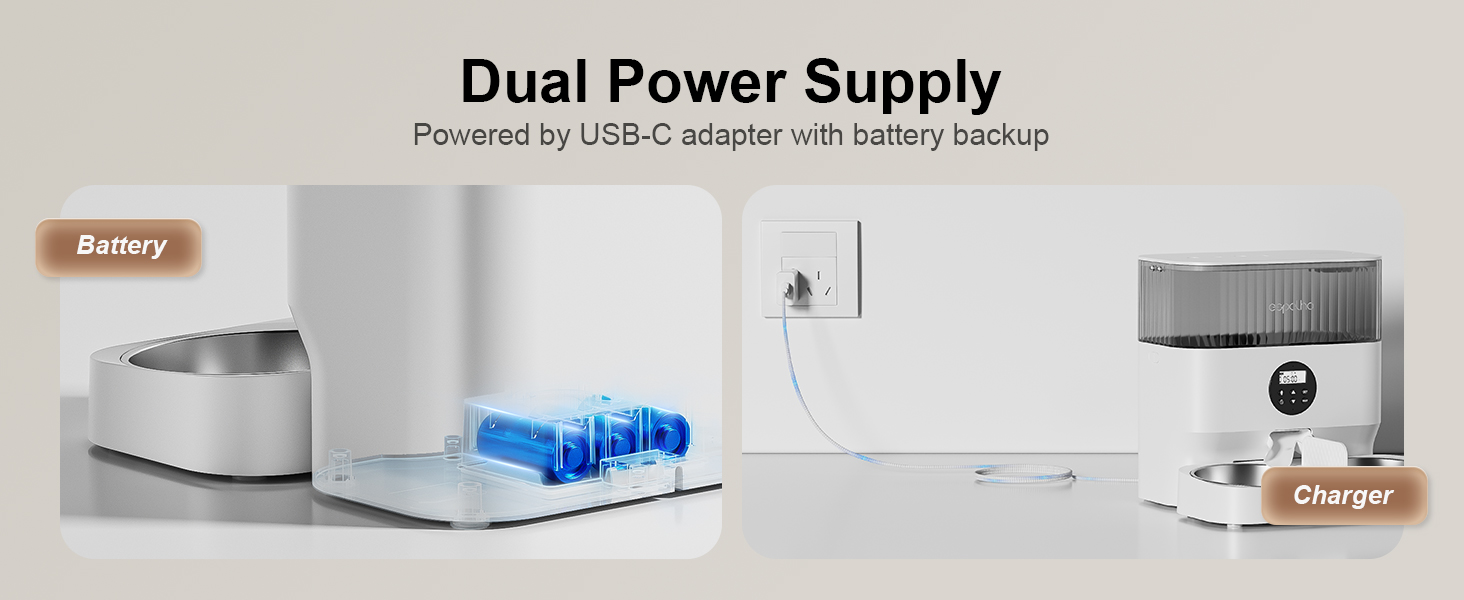
Figure 1: Exploded view of the feeder components, highlighting the secure lid, desiccant compartment, and anti-clog mechanism.
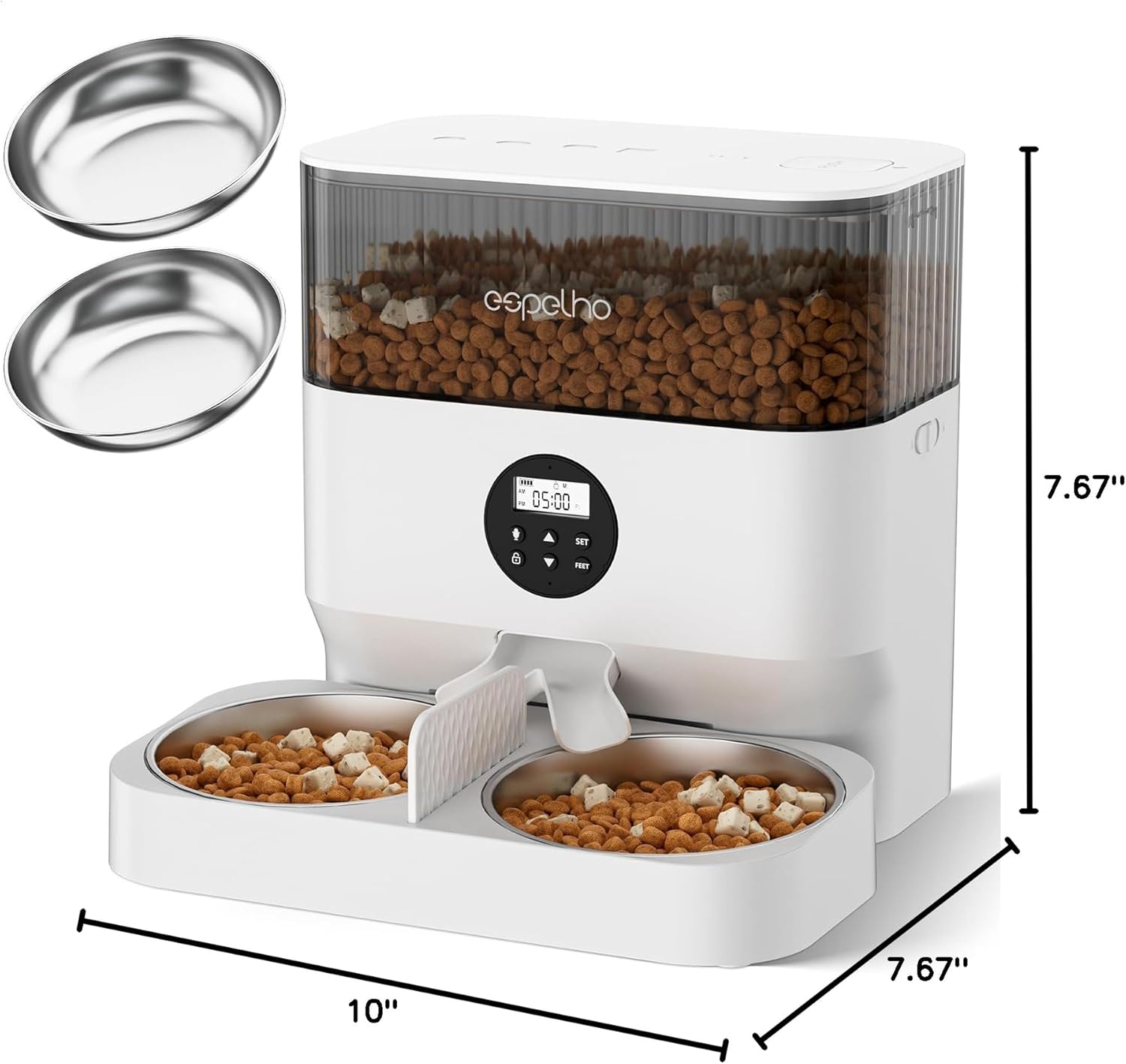
Figure 2: Product dimensions for placement reference.
Video 1: Official Espelho video demonstrating the assembly and initial setup of the automatic cat feeder, including the adjustable height feature.
2. Power Supply
Connect the 5V USB-C adapter to a power outlet. For backup power, install three D-cell alkaline batteries (not included) in the battery compartment at the bottom of the feeder. Ensure the power switch is turned on.
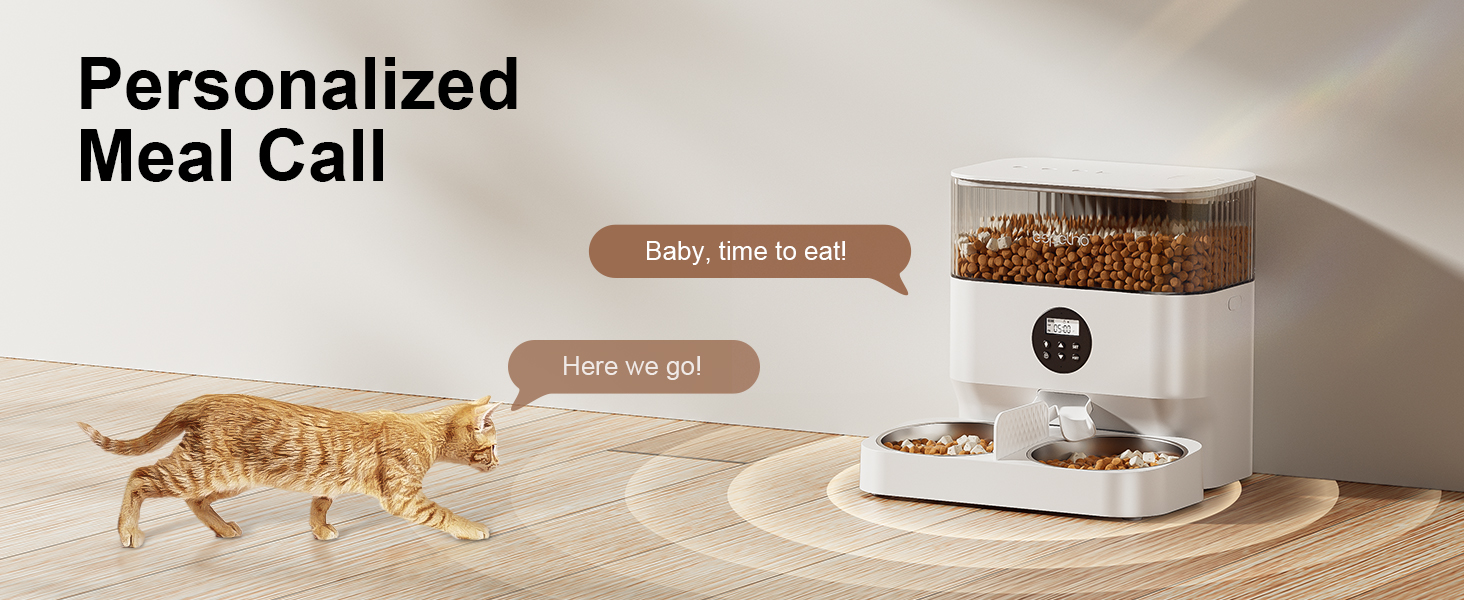
Figure 3: Illustration of the dual power supply system, including AC adapter and battery backup.
3. Load Dry Food
Open the top lid and pour dry kibble into the food tank. The feeder is suitable for kibble sizes between 3-13mm (0.08-0.5 inches). Close the lid securely to maintain freshness.
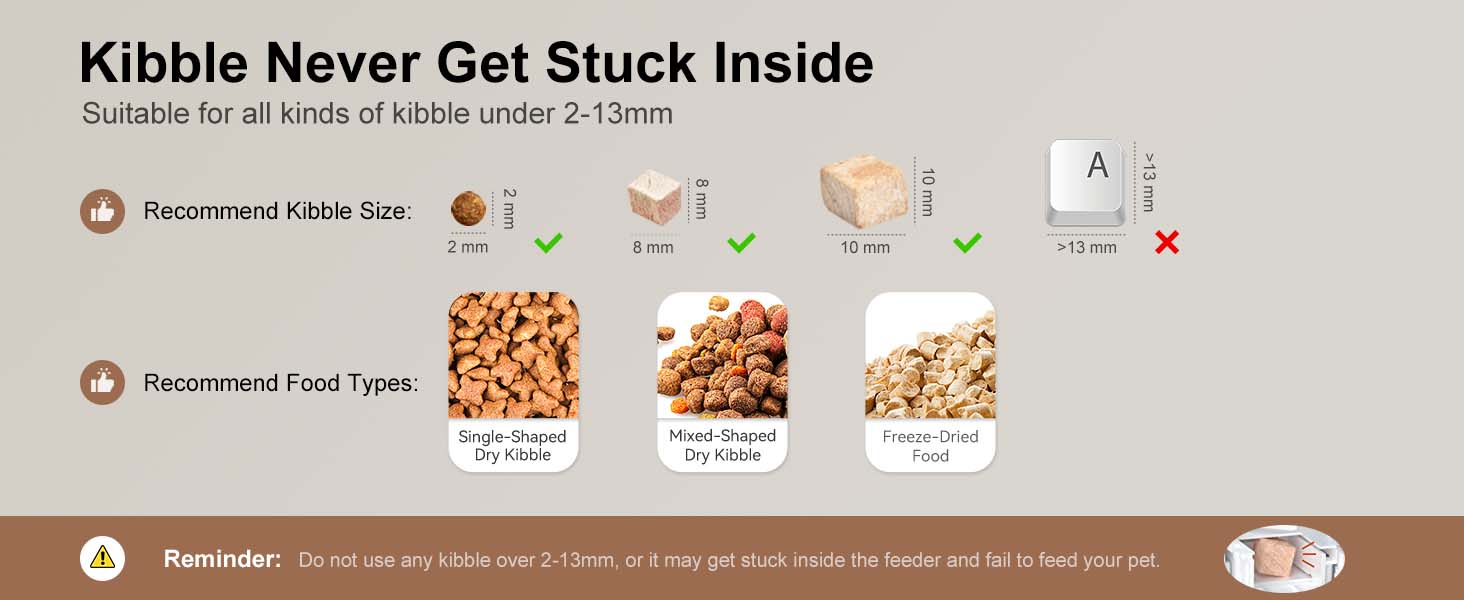
Figure 4: Recommended kibble sizes for optimal feeder performance.
Operating Instructions
1. Set Current Time
Press and hold the unlock button for 3 seconds. Then, press and hold the 'SET' button for 3 seconds until the hour icon flashes. Use the up/down arrows to adjust the hour, press 'SET' to confirm, then adjust the minute and press 'SET' again to save.
2. Set Feeding Schedules
After setting the current time, press 'SET' to enter meal programming. The 'M' icon will flash. Use the up/down arrows to select the number of meals (1-6). Press 'SET' to confirm. For each meal, set the feeding time (hour and minute) and the portion size (1-20 portions) using the up/down arrows and 'SET' button. Repeat for all desired meals.
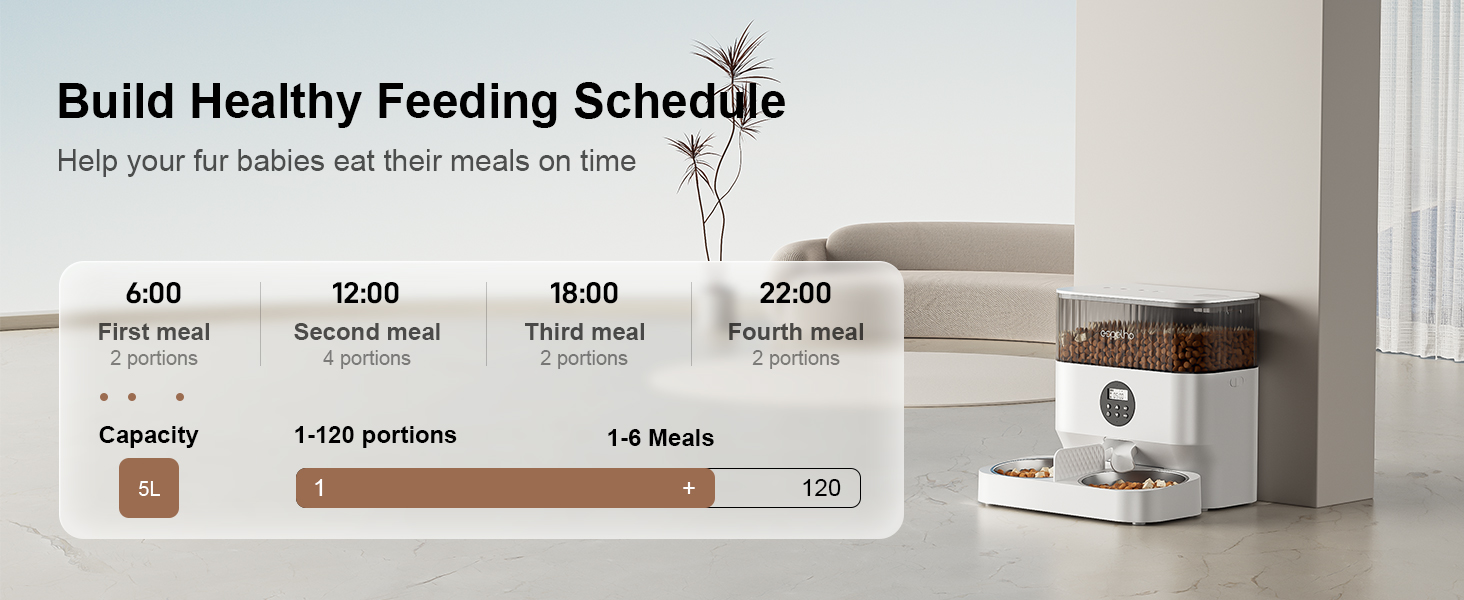
Figure 5: Example of a healthy feeding schedule setup.
3. Manual Feeding
To dispense food manually, unlock the feeder by pressing and holding the unlock button for 3 seconds. Then, press the 'FEED' button to dispense one portion. You can press it multiple times for additional portions.
Video 2: Demonstration of the manual feeding function, showing food dispensing into the bowls.
4. Record a Meal Call
Unlock the feeder. Press and hold the microphone button until you hear a 'di' sound. Begin recording your 10-second message. Release your hand when finished; a 'didi' sound confirms the recording is saved. You can re-record by repeating this step.

Figure 6: Visual representation of the personalized meal call feature.
5. Clear All Settings
To clear all programmed settings, ensure the feeder is in locked mode (a lock icon is displayed). Press and hold the up arrow button for 5 seconds. The display will reset, indicating that all settings have been cleared.
Maintenance
1. Cleaning
The feeder features a detachable design for easy cleaning. Push the switch to the unlock icon to disassemble the food tank. All removable parts, including the food tank, stainless steel bowls, and food tray, can be washed with water. Ensure all parts are completely dry before reassembly.

Figure 7: Detachable components for easy and thorough cleaning.
2. Desiccant Bag Replacement
The desiccant bag helps maintain food freshness. Replace the desiccant bag periodically (approximately every 1-2 months, depending on humidity) to ensure optimal food preservation. Replacement desiccant bags can be found by searching for 'B0BG3Z6XX6'.
Troubleshooting
- Feeder not dispensing food: Check power supply (AC adapter or batteries). Ensure the food tank is not empty and kibble size is within the recommended 3-13mm range. Verify that the anti-clog mechanism is clear.
- Incorrect portion sizes: Recheck programmed portion settings. Ensure the food tank is properly seated and the rotor is not obstructed.
- Display not working: Check power connection. If using batteries, ensure they are correctly installed and not depleted.
- Voice recording issues: Ensure the microphone is clear and you are holding the button for the correct duration during recording.
For further assistance, please refer to the warranty and support section.
Specifications
| Item Weight | 2.07 Kilograms (4.56 Pounds) |
| Item Dimensions (LxWxH) | 14.5 x 13.5 x 7.5 inches |
| Material | Acrylonitrile Butadiene Styrene |
| Capacity | 5 Liters |
| Kibble Size | 3-13mm (0.08-0.5 inches) |
| Power Supply | 5V USB-C Adapter, 3x D-cell Batteries (backup) |
| Meals per Day | Up to 6 |
| Portions per Meal | Up to 20 |
| Voice Recording | 10 seconds |
| Target Species | Cat, Small Dog |
Warranty and Support
This Espelho Automatic Cat Feeder comes with a 36-month warranty. For any product inquiries, technical support, or warranty claims, please contact our customer service. We offer 24-hour customer service to assist you.
Please refer to the contact information provided in your purchase documentation or visit the official Espelho website for support details.


