1. Introduction
This user manual provides detailed instructions for the installation, operation, and maintenance of your TIGERKING Biometric Fingerprint Safe Box, Model 50SPFR. This safe is designed to provide secure storage for your valuables, including documents, cash, jewelry, and other important items, utilizing advanced biometric and digital keypad locking mechanisms.
Please read this manual thoroughly before using the safe to ensure proper function and to maximize its security features. Keep this manual for future reference.
2. Safety Information
- Always keep the emergency keys in a secure location away from the safe. Do not store them inside the safe.
- Ensure the safe is securely mounted to a wall or floor to prevent unauthorized removal.
- Do not expose the safe to extreme temperatures or humidity.
- Avoid using abrasive cleaners or solvents on the safe's surface.
- If the safe is not opening, refer to the troubleshooting section before attempting forced entry.
- This safe is designed for security against forced entry and is not fireproof or waterproof unless explicitly stated.
3. Package Contents
Verify that all items listed below are included in your package:
- TIGERKING Safe Box (x1)
- Expansion Screws (x4)
- Emergency Keys (x2)
- User Manual (x1)
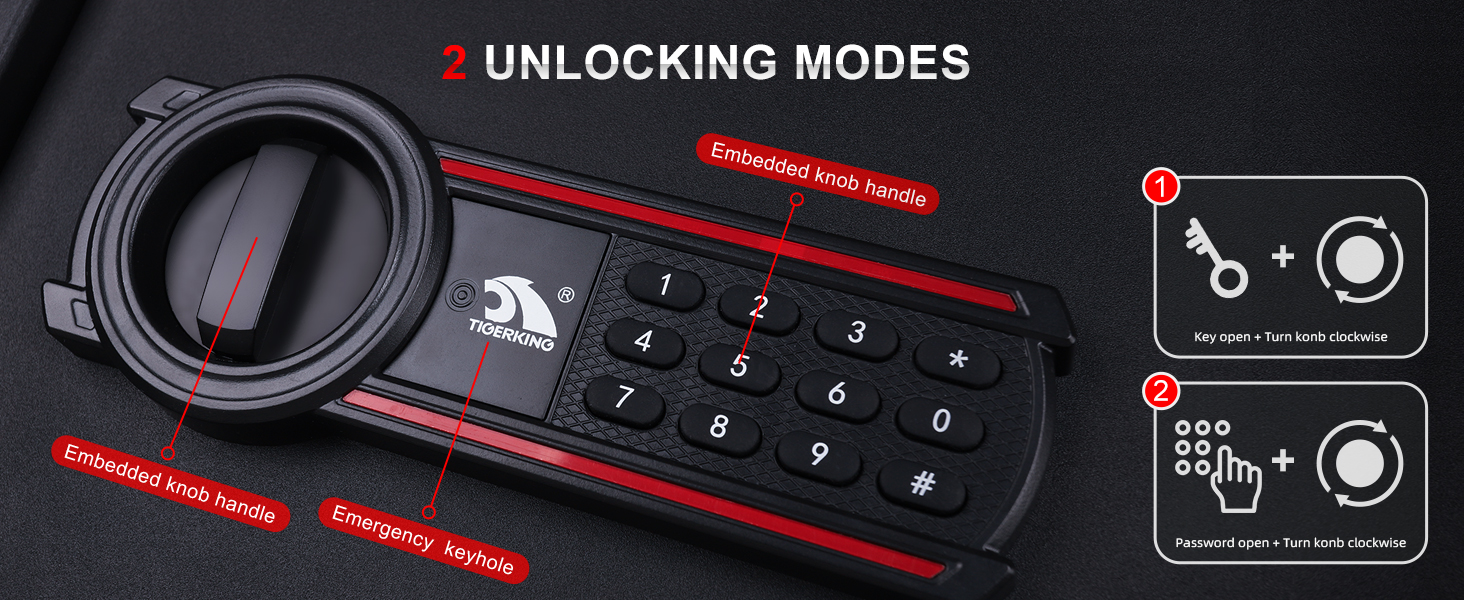
Figure 3.1: Included Package Contents
4. Product Overview
The TIGERKING Biometric Fingerprint Safe Box is constructed from reinforced solid steel, providing robust physical protection. It features a dual-cylinder latch system for enhanced security.

Figure 4.1: TIGERKING Safe Box (Open View)
This image displays the safe with its door open, showcasing the spacious interior and the removable shelf. The safe's dimensions are approximately 19.68 inches (H) x 13.77 inches (W) x 11.81 inches (D) externally, offering 1.8 cubic feet of storage.

Figure 4.2: 20mm Solid Bolts
The safe features two robust 20mm solid steel bolts that provide a sturdy anti-pick mechanism, enhancing the security against forced entry.

Figure 4.3: Removable Shelf
The safe includes a removable shelf, allowing for flexible organization of items of various sizes, from small jewelry to larger documents or laptops.

Figure 4.4: Product Details
Key features include a wide 90-degree door opening angle for easy access, solid bolts for security, pre-drilled mounting holes for installation, and an easily accessible reset button for programming.
5. Setup
5.1 Initial Access
Upon receiving your safe, use one of the provided emergency keys to open the safe for the first time. The keyhole is typically located behind the keypad cover or a small removable panel on the keypad itself. Insert the key and turn it while simultaneously turning the knob to open the door.
5.2 Mounting the Safe
For optimal security, it is highly recommended to mount the safe to a wall, floor, or inside a cabinet using the pre-drilled holes and included expansion screws.
- Choose a suitable location for the safe, ensuring it is on a stable surface and out of plain sight if possible.
- Open the safe door and locate the pre-drilled holes on the back and/or bottom panels.
- Position the safe in the desired location and mark the drilling points through the holes onto the wall or floor.
- Move the safe and drill pilot holes at the marked points using an appropriate drill bit for your wall/floor material.
- Align the safe with the drilled holes and insert the expansion screws through the safe's holes into the pilot holes.
- Tighten the screws firmly to secure the safe in place.
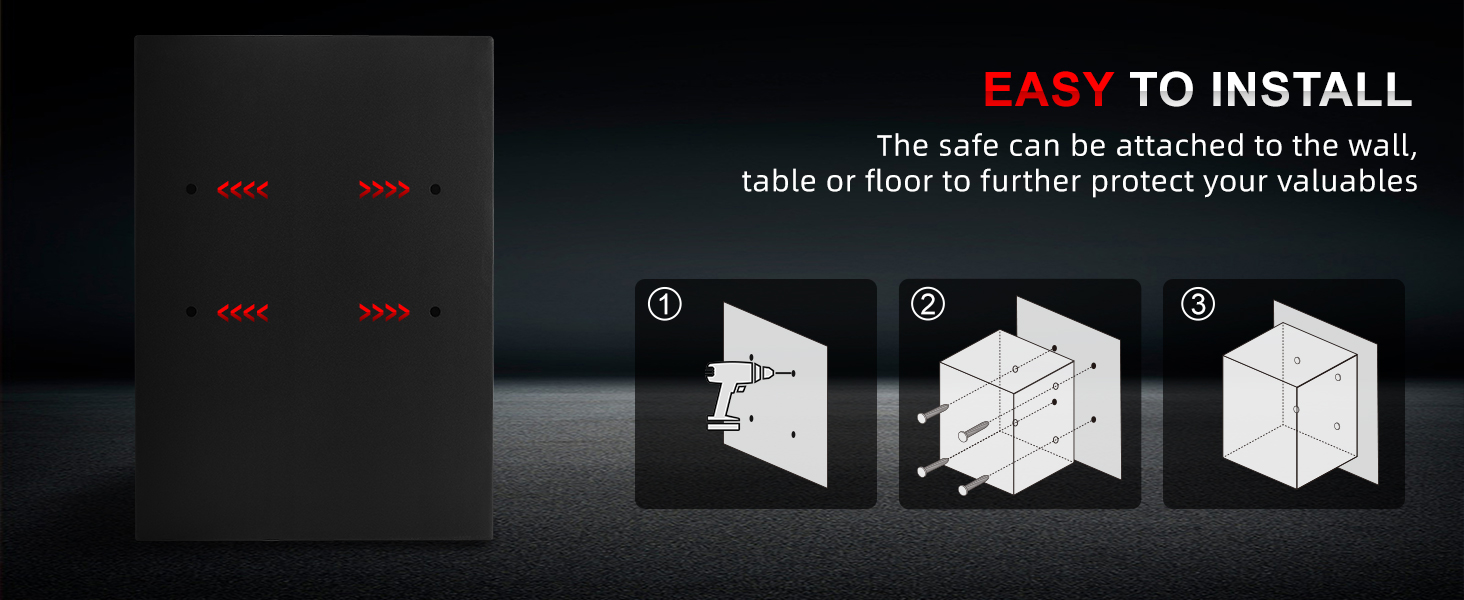
Figure 5.1: Safe Installation Steps
6. Operating Instructions
6.1 Unlocking the Safe
Your TIGERKING safe offers multiple unlocking methods for convenience and security:

Figure 6.1: Three Unlocking Methods
This graphic summarizes the three primary ways to open your safe: with the emergency key, a registered fingerprint, or a digital password. In all cases, after successful authentication, the knob must be turned clockwise to open the door.

Figure 6.2: Keypad and Unlocking Modes
A closer look at the keypad highlights the emergency keyhole and the embedded knob handle. The two main electronic unlocking modes are via digital password or fingerprint.
6.1.1 Using the Digital Keypad
- Enter your 3-8 digit password on the keypad.
- Press the '#' key to confirm.
- Within 5 seconds, turn the knob clockwise to open the safe door.
6.1.2 Using the Biometric Fingerprint Sensor
- Place a registered finger firmly on the fingerprint sensor.
- The indicator light will confirm successful recognition.
- Within 5 seconds, turn the knob clockwise to open the safe door.

Figure 6.3: Biometric Fingerprint Operation
The biometric sensor provides quick access with high precision (over 500 DPI) and a recognition speed of less than 0.1 seconds. The safe can store up to 29 unique fingerprints.
6.1.3 Using the Emergency Key
- Locate the emergency keyhole (usually hidden behind a cover on the keypad).
- Insert the emergency key and turn it.
- Simultaneously turn the knob clockwise to open the safe door. This method is useful if batteries are depleted or if you forget your code/fingerprint.
6.2 Setting/Changing Passwords
To set or change your digital password:
- With the safe door open, press the reset button (typically located on the inside of the door or near the battery compartment).
- The indicator light on the keypad will flash.
- Enter your new 3-8 digit password.
- Press the '#' key to confirm. The light will stop flashing, indicating successful programming.
- Test the new password with the door open before closing it.
6.3 Registering Fingerprints
To register a new fingerprint:
- With the safe door open, press the reset button.
- When the indicator light flashes, place the finger you wish to register firmly on the fingerprint sensor.
- Lift and place the finger repeatedly (usually 3-5 times) until the indicator light confirms successful registration (e.g., a solid green light or a specific beep pattern).
- Repeat for additional fingerprints, up to a maximum of 29.
- Test each registered fingerprint with the door open before closing it.
6.4 Dual Authentication Setting
The safe supports a dual authentication mode for enhanced security, requiring both a password and a fingerprint to open. This feature can be enabled or disabled through the safe's internal settings (refer to the specific instructions provided on the safe's internal panel or a more detailed digital manual if available). When enabled, only a combination of password + fingerprint or fingerprint + password will open the safe.
Video 6.1: TIGERKING Biometric Fingerprint Safe Box Overview
This video provides a visual overview of the TIGERKING safe, demonstrating its features including the operation panel, double cylinder latch, solid steel construction, and the three unlocking modes (key, fingerprint, password). It also briefly touches upon the dual authentication setting, which requires both a password and a fingerprint for access.
7. Maintenance
- Cleaning: Wipe the safe's exterior with a soft, damp cloth. Do not use harsh chemicals or abrasive materials.
- Battery Replacement: While the product specifications state "No Batteries Required?", digital keypads typically require power. If your safe's keypad or biometric sensor stops responding, it may indicate a need for battery replacement. Consult the safe's internal compartment for battery type and replacement instructions, or use the emergency key for access.
- Lock Mechanism: Periodically check the locking bolts and hinges for any obstructions or signs of wear. Do not lubricate the lock mechanism unless specifically instructed by the manufacturer.
8. Troubleshooting
| Problem | Possible Cause | Solution |
|---|---|---|
| Safe does not open with code/fingerprint. | Incorrect code/fingerprint, low battery, or system error. |
|
| Keypad is unresponsive. | Dead batteries. | Use emergency key to open the safe. Replace batteries if applicable. |
| Door does not close properly. | Obstruction, misaligned bolts. |
|
9. Specifications
| Feature | Detail |
|---|---|
| Brand | TIGERKING |
| Model Number | 50SPFR |
| Product Dimensions | 11.81"D x 13.7"W x 19.67"H |
| Lock Type | Biometric, Digital Keypad, Key |
| Color | Black |
| Capacity | 1.8 Cubic Feet |
| Material | Alloy Steel |
| Special Feature | Biometric Fingerprint |
| Mounting Type | Freestanding, Tabletop (Wall/Floor mountable) |
| Item Weight | 31.4 pounds (14.29 Kilograms) |
| Water Resistance Level | Water Resistant |
| Fingerprint Storage | Up to 29 fingerprints |
| Password Digits | 3-8 digits |
10. Warranty and Support
TIGERKING provides a 1-year warranty for this product. If you encounter any problems or have concerns regarding your safe, please contact our professional after-sales team directly. We are committed to providing a satisfactory solution as soon as possible.
For support, please refer to the contact information provided on the product packaging or the official TIGERKING website.


