
Introduction
Thank you for choosing the Nuvance Professional Hair Clipper. This manual provides essential information for the safe and effective use, maintenance, and troubleshooting of your new hair clipper. Please read these instructions thoroughly before first use and keep them for future reference.
Important Safety Instructions
To reduce the risk of electric shock, injury, or fire, always follow these basic safety precautions:
- Do not immerse the appliance in water or other liquids.
- Keep the appliance away from water sources, especially when charging.
- Do not use the clipper if it has a damaged cord or plug, or if it is not working properly.
- This appliance is not intended for use by persons with reduced physical, sensory, or mental capabilities, or lack of experience and knowledge, unless they have been given supervision or instruction concerning use of the appliance by a person responsible for their safety.
- Children should be supervised to ensure they do not play with the appliance.
- Only use attachments supplied by the manufacturer.
- Unplug the clipper before cleaning or performing maintenance.
- Store the clipper in a dry place when not in use.
Package Contents
Verify that all items are present in the package:
- Nuvance Professional Hair Clipper
- 12 Guide Combs (various lengths)
- USB Charging Cable
- Cleaning Brush
- Blade Oil
- User Manual
Product Overview
Familiarize yourself with the components of your Nuvance Hair Clipper.

Figure 1: Nuvance Hair Clipper components. This image shows the clipper from the side, highlighting the stainless steel blade, the blade adjustment lever, the power on/off switch, the battery indicator screen, and the USB charging port. The overall height of the clipper is indicated as 18.5 cm.
- Stainless Steel Blade: High-quality cutting blades for precise trimming.
- Blade Adjustment Lever: Allows fine-tuning of cutting length from 0.8mm to 2.0mm without a guide comb.
- Power On/Off Switch: Activates and deactivates the clipper.
- Digital Display: Shows battery level and charging status.
- USB Charging Port: For connecting the USB charging cable.
- Guide Comb Attachments: Various sizes for different hair lengths.
Setup
Charging the Clipper
Before first use, fully charge the clipper. A full charge typically takes approximately 3 hours and provides extended cordless operation.
- Ensure the clipper is switched off.
- Insert the USB charging cable into the charging port at the bottom of the clipper.
- Connect the other end of the USB cable to a USB power adapter (not included) or a compatible USB port (e.g., computer, power bank).
- The digital display will show the charging progress. Once fully charged, the display will indicate 100%.

Figure 2: USB charging and digital display. The image illustrates the clipper being charged via a USB cable, with the digital screen showing the battery percentage. It also highlights the power switch for quick operation.
Attaching Guide Combs
The clipper comes with 12 guide combs to achieve various hair lengths from 0.8mm to 25mm.

Figure 3: Guide comb lengths. This image displays different guide comb attachments, indicating their respective trimming lengths: 1.5mm, 3mm, 4.5mm, 6mm, 10mm, 13mm, 19mm, and 25mm. It also mentions 4 reserve attachments for 1, 2, 3, and 4.
- Select the desired guide comb for your preferred hair length.
- Align the guide comb with the clipper blade and push it firmly until it clicks into place.
- To remove, gently pull the comb away from the blade.
Operating Instructions
Basic Operation
- Ensure the clipper is charged and a guide comb is securely attached (if desired).
- Press the Power On/Off switch to turn on the clipper.
- Hold the clipper with the blade pointing downwards.
- Move the clipper slowly against the direction of hair growth.
- After use, press the Power On/Off switch to turn off the clipper.
Adjusting Cutting Length (without guide comb)
The blade adjustment lever allows for precise cutting length adjustments from 0.8mm to 2.0mm without a guide comb.
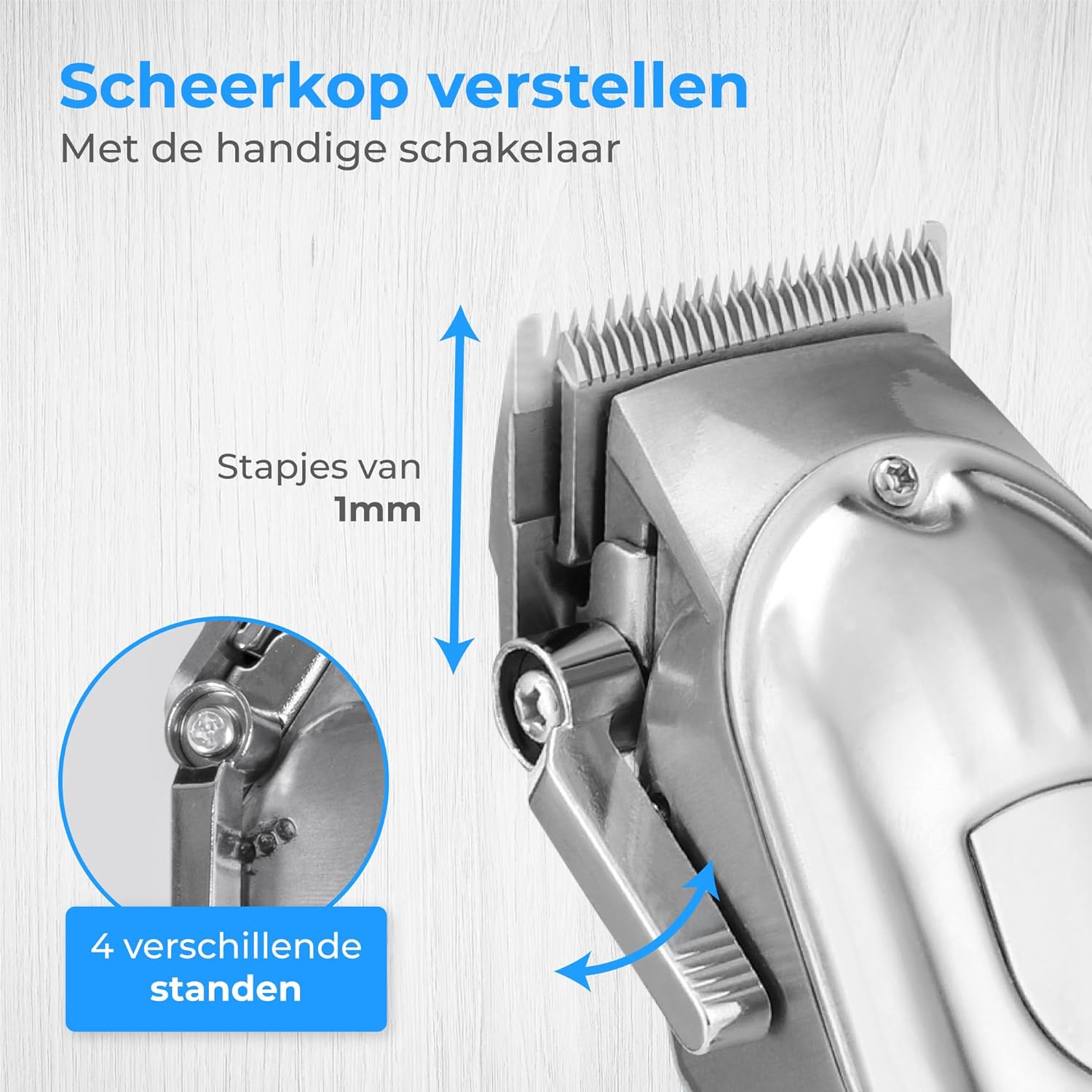
Figure 4: Blade adjustment lever. This image focuses on the side of the clipper, illustrating the lever that allows for fine adjustment of the blade's cutting length in 1mm increments, offering 4 different settings.
- Move the lever up for a shorter cut (closer to 0.8mm).
- Move the lever down for a longer cut (closer to 2.0mm).
Trimming Hair and Beard
This clipper is suitable for various grooming needs, including head hair, beard, and body hair.

Figure 5: Multi-functional use. This image highlights the clipper's ability to trim hair on various body parts, including head hair, beard, chest, and stomach, indicating its versatile application.
- For head hair: Start with a longer guide comb and gradually reduce the length until the desired style is achieved.
- For beard trimming: Use a guide comb to maintain an even length. For detailing, remove the guide comb and use the blade adjustment lever.
- For body hair: Use appropriate guide combs for sensitive areas.
Maintenance
Cleaning the Blades
Regular cleaning ensures optimal performance and extends the life of your clipper.
- Turn off and unplug the clipper.
- Remove any attached guide comb.
- Use the provided cleaning brush to remove loose hairs from the blades.
- For a more thorough clean, the blades can be carefully detached (refer to specific instructions if provided in the physical manual for blade removal). Rinse detached blades under running water and ensure they are completely dry before reattaching. Do not rinse the clipper body.
Oiling the Blades
Apply a few drops of the supplied blade oil to the blades after every few uses to maintain sharpness and smooth operation.
- Apply 1-2 drops of oil to the top of the blades.
- Turn on the clipper for a few seconds to distribute the oil evenly.
- Wipe off any excess oil with a soft cloth.
Troubleshooting
| Problem | Possible Cause | Solution |
|---|---|---|
| Clipper does not turn on. | Battery is depleted. | Charge the clipper fully. |
| Clipper pulls hair or cuts poorly. | Blades are dull, dirty, or not oiled. | Clean and oil the blades. If problem persists, blades may need replacement. |
| Clipper makes unusual noise. | Blades are not properly aligned or lubricated. | Ensure blades are clean and oiled. Check for proper blade attachment. |
| Digital display not working. | Unit is off or battery is completely dead. | Turn on the clipper or connect to charger. |
Specifications
- Model: HF-8933
- Brand: Nuvance
- Power Source: USB Rechargeable
- Blade Material: Stainless Steel
- Cutting Lengths: 0.8mm - 25mm (with 12 guide combs)
- Battery Indicator: Digital Display
Warranty and Support
Nuvance products are manufactured to high-quality standards. For warranty information or technical support, please refer to the contact details provided with your purchase or visit the official Nuvance website.
Please retain your proof of purchase for any warranty claims.