
IRONWALLS BI00TPS7063
IRONWALLS Panic Bars for Exit Doors Instruction Manual
Model: BI00TPS7063
1. Introduction
This instruction manual provides detailed information for the installation, operation, and maintenance of your IRONWALLS Panic Bar for Exit Doors. Please read this manual thoroughly before installation and use to ensure proper function and safety. Keep this manual for future reference.

Image: The IRONWALLS Panic Bar for Exit Doors in silver, shown with its exterior lever handle and the product packaging.
2. Product Features
- High Compatibility: Designed for most 32"-47" wide wood/metal doors. Can be installed on both right and left opening doors. The bar tail is cuttable for narrow doors.
- Reliable Panic Bar Hardware: Constructed from heavy-duty stainless steel, capable of withstanding over 1300N of external tensile force and interior thrust resistance. ANSI Grade 1 certified and ADA approved for medium to high traffic areas. Fire resistance of 960℃ for over 72 minutes.
- Fast Escape & High Security: Features a dogging function. Allows easy exit with a light push during emergencies. Automatically locks when the door is closed, preventing unauthorized external entry. Exterior lever requires a key for access.
- Simple Installation: Includes all necessary accessories for quick setup.
- Wide Application: Suitable for commercial exit doors in office buildings, hospitals, shopping malls, apartments, factories, and similar high-traffic environments.
3. Package Contents
Verify that all components listed below are present in your package:

Image: A detailed view of all components included in the IRONWALLS Panic Bar set, numbered for easy identification.
- Push Panic Bar
- Emergency Sticker
- Exterior Door Lever
- 6pcs Keys for Door Lever
- 6pcs Hex Keys
- Roller Strike
- End Cap
- Fixing Screws
- Shim for Lever
- User Manual (this document)
- Package Box
4. Specifications
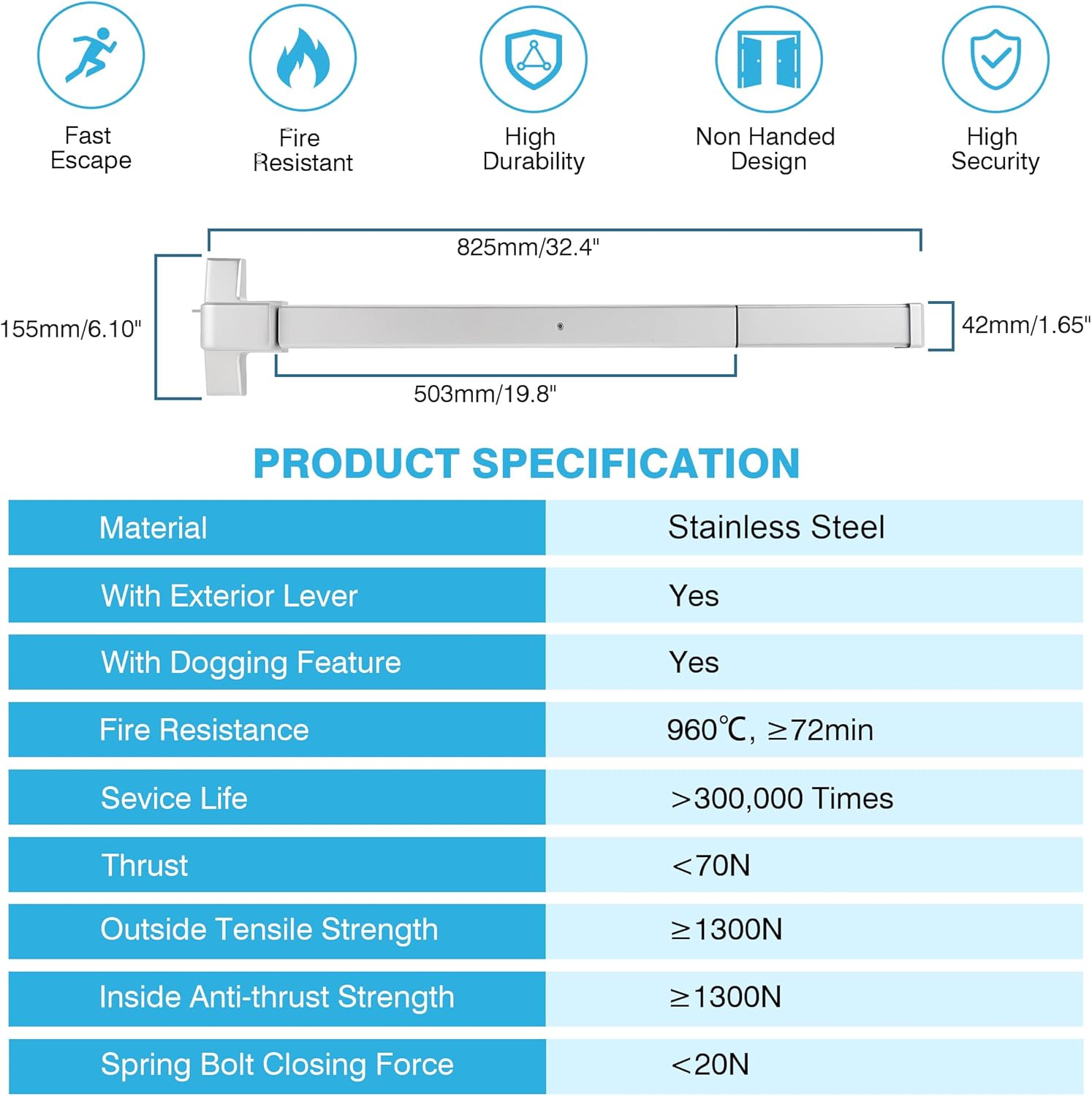
Image: A table summarizing key product specifications and dimensions.
| Specification | Detail |
|---|---|
| Material | Stainless Steel |
| Color | Silver |
| Product Dimensions | 32.28"L x 6.3"W |
| Exterior Finish | Chrome |
| Lock Type | Key Lock |
| Item Weight | 8.98 pounds (4.08 Kilograms) |
| Handle Material | Stainless Steel |
| Hand Orientation | Ambidextrous |
| Fire Resistance | 960℃, >72min |
| Outside Tensile Strength | ≥1300N |
| Inside Anti-thrust Strength | ≥1300N |
5. Compatibility
The IRONWALLS Panic Bar is designed for high compatibility with various door types and configurations:
- Door Width: Fits most doors ranging from 32 inches to 47 inches wide. The bar tail can be cut to fit narrower doors, but the door width must always be longer than the panic bar itself.
- Door Material: Suitable for wood, metal, and composite doors.
- Door Handing: Can be installed on both right and left opening doors due to its non-handed design.
- Door Type: Suitable for single doors. For double doors, it requires a vertical rod exit or double-gate device (not included).

Image: Illustrations showing the panic bar's compatibility with various door widths and types, including single and double doors, and different materials like wood, metal, and composite.
6. Installation (Setup)
The IRONWALLS Panic Bar is designed for simple installation. Please follow the instructions provided in the included user manual (item 10 in Package Contents) for detailed step-by-step guidance. Ensure you have all listed components before beginning installation.
Key Installation Considerations:
- The panic bar works for both left and right opening doors.
- The width of the door must be longer than the length of the panic bar.
- The tail of the panic bar can be cut to fit narrower doors if necessary.
- Utilize the precise pre-punched holes and fixing screws for secure mounting.

Image: Close-up views highlighting the exterior door lever with keys, precise pre-punched holes for easy installation, the rust-proof chrome coating, and the smooth surface with blunt edges for safety.
7. Operation
Operating the IRONWALLS Panic Bar is straightforward, designed for fast and secure egress.
Exiting (From Inside):
In an emergency or for normal exit, simply push the panic bar lightly. The sensitive mechanical push bar mechanism will disengage the latch, allowing the door to open quickly and effortlessly. The dogging feature allows the bar to be held in the unlocked position for periods of high traffic, if desired, using the provided hex keys.

Image: A hand demonstrating how to push the panic bar from the inside to open the door, emphasizing the ease of operation.
Entry (From Outside):
The exterior door lever requires a key for access, enhancing security. Insert the key into the lock cylinder of the lever handle and turn to unlock the mechanism, then depress the lever to open the door. When the door is closed, the anti-pick auxiliary guarded latch automatically deadlocks the main latch bolt, preventing unauthorized entry from the outside.

Image: Close-up details of the anti-pick auxiliary guarded latch, which ensures automatic deadlocking upon closing, and the dogging feature, accessible with hex keys for temporary unlocking.
8. Maintenance
To ensure the longevity and reliable operation of your IRONWALLS Panic Bar, regular maintenance is recommended:
- Cleaning: Wipe down the panic bar and exterior lever with a soft, damp cloth periodically to remove dust and grime. Avoid abrasive cleaners or solvents that could damage the chrome finish.
- Lubrication: Apply a small amount of silicone-based lubricant to the internal moving parts of the latch mechanism and the key cylinder annually. This helps ensure smooth operation and prevents sticking.
- Inspection: Regularly check all screws and fasteners to ensure they are tight. Inspect the panic bar for any signs of damage, wear, or misalignment. Ensure the push bar moves freely and returns to its original position without obstruction.
- Functionality Test: Periodically test the panic bar's operation from the inside to ensure it opens easily and the latch retracts fully. Test the exterior lever with the key to confirm secure locking and unlocking.
9. Troubleshooting
If you encounter any issues with your IRONWALLS Panic Bar, refer to the following common troubleshooting steps:
- Panic Bar is Stiff or Hard to Push:
- Check for any obstructions around the door or the panic bar mechanism.
- Apply lubricant to the internal moving parts as described in the Maintenance section.
- Ensure the mounting screws are not overtightened, which can cause binding.
- Door Does Not Latch Properly:
- Verify that the strike plate on the door frame is correctly aligned with the latch bolt. Adjust if necessary.
- Check for any debris or foreign objects in the latch mechanism or strike plate.
- Ensure the door itself is not warped or misaligned in its frame.
- Key Does Not Operate Exterior Lever:
- Ensure you are using the correct key.
- Apply a small amount of graphite lubricant to the key cylinder if it feels stiff.
- Check for any damage to the key or the lock cylinder.
- Panic Bar Does Not Return to Locked Position:
- Check if the dogging feature is engaged. Disengage it using the hex key if it is.
- Inspect the internal spring mechanism for any damage or obstruction.
If these steps do not resolve the issue, please contact IRONWALLS customer support for further assistance.
10. Warranty and Support
For information regarding product warranty, please refer to the warranty card included with your purchase or visit the official IRONWALLS website. Keep your proof of purchase for warranty claims.
For technical support, replacement parts, or any other inquiries, please contact IRONWALLS customer service through their official channels. You can find more information and contact details on the IRONWALLS Brand Store on Amazon.
Ask a question about this manual
Ask about setup, troubleshooting, compatibility, parts, safety, or missing instructions. Manuals+ will review the question and use this page’s manual context to help answer it.