Introduction
Welcome to the user manual for your Technical Pro RXM7BT Home Receiver and Rockville HC85 In-Ceiling Speakers bundle. This comprehensive guide provides detailed instructions for setting up, operating, and maintaining your new audio system. Please read this manual thoroughly before use to ensure proper installation and optimal performance.
Important Safety Instructions
To reduce the risk of electric shock, fire, or injury, always follow basic safety precautions when using electronic equipment. Keep these instructions for future reference.
- Read all instructions before operating the appliance.
- Do not use this apparatus near water.
- Clean only with a dry cloth.
- Do not block any ventilation openings. Install in accordance with the manufacturer's instructions.
- Do not install near any heat sources such as radiators, heat registers, stoves, or other apparatus (including amplifiers) that produce heat.
- Do not defeat the safety purpose of the polarized or grounding-type plug. A polarized plug has two blades with one wider than the other. A grounding type plug has two blades and a third grounding prong. The wide blade or the third prong are provided for your safety. If the provided plug does not fit into your outlet, consult an electrician for replacement of the obsolete outlet.
- Protect the power cord from being walked on or pinched, particularly at plugs, convenience receptacles, and the point where they exit from the apparatus.
- Only use attachments/accessories specified by the manufacturer.
- Unplug this apparatus during lightning storms or when unused for long periods of time.
- Refer all servicing to qualified service personnel. Servicing is required when the apparatus has been damaged in any way, such as power-supply cord or plug is damaged, liquid has been spilled or objects have fallen into the apparatus, the apparatus has been exposed to rain or moisture, does not operate normally, or has been dropped.

Image: Side view of the RXM7BT receiver, showing a warning label indicating that opening the unit will void the warranty. This emphasizes the importance of not attempting internal repairs.
Package Contents
Verify that all items listed below are included in your package. If any items are missing or damaged, please contact customer support.
- 1 x Technical Pro RXM7BT Home Receiver
- 4 x Rockville HC85 8" In-Ceiling Speakers
- 1 x Remote Control
- 1 x Power Cable
- User Manual (this document)

Image: The complete bundle, including the RXM7BT receiver, four HC85 in-ceiling speakers, and the system's remote control, as they appear when unboxed.
Product Overview
RXM7BT Receiver Front Panel

Image: A detailed view of the RXM7BT receiver's front panel, highlighting the display, input selection buttons, volume knobs, microphone inputs, and tone controls.
The front panel of the RXM7BT receiver provides access to all primary controls and indicators. This includes the digital display for FM tuning and input status, master volume control, microphone volume and tone adjustments, and input selection buttons for RCA, Bluetooth, USB, SD Card, and MP3 (AUX) sources. USB and SD card slots are conveniently located on the front for easy access.
RXM7BT Receiver Rear Panel

Image: The rear panel of the RXM7BT receiver, displaying the various input and output ports, including RCA audio inputs, speaker binding posts, FM antenna connection, and voltage selector.
The rear panel houses all necessary connections for your audio system. This includes RCA inputs for two audio sources (e.g., DVD, Line), banana binding posts for speaker connections, RCA line out, and an FM antenna input. A voltage selector switch (110/220V) is also present, factory-set for your region.
Rockville HC85 In-Ceiling Speakers

Image: A pair of Rockville HC85 in-ceiling speakers, one with its paintable sheer grill attached and the other with the grill removed to show the 8-inch polypropylene cone woofer and Mylar dome tweeter.
The Rockville HC85 speakers are designed for in-ceiling installation, providing clear and rich audio without visible speaker cabinets. Each speaker features an 8-inch polypropylene cone woofer for deep bass and clear mids, and a ½-inch Mylar dome tweeter for crisp highs. The paintable flush-mount grills allow for seamless integration with any room decor. Spring-loaded push terminals ensure a secure connection.
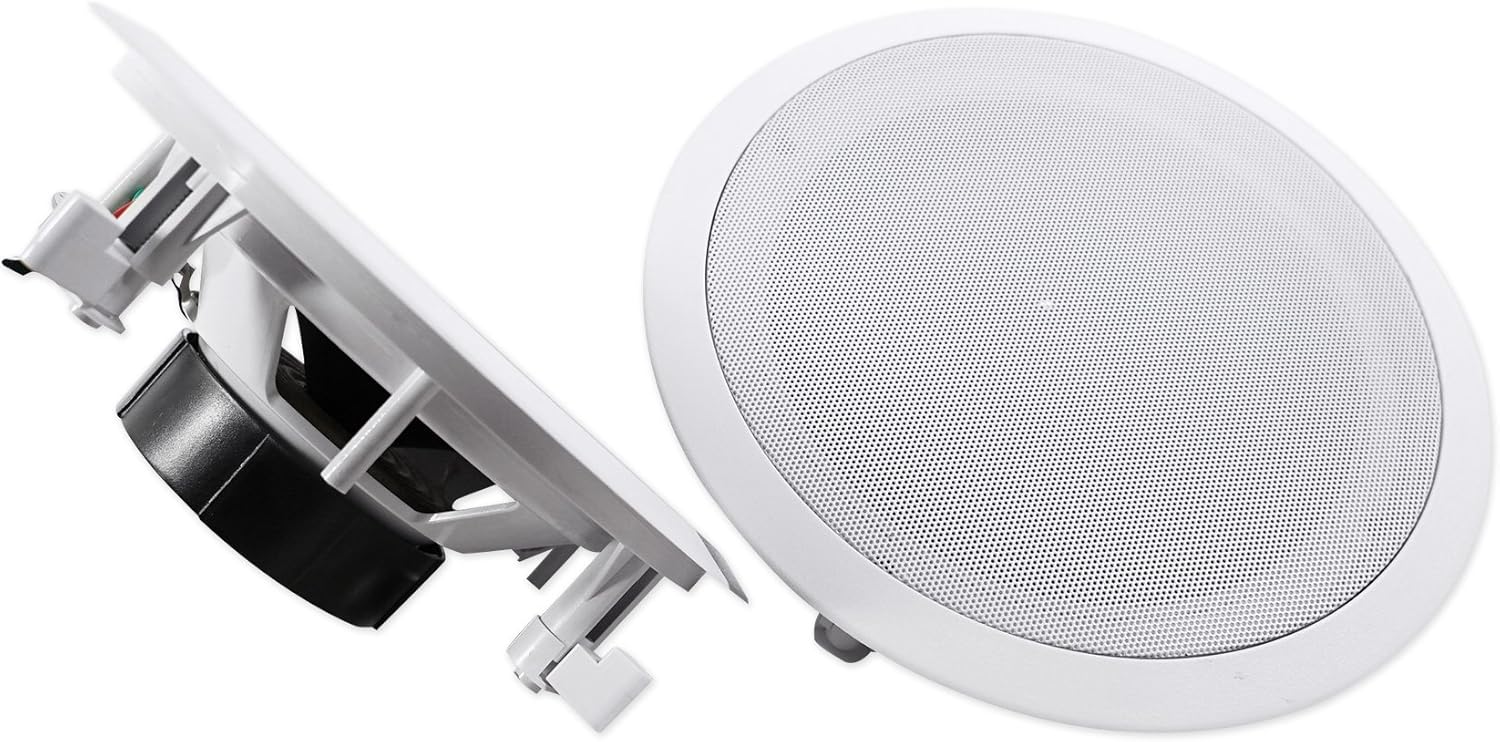
Image: A side profile of the Rockville HC85 in-ceiling speaker, illustrating the robust mounting clips that secure the speaker firmly within the ceiling cutout.
Remote Control
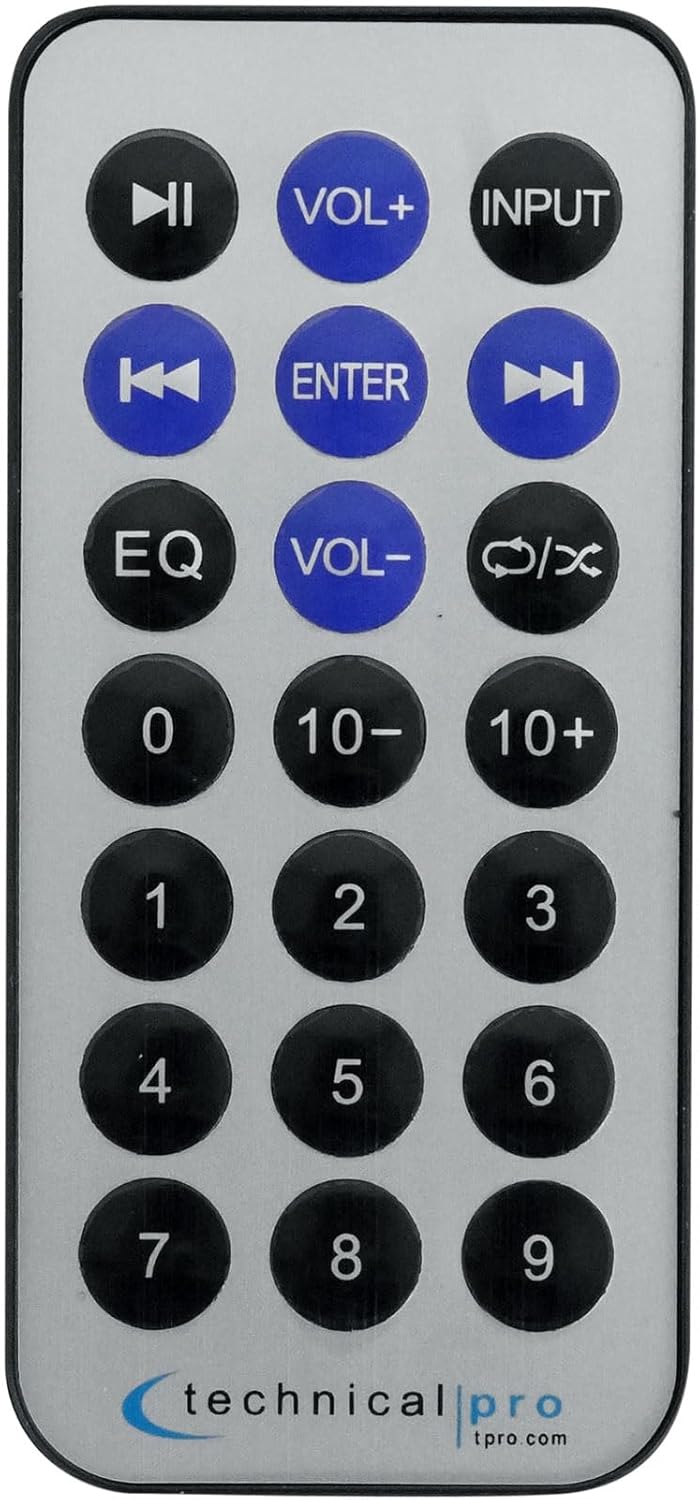
Image: The compact remote control for the RXM7BT receiver, featuring buttons for power, input selection, volume adjustment, track control, EQ settings, and numerical input for FM stations.
The included remote control provides convenient wireless operation of your RXM7BT receiver. Functions include power on/off, input selection, volume control, track navigation for USB/SD playback, and FM tuner controls.
Setup
Speaker Installation (Rockville HC85)
Before installing, ensure you have appropriate wiring (16-gauge or thicker speaker wire recommended) and tools (drill, drywall saw, wire strippers).
- Choose Location: Select a suitable location in your ceiling, avoiding joists, electrical wires, or plumbing. Ensure adequate clearance behind the speaker for proper air circulation.
- Cut Hole: Use the provided template (if available, or refer to specifications for cut-out diameter) to mark the desired hole. Carefully cut the hole in the drywall using a drywall saw. The cut-out diameter is 9.3 inches.
- Run Wires: Route speaker wires from the receiver location to each speaker cutout. Leave enough slack for easy connection.
- Connect Speaker: Strip approximately ½ inch of insulation from the speaker wire ends. Press down on the spring-loaded push terminals on the speaker and insert the bare wire ends. Connect the positive (+) terminal on the speaker to the positive (+) terminal on the receiver, and the negative (-) terminal on the speaker to the negative (-) terminal on the receiver. Ensure polarity is consistent for all speakers.
- Mount Speaker: Carefully insert the speaker into the cutout. The mounting clips will automatically flip out and secure the speaker to the drywall as you push it in. For a tighter fit, some models may require tightening screws on the front baffle to engage the dog-leg clamps.
- Attach Grill: Once the speaker is securely mounted, attach the magnetic grill. The grill can be painted to match your ceiling color.
Receiver Connections (Technical Pro RXM7BT)
Ensure the receiver is unplugged from the power outlet before making any connections.
- Speaker Connection: Connect the speaker wires from your HC85 speakers to the "MAIN SPEAKERS" banana binding posts on the rear of the RXM7BT receiver. Match positive (+) to positive (+) and negative (-) to negative (-). The RXM7BT supports 8-ohm speakers.
- Audio Source Connection (RCA): Connect external audio devices (e.g., DVD player, CD player, TV audio out) to the "INPUT" RCA jacks (DVD or LINE) on the rear panel using RCA cables.
- FM Antenna Connection: Connect the included FM antenna to the "FM ANTENNA" terminal on the rear panel for radio reception. Extend the antenna for better signal.
- Power Connection: Once all audio and speaker connections are made, plug the receiver's power cord into a standard 110/220V AC power outlet (ensure the voltage selector switch is set correctly for your region).
Operating Instructions
Power On/Off
Press the POWER button on the front panel or the remote control to turn the unit on or off.
Input Selection
Press the INPUT button on the front panel or remote control repeatedly to cycle through available audio sources: RCA (DVD/LINE), Bluetooth, USB, SD Card, and MP3 (AUX).
Volume Control
Adjust the master volume using the large VOLUME knob on the front panel or the VOL+ / VOL- buttons on the remote control.
Use the BASS and TREBLE knobs on the front panel to adjust the tone of the audio output. The BALANCE knob adjusts the left/right speaker balance.
Bluetooth Pairing
- Select Bluetooth as the input source using the INPUT button. The display will show "BT INPUT" or "BLUETOOTH".
- On your Bluetooth-enabled device (smartphone, tablet, etc.), enable Bluetooth and search for available devices.
- Select "RXM7BT" from the list of devices.
- Once paired, the display will indicate a successful connection, and you can play audio from your device through the receiver. The Bluetooth range is approximately 30 feet.
USB/SD Card Playback
Insert a USB drive or SD card (up to 128GB) containing .mp3, .wav, or .wma audio files into the respective slot on the front panel. The receiver will automatically switch to USB/SD input and begin playback. Use the track navigation buttons (PREV, NEXT, PLAY/PAUSE) on the front panel or remote control.
FM Tuner
Select FM as the input source. Use the CH- and CH+ buttons to manually tune to stations. Press FM SCAN to automatically scan and save available stations.
Microphone Usage
Connect up to two microphones to the MIC1 and MIC2 inputs on the front panel. Adjust microphone volume using the MIC.VOLUME knob. Use the MIC.BASS, MIC.TREBLE, and ECHO knobs to fine-tune the microphone sound.
Maintenance
Proper care and maintenance will ensure the longevity and optimal performance of your audio system.
- Cleaning: Disconnect the power before cleaning. Use a soft, dry cloth to wipe the exterior surfaces of the receiver and speakers. Do not use liquid cleaners, aerosols, or abrasive chemicals, as they may damage the finish or internal components.
- Ventilation: Ensure the receiver's ventilation openings are not blocked. Adequate airflow is crucial to prevent overheating.
- Storage: If storing the unit for an extended period, unplug it from the power outlet and store it in a cool, dry place away from direct sunlight and extreme temperatures.
- Speaker Grills: The speaker grills can be carefully removed for painting. Ensure they are fully dry before reattaching.
Troubleshooting
If you encounter any issues with your system, refer to the table below for common problems and their solutions. If the problem persists, contact customer support.
| Problem | Possible Cause | Solution |
|---|---|---|
| No power | Power cord not connected; Power outlet not active; Unit is off. | Ensure power cord is securely plugged in; Check power outlet with another device; Press the POWER button. |
| No sound from speakers | Incorrect input selected; Volume too low; Speaker wires loose or incorrectly connected; Mute function active. | Select correct input; Increase volume; Check speaker wire connections (polarity); Ensure unit is not muted. |
| Bluetooth not connecting | Receiver not in Bluetooth mode; Device too far; Device already connected to another unit; Interference. | Select Bluetooth input; Move device closer (within 30ft); Disconnect from other devices; Restart receiver and device. |
| USB/SD playback issues | Unsupported file format; USB/SD card corrupted; Card size exceeds limit. | Ensure files are .mp3, .wav, or .wma; Try a different USB/SD card; Ensure card size is 128GB or less. |
| Poor FM reception | Antenna not connected or extended; Weak signal. | Connect and fully extend FM antenna; Try repositioning the antenna; Use auto-scan feature. |
Technical Specifications
Below are the detailed specifications for the Technical Pro RXM7BT Receiver and Rockville HC85 Speakers.
Technical Pro RXM7BT Receiver
| RMS Power | 150 watts RMS Both Channels Driven @ 1.0% THD @ 8 ohms |
| Peak Power | 1000 watts |
| Inputs | RCA (2 audio sources), Bluetooth, USB, SD Card, MP3 (AUX) |
| Outputs | Banana binding post (2 speakers), RCA (Line Out) |
| USB & SD Card Max Size | 128GB |
| Supported File Types | .mp3, .wav, .wma |
| Bluetooth Range | 30 Feet |
| Frequency Response | 20Hz-20KHz |
| Headphone Output | 1/8'' Jack |
| Voltage | 110/220v (Switchable) |
| Dimensions (L x W x H) | 9.10" L x 10.25" W x 4.1" H |
| Item Weight | 6 lbs (Receiver only) |
Rockville HC85 In-Ceiling Speakers
| Peak Power Handling | 350 Watts (per speaker) / 700 Watts (per pair) |
| RMS Power Handling | 120 Watts (per speaker) / 240 Watts (per pair) |
| Woofer | 8" Polypropylene Cone with Rubber Surround |
| Tweeter | ½" Mylar Dome Tweeter |
| Voice Coil | 1" Aluminum |
| Magnet | 20 oz. Ferrite |
| Impedance | 8 Ohms |
| Frequency Response | 40Hz - 20KHz |
| Sensitivity | 89 dB @ 1w / 1m |
| Mounting Depth | 3.03" |
| Cut-out Diameter | 9.3" |
| Color | White (Paintable) |
Warranty Information
This product is covered by a manufacturer's warranty. Please refer to the warranty card included in your original packaging for specific terms and conditions, including warranty duration and coverage details. Keep your proof of purchase for warranty claims.
- 2-Year Protection Plan: Available for purchase separately.
- 3-Year Protection Plan: Available for purchase separately.
Customer Support
For technical assistance, troubleshooting beyond this manual, or warranty inquiries, please contact Technical Pro customer support. Contact information can typically be found on the manufacturer's official website or on the product packaging.
When contacting support, please have your product model number (RXM7BT+(2) HC85) and proof of purchase readily available.


