
ANDELI TIG-205Pro AC DC
ANDELI TIG-205Pro AC DC Welding Machine User Manual
Model: TIG-205Pro AC DC | Brand: ANDELI
1. Introduction
The ANDELI TIG-205Pro AC DC is a versatile and portable welding machine designed for a wide range of welding applications. It supports both 100V and 200V power inputs, offering flexibility for various work environments. Weighing approximately 12.5 kg, its lightweight design ensures easy transport. This machine features a smart LCD panel for precise control and offers multiple welding modes including AC TIG, DC TIG, Pulse TIG, Cold Welding, and Arc Welding, making it suitable for both beginners and experienced users.
This manual provides essential information for the safe and effective operation, setup, and maintenance of your ANDELI TIG-205Pro AC DC welding machine. Please read it thoroughly before use.

Figure 1: The ANDELI TIG-205Pro AC DC welding machine with its included accessories, showcasing its compact design and comprehensive kit.
2. Safety Information
Welding operations involve significant risks. Always prioritize safety to prevent injury or damage to equipment. This section outlines general safety precautions. Refer to local safety regulations and standards for comprehensive guidelines.
- Personal Protective Equipment (PPE): Always wear a welding helmet with appropriate shade, flame-resistant clothing, welding gloves, and safety shoes. Protect bystanders with welding screens.
- Ventilation: Ensure adequate ventilation to remove welding fumes, which can be hazardous to health. Work in a well-ventilated area or use fume extraction equipment.
- Electrical Safety: Ensure the welding machine is properly grounded. Do not operate in wet conditions. Inspect cables and connections for damage before each use. Never touch live electrical parts.
- Fire Prevention: Keep flammable materials away from the welding area. Have a fire extinguisher readily available. Be aware of hot metal and sparks.
- Gas Cylinders: Secure gas cylinders to prevent tipping. Use the correct gas for the welding process (e.g., pure argon for TIG welding).
- Electromagnetic Fields (EMF): Welding currents create EMFs. Consult a physician if you have a pacemaker or other medical implants.
3. Package Contents
Verify that all items listed below are included in your package. If any items are missing or damaged, please contact customer support.
- TIG-205 Pro Welding Machine (x1)
- 2-pin Foot Switch (x1)
- 5-pin Foot Switch (x1)
- WP-26 TIG Torch (x1)
- Nozzles (x20)
- WP-9 TIG Torch (x1)
- Collets (x20)
- Tungsten Electrodes (x20)
- 100V Conversion Adapter (x1)
- Earth Clip with Cable (x1)
- Gas Hose (x1)

Figure 2: Visual representation of the included accessories and the main components of the TIG-205Pro welding machine.
4. Product Overview & Components
Familiarize yourself with the main unit and its connection points:
- Output Terminal Socket (- Minus)
- Gas Outlet Socket (for TIG Torch)
- Torch Switch Socket (2-pin connector)
- Foot Switch Socket (5-pin connector)
- Output Terminal Socket (+ Plus)
- Power Switch
- Gas Hose Connector
- Power Cord
- Connection Port (Special Welding Connection)

Figure 3: Front and rear panel connections and components of the TIG-205Pro.
5. Setup
Follow these steps to set up your welding machine:
- Power Connection: The machine is compatible with both 100V and 200V power supplies. Use the appropriate power cord and the included 100V conversion adapter if necessary. Ensure the power source matches the machine's requirements.
- Gas Connection: Connect one end of the gas hose to the gas hose connector (7) on the machine and the other end to your pure argon gas cylinder regulator. Ensure all connections are tight to prevent gas leaks.
- Torch and Earth Clamp Connection: Connect the TIG torch to the gas outlet socket (2) and the torch switch socket (3). Connect the earth clamp cable to the output terminal socket (- Minus) (1) and the work piece. For positive polarity, connect to the output terminal socket (+ Plus) (5).
- Foot Switch Connection: If using a foot switch for control, connect it to the foot switch socket (4). The machine supports both 2-pin and 5-pin foot switches.

Figure 4: The TIG-205Pro supports various control methods, including foot switch and torch remote control.
6. Operating Instructions
6.1. LCD Panel & Controls
The TIG-205Pro features a 4.3-inch Japanese LCD panel for intuitive control. Rotate and press the buttons to easily set welding modes, functions, and parameters. All parameters are clearly displayed, simplifying operation even for beginners.

Figure 5: The smart LCD panel allows for precise and easy adjustment of welding parameters.
6.2. Welding Modes
The machine supports various welding modes for different materials and applications:
- AC TIG: Ideal for aluminum and magnesium alloys.
- DC TIG: Suitable for stainless steel, carbon steel, copper, and titanium.
- Pulse TIG: Offers better control over heat input, reducing deformation and discoloration, especially for thin materials or precision welding.
- Cold Welding: Minimizes heat input to prevent material deformation and discoloration, resulting in a silver-white weld on stainless steel. Requires pure argon gas.
- Arc Welding (MMA): For general stick welding applications.
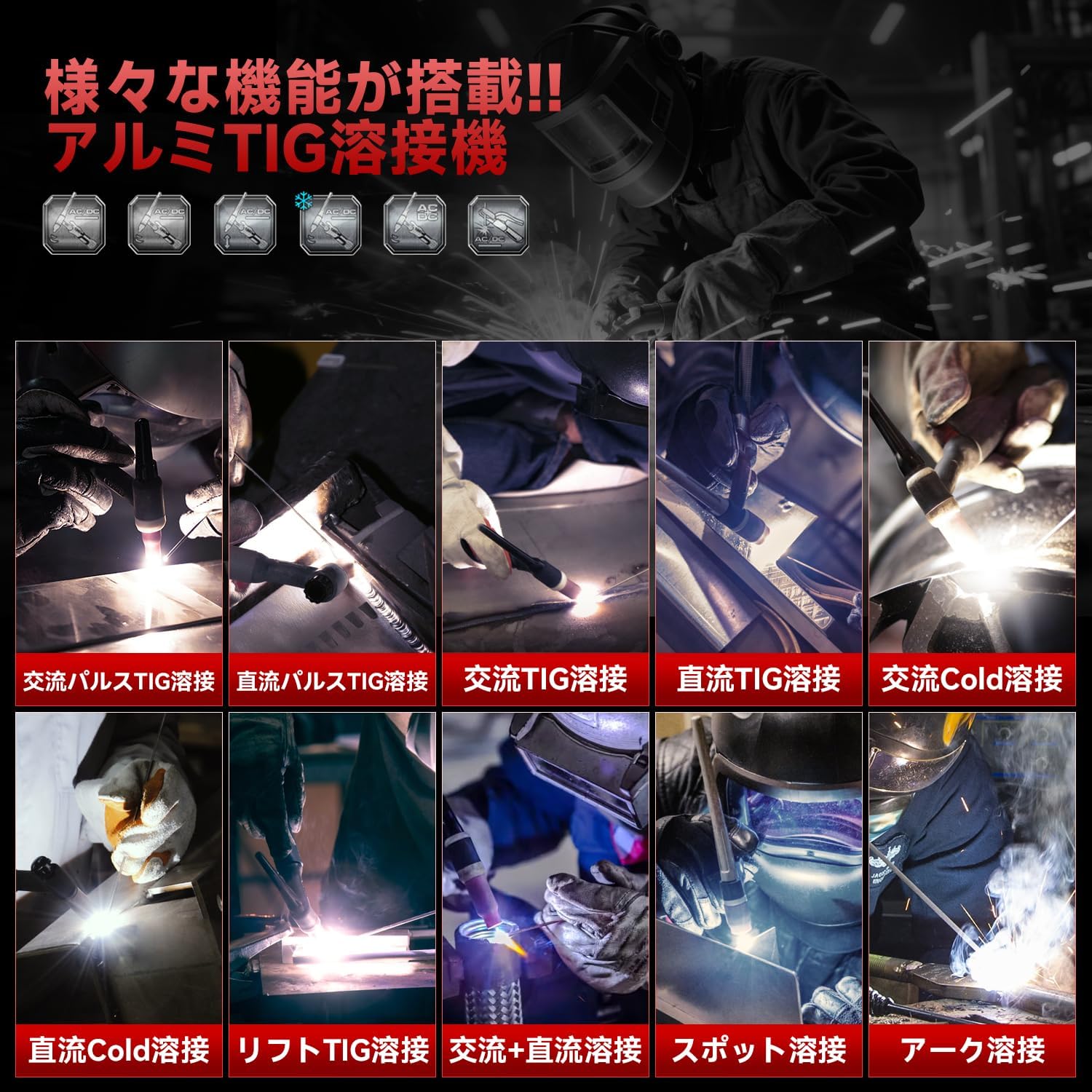
Figure 6: The TIG-205Pro supports a variety of welding modes for diverse applications.
6.3. Pulse TIG Settings
Pulse TIG welding allows for precise heat control. You can switch Pulse ON or OFF:
- Pulse ON: Controls heat input, suppresses deformation and discoloration of base material. Recommended for thin plates, stainless steel, and precision parts where appearance is critical.
- Pulse OFF: Provides simple and stable DC output. Settings and operation are easy, and it offers deep penetration into the base material. Suitable for general work and short-duration tasks.

Figure 7: Visual difference in weld quality with Pulse TIG ON (left) and OFF (right).
6.4. AC Waveform Switching
For AC TIG welding, you can select from three waveform types to optimize your weld:
- Square Wave: Produces minimal spatter and is suitable for thin plate and precision work.
- Hard (Short Wave): Offers deeper penetration into the base material and a stronger arc.
- Standard (Sine Wave): Provides good operability and stability, suitable for a wide range of applications.

Figure 8: AC waveform options and their effects on the weld.
6.5. 2T/4T Settings
The TIG torch switch offers two self-holding functions:
- 2T (Two-Touch): The arc starts when you press the switch and stops when you release it. Simple and direct control.
- 4T (Four-Touch): Press the switch to start the initial current, release it to weld, press again to reduce to minimum current, and release to stop the arc. This mode is useful for longer welds as it reduces finger fatigue.

Figure 9: Understanding 2T and 4T torch switch operations.
6.6. Welding Parameter Examples
Here are reference parameters for common welding tasks:
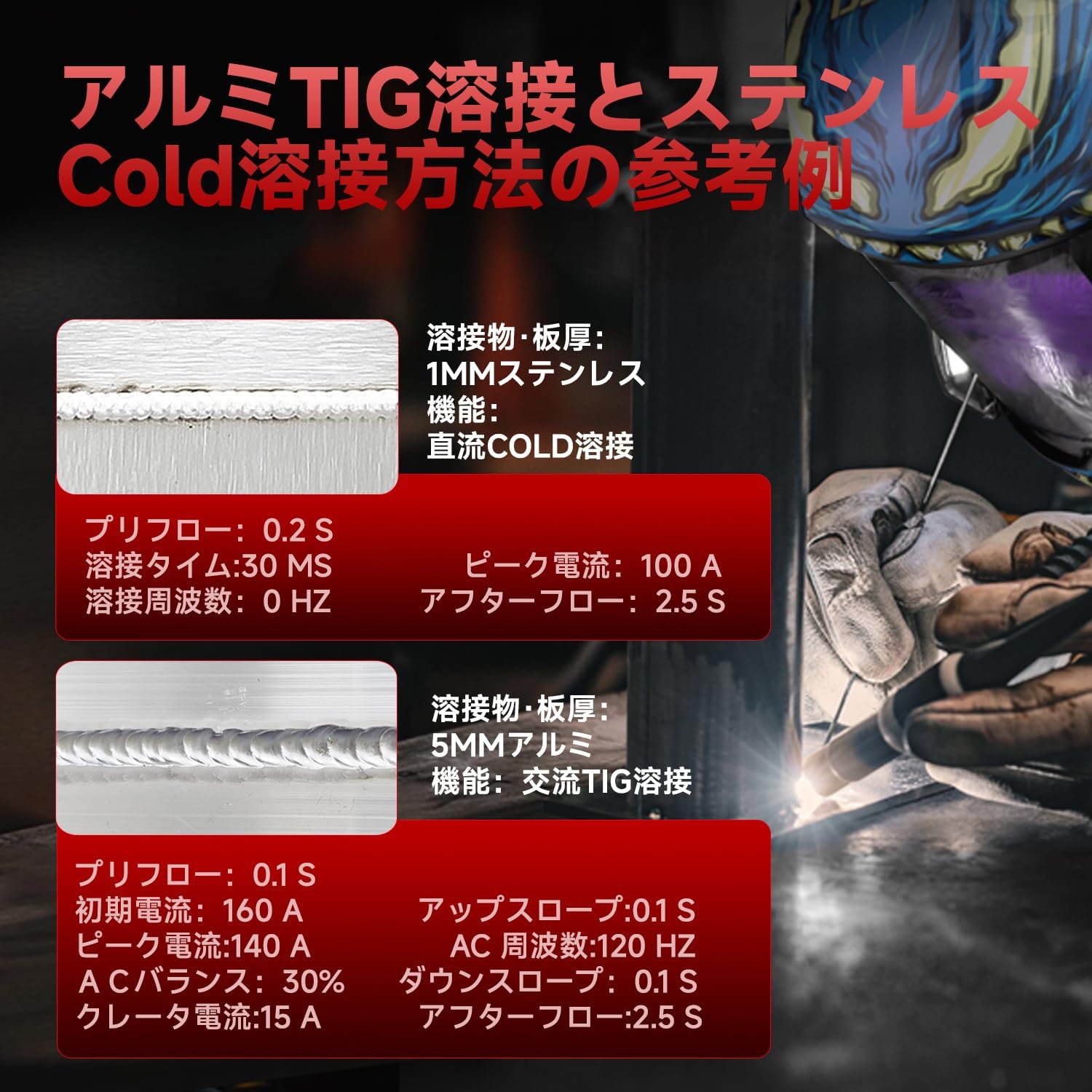
Figure 10: Reference welding parameters for stainless steel Cold welding and aluminum TIG welding.
Example 1: 1mm Stainless Steel (DC Cold Welding)
- Preflow: 0.2 S
- Welding Time: 30 MS
- Welding Frequency: 0 HZ
- Peak Current: 100 A
- Afterflow: 2.5 S
Example 2: 5mm Aluminum (AC TIG Welding)
- Preflow: 0.1 S
- Initial Current: 160 A
- Peak Current: 140 A
- AC Balance: 30%
- Crater Current: 15 A
- Upslope: 0.1 S
- AC Frequency: 120 HZ
- Downslope: 0.1 S
- Afterflow: 2.5 S
7. Applications & Versatility
The ANDELI TIG-205Pro AC DC welding machine offers high versatility, suitable for various materials and applications including:
- Aluminum and Magnesium Alloys
- Titanium Alloys
- Mild Steel
- Copper
- Carbon Steel
- Stainless Steel
Common uses include:
- Automotive bodywork and repair (e.g., aluminum wheel repair)
- General metal welding
- Precision welding
- Home use and DIY projects
- Maintenance work
- Construction
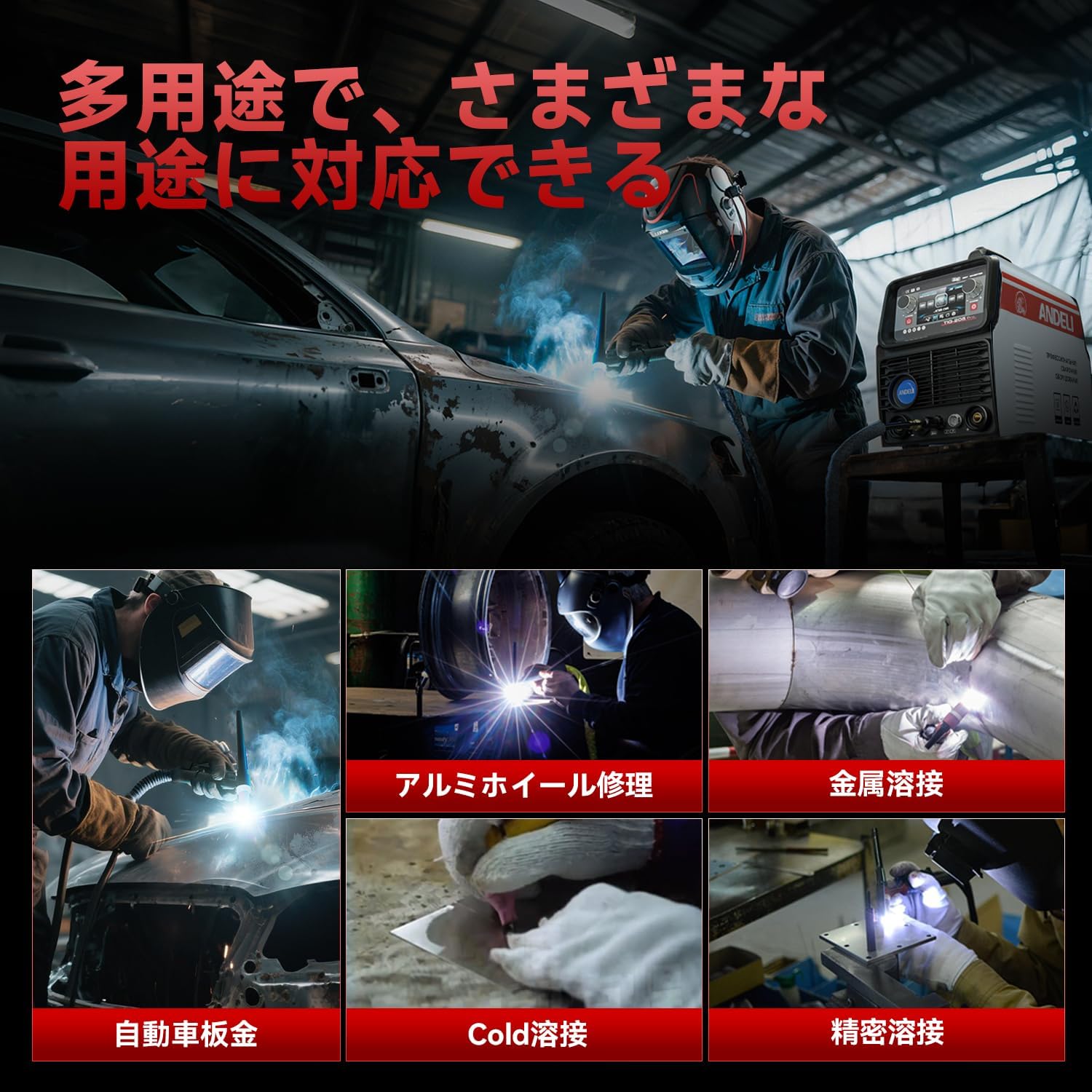
Figure 11: The TIG-205Pro is suitable for a wide range of applications and materials.
8. Maintenance
Regular maintenance ensures the longevity and optimal performance of your welding machine. Always disconnect the power supply before performing any maintenance.
- Cleaning: Periodically clean the machine's exterior with a dry, soft cloth. Use compressed air to blow out dust and debris from the ventilation openings.
- Cable Inspection: Regularly inspect all cables (power, torch, earth clamp) for cuts, cracks, or damage. Replace damaged cables immediately.
- Torch Maintenance: Clean the torch nozzle, collet, and collet body regularly. Replace worn-out tungsten electrodes and other consumables as needed.
- Gas System: Check gas hoses and connections for leaks. Ensure the gas regulator is functioning correctly.
- Storage: Store the welding machine in a clean, dry, and dust-free environment when not in use.
9. Troubleshooting
This section provides general troubleshooting tips for common issues. If you encounter problems not listed here or if solutions do not resolve the issue, please contact customer support.
| Problem | Possible Cause | Solution |
|---|---|---|
| Machine does not power on | No power supply; Power switch off; Damaged power cord | Check power outlet; Turn on power switch; Inspect and replace power cord |
| No arc ignition | Earth clamp not connected; Incorrect welding parameters; Tungsten electrode not sharp or contaminated; Gas flow issue | Ensure earth clamp is securely attached to workpiece; Adjust current/voltage; Sharpen or replace tungsten; Check gas supply and flow rate |
| Poor weld quality (porosity, discoloration) | Insufficient shielding gas; Contaminated workpiece; Incorrect welding speed/technique | Increase gas flow, check for leaks; Clean workpiece thoroughly; Adjust welding technique and speed |
| Overheat protection activated | Exceeded duty cycle; Blocked ventilation | Allow machine to cool down; Ensure clear ventilation paths |
10. Specifications
Technical specifications for the ANDELI TIG-205Pro AC DC welding machine:
| Feature | TIG-205 Pro (200V) | TIG-205 Pro (100V) |
|---|---|---|
| Rated Input Voltage | 200±10%, 50/60Hz | 100±10%, 50/60Hz |
| Rated Input Current (A) | 37/20 (TIG) | 51/23 (TIG) |
| Rated Input Power (KW) | 8.5 (TIG) | 11.7 (TIG) |
| Power Factor | 0.63 | 0.84 |
| No-load Voltage (V) | 68 | 68 |
| Initial Current (A) | 10~Peak Current (HF/Lift) | 10~Peak Current (HF/Lift) |
| Rated Output Current (A) | 10~205 (TIG) / 10~145 (MMA) | 10~145 (TIG) / 10~120 (MMA) |
| Downslope (S) | 0~5 | |
| Preflow (S) | 0~1 | |
| Afterflow (S) | 0.1~10 | |
| Efficiency (%) | 20~80 | |
| Insulation Class | F | |
| Cooling Type | Air Cooling | |
| Body Dimensions (L×W×H) | 490 x 215 x 325 mm | |
| Weight | 12.5 kg | |
Rated Duty Cycle:
- AC TIG: 60% at 205A, 100% at 110A
- DC TIG: 60% at 141A, 100% at 89A
- AC MMA: 60% at 118A, 100% at 92A
- DC MMA: 60% at 98A, 100% at 76A
11. Warranty and Support
The ANDELI TIG-205Pro AC DC welding machine is manufactured under strict quality control and is CE certified. We are confident in the quality and performance of our products.
For warranty information, technical support, or service inquiries, please refer to the warranty card included with your product or contact ANDELI customer service. Our efficient customer service team is available to assist you with any questions or concerns regarding your welding machine.
Related documentsTIG-205Pro AC DC


Ask a question about this manual
Ask about setup, troubleshooting, compatibility, parts, safety, or missing instructions. Manuals+ will review the question and use this page’s manual context to help answer it.