
Introduction
The CYCPLUS AL1 Portable Air Compressor is a versatile 2-in-1 tire inflator designed for convenience and efficiency. It features both DC (12V car cigarette lighter) and AC (battery-powered) options, an auto shut-off function, a digital pressure gauge, and an integrated LED light. This compact device is suitable for inflating tires on cars, motorcycles, bicycles, and various sports equipment, ensuring accurate pressure and ease of use.

Image: The CYCPLUS AL1 Portable Air Compressor shown with its various accessories, including different nozzles and charging cables.
What's in the Box
Please check the package contents to ensure all items are present:
- 1* Car Tire Inflator
- 2* Air Hose
- 1* General Nozzle Cone
- 1* Needle Adapter
- 1* Presta Adapter
- 1* USB-C Charging Cable
- 1* Canvas storage bag
- 1* User Manual

Image: A visual representation of all items included in the CYCPLUS AL1 product package.
Setup
1. Charging the Device
Before first use, fully charge the inflator using the provided USB-C charging cable. Connect the USB-C end to the inflator and the USB-A end to a compatible power adapter (not included) or a USB port. The digital display will indicate charging status. The device can also be powered directly via the 12V DC car cigarette lighter cable for continuous operation without battery worries.

Image: Illustrates the dual power supply options for the inflator: cordless operation using the internal battery and corded operation via a 12V DC car cigarette lighter.
2. Attaching the Air Hose
The inflator features a built-in air hose for convenient storage. Gently pull the hose out from its housing. Screw the appropriate adapter (e.g., Presta adapter for bicycles, needle adapter for balls) onto the end of the air hose if needed for your specific item.

Image: Diagram showing the built-in air hose being pulled out and retracted from the inflator for use and storage.
3. Powering On and Setting Units
Press and hold the power button to turn on the device. The digital display will show the current pressure. Use the 'U' button to cycle through different pressure units (PSI, BAR, KPA, kgf/cm²). Use the '+' and '-' buttons to set your desired target pressure.
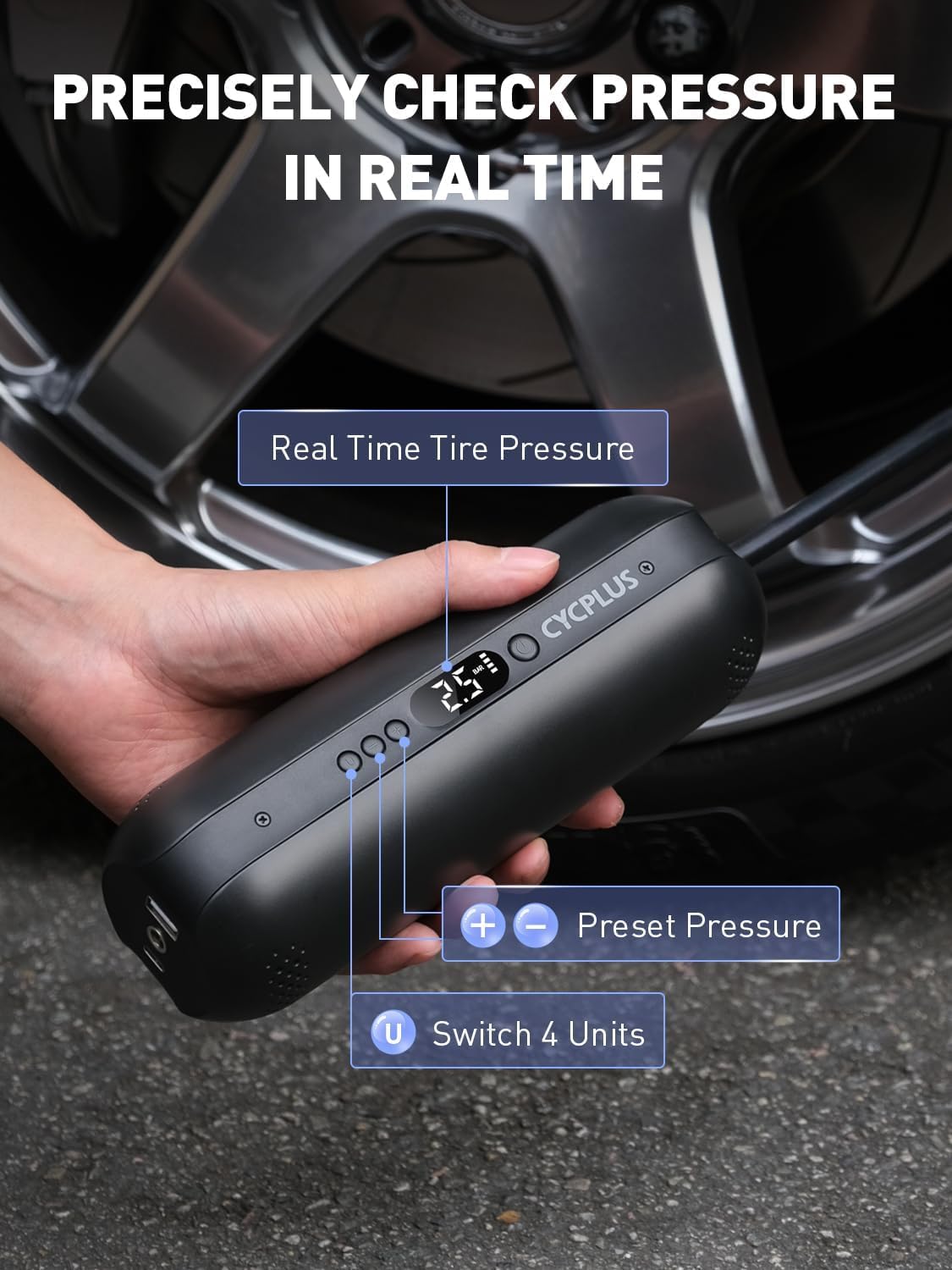
Image: Close-up of the inflator's digital display and control buttons, highlighting the real-time pressure display, preset pressure adjustment, and unit switching function.
Operating Instructions
1. Connecting to the Item
Securely connect the air hose (with the appropriate adapter if necessary) to the valve stem of the item you wish to inflate. Ensure a tight seal to prevent air leakage.
2. Starting and Stopping Inflation
Once the desired pressure is set and the hose is connected, press the power button to begin inflation. The inflator will automatically stop once the preset pressure is reached. You can manually stop inflation at any time by pressing the power button again.
3. Inflation for Various Items
The CYCPLUS AL1 is designed for a variety of inflation needs:
Car Tires:
A fully charged inflator can fill 4 car tires (195/65 R15) from 0 PSI to 36 PSI. Each tire typically takes about 6 minutes. Use the Schrader valve connection.

Image: The CYCPLUS AL1 inflator connected to a car tire, demonstrating its use for vehicle tire inflation.
Motorcycle Tires:
A fully charged inflator can fill 8 motorcycle tires from 0 PSI to 36 PSI. Each tire typically takes about 4 minutes. Use the Schrader valve connection.

Image: The CYCPLUS AL1 inflator connected to a motorcycle tire, illustrating its application for motorcycle tire inflation.
Road Bike/Mountain Bike Tires:
A fully charged inflator can fill 15 700*25C bike tires from 0 PSI to 100 PSI. Each tire typically takes about 2 minutes. Use the Presta valve adapter or Schrader valve connection as appropriate.

Image: The CYCPLUS AL1 inflator connected to a bicycle tire, showing its use for road and mountain bike tires.
Sports Balls:
A fully charged inflator can fill 75 basketballs from 0 PSI to 8 PSI. Each ball typically takes about 30 seconds. Use the ball needle adapter.

Image: The CYCPLUS AL1 inflator with a basketball, demonstrating its capability to inflate sports balls using the appropriate needle adapter.
4. Additional Functions
- Emergency LED Light: Press the light button to activate the built-in LED light for illumination in low-light conditions or emergencies.
- Power Bank: The inflator can also function as a power bank with its 7800 mAh capacity. Use the USB-A output port to charge your mobile devices.

Image: Shows the inflator being used to charge a smartphone via its USB output and its integrated emergency LED light in operation.
5. Official Product Video
Video: Official product video demonstrating the features and operation of the CYCPLUS Portable Air Compressor Tire Inflator AL1.
Maintenance
- Charging: To prolong battery life, charge the device regularly, even if not in frequent use. Avoid completely draining the battery before recharging.
- Storage: Store the inflator in a cool, dry place, away from direct sunlight and extreme temperatures. Use the provided canvas storage bag to protect it from dust and scratches.
- Cleaning: Wipe the exterior of the inflator with a soft, damp cloth. Do not use harsh chemicals or abrasive cleaners. Ensure the device is dry before storing.
Troubleshooting
- Device not turning on: Ensure the battery is charged. If using the 12V DC cable, check the car's cigarette lighter socket for power.
- Inflation is slow or not working: Check that the air hose is securely connected to both the inflator and the item's valve stem. Ensure the correct adapter is used and properly sealed. Verify the target pressure is set correctly.
- Inaccurate pressure reading: Ensure the hose is fully screwed onto the valve stem. Slight variations may occur, but significant discrepancies might indicate a loose connection.
- Overheating: The device has efficient heat dissipation, but continuous long-duration use may cause it to warm up. Allow it to cool down if it feels excessively hot.
Specifications
| Brand | CYCPLUS |
| Model Name | AL1 |
| Voltage | 12 Volts |
| Power Source | Corded Electric; Battery Powered |
| Maximum Operating Pressure | 150 PSI |
| Capacity | 36 LPM |
| Air Flow Capacity | 12 LPM |
| Battery | 3 Lithium Polymer batteries (included) |
| Material | Plastic |
| Item Weight | 1.34 pounds (approx. 607 grams) |
| Product Dimensions | 2.09"L x 7.01"W x 2.52"H |
| Special Features | Portable, Digital Display, Automatic Shut-Off, LED Light, Power Bank Function |
Warranty and Support
The CYCPLUS AL1 Portable Air Compressor comes with a one-year free maintenance warranty from the date of purchase.
For any after-sales support or inquiries, please contact CYCPLUS customer service via email: steven@cycplus.com.
You can also visit the official CYCPLUS website for more information: www.cycplus.com.