
Introduction
Welcome to your new JadeAudio JW1 Open Ear Headphones. These headphones are designed for comfort, versatility, and high-quality audio, perfect for active lifestyles and everyday use. This manual will guide you through the setup, operation, and maintenance of your JW1 headphones.

The JadeAudio JW1 Open Ear Headphones and their compact charging case.
Key Features
- Open, Non-In-Ear Design: Comfortable for long periods of wear without discomfort, allowing you to stay aware of your surroundings.
- All-Around Versatility: Suitable for outdoor exercise, work, studies, leisure, and entertainment.
- Bluetooth 5.3 Connectivity: Ensures faster, more stable connections with greater efficiency for seamless audio.
- Convenient Touch Controls: One-handed control for music playback, calls, and voice assistant.
- Water and Sweat-Resistant (IPX5): No worries about water and sweat, even during intense activities.
Official product video showcasing the JadeAudio JW1 Open Ear Headphones.
What's in the Box
Your JadeAudio JW1 package includes the following items:
- JW1 Open Ear Headphones (Left and Right)
- Charging Case
- USB Charging Cable

The JW1 headphones neatly stored within their charging case.
Setup
Charging the Headphones
Before first use, fully charge your JW1 headphones and charging case.
- Place the headphones into their respective slots in the charging case.
- Connect the USB charging cable to the charging port on the case and to a compatible USB power source.
- The indicator light on the case will show the charging status. A full charge for the case takes approximately 6 hours. The headphones will charge automatically when placed in the case.

The JW1 charging case, ready for connection to a power source.
Pairing with a Device
The JW1 headphones utilize advanced Bluetooth 5.3 technology for fast and stable connections.
- Ensure the headphones are charged and removed from the charging case. They will automatically enter pairing mode, indicated by a flashing light.
- On your device (smartphone, tablet, laptop, etc.), go to the Bluetooth settings menu and turn Bluetooth on.
- Search for "JW1" in the list of available devices and select it to connect.
- Once successfully connected, you will hear an audio prompt, and the indicator light on the headphones will change to a steady light or turn off, depending on the model.

Diagram illustrating the Bluetooth 5.3 connectivity of the JW1 headphones.
Operating Your JW1 Headphones
Wearing the Headphones
The JW1 features an open-ear, non-in-ear design for maximum comfort and situational awareness.
- Gently place the ear hook over the top of your ear.
- Position the speaker unit so it rests comfortably near your ear canal, without entering it.
- Adjust the headphones for a secure and comfortable fit. The ergonomic design ensures stability even during active movement.
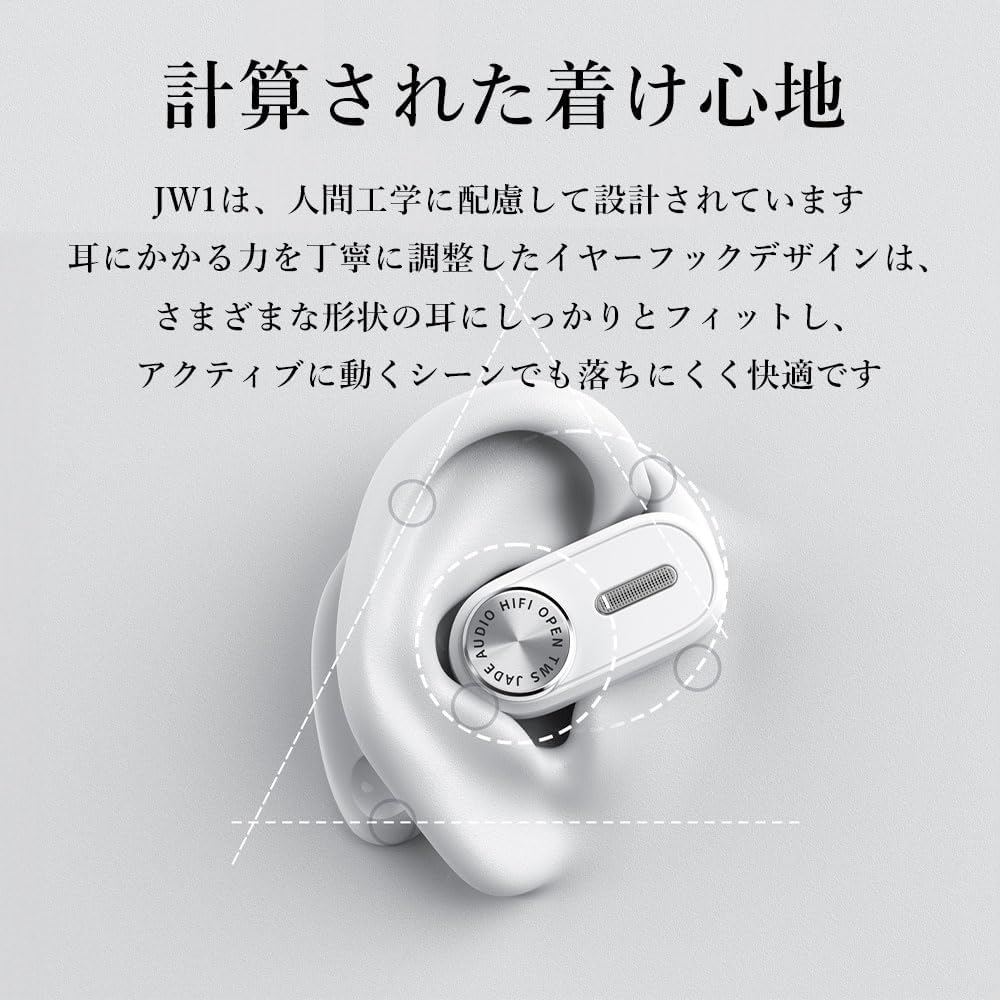
Visual guide for correctly wearing the JW1 Open Ear Headphones.
Touch Controls
Both the left and right earbud units are equipped with touch controls for convenient operation. Refer to the table below for specific functions:
| Action | Control |
|---|---|
| Play/Pause/Answer/End Call | Double tap |
| Previous Track | Triple tap left earbud |
| Next Track | Triple tap right earbud |
| Wake Voice Assistant | Four taps |
| Power On | Long press 5 seconds |

Illustration of the touch control area on the JW1 headphones.
Maintenance and Care
Water and Sweat Resistance
The JW1 headphones are designed with IPX5 water and sweat resistance, making them ideal for active use. To ensure longevity:
- After intense workouts or exposure to water, always wipe the headphones dry with a soft, clean cloth.
- Ensure the charging contacts on both the headphones and the case are completely dry before placing the headphones back into the charging case. Moisture on contacts can cause damage.
- Note: The sound tube, ventilation holes, microphone, and the charging case itself are not IPX5 rated and should be protected from direct water exposure.

The JW1 headphones are designed to withstand splashes and sweat.
Cleaning
Use a dry, soft, lint-free cloth to clean the headphones and charging case. Avoid using abrasive materials, solvents, or harsh chemicals, as these may damage the product's finish or internal components.
Troubleshooting
If you encounter any issues with your JW1 headphones, please refer to the following common problems and solutions:
| Issue | Possible Cause | Solution |
|---|---|---|
| No Sound | Headphones not connected; Low battery; Device volume too low | Ensure headphones are paired; Charge headphones; Increase volume on device and headphones |
| Cannot Pair | Headphones out of range; Already connected to another device; Pairing mode not active | Move device closer; Disconnect from other devices; Place headphones in case then remove to re-enter pairing mode |
| Intermittent Connection | Bluetooth interference; Device too far; Obstructions between device and headphones | Move away from other wireless devices; Reduce distance to device; Ensure clear line of sight |
| Touch Controls Unresponsive | Dirty sensor; Software glitch | Clean the touch sensor area; Place headphones in case and remove to restart them |
| Charging Issue | Dirty charging contacts; Faulty charging cable or adapter | Clean charging contacts with a dry cotton swab; Try a different USB cable and power adapter |
Specifications
| Feature | Detail |
|---|---|
| Model Name | JW1 |
| Brand | JadeAudio |
| Connectivity Technology | Wireless (Bluetooth) |
| Bluetooth Version | 5.3 |
| Ear Placement | Open Ear |
| Form Factor | Open Ear |
| Audio Driver Type | Dynamic Driver |
| Frequency Range | 20 Hz - 20,000 Hz |
| Battery Life (Headphones) | Up to 6 Hours per charge |
| Total Playtime (with Case) | Up to 18 Hours |
| Charging Time (Case) | Approx. 6 Hours |
| Water Resistance Level | Water Resistant (IPX5) |
| Control Method | Touch |
| Material | Silicone or TPE (Thermoplastic Elastomer) |
| Item Weight | 7.4 ounces |
| Package Dimensions | 6.81 x 5.2 x 1.97 inches |
| Manufacturer | JadeAudio |
| Country of Origin | China |
Warranty and Support
For detailed warranty information, technical support, or service inquiries regarding your JadeAudio JW1 Open Ear Headphones, please refer to the warranty card or documentation included with your purchase. You may also visit the official JadeAudio website for the most up-to-date support resources and contact information.
