
1. Introduction
The Linsoul SIMGOT EM6L In-Ear Monitors are designed for audiophiles and gamers, featuring a 1DD + 4BA hybrid driver configuration. These earphones deliver a balanced sound profile, precise soundstage, and accurate imaging, making them suitable for both music listening and competitive gaming. The EM6L incorporates a 3D-printed resin housing and a high-purity silver-plated OFC detachable cable for enhanced audio fidelity and durability.

Figure 1: Linsoul SIMGOT EM6L In-Ear Monitors with detachable cable.
2. Package Contents
Please verify that all items are present in your package:
- 1 Pair of EM6L In-Ear Monitors
- 1 Custom SIMGOT IEM Cable
- 3 Pairs of Silicone Eartips (S/M/L)
- 1 IEM Storage Case
- 1 User Manual

Figure 2: Contents of the SIMGOT EM6L package, including IEMs, cable, ear tips, and storage case.
3. Setup
3.1 Connecting the Cable
- Identify the left (L) and right (R) earphone units and the corresponding connectors on the cable. The cable features a 0.78mm recessed 2-pin connector system.
- Align the pins on the cable with the sockets on the earphone units. Ensure correct polarity (usually indicated by color or markings).
- Gently push the cable connectors into the earphone sockets until they are securely seated. Do not force the connection.

Figure 3: Illustration of the detachable 2-pin cable connection to the SIMGOT EM6L IEMs.
3.2 Choosing and Attaching Ear Tips
Select the ear tips that provide the best seal and comfort for your ears. A proper seal is crucial for optimal sound quality and bass response. The package includes three sizes (S, M, L) of silicone ear tips.
- Gently remove any pre-installed ear tips by pulling them off the nozzle.
- Select your preferred size of ear tips.
- Push the new ear tip onto the earphone nozzle until it is firmly attached.
3.3 Wearing the IEMs
The SIMGOT EM6L are designed for an over-ear fit, which provides better stability and reduces microphonics (cable noise).
- Insert the earphone unit into your ear canal.
- Guide the cable over the top and behind your ear.
- Adjust the earphone and cable for a comfortable and secure fit.

Figure 4: Proper wearing technique for the SIMGOT EM6L In-Ear Monitors, showing the over-ear cable routing.
4. Operation
4.1 Basic Audio Playback
Connect the 3.5mm mini-plug connector of the cable to your audio source (e.g., smartphone, digital audio player, computer, gaming console). Ensure the connection is firm. Adjust the volume on your audio source to a comfortable listening level before placing the IEMs in your ears.
4.2 Audio Experience
The SIMGOT EM6L is engineered to deliver a high-fidelity audio experience:
- Hybrid Driver Configuration: Features an 8mm custom-designed high-polymer diaphragm dual-cavity dynamic driver for mid-to-low frequencies and two sets of balanced armature drivers for mid-to-high and high frequencies.
- H-2019 Target Curve Tuning: Tuned to the H-2019 Target Curve for balanced three-frequency response, natural soundstage, and expansive audio field.
- Sound Isolation: The ergonomic design and proper ear tip selection provide effective passive noise isolation, enhancing your listening experience.
4.3 Gaming Performance
The precise soundstage positioning and imaging of the SIMGOT EM6L are particularly beneficial for gaming, allowing for accurate identification of in-game audio cues such as footsteps and gunshots. The dynamic low-frequency response contributes to an immersive gaming experience.

Figure 5: Frequency response graph and illustration of SIMGOT EM6L's application in gaming.
4.4 Product Overview
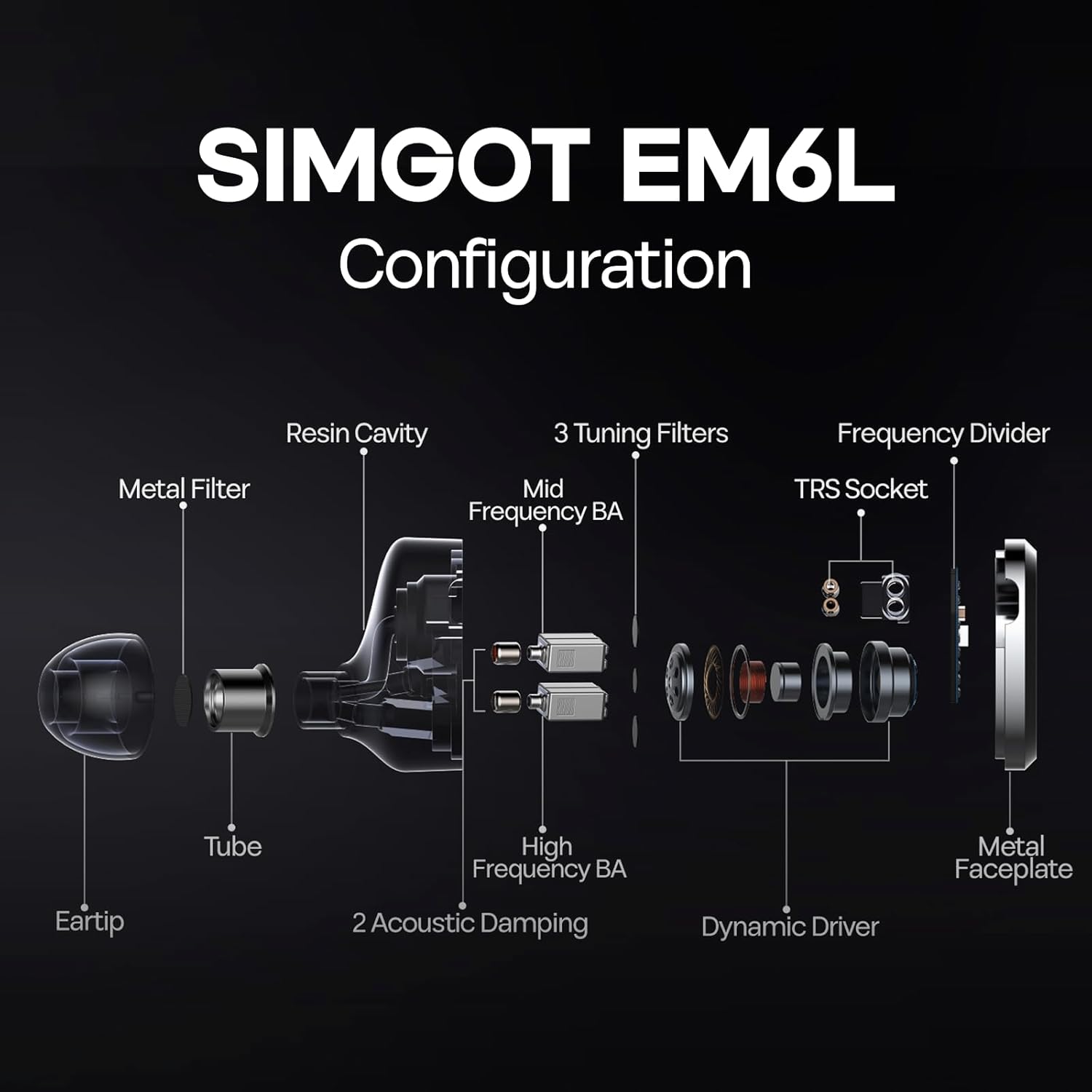
Figure 6: Exploded view diagram illustrating the internal components and configuration of the SIMGOT EM6L IEMs.
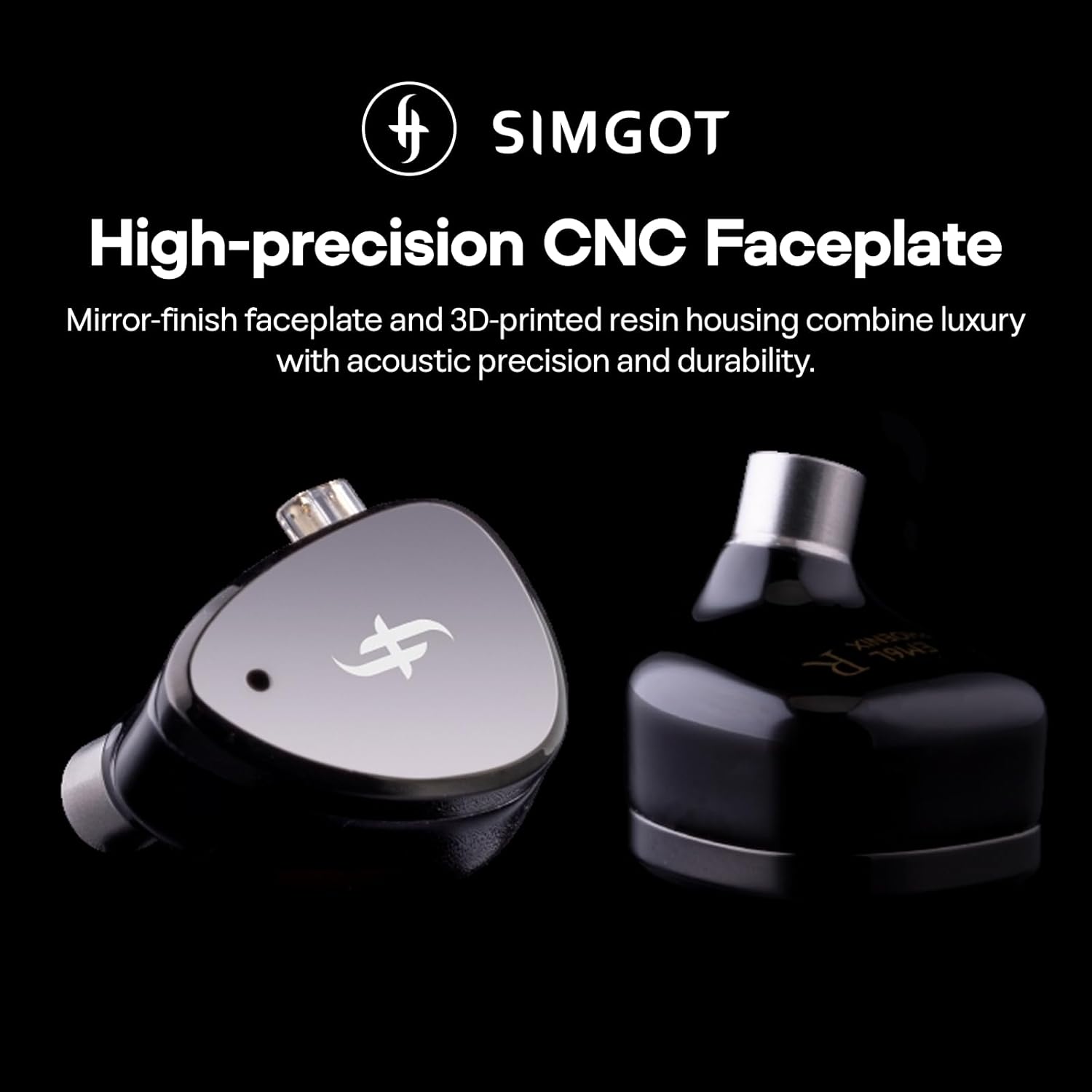
Figure 7: Close-up of the SIMGOT EM6L's high-precision CNC processed faceplate and 3D-printed resin housing.
5. Maintenance
5.1 Cleaning
- Ear Tips: Regularly remove ear tips and clean them with a soft cloth dampened with mild soap and water. Ensure they are completely dry before reattaching.
- Earphone Housing: Wipe the resin housing with a soft, dry, lint-free cloth. Avoid using harsh chemicals or abrasive materials.
- Nozzles: Gently clean any earwax or debris from the earphone nozzles using a small brush or cleaning tool.
- Cable: Wipe the silver-plated OFC cable with a soft, dry cloth. Avoid excessive bending or twisting to prevent damage.
5.2 Storage
When not in use, store your SIMGOT EM6L IEMs in the provided protective case to prevent damage from dust, impacts, and tangling.
5.3 Water Resistance
The SIMGOT EM6L In-Ear Monitors are NOT water resistant. Avoid exposure to water, moisture, and excessive humidity to prevent damage.
6. Troubleshooting
If you encounter issues with your SIMGOT EM6L IEMs, please refer to the following common solutions:
- No Sound or Intermittent Audio:
- Ensure the cable is securely connected to both the earphone units and the audio source.
- Check the audio source's volume level and ensure it is not muted.
- Test the IEMs with a different audio source or cable to rule out component failure.
- Inspect the 2-pin connectors for any bent pins or debris.
- Poor Sound Quality or Lack of Bass:
- Ensure the ear tips form a proper seal in your ear canal. Try different sizes of ear tips.
- Clean the earphone nozzles to remove any obstructions.
- Dislodged Nozzle: In rare cases, a nozzle may become loose. If this occurs, it can often be reattached securely with a small amount of appropriate adhesive.
If the issue persists, please contact Linsoul customer support for further assistance.
7. Specifications
| Feature | Detail |
|---|---|
| Model Name | SIMGOT EM6L |
| Driver Configuration | 1DD+4BA Per Side |
| Dynamic Driver | High-Performance Polymer Composite Diaphragm & Dual-Cavity Driver |
| Impedance | 26 Ohms |
| Sensitivity | 119 dB |
| Frequency Response Range | 8Hz-40kHz |
| Headphones Jack | 3.5 mm Jack |
| Connectivity Technology | Wired |
| Wireless Communication Technology | Wired |
| Noise Control | Sound Isolation |
| Material | Plastic (Housing), Resin and Metal (Carrying Case) |
| Cable Feature | Detachable |
| Water Resistance Level | Not Water Resistant |
| Product Dimensions | 3.94 x 3.15 x 1.18 inches |
| Item Weight | 9.2 ounces |
8. Warranty and Support
For warranty information, technical support, or any product-related inquiries, please contact Linsoul Audio directly. Refer to the official Linsoul website or your purchase documentation for specific warranty terms and contact details.
9. Product Videos
9.1 Linsoul SIMGOT EM6L 1DD + 4BA Hybrid Driver in-Ear Monitor Gaming Earbud
This video provides a brief overview and unboxing of the Linsoul SIMGOT EM6L In-Ear Monitors, highlighting their design and key features. It showcases the product's aesthetic and initial presentation.
9.2 SIMGOT EM6L in Ear Monitor
This video offers another quick look at the SIMGOT EM6L In-Ear Monitors, focusing on their physical appearance and components. It serves as a visual introduction to the product.
