Introduction
Thank you for choosing the Sensei Phase 61 Pro Electronic Keyboard. This manual provides essential information for the safe and effective use of your instrument. Please read it thoroughly before operation and retain it for future reference.
Safety Information
- Ensure the power source matches the voltage requirements specified for the keyboard.
- Do not expose the keyboard to water, moisture, or extreme temperatures.
- Avoid placing heavy objects on the keyboard.
- Keep the instrument away from direct sunlight and heat sources.
- Disconnect the power cable during thunderstorms or when not in use for extended periods.
- Do not attempt to disassemble or modify the keyboard. Refer all servicing to qualified personnel.
Package Contents
Verify that all items are present in the package:
- Sensei Phase 61 Pro Electronic Keyboard
- Keyboard Stand
- Stool
- Headphones
- USB Charger Line
- Music Rest
Product Overview
The Sensei Phase 61 Pro is a 61-key touch-sensitive electronic keyboard designed for a comprehensive musical experience. It features an LCD display, various control buttons, built-in speakers, and multiple connectivity options.

Figure 1: Sensei Phase 61 Pro Electronic Keyboard complete set, including the keyboard, adjustable stand, padded stool, and headphones.
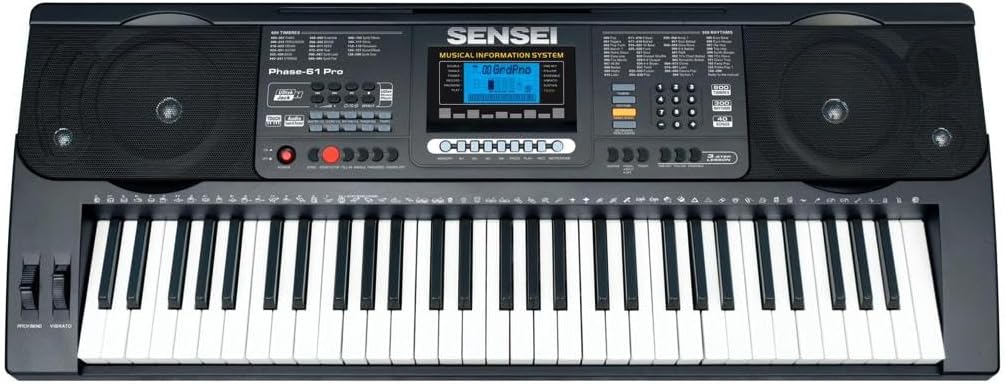
Figure 2: Detailed view of the Sensei Phase 61 Pro keyboard's control panel, LCD display, speakers, and 61 touch-sensitive keys.
Setup
1. Keyboard Stand Assembly
Unfold the keyboard stand and adjust it to a comfortable playing height. Ensure all locking mechanisms are securely fastened to prevent wobbling.
2. Stool Assembly
Unfold the stool and ensure its legs are stable. The stool provides a comfortable seating option for playing.

Figure 3: The included foldable stool, designed for stability and portability.
3. Power Connection
Connect the provided USB charger line to the keyboard's power input port and then to a suitable USB power adapter (not included) or a powered USB port. The keyboard is USB powered.
4. Connecting Accessories
- Headphones: Plug the headphones into the 3.5mm Phone/Output Jack for private practice.
- USB Flash Disk: Insert a USB flash disk (not included) into the Udisk Jack to use the music player function.
- Microphone: Connect a microphone to the MIC Jack for vocal input.
- Audio Input: Use the Audio Input Jack to connect external audio sources.

Figure 4: The included over-ear headphones for silent practice.
Operating Instructions
1. Power On/Off and Volume
- Press the POWER button to turn the keyboard on or off.
- Adjust the overall sound level using the Master Volume control.
- Separate volume controls are available for Chord Volume and Rhythm Volume.
2. Timbres and Rhythms
- The keyboard features 600 Timbres (instrument sounds) and 300 Rhythms (accompaniment styles).
- Use the dedicated buttons or number pad to select desired Timbres and Rhythms. The LCD display will show the current selection.
3. Demonstration Songs and Percussion
- Access 40 Demonstration Songs for listening or practice.
- Engage Keyboard Percussion mode to assign drum sounds to the keys.
4. Advanced Key Features
- Touch Function: The keys are touch-sensitive, meaning the volume changes based on how hard you press them, mimicking an acoustic piano.
- Transpose Control: Adjust the pitch of the entire keyboard up or down in semitone steps.
- Dual Mode: Layer two different Timbres to play simultaneously with each key press.
- Keyboard Split: Divide the keyboard into two sections, each with a different Timbre, allowing two different sounds to be played at once.
- Chord Functions:
- Single Finger Chord: Play chords by pressing a single key in the lower section of the keyboard.
- Fingered Chord: Play chords by pressing the appropriate chord notes in the lower section.
- Chord Off: Disables the auto-accompaniment chord function.
5. Rhythm Control
- Start/Stop: Begin or end the selected rhythm.
- Sync: Start the rhythm automatically when you play a key or chord.
- Fill-in: Add a short drum fill to the rhythm.
- Metronome: Activate a click track for timing practice.
- Tempo Control: Adjust the speed of the rhythm and metronome.
6. Learning Modes
- One-key: Practice a song by pressing any key to advance the melody.
- Follow: The keyboard waits for you to play the correct note before proceeding.
- Ensemble: Play along with the melody, and the keyboard will provide accompaniment.
7. Recording and Playback
- Use the Rhythm Programming Function to create and store your own rhythm patterns.
- The Record & Playback function allows you to record your performances and listen back to them.
8. Memory Functions
Store your preferred settings (Timbre, Rhythm, Tempo, etc.) into Memory banks M1, M2, M3, M4 for quick recall.
9. Expressive Controls
- Pitch Bend: Use the pitch bend wheel to smoothly raise or lower the pitch of notes.
- Vibrato: Add a slight, rapid fluctuation in pitch to notes for expressive effect.
- Sustain: Extend the decay of notes, similar to a piano's sustain pedal.
Maintenance
- Cleaning: Wipe the keyboard surface with a soft, dry cloth. For stubborn dirt, use a slightly damp cloth and then dry thoroughly. Avoid abrasive cleaners or solvents.
- Storage: When not in use, store the keyboard in a clean, dry place, away from direct sunlight and extreme temperatures. If possible, cover it to protect against dust.
- Handling: Always handle the keyboard with care. Avoid dropping it or subjecting it to strong impacts.
Troubleshooting
| Problem | Possible Cause | Solution |
|---|---|---|
| No power | Power cable not connected; USB power source faulty. | Ensure USB cable is securely connected. Try a different USB power adapter or port. |
| No sound | Volume too low; headphones connected; Timbre not selected. | Increase Master Volume. Disconnect headphones. Select a Timbre. |
| Keys unresponsive | Keyboard in a specific mode (e.g., learning mode waiting for input). | Check current mode settings. Power cycle the keyboard. |
| Rhythm not playing | Rhythm not selected; Tempo set to zero; Start/Stop not pressed. | Select a rhythm. Adjust Tempo. Press Start/Stop. |
Specifications
| Feature | Detail |
|---|---|
| Model Name | PHASE-61 PRO |
| Number of Keys | 61 Touch Sensitive Keys |
| Timbres | 600 |
| Rhythms | 300 |
| Demonstration Songs | 40 |
| Power Source | USB powered |
| Headphone Jack | 3.5mm Jack |
| Connectivity Technology | USB |
| Item Weight | 8.1 kg |
| Product Dimensions | 16 x 16.8 x 41 cm |
| UPC | 810015319994 |
Warranty and Support
For warranty information, please refer to the documentation provided at the time of purchase or contact your retailer. For technical support or service inquiries, please reach out to the manufacturer, SENSEI, through their official support channels.


