1. Introduction
Thank you for choosing the N-Gear Let's Go Party 5150 Portable Bluetooth Speaker. This manual provides essential information for the safe and efficient operation of your device. Please read it thoroughly before use and retain it for future reference.

Image 1.1: N-Gear Let's Go Party 5150 Portable Bluetooth Speaker with active LED lighting.
Key Features:
- Powerful 200 Watt output with dual 6-inch speakers.
- Bluetooth wireless connectivity for seamless audio streaming.
- Integrated LED disco lighting and light projection for enhanced ambiance.
- True Wireless Stereo (TWS) function to connect multiple speakers.
- Wireless microphone included for karaoke and announcements.
- MP3 playback via USB and MicroSD card.
- AUX audio input for wired connections.
- Built-in power bank function to charge external devices.
- Up to 5 hours of battery life (actual duration may vary).
- Remote control for convenient operation.
- Waterproof design for outdoor use.
2. Safety Information
Please observe the following safety precautions to prevent damage to the device or injury to yourself:
- Do not expose the speaker to extreme temperatures, direct sunlight, or excessive humidity.
- Ensure the charging port cover is securely closed when not charging, especially in wet environments, to maintain its waterproof rating.
- Do not disassemble, repair, or modify the device yourself. Contact qualified service personnel for any repairs.
- Keep the speaker away from sources of strong magnetic fields.
- Use only the specified charging cable and power adapter.
- Avoid listening at excessively high volumes for prolonged periods to prevent hearing damage.
- Keep out of reach of children.
3. Package Contents
Verify that all items are present in the package:
- N-Gear Let's Go Party 5150 Portable Bluetooth Speaker
- Wireless Microphone
- Remote Control
- AC Charging Cable
- User Manual (this document)

Image 3.1: Included Remote Control and Wireless Microphone.
4. Setup
4.1 Charging the Speaker
- Locate the AC charging port on the back panel of the speaker.
- Connect the supplied AC charging cable to the speaker and then to a power outlet.
- The charging indicator light will illuminate. Allow approximately 3-4 hours for a full charge.
- Once fully charged, disconnect the charging cable and ensure the port cover is sealed.
4.2 Powering On/Off
- To power on: Press and hold the Power button (usually located on the control panel) for a few seconds until you hear an audible prompt or see the display light up.
- To power off: Press and hold the Power button again until the speaker shuts down.
4.3 Bluetooth Pairing
- Ensure the speaker is powered on and in Bluetooth mode. If not, press the 'MODE' button on the speaker or remote control until "Bluetooth" or "BT" is displayed.
- On your mobile device (smartphone, tablet, etc.), enable Bluetooth and search for available devices.
- Select "N-Gear LGP 5150" from the list of devices.
- Once paired, the speaker will emit a confirmation sound, and the Bluetooth indicator will remain solid.
Note: The speaker will automatically attempt to reconnect to the last paired device when powered on.
4.4 Connecting the Wireless Microphone
- Insert batteries into the wireless microphone (if not pre-installed).
- Power on the microphone using its dedicated power switch.
- The microphone should automatically connect to the speaker. Adjust the microphone volume using the dedicated knob on the speaker's control panel.
5. Operating Instructions
5.1 Mode Selection
Press the 'MODE' button on the speaker or remote control to cycle through available input modes:
- Bluetooth (BT): For wireless audio streaming from your paired device.
- USB: For playing MP3 files from a USB flash drive.
- MicroSD (TF Card): For playing MP3 files from a MicroSD card.
- AUX: For wired audio input using a 3.5mm audio cable.
5.2 Audio Playback
- Volume Control: Use the main volume knob on the speaker or the VOL+/- buttons on the remote control.
- Track Navigation: Use the Previous/Next buttons on the speaker or remote control to skip tracks in Bluetooth, USB, or MicroSD modes.
- Play/Pause: Press the Play/Pause button to start or pause playback.
5.3 LED Lighting Control
The speaker features integrated LED disco lights and a top light projector.
- Press the dedicated 'LIGHT' or 'LED' button on the speaker or remote control to cycle through different light modes or turn them off.
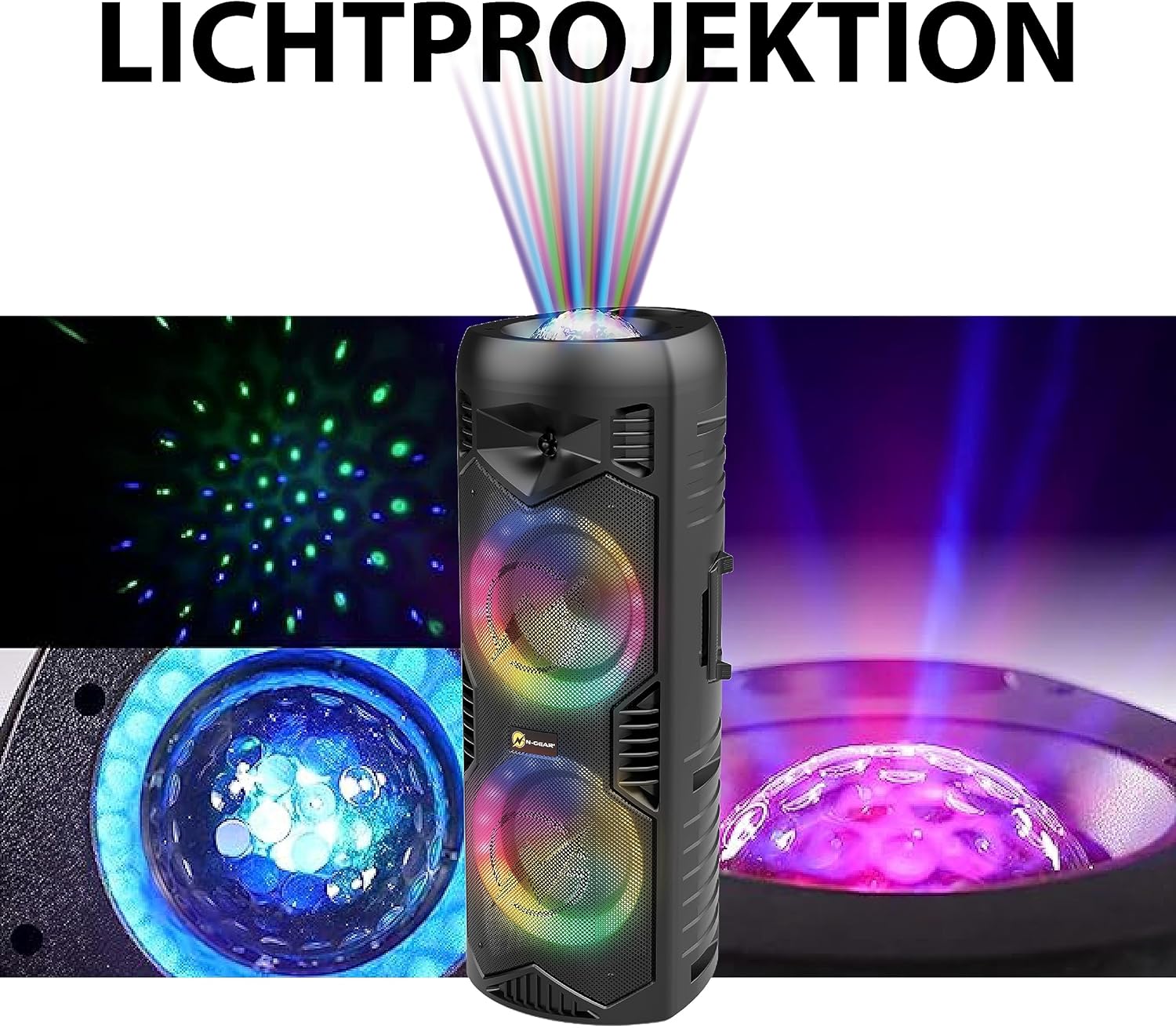
Image 5.1: Detail of the speaker's light projection and LED effects.
5.4 True Wireless Stereo (TWS) Function
The TWS function allows you to pair two N-Gear Let's Go Party 5150 speakers together for a stereo sound experience.
- Ensure both speakers are powered on and in Bluetooth mode, but not connected to any device.
- On one speaker (this will be the primary speaker), press and hold the 'TWS' button (if available) or a combination of buttons as indicated in the quick start guide.
- The primary speaker will search for the secondary speaker. Once connected, you will hear a confirmation sound.
- Now, connect your mobile device to the primary speaker via Bluetooth as described in section 4.3. Audio will play in stereo through both speakers.
5.5 Power Bank Function
The speaker can be used to charge external devices via its USB output port.
- Connect your device's USB charging cable to the USB output port on the speaker.
- The speaker will begin charging your device.
6. Maintenance
6.1 Cleaning
- Wipe the speaker's exterior with a soft, damp cloth. Do not use abrasive cleaners or solvents.
- Ensure all ports are dry before use, especially after exposure to water.
6.2 Storage
- Store the speaker in a cool, dry place away from direct sunlight and extreme temperatures.
- If storing for an extended period, charge the battery to approximately 50% every few months to prolong its lifespan.
7. Troubleshooting
| Problem | Possible Cause | Solution |
|---|---|---|
| Speaker does not power on. | Battery is depleted. | Connect the speaker to a power source using the AC charging cable and allow it to charge. |
| No sound from the speaker. | Volume is too low; incorrect mode selected; device not properly connected. | Increase the volume. Ensure the correct input mode (Bluetooth, USB, AUX) is selected. Re-pair Bluetooth device or check cable connections. |
| Bluetooth device cannot pair. | Speaker is not in pairing mode; device is too far; interference. | Ensure speaker is in Bluetooth mode and discoverable. Move device closer to speaker. Turn off other Bluetooth devices. |
| Microphone not working. | Microphone is off; batteries are low/dead; microphone volume is low. | Ensure microphone is powered on. Replace microphone batteries. Increase microphone volume on the speaker. |
| LED lights are not working. | Lights are turned off or in a static mode. | Press the 'LIGHT' or 'LED' button to cycle through modes or turn them on. |
8. Specifications
| Feature | Detail |
|---|---|
| Model Number | LGP 5150 BK |
| Brand | N-Gear |
| Output Power | 200 Watts |
| Speaker Size | Dual 6-inch speakers |
| Connectivity | Bluetooth, USB, MicroSD, AUX (3.5mm) |
| Wireless Technology | Bluetooth |
| Battery Type | Lithium-ion (included) |
| Battery Life | Up to 5 hours (varies with usage) |
| Dimensions (L x W x H) | 26.5 x 32 x 68.5 cm (10.4 x 12.6 x 26.9 inches) |
| Weight | 5.5 Kilograms (12.1 lbs) |
| Waterproof | Yes |
| Included Components | Speaker, Wireless Microphone, Remote Control, AC Charging Cable, User Manual |

Image 8.1: Speaker Dimensions.
9. Warranty and Support
N-Gear products are designed and manufactured to the highest quality standards. For information regarding warranty coverage, please refer to the warranty card included with your purchase or visit the official N-Gear website.
For technical support, troubleshooting assistance, or service inquiries, please contact N-Gear customer support through their official channels. Contact information can typically be found on the product packaging or the N-Gear website.
Website: www.n-gear.eu


