
Introduction
This manual provides instructions for the safe and effective use of your Uetmulik Timotion TP2/TP2P IP20 5-Pin Power Supply Adapter Kit. This power supply is designed as a replacement for specific power recliner lift chairs that utilize a 5-pin power adapter. Please read this manual thoroughly before installation and operation.
Safety Information
- Indoor Use Only: This power supply is designed for indoor use in dry locations only. Do not expose to water or excessive moisture.
- Electrical Safety: Ensure the power outlet is easily accessible and properly grounded. Do not overload electrical outlets.
- Compatibility: This power supply is not universally compatible. Verify that your recliner chair requires a Timotion TP2/TP2P IP20 5-pin power adapter before installation. Incompatible connections can cause damage.
- Damage Inspection: Before each use, inspect the power cord and adapter for any signs of damage. Do not use if damaged.
- Battery Backup: The unit supports a battery backup function (requires 2x 9V batteries, not included). Ensure correct battery polarity when installing.
- Disconnect Power: Always disconnect the power supply from the wall outlet before performing any maintenance or troubleshooting.
Package Contents
Verify that all items are present in your package:
- 1 x Timotion TP2/TP2P IP20 Power Supply Adapter
- 1 x US Plug Power Cord
Setup Instructions
- Identify Your Current Power Supply: Before replacing, carefully examine your existing power supply and the recliner's connection port. Ensure it is a 5-pin female plug with a straight connector, compatible with the Timotion TP2/TP2P model.
- Disconnect Old Power Supply: Unplug the old power supply from the wall outlet and then disconnect it from the recliner chair.
- Install Battery Backup (Optional): The power supply has a built-in compartment for two 9V batteries (not included). This feature provides temporary power in case of a power outage. Open the battery compartment, insert two 9V batteries, ensuring correct polarity, and close the compartment.
- Connect New Power Supply to Recliner: Locate the 5-pin male connector on the recliner chair. Align the new power supply's 5-pin female connector with the recliner's connector and push them together firmly until they click into place. No tools are required for this step.
- Connect Power Cord: Insert the included US plug power cord into the power supply adapter.
- Plug into Wall Outlet: Plug the power cord into a standard 100-240V AC wall outlet.

Image: The 5-pin female connector of the power supply. Ensure this matches your recliner's male connector.

Image: The complete power supply unit with its cable and connector.
Operating Instructions
Once the power supply is correctly installed and plugged into a wall outlet, your recliner chair should be ready for operation. Use your recliner's standard controls (hand remote or integrated buttons) to adjust its position. The power supply will deliver the necessary 29V DC power to the recliner's motor.
If 9V batteries are installed, they will provide temporary power to operate the recliner in the event of a main power failure. This allows you to return the recliner to a seated position.
Maintenance
- Cleaning: Disconnect the power supply from the wall outlet before cleaning. Use a dry, soft cloth to wipe the exterior of the adapter. Do not use liquid cleaners or abrasive materials.
- Storage: When not in use for extended periods, store the power supply in a cool, dry place, away from direct sunlight and moisture.
- Battery Replacement: If using the battery backup feature, replace the 9V batteries periodically (e.g., annually) or if the recliner does not operate during a power outage.
Troubleshooting
- Recliner Not Responding:
- Ensure the power cord is securely plugged into both the wall outlet and the power supply adapter.
- Verify that the 5-pin connector from the power supply is firmly connected to the recliner's motor or control box.
- Check the wall outlet by plugging in another device to confirm it has power.
- If using the battery backup, ensure the 9V batteries are fresh and correctly installed.
- Power Supply Feels Warm: It is normal for the power supply to feel slightly warm during operation. If it becomes excessively hot or emits a burning smell, immediately unplug it and contact support.
- Incompatible Connector: If the connector does not fit your recliner, it indicates an incompatibility. This power supply is specifically for 5-pin Timotion TP2/TP2P systems. Do not force connections.
Specifications
| Model Number | TP2 |
| Transformer Type | SMPS (Switch Mode Power Supply) |
| Input Voltage | 100-240V AC |
| Max. Output | 29V DC, 2.5A |
| Wattage | 72.5W |
| Connector Type | 5-Pin Female (Straight) |
| Battery Backup | Requires 2x 9V batteries (not included) |
| Certifications | CE, UL |
| Enclosure Material | Plastic |
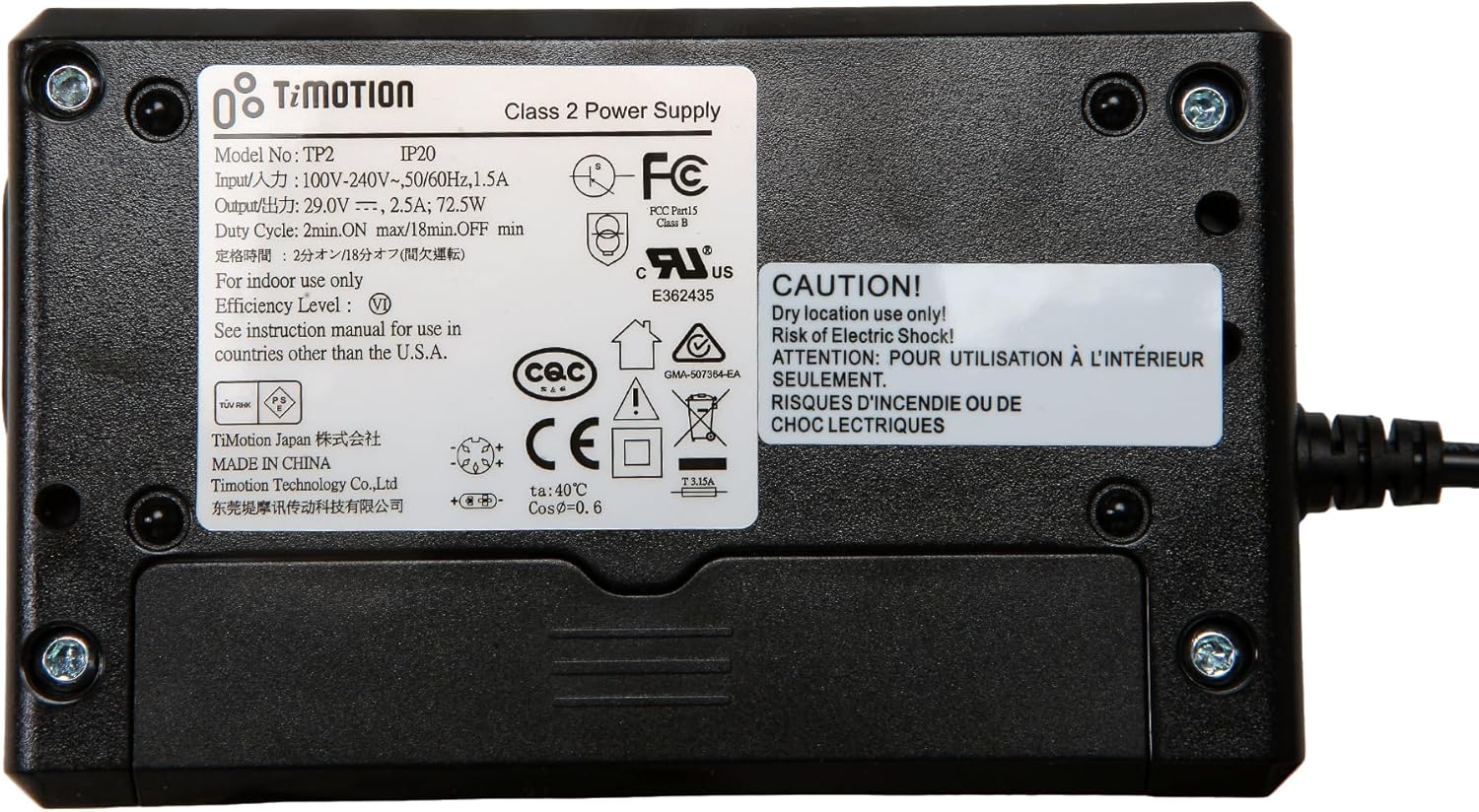
Image: Product label displaying technical specifications and certifications.
Support
If you encounter any issues not covered in this manual or require further assistance, please contact Uetmulik customer support through your retailer's platform or the brand's official website.