
1. Introduction
This user manual provides comprehensive instructions for the installation, operation, and maintenance of your AIERBOZ YL-57A Biometric Fingerprint Door Knob. Please read this manual thoroughly before installation and use to ensure proper functionality and safety.
2. Safety Information
- Do not expose the lock to direct water or extreme humidity.
- Avoid using corrosive cleaners on the lock's surface.
- Ensure correct battery polarity when installing batteries.
- Keep emergency keys in a secure location outside the room where the lock is installed.
- This lock is designed for indoor use and is not suitable for outdoor doors.
3. Package Contents
Please verify that all components are present before beginning installation:
- AIERBOZ YL-57A Biometric Fingerprint Door Knob (Front and Rear Handles)
- Latch Bolt
- Strike Plate
- Mounting Screws
- Emergency Keys (x2)
- Installation Template
- User Manual (this document)
4. Product Overview
The AIERBOZ YL-57A is a 3-in-1 smart door lock offering multiple unlocking methods for enhanced convenience and security.
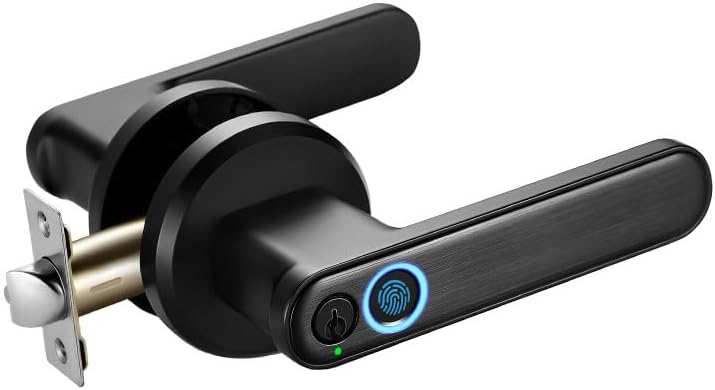
Figure 1: Overview of the AIERBOZ YL-57A Biometric Fingerprint Door Knob.
Key features include biometric fingerprint recognition, app control, and traditional key access. It also supports passage mode and silent mode for various usage scenarios.

Figure 2: Multifunction capabilities including multiple users, app control, silent mode, 3S auto-lock, passage mode, wide temperature range, and easy installation.
5. Setup and Installation
Installation of the AIERBOZ YL-57A is designed to be straightforward, requiring only a screwdriver for most steps. Ensure your door meets the following specifications:
- Door Thickness: Approximately 1.26 to 1.89 inches (32mm to 48mm).
- Adjustable Backset: 2-3/8 inches (60mm) or 2-3/4 inches (70mm).

Figure 3: Door dimensions and adjustable backset for standard US doors.
5.1. Installation Steps
- Prepare the door according to the provided installation template.
- Install the latch bolt into the door edge. Ensure the latch is oriented correctly for your door's swing.
- Connect the cables between the front and rear handles.
- Secure the front and rear handles to the door using the provided screws.
- Install 4 AAA batteries into the battery compartment. Ensure cables are properly connected and not pinched.
- Test the mechanical operation of the knob and latch.
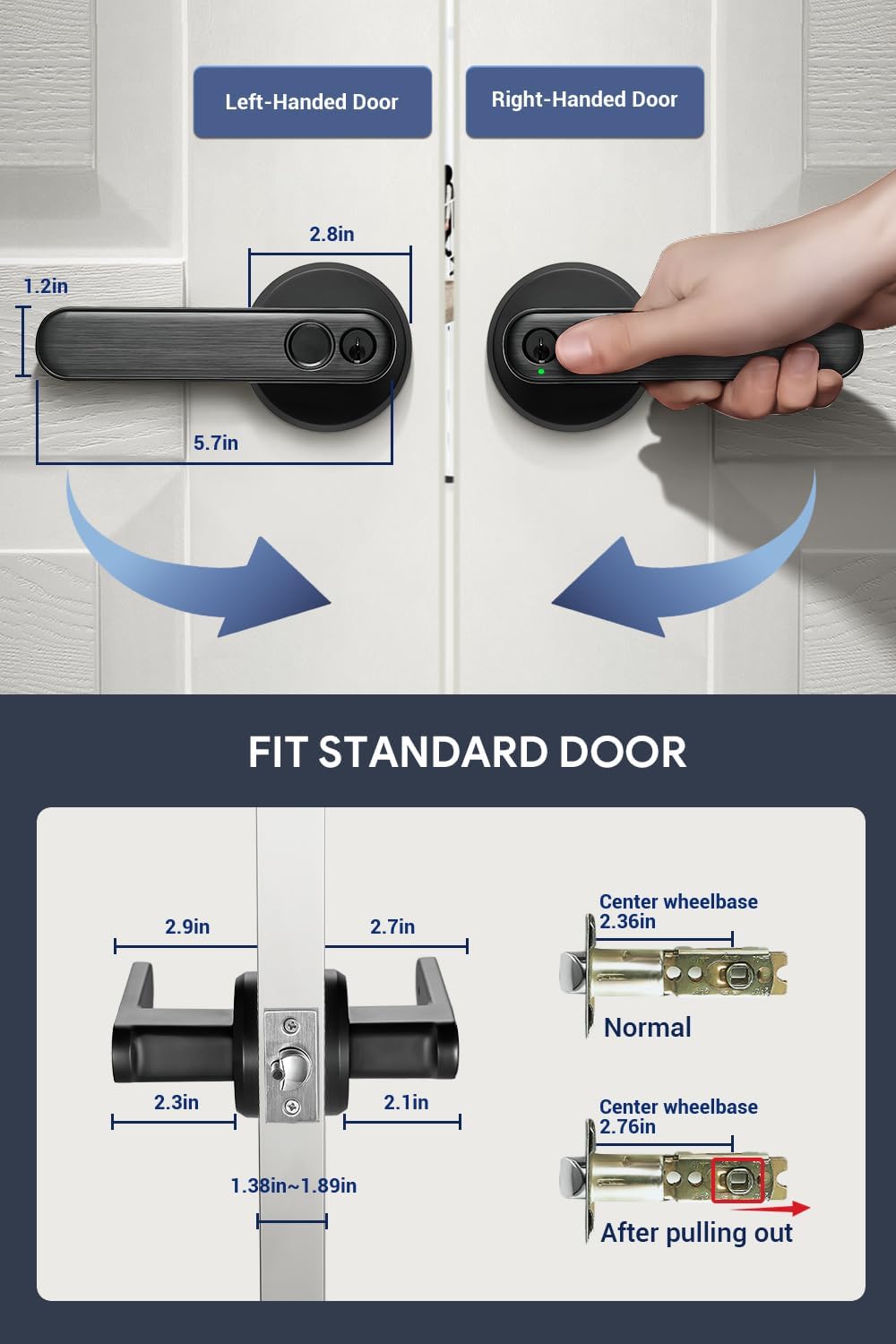
Figure 4: Visual representation of the easy installation process with a screwdriver.
6. Operating Instructions
The AIERBOZ YL-57A offers three primary unlocking methods: fingerprint, key, and mobile application.

Figure 5: The three convenient unlocking methods: App Unlock, Key Unlock, and Fingerprint Unlock.
6.1. Fingerprint Unlocking
The lock features an advanced biometric fingerprint sensor for quick and accurate access.
- Recognition Speed: 0.2 seconds.
- Recognition Rate: 99%.
- Fingerprint Capacity: Up to 20 fingerprints can be stored.
- 360° Recognition: Allows for recognition from various angles.
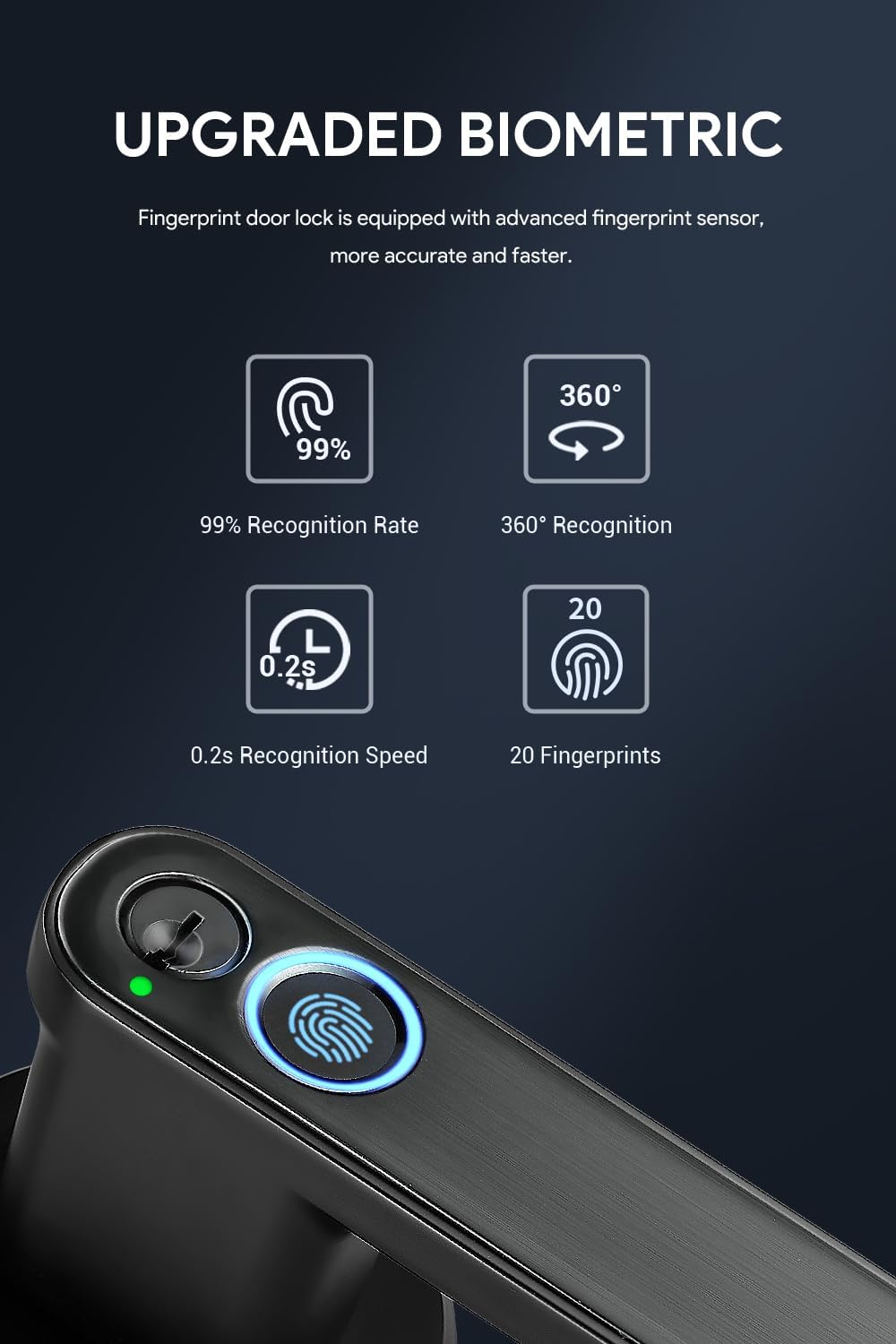
Figure 6: Details of the upgraded biometric fingerprint sensor, highlighting speed and accuracy.
6.2. Key Unlocking
For emergency situations or as an alternative, traditional keys are provided. The keyhole is conveniently located on the handle.

Figure 7: Illustration of using the emergency key to unlock the door knob.
6.3. Mobile App Control
The lock can be controlled via a dedicated mobile application, offering advanced management features.
Video 1: Detailed guide on how to use the AIERBOZ YL-57A smart lock with the mobile application, covering setup and various features.
6.3.1. App Download and Setup
- Download the App: Open your mobile app store (e.g., App Store, Google Play Store) and search for "TUYA Smart" or "Smart Life - Smart Living". Download and install the application.
- Open the App: After installation, open the TUYA Smart application. You may need to agree to terms of service and allow notifications.
- Login/Register: Log in to your existing account or register a new one.
6.3.2. Adding the Device
- Ensure your phone's Wi-Fi and Bluetooth are enabled.
- In the app, select "Add Device". The app will automatically search for nearby door lock devices.
- Once your lock (e.g., "J8-FIVE") is detected, select it to add. Keep your phone close to the lock during this process.
- After successful addition, you can tap and hold the unlock icon on the app interface to unlock the door.
6.3.3. Adding Fingerprint Passwords via App
- From the main lock interface in the app, navigate to "Fingerprint Management" (usually found in settings).
- Select the user for whom you want to add a fingerprint.
- Click "Start Capturing". The fingerprint collection area on the lock will light up.
- Place your finger on the fingerprint sensor and lift it when prompted. Repeat this process six times at different angles to ensure accurate capture.
- Once successfully added, you can add more fingerprints by clicking the "+" sign in the upper right corner.
6.3.4. Passage Mode
Passage mode allows anyone to unlock the door with any fingerprint, providing convenient temporary access. The fingerprint collector indicator will light up magenta in this mode.

Figure 8: Passage mode ensures quiet operation, perfect for not disturbing sleeping individuals.
- In the app, go to the lock's settings.
- Select the "Passage" option. Choose "Passage Mode" to activate.
- To deactivate, select "Normal Mode" from the same option.
6.3.5. Silent Mode
Silent mode disables prompt sounds from the door lock, ideal for quiet environments.
Figure 9: Silent mode ensures quiet operation, perfect for not disturbing sleeping individuals.
- In the app, go to the lock's settings.
- Select the "Unlock Voice" option. Choose "Mute" to activate silent mode.
- To deactivate, select "Normal" from the same option.
6.3.6. Fingerprint Error Alarm
If an incorrect fingerprint is entered multiple times, the lock will trigger an alarm. Your phone application will receive a message notification, and the fingerprint collection area on the lock will flash red continuously.
6.3.7. Deleting Fingerprints
You can manage stored fingerprints by deleting or changing them through the app's fingerprint management options.
- In the app, go to "Fingerprint Management".
- Select the fingerprint you wish to delete or modify.
- Choose the appropriate option (Delete/Change) from the menu.
6.3.8. Reset Settings
To restore the lock to factory settings, locate the reset button in the battery compartment hole. Press and hold it for 5 seconds.
7. Maintenance
- Cleaning: Wipe the lock surface with a soft, dry cloth. Avoid abrasive materials or harsh chemicals.
- Battery Replacement: The lock requires 4 AAA batteries. When the battery is low, a red light will indicate it. Replace all batteries promptly to ensure continuous operation. You can use the spare key for access if batteries die.
- Fingerprint Sensor Care: Keep the fingerprint sensor clean and free of debris for optimal performance.

Figure 10: Visual indicator for low battery reminder, prompting replacement.
8. Troubleshooting
| Problem | Possible Cause | Solution |
|---|---|---|
| Fingerprint not recognized. | Finger is dirty/wet, sensor is dirty, fingerprint not properly enrolled, or wrong finger used. | Clean finger and sensor. Re-enroll fingerprint if necessary. Ensure correct finger is used. |
| App cannot connect to the lock. | Bluetooth is off, phone is too far, or app glitch. | Ensure Bluetooth is on and phone is close to the lock. Restart the app or phone. |
| Lock is unresponsive. | Low battery or internal error. | Replace batteries. Use emergency key to open. If issues persist, perform a factory reset. |
| Door lock fails to unlock multiple times. | Incorrect fingerprint attempts. | The app will push an alarm notification. Try again with a correct fingerprint or use the key. |
9. Specifications
| Feature | Detail |
|---|---|
| Brand | AIERBOZ |
| Model Name | YL-57A-Black |
| Lock Type | Biometric |
| Material | Zinc |
| Color | Black |
| Item Weight | 2.86 pounds |
| Product Dimensions (L x W x H) | 6.69 x 6.1 x 6.1 inches |
| Special Features | Alarm, Anti-Peeping Password, Auto-Lock, Fingerprint |
| Controller Type | Android, Hand Control, Mechanical knob |
| Control Method | App |
| Connectivity Protocol | Bluetooth |
| Batteries Required? | Yes (4 x AAA, not included) |
| UPC | 780669096162 |
10. Warranty & Support
AIERBOZ offers a one-year lock change service from the date of purchase. For any questions, technical support, or warranty claims, please contact our customer service team through the retailer's platform or visit the official AIERBOZ store page.
AIERBOZ Store: Visit AIERBOZ Store on Amazon