
DEMULLER ANHUI-BX001
DEMULLER ANHUI-BX001 3.5 Cu.ft Retro Mini Fridge with Freezer User Manual
Model: ANHUI-BX001
1. Introduction
Thank you for choosing the DEMULLER ANHUI-BX001 3.5 Cu.ft Retro Mini Fridge with Freezer. This manual provides important information regarding the installation, operation, and maintenance of your appliance. Please read it thoroughly before use and keep it for future reference.

Image 1.1: Exterior view of the DEMULLER ANHUI-BX001 Retro Mini Fridge, showcasing its compact design and dual doors.
2. Safety Information
To reduce the risk of fire, electric shock, or injury when using your refrigerator, follow these basic precautions:
- Ensure the refrigerator is properly grounded.
- Do not use extension cords or ungrounded adapters.
- Unplug the refrigerator before cleaning or performing any maintenance.
- Keep ventilation openings clear of obstruction.
- Do not store explosive substances such as aerosol cans with a flammable propellant in this appliance.
- Do not touch cold surfaces with wet or damp hands, as skin may stick to these surfaces.
- This appliance is not intended for use by persons (including children) with reduced physical, sensory or mental capabilities, or lack of experience and knowledge, unless they have been given supervision or instruction concerning use of the appliance by a person responsible for their safety.
3. Product Features
The DEMULLER ANHUI-BX001 mini fridge offers convenient storage solutions with its thoughtful design and features:
- Compact Size: Measures 17.72"D x 18.2"W x 35.63"H, ideal for small spaces.
- Dual Doors: Separate freezer (1.0 Cu.ft) and refrigerator (2.5 Cu.ft) compartments.
- Adjustable Thermostat: 7-level temperature control for optimal cooling.
- Removable Shelves: Two glass shelves in the refrigerator compartment for flexible storage.
- Crisper Drawer: One crystal crisper drawer for fruits and vegetables.
- LED Interior Light: Illuminates the refrigerator compartment for easy visibility.
- Retro Design: Stylish appearance with chrome handles.
- Low Noise Operation: Operates at approximately 38 decibels.
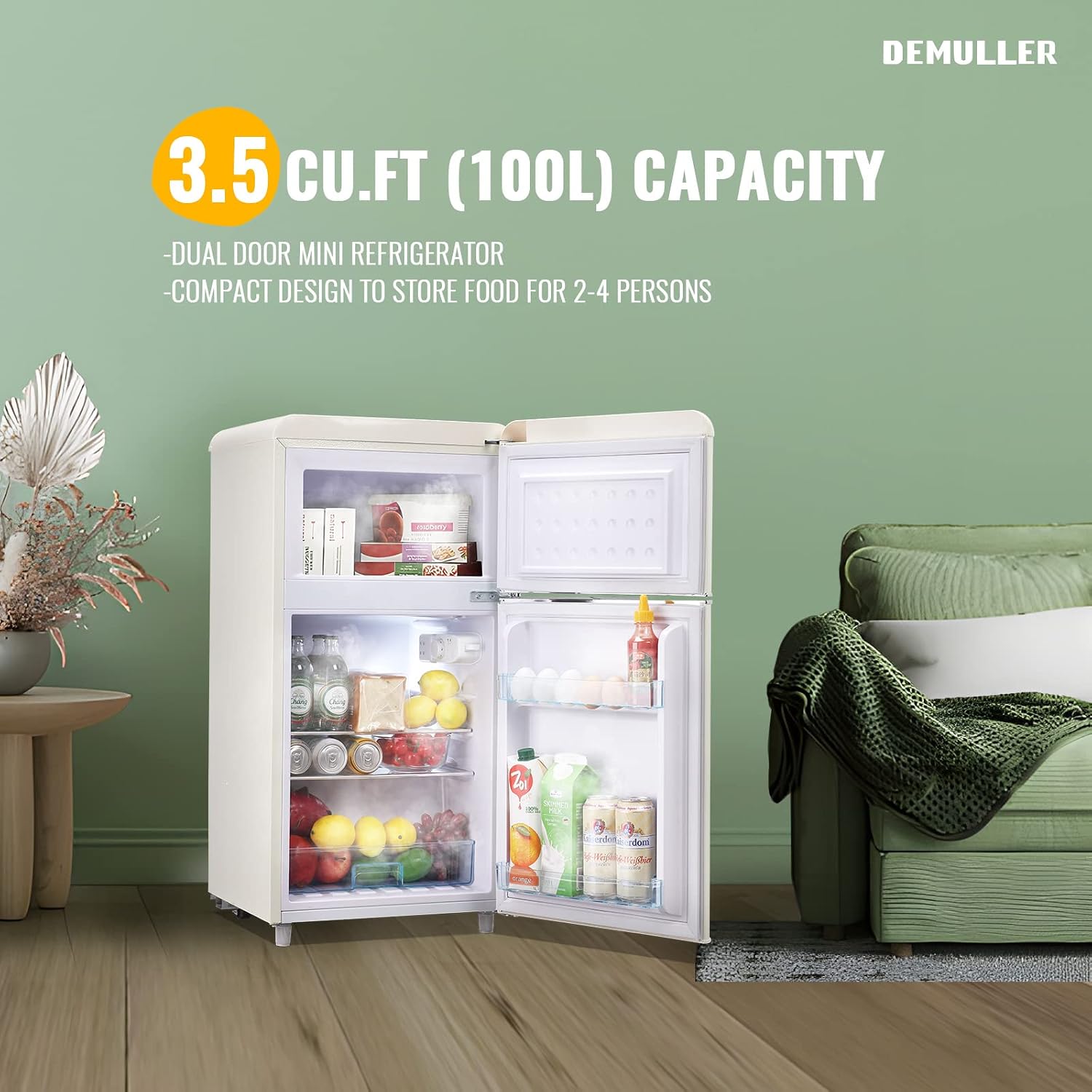
Image 3.1: The mini fridge with both freezer and refrigerator doors open, revealing the interior layout including shelves and crisper drawer.

Image 3.2: Close-up of the removable crisper drawer and adjustable glass shelves, highlighting customizable storage options.
4. Setup and Installation
Follow these steps for proper setup of your DEMULLER mini fridge:
- Unpacking: Carefully remove all packaging materials. Inspect the appliance for any damage.
- Placement: Place the refrigerator on a flat, stable surface. Ensure there is adequate space around the unit for proper ventilation (at least 4 inches on sides and back). This is a freestanding unit.
- Leveling: Adjust the bottom adjustable feet to ensure the refrigerator is level. This helps with door alignment and efficient operation.
- Power Connection: Plug the refrigerator into a dedicated 110 Volt, 60 Hz grounded electrical outlet. Do not use extension cords.
- Initial Cooling: Allow the refrigerator to stand upright for at least 2-4 hours before plugging it in. After plugging in, let it run for 24 hours empty to reach stable operating temperatures before loading with food.

Image 4.1: Diagram showing the dimensions of the mini fridge: 17.72 inches deep, 18.2 inches wide, and 35.63 inches high.

Image 4.2: Close-up of the adjustable feet at the bottom of the refrigerator, used for leveling the unit.
5. Operating Instructions
5.1 Temperature Control
Your DEMULLER mini fridge features a 7-level adjustable thermostat control located inside the refrigerator compartment. Turn the knob to select the desired temperature setting:
- Settings 1-7: 1 is the warmest, 7 is the coldest.
- Recommended setting: Typically, a mid-range setting (e.g., 4) is suitable for general use. Adjust as needed based on ambient temperature and food load.
- Temperature Range: The freezer compartment operates between -4°F and 32°F. The refrigerator compartment operates between 32°F and 50°F.

Image 5.1: Close-up of the 7-level temperature control knob located within the refrigerator compartment.
5.2 Storage Recommendations
- Freezer Compartment: Use for storing frozen foods. Ensure packages are sealed to prevent freezer burn.
- Refrigerator Compartment:
- Utilize the removable glass shelves for organizing various items.
- The crisper drawer is designed for fresh fruits and vegetables to maintain their freshness.
- Door shelves are suitable for beverages, condiments, and smaller items.

Image 5.2: Interior view illustrating the 1.0 Cu.ft freezer and 2.5 Cu.ft refrigerator capacities, along with their respective temperature ranges.
Video 5.3: An official product video demonstrating the interior features and storage capabilities of the DEMULLER mini fridge, titled "Chill and freeze your favorites".
6. Maintenance and Care
6.1 Cleaning
- Always unplug the refrigerator before cleaning.
- Clean the interior and exterior surfaces with a soft cloth and a mild detergent solution.
- Remove and wash shelves and the crisper drawer with warm, soapy water. Rinse and dry thoroughly before returning them to the unit.
- Wipe door gaskets regularly to ensure a proper seal.
- Clean the condenser coils at the back of the unit periodically to maintain efficiency.
6.2 Manual Defrost
This refrigerator features manual defrost for the freezer compartment. When frost accumulates to about 1/4 inch (6mm) thickness, it's time to defrost:
- Unplug the refrigerator from the power outlet.
- Remove all food items from both compartments and store them in a cooler to keep them frozen or chilled.
- Leave the freezer door open to allow frost to melt naturally. You can place towels at the bottom to absorb water. Do not use sharp objects or heating devices to speed up defrosting, as this can damage the unit.
- Once all frost has melted, clean and dry the interior thoroughly.
- Plug the refrigerator back in and allow it to cool for a few hours before returning food.
7. Troubleshooting
If you experience issues with your refrigerator, consult the following common troubleshooting tips:
| Problem | Possible Cause | Solution |
|---|---|---|
| Refrigerator does not operate | Not plugged in; circuit breaker tripped; temperature control set to "OFF". | Ensure plug is secure; reset circuit breaker; turn temperature control to a desired setting. |
| Temperature is too warm | Temperature control set too low; door opened too frequently; warm food placed inside; poor ventilation. | Adjust temperature to a colder setting; minimize door openings; allow hot food to cool before storing; ensure adequate clearance around the unit. |
| Excessive frost buildup in freezer | Freezer door not sealed properly; high humidity; frequent door openings. | Check door gasket for proper seal; perform manual defrost as described in Section 6.2. |
| Unusual noises | Refrigerator not level; objects vibrating against the unit; normal operating sounds. | Level the refrigerator using adjustable feet; ensure nothing is touching the unit; gurgling or humming sounds are normal. |
8. Specifications
| Feature | Detail |
|---|---|
| Brand | DEMULLER |
| Model Number | ANHUI-BX001 |
| Total Capacity | 3.5 Cubic Feet |
| Refrigerator Capacity | 2.5 Cubic Feet |
| Freezer Capacity | 1.0 Cubic Feet |
| Product Dimensions (D x W x H) | 17.72 x 18.2 x 35.63 inches |
| Item Weight | 48.5 Pounds |
| Noise Level | 38 Decibels |
| Installation Type | Freestanding |
| Number of Doors | 2 |
| Defrost System | Manual |
| Voltage | 110 Volts |
| Included Components | Fridge, Manual, Removable shelves, Crisper drawer |
9. Warranty and Support
For warranty information or technical support, please refer to the contact details provided with your purchase documentation or visit the official DEMULLER website. Keep your proof of purchase for any warranty claims.

Image 9.1: Illustration of items included in the package: Refrigerator, removable drawer, storage shelves, user manual, and information on online service & guarantee.
Ask a question about this manual
Ask about setup, troubleshooting, compatibility, parts, safety, or missing instructions. Manuals+ will review the question and use this page’s manual context to help answer it.