
Introduction
The TEYUN A8 8-Channel Professional Portable Mixer is a versatile sound mixing console designed for a wide range of audio applications, including live broadcasting, recording, and music production. Equipped with a high-speed ARM chip, it offers advanced sound processing capabilities such as low noise, sound modification, tone adjustment, reverberation, time delay, and various electric sound effects. Its comprehensive connectivity options, including Bluetooth and a USB audio interface, ensure seamless integration with computers and other audio equipment, making it suitable for both novice users and experienced professionals.
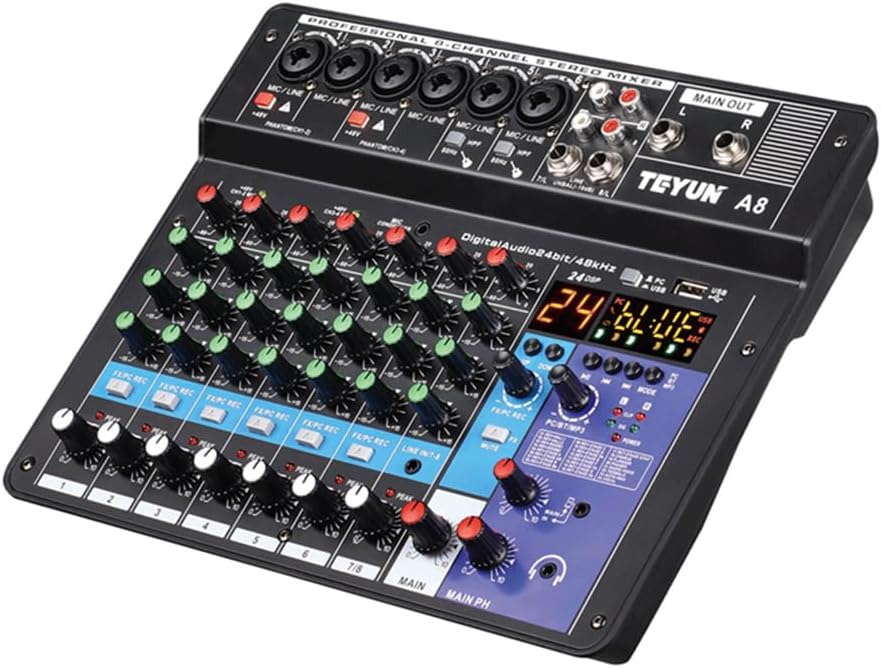
Figure 1: TEYUN A8 8-Channel Professional Portable Mixer.
Setup Guide
Follow these steps to set up your TEYUN A8 mixer for optimal performance.
Power Connection
Connect the mixer to a power source using the provided USB cable and power adapter. Ensure the power button is pressed when connecting to either a power supply or a computer.

Figure 2: Rear view of the mixer with USB and power input.
Video 1: Overview of the TEYUN A8 USB Audio Interface, including power connection.
Input Connections
The TEYUN A8 supports various input sources. Connect your microphones, instruments, or other audio devices to the appropriate input jacks.
- Microphone/Line Inputs: Use XLR or 1/4" plugs for microphones (dynamic or 48V condenser) and line-level instruments.
- 48V Phantom Power: Activate the 48V phantom power switch for condenser microphones.
- High-Pass Filter (HPF): Use the HPF switch to minimize breath and vibration sounds, especially with electric guitars or microphones.
- Line Input (Channels 7/8): For connecting external audio sources like CD players or other line-level devices.
- Accompaniment Jack: Connect a high-quality 3.5mm audio cable from your mobile phone or other device for background music.
- Mobile Phone Live Socket: Connect your mobile phone for live broadcasting.

Figure 3: Detailed connection diagram for the mixer.
Video 2: Detailed setup and connection guide for the TEYUN A6 Mixing Console (similar to A8).
Operating Instructions
Familiarize yourself with the controls and functions of your TEYUN A8 mixer.
Channel Controls
- Gain Adjustment: Adjust the input sensitivity for each channel.
- Treble/Bass Adjustment: Fine-tune the high and low frequencies for each channel.
- EFX SEND: Controls the amount of signal sent to the effects processor.
- Peak Indicator: Lights up when the input signal is too high, indicating potential clipping.
- Channel Volume: Adjusts the individual volume level for each channel.

Figure 4: Close-up view of channel controls.
Master Controls & Digital Features
- LED Display: Shows current mode (MP3, Bluetooth, PC) and DSP effect number.
- 24DSP: Digital Signal Processor for various effects.
- Mode Selection: Press to switch between MP3, Bluetooth (BT), and PC modes.
- Pause/Previous/Next Song: Controls for media playback.
- Main Effect Volume: Adjusts the overall volume of the applied effects.
- Digital Signal Volume Control: Adjusts the volume of digital audio sources.
- Main Volume (MAIN PH): Controls the overall output volume.
- Mute: Mutes the main output.
- Headphone Monitor Jack: For connecting headphones to monitor the audio.

Figure 5: Digital display and main control section, featuring loopback recording.
Recording and Webcasting
The TEYUN A8 supports internal recording and webcasting by integrating the mixer and sound card functionalities. Ensure the PC/USB button is pressed when using USB for recording or connecting to a computer.
Maintenance
Proper maintenance ensures the longevity and optimal performance of your TEYUN A8 mixer.
- Cleaning: Use a soft, dry cloth to clean the surface of the mixer. Avoid abrasive cleaners or solvents that could damage the finish or internal components.
- Storage: Store the mixer in a cool, dry place away from direct sunlight, extreme temperatures, and high humidity.
- Handling: Always handle the mixer with care. Avoid dropping it or subjecting it to strong impacts.
- Cables: Regularly check all cables for damage. Replace frayed or damaged cables immediately to prevent electrical hazards or signal loss.
- Ventilation: Ensure proper ventilation around the mixer to prevent overheating. Do not block any ventilation openings.
Troubleshooting
If you encounter issues with your TEYUN A8 mixer, refer to the following common troubleshooting tips:
| Problem | Possible Cause | Solution |
|---|---|---|
| No power | Power cable disconnected; Power button not pressed; Faulty power adapter. | Check power cable connection; Ensure power button is pressed; Try a different power adapter. |
| No sound output | Main volume too low; Mute engaged; Incorrect output connection; Input gain too low. | Increase MAIN PH volume; Disengage Mute; Check main output cables; Increase channel gain. |
| Distorted sound | Input gain too high (clipping); Faulty cable; Incorrect impedance. | Reduce input gain (check Peak indicator); Replace cable; Ensure correct impedance matching. |
| Bluetooth not connecting | Mixer not in BT mode; Device too far; Interference. | Select BT mode on mixer; Move device closer; Reduce interference sources. |
Specifications
| Feature | Detail |
|---|---|
| Item Weight | 2.53 pounds (1.15 Kilograms) |
| Product Dimensions | 10.63 x 12.99 x 3.15 inches (3.23"D x 3.23"W x 10.24"H) |
| Country of Origin | China |
| Item Model Number | 8-Channel |
| Power Source | Corded Electric |
| Voltage | 48 Volts |
| Number of Channels | 8 |
| Connectivity Technology | Bluetooth, USB |
| First Available Date | July 27, 2023 |
Warranty and Support
This TEYUN A8 mixer comes with a manufacturer's warranty. For specific warranty details, including coverage period and terms, please refer to the documentation included with your purchase or contact the seller directly. For technical support or service inquiries, please reach out to the TEYUN customer service team through their official channels.
Please retain your proof of purchase for any warranty claims.


