
1. Product Overview
The TEYUN 4-Channel Professional Portable Mixer (Model A4) is a compact and versatile sound mixing console designed for various audio applications, including home music production, live broadcasting, webcasting, DJing, karaoke, and more. It features multiple input options, built-in digital signal processing (DSP) effects, and convenient connectivity for computers and mobile devices.

Figure 1.1: TEYUN A4 4-Channel Professional Portable Mixer
2. Key Features
- 4-Channel Mixing Board: Equipped with 4 XLR/TRS combined mono mic/line input jacks and 2 TRS & 2 RCA stereo input jacks.
- 24 DSP Multipurpose Effects: Offers a variety of digital sound effects suitable for diverse audio needs.
- Portable Design: Compact and lightweight, ideal for on-the-go use.
- Flexible Power Supply: Can be powered by computer, 5V power bank, USB, or DC adapter.
- Comprehensive Audio Control: Features input gain, high and low sound adjustment (3-stage equilibrium).
- 48V Phantom Power: Directly supports condenser microphones.
- High-Definition Headset Output: Dedicated port for monitoring audio.
- MP3 Player Functionality: Supports U-Disk for playing MP3/WAV/WMA/FLAC files.
- Integrated Sound Card: Allows direct connection to a computer for audio input and output.
- Bluetooth Function: Enables wireless audio streaming from smartphones, tablets, and laptops.
3. Setup Guide
3.1 Powering the Mixer
The TEYUN A4 mixer offers multiple power supply options for convenience:
- Computer USB Port: Connect the mixer directly to a computer's USB port.
- Power Adapter: Use a standard 5V DC power adapter (ensure current is >1.5A).
- Power Bank: Connect to a 5V power bank for portable use.

Figure 3.1: USB Power Supply Options (Computer, Power Adapter, Power Bank)
3.2 Connecting Audio Devices
Refer to the diagram below for common connection setups:

Figure 3.2: Typical Connection Diagram for TEYUN A4
- Microphones: Connect dynamic or condenser microphones to the XLR/TRS combo jacks (Channels 1-2). Activate 48V phantom power for condenser microphones using the dedicated switch.
- Line-Level Devices: Connect instruments (e.g., electric guitar, keyboard) or other line-level audio sources to the TRS/RCA input jacks (Channels 3-4).
- Headphones: Plug your headphones into the PHONES output for monitoring.
- Output to Amplifier/Speakers: Connect the MAIN OUT (TRS) or REC OUT (RCA) to your power amplifier or active speakers.
4. Operating Instructions
4.1 Control Panel Overview
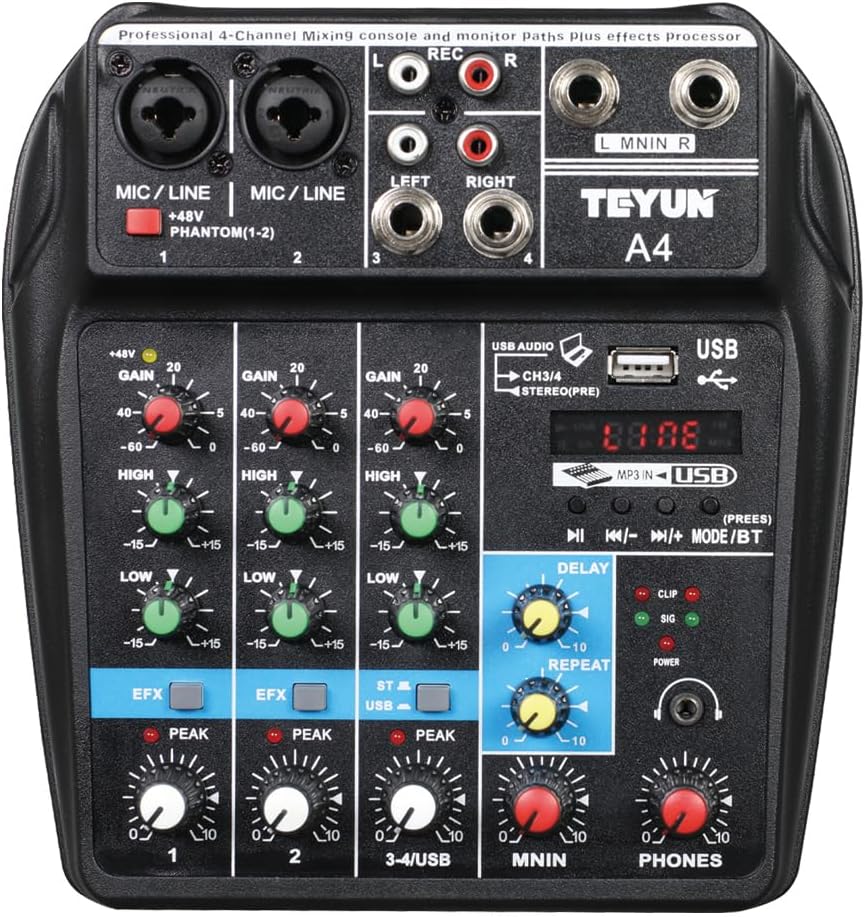
Figure 4.1: TEYUN A4 Control Panel
The mixer features intuitive controls for each channel and master output:
- GAIN: Adjusts the input sensitivity for each channel.
- HIGH/LOW: Treble and bass equalization for each channel.
- EFX: Controls the amount of effect sent from each channel.
- PEAK: Indicator light for signal clipping.
- Channel Volume: Adjusts the individual channel output level.
- DELAY/REPEAT: Controls for the built-in digital effects.
- MAIN: Master volume control for the main output.
- PHONES: Volume control for the headphone output.
4.2 Audio Adjustment and Effects
The mixer allows for independent equilibrium regulation to fine-tune your sound:

Figure 4.2: Independent Equilibrium Regulation and Effects
- Gain Adjustment: Use the GAIN knob to set the optimal input level for each microphone or instrument.
- Treble and Bass Adjustment: Utilize the HIGH and LOW knobs to shape the tone of each channel.
- Reverb Sound: Apply reverb effects to make the music sound fuller.
- Music Accompaniment: Adjust the volume of background music as needed.
4.3 Bluetooth Connectivity
The mixer supports Bluetooth for wireless audio streaming:
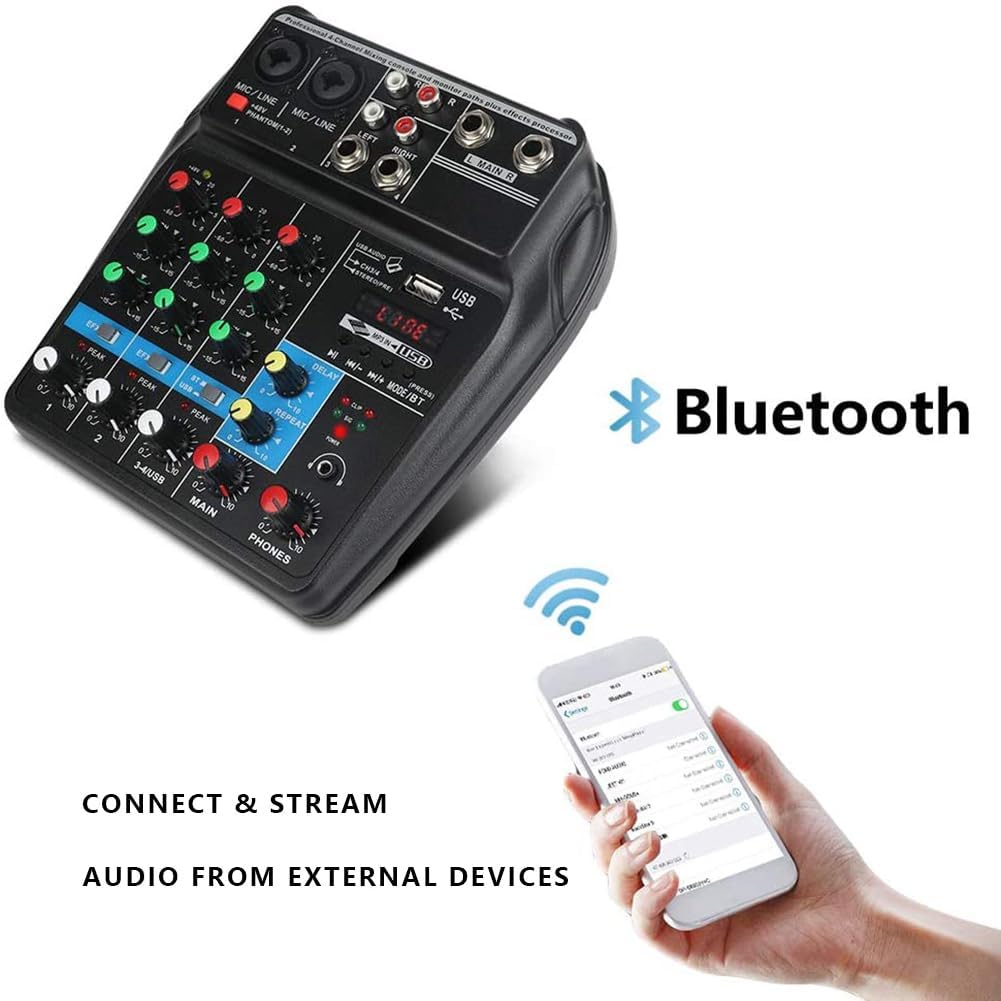
Figure 4.3: Bluetooth Connection
To connect via Bluetooth:
- Press the MODE button on the mixer until 'BT' is displayed.
- On your smartphone or tablet, search for Bluetooth devices and select 'A4' (or similar name) to pair.
- Once connected, you can stream audio wirelessly to the mixer.
4.4 USB Playback and Recording
The mixer supports U-Disk playback and computer recording:

Figure 4.4: U-Disk Functionality
U-Disk Playback: Insert a USB flash drive into the USB port. The mixer can play MP3, WAV, WMA, and FLAC audio files.
Computer Recording: Connect the mixer to your computer via a USB cable. The mixer acts as a sound card, allowing you to record mixed audio directly to your computer using recording software.

Figure 4.5: Recording Process via Computer
Video Demonstration: TEYUN USB Audio Interface A4 Overview
Video 4.1: An overview of the TEYUN USB Audio Interface A4, demonstrating its features and connectivity.
Video Demonstration: TEYUN USB Audio Interface A4
Video 4.2: A detailed demonstration of the TEYUN USB Audio Interface A4 in action, showcasing its various functions.
5. Maintenance
To ensure the longevity and optimal performance of your TEYUN A4 mixer, follow these maintenance guidelines:
- Cleaning: Use a soft, dry cloth to clean the exterior of the mixer. Avoid using abrasive cleaners, solvents, or waxes.
- Storage: Store the mixer in a cool, dry place away from direct sunlight, extreme temperatures, and high humidity.
- Handling: Handle the mixer with care. Avoid dropping it or subjecting it to strong impacts.
- Ventilation: Ensure proper ventilation around the mixer to prevent overheating.
- Cable Management: Keep cables organized and avoid sharp bends or kinks that could damage them.
6. Troubleshooting
If you encounter issues with your TEYUN A4 mixer, refer to the following common problems and solutions:
| Problem | Possible Cause | Solution |
|---|---|---|
| No sound output | Incorrect volume levels, incorrect input/output connections, faulty cables. | Check all volume knobs (GAIN, Channel, MAIN, PHONES). Ensure cables are securely connected to the correct ports. Test with different cables. |
| Distorted sound / Noise | Input gain too high, faulty cable, ground loop, interference. | Reduce input GAIN. Ensure cables are in good condition. Try connecting the mixer to a different power outlet or using a ground loop isolator if noise persists. |
| Microphone not working | 48V phantom power off (for condenser mics), incorrect mic type, faulty mic. | Activate 48V phantom power if using a condenser microphone. Ensure the microphone is compatible and functioning correctly. |
| Bluetooth connection issues | Mixer not in BT mode, device too far, interference. | Press MODE button until 'BT' is displayed. Ensure your device is within range. Restart both the mixer and your Bluetooth device. |
| USB recording not working | Mixer not in PC mode, recording software issues, incorrect USB cable. | Ensure the mixer is in PC mode. Check your computer's sound settings to confirm the mixer is selected as the input device. Verify recording software settings. |
7. Specifications
| Feature | Specification |
|---|---|
| Item Weight | 1.3 pounds (0.59 Kilograms) |
| Product Dimensions | 2.76 x 9.06 x 9.06 inches |
| Country of Origin | China |
| Item Model Number | 4-Channel |
| Power Source | Corded Electric (DC 5V) |
| Number of Channels | 4 |
| Connectivity Technology | USB, Bluetooth |
| Voltage | 100~240V (via adapter) |
| Frequency Response | 20Hz~20KHz/±0.5dB |

Figure 7.1: TEYUN A4 Mixer Dimensions (180mm x 150mm)
8. Warranty and Support
For warranty information and technical support, please refer to the manufacturer's official website or contact the seller directly. Keep your purchase receipt as proof of purchase for any warranty claims.