1. Introduction
This manual provides essential information for the safe and efficient operation and maintenance of your Shark LA301 Navigator ADV Lift-Away Upright Corded Vacuum. Please read all instructions carefully before use.
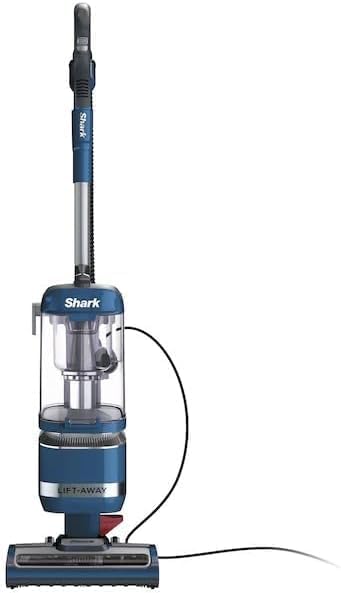
Figure 1: Shark LA301 Navigator ADV Lift-Away Upright Corded Vacuum in blue.
2. Setup
Follow these steps to assemble your Shark LA301 Navigator ADV Lift-Away Upright Corded Vacuum:
- Unpack Components: Carefully remove all parts from the packaging. Ensure all components listed in the 'Included Components' section are present.
- Attach the Pod: Align the detachable pod with the main vacuum body and press firmly until it clicks into place.
- Connect the Hose: Securely connect the flexible hose to the designated port on the vacuum.
- Insert Handle/Wand: Insert the handle/wand assembly into the top of the pod until it locks.
- Store Accessories: Attach the crevice tool and upholstery brush tool to the onboard storage posts for easy access.
3. Operating Modes
Your Shark LA301 Navigator ADV offers versatile cleaning options:
3.1 Upright Mode
For deep cleaning carpets and strong suction on hard floors. Simply plug in the vacuum and select the appropriate floor setting (Hard Floor or Carpet) using the switch on the main body. The powerful LED headlights on the nozzle will illuminate hidden debris.

Figure 2: Upright mode for carpets and hard floors.
3.2 Lift-Away Mode
Transform your upright vacuum into a portable canister vacuum for easy above-floor cleaning. Press the pod-release pedal to detach the main pod from the nozzle. This allows you to clean stairs, furniture, and other hard-to-reach areas with ease.

Figure 3: Detaching the pod for portable cleaning.

Figure 4: Using the Lift-Away pod to clean stairs.

Figure 5: Extended reach for cleaning high areas.
4. Attachments
Your vacuum includes the following tools for specialized cleaning:
- Crevice Tool: Ideal for cleaning tight spaces, corners, and along edges.
- Upholstery Brush Tool: Designed for removing pet hair, dust, and debris from upholstery and fabrics.
- Dusting Brush: For delicate surfaces and removing fine dust.
To use an attachment, ensure the vacuum is in Lift-Away mode. Connect the desired tool to the end of the hose or wand until it clicks securely.

Figure 6: Using the upholstery brush tool for pet hair pickup.
5. Maintenance
Regular maintenance ensures optimal performance of your vacuum cleaner.
5.1 Emptying the Dust Cup
Empty the dust cup after each use or when debris reaches the 'Max Fill' line. To empty, press the dust cup release button and remove the cup. Hold the dust cup over a trash bin and press the bottom release latch to open the bottom flap and empty debris. Close the flap securely before reattaching the dust cup to the vacuum.
5.2 Cleaning Filters
Your vacuum uses foam filters. Rinse the foam filters with water as needed, or at least once a month, to maintain suction power. Allow filters to air dry completely for at least 24 hours before reinstalling. Do not operate the vacuum without filters in place.
5.3 Brush Roll Maintenance
Periodically check the brush roll for any hair, string, or debris that may have wrapped around it. Use scissors to carefully cut away any entangled material. Ensure the brush roll is clear for effective cleaning.
6. Specifications
| Feature | Detail |
|---|---|
| Brand | Shark |
| Model Name | LA301 Navigator Lift-Away ADV |
| Form Factor | Upright |
| Special Feature | Bagless |
| Filter Type | Foam |
| Included Components | Crevice Tool, Dusting Brush, and Upholstery Tool |
| Is Cordless? | No |
| Capacity | 1.9 Quarts |
| Wattage | 960 watts |
| Power Source | Corded Electric |
| Recommended Uses | Carpet, Hard Floor, Home |
| Color | Blue |
| Item Weight | 12.3 pounds |
| Product Dimensions | 10 x 12 x 46.5 inches |
| Noise Level | 80 Decibels |
| Amperage | 10 Amps |
| Vacuum Collection Technology | Cyclonic Suction |
7. Troubleshooting
If you encounter issues with your Shark LA301 Navigator ADV, refer to the following common solutions:
- No Suction or Low Suction: Check if the dust cup is full and empty it. Inspect filters for clogs and clean them as per maintenance instructions. Ensure all hose connections are secure and check for blockages in the hose or nozzle.
- Brush Roll Not Spinning: Ensure the vacuum is in the correct floor setting (Carpet mode activates the brush roll). Check the brush roll for any obstructions like hair or debris and remove them.
- Vacuum Shuts Off: The vacuum may have overheated. Turn off the vacuum, unplug it, and allow it to cool for at least 45 minutes. Check for clogged filters or blockages before restarting.
For further assistance, please contact Shark customer support.
8. Warranty & Support
8.1 Warranty Information
This product comes with a 90 days limited warranty. Please retain your proof of purchase for warranty claims.
8.2 Customer Support
For product registration, warranty inquiries, or technical support, please visit the official Shark website or contact their customer service line. Contact details can typically be found on the product packaging or the manufacturer's website.


