
1. Introduction
The NJOY Echo Pro 2000 is an advanced Uninterruptible Power Supply (UPS) designed to provide reliable power protection for critical equipment such as servers, workstations, and networking devices. Featuring double conversion online technology, it delivers a pure sine wave output, ensuring the highest degree of compatibility and protection for sensitive electronics. This manual provides essential information for the safe and efficient installation, operation, and maintenance of your Echo Pro 2000 UPS.

Figure 1.1: Front view of the NJOY Echo Pro 2000 UPS. This image shows the main unit with its front panel display and control buttons.
2. Safety Information
Please read and follow all safety instructions carefully before installing, operating, or servicing the UPS. Failure to comply with these instructions may result in electric shock, fire, or serious injury.
- Electrical Safety: The UPS contains hazardous voltages. Do not attempt to disassemble the unit. Servicing should only be performed by qualified personnel.
- Battery Safety: Batteries can present a risk of electrical shock and high short-circuit current. Observe proper polarity when connecting batteries. Do not dispose of batteries in a fire.
- Environment: Install the UPS in a well-ventilated area, free from excessive dust, humidity, and corrosive substances. Avoid direct sunlight and heat sources.
- Grounding: Ensure the UPS is properly grounded to prevent electrical shock.
- Emergency Power Off (EPO): Familiarize yourself with the EPO function for immediate shutdown in emergencies.
3. Product Overview
3.1 Key Features
- Double Conversion Online Technology: Provides continuous, clean power by converting incoming AC to DC and then back to AC, isolating connected equipment from utility power fluctuations.
- Pure Sine Wave Output: Ensures compatibility with all types of electronic loads, preventing distortion and electrical noise.
- Low Noise Level: Operates at less than 40 dB, suitable for office environments.
- Software Management: Includes specialized software for remote monitoring, scheduled power on/off, battery tests, and complete UPS configuration.
- Communication Ports: Equipped with RS232, HID USB, and EPO ports. An optional SNMP card slot is available for advanced network monitoring.
- Internal Batteries: Features 4 x 12V7Ah sealed lead-acid batteries for reliable backup power.
3.2 Rear Panel Connections
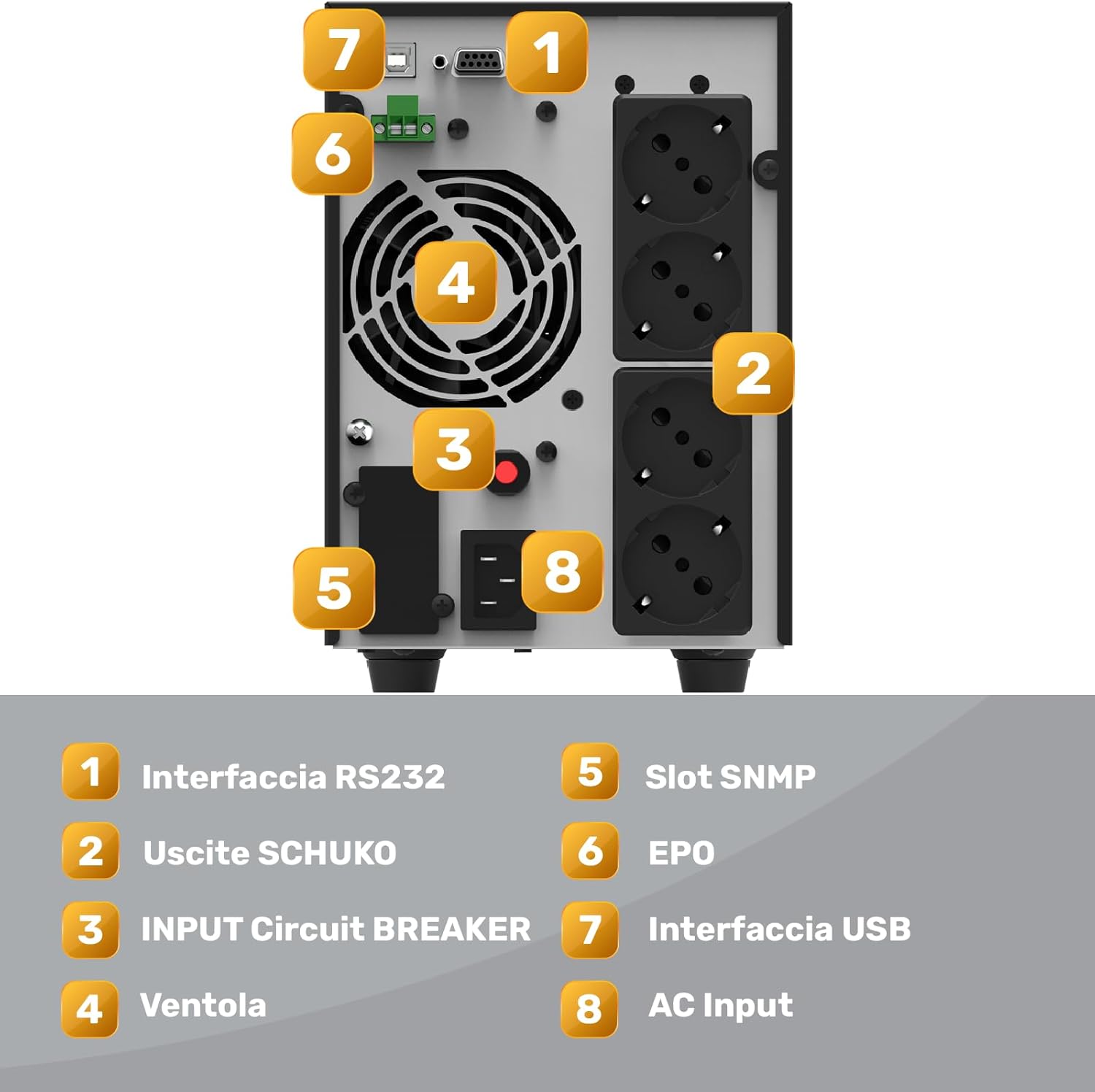
Figure 3.1: Rear panel of the NJOY Echo Pro 2000 UPS, showing various connection ports.
- RS232 Interface: For serial communication with a computer or network device.
- Schuko Outlets (x4): Output receptacles for connecting protected equipment.
- Input Circuit Breaker: Overcurrent protection for the UPS input.
- Fan: Cooling fan for internal components.
- SNMP Slot: Expansion slot for an optional SNMP card (not included) for network management.
- EPO (Emergency Power Off): Connector for remote emergency shutdown.
- USB Interface: For USB communication with a computer.
- AC Input: Power input connector for the UPS.
4. Setup
Follow these steps to properly set up your NJOY Echo Pro 2000 UPS:
- Unpacking: Carefully unpack the UPS and inspect it for any shipping damage. Report any damage to your dealer.
- Placement: Place the UPS in a clean, dry, and well-ventilated indoor environment. Ensure adequate clearance around the unit for proper airflow. Avoid placing it near heat sources or in direct sunlight.
- Initial Charging: Connect the UPS to a grounded AC power outlet using the provided power cord. Allow the UPS to charge for at least 8 hours before connecting any equipment to ensure optimal battery performance. The LCD display will indicate charging status.
- Connecting Equipment: Once the UPS is fully charged, connect your critical equipment (servers, computers, monitors, etc.) to the Schuko output receptacles on the rear panel. Do not connect surge suppressors or power strips to the UPS output.
- Communication Setup: For monitoring and management, connect the UPS to your computer using the provided USB or RS232 cable. Install the specialized management software (refer to Section 5.2).
- EPO Connection (Optional): If using the Emergency Power Off function, connect the EPO cable to the designated port.
5. Operating Instructions
5.1 Powering On/Off
- To Power On: Press and hold the 'ON' button on the front panel for approximately 2 seconds until the UPS powers on and the LCD display illuminates.
- To Power Off: Press and hold the 'OFF' button for approximately 2 seconds. The UPS will shut down, and the display will turn off.
5.2 LCD Display and Control Buttons
The front panel LCD provides real-time status information. Use the 'ENTER' and 'ESC' buttons to navigate through the display menus and view various parameters such as input/output voltage, battery level, load level, and operating mode.
5.3 Software Management
The included software allows for comprehensive monitoring and control of the UPS. Install the software on a connected computer to:
- Monitor real-time UPS status and parameters.
- Schedule automatic power on/off and battery tests.
- Configure UPS settings and alarm thresholds.
- Receive notifications for power events.
- Perform safe shutdown of connected computer systems during extended power outages.

Figure 5.1: Example of the UPS management software interface, showing status and configuration options.
6. Maintenance
Regular maintenance ensures the longevity and optimal performance of your UPS.
- Battery Care: The UPS contains sealed lead-acid batteries. These batteries typically last 3-5 years under normal operating conditions. Replace batteries when their runtime significantly decreases. Only use replacement batteries of the same type and rating (4 x 12V7Ah). Battery replacement should be performed by qualified service personnel.
- Cleaning: Keep the UPS clean and free of dust. Use a dry cloth to wipe the exterior. Do not use liquid cleaners or solvents. Ensure ventilation openings are clear of obstructions.
- Environmental Conditions: Maintain the UPS within the recommended operating temperature and humidity ranges to prolong its lifespan.
- Self-Test: Periodically perform a battery self-test using the management software or front panel controls to assess battery health.
7. Troubleshooting
This section provides solutions to common issues you might encounter with your UPS. If the problem persists, contact technical support.
| Problem | Possible Cause | Solution |
|---|---|---|
| UPS does not turn on | No AC input; Low battery; UPS fault | Check AC power cord connection; Allow UPS to charge; Contact support if fault persists. |
| UPS beeps continuously | Overload; Low battery; UPS fault | Reduce connected load; Allow UPS to charge; Check LCD for error codes. |
| Short backup time | Overload; Batteries need replacement | Reduce connected load; Perform battery test and replace if necessary. |
| Software not communicating with UPS | Incorrect cable; Driver issue; Software settings | Ensure correct USB/RS232 cable is used; Reinstall drivers; Check software communication settings. |
8. Specifications
| Feature | Specification |
|---|---|
| Brand | NJOY |
| Model Number | UPOL-OL200EP-CG01B_SIL |
| Product Type | Tower UPS |
| Technology | Online (VFI) Double Conversion |
| Power Capacity | 2000 VA / 1600 W |
| Output Power Factor | 0.8 |
| Input Nominal Voltage | 230 V AC |
| Input Voltage Range | 80 – 300 V AC |
| Input Frequency | 50 Hz / 60 Hz (auto-sensing) |
| Output Nominal Voltage | 208/220/230/240 V AC |
| Output Waveform | Pure Sine Wave |
| Outlets | 4 x Schuko |
| Batteries | 4 x 12V7Ah Sealed Lead-Acid (internal) |
| Efficiency | Up to 96% |
| Display | LCD |
| Communication Ports | RS232, HID USB, EPO, SNMP Slot (optional card) |
| Noise Level | <40 dB |
| Compatible Devices | Gaming Computers, DVRs, Video Surveillance Systems, WiFi/ADSL/Fiber Modems, Monitors, Printers, TVs, NAS, Servers |

Figure 8.1: Runtime autonomy chart for the NJOY Echo Pro 2000 UPS. This chart illustrates the approximate backup duration at different load levels. For example, at 1600W (100% load), the runtime is approximately 1 minute, while at 400W (25% load), it is approximately 17 minutes.
9. Warranty Information
For detailed warranty terms and conditions, please refer to the warranty card included with your product or visit the official NJOY website. Keep your proof of purchase for warranty claims.
10. Support
If you require technical assistance or have questions regarding your NJOY Echo Pro 2000 UPS, please contact NJOY customer support through their official website or the contact information provided in your product documentation.


