
Sejoy AP-1220-GS
Sejoy True HEPA Air Purifier AP-1220-GS User Manual
Model: AP-1220-GS
1. Introduction
Thank you for choosing the Sejoy True HEPA Air Purifier AP-1220-GS. This manual provides important information for the safe operation, maintenance, and troubleshooting of your air purifier. Please read it thoroughly before use and keep it for future reference.
The Sejoy AP-1220-GS is designed to improve indoor air quality by effectively removing airborne particles, odors, and allergens, creating a healthier living environment.

Image: The Sejoy Air Purifier operating in a living room, demonstrating its ability to filter various airborne pollutants including odors, smoke, pet dander, mold spores, dust, and pollen, with 99.97% efficiency.

Image: The air purifier shown in different settings such as a bedroom, kitchen, living room, and office, highlighting its suitability for various living and working spaces.
2. Important Safety Instructions
To reduce the risk of fire, electric shock, or injury, please follow these basic safety precautions:
- Read all instructions before operating the appliance.
- Always place the air purifier on a firm, level surface.
- Keep the power cord away from heated surfaces.
- Do not operate the appliance if the cord or plug is damaged.
- Do not use the air purifier in wet or damp environments.
- Unplug the appliance before cleaning or performing any maintenance.
- Do not block air inlets or outlets.
- This appliance is not intended for use by persons (including children) with reduced physical, sensory or mental capabilities, or lack of experience and knowledge, unless they have been given supervision or instruction concerning use of the appliance by a person responsible for their safety.
- Children should be supervised to ensure that they do not play with the appliance.
3. Product Overview
3.1 Components

Image: The Sejoy AP-1220-GS Air Purifier with its multi-layer filter element, illustrating the internal filtration system.
The Sejoy AP-1220-GS Air Purifier consists of the following main components:
- Control Panel: Touch-sensitive interface for all functions.
- Air Outlet: Top section where purified air is released.
- Housing: The main body of the air purifier.
- Air Inlet: 360-degree openings around the base for drawing in air.
- 3-in-1 Filter: Multi-layer filtration system located inside the unit.
- Base Cover: Secures the filter in place at the bottom of the unit.
- Power Cord Connection: Located at the rear of the appliance.
- Particle Sensor: Detects air quality, located at the rear.
3.2 3-in-1 Filtration System
The Sejoy AP-1220-GS utilizes a multi-layer filtration system to capture various airborne pollutants:

Image: Illustration of the 3-in-1 filter system, detailing the function of the Preliminary, HEPA, and Activated Carbon layers.
- Fine Preliminary Filter: Captures large particles such as hair, pet fur, and lint.
- H11 True HEPA Filter: Traps fine particles, including dust mites and pollen, with 99.9% efficiency for particles as small as 0.3 microns.
- High-Efficiency Activated Carbon Filter: Neutralizes various household odors, such as cooking smells, pet odors, and cigarette smoke.
4. Setup and Installation
- Unpack the Air Purifier: Carefully remove the air purifier from its packaging.
- Remove Filter Packaging: Before first use, turn the unit upside down, twist the base cover counter-clockwise to unlock, and remove the plastic packaging from the 3-in-1 filter.
- Install Filter: Place the filter back into the air purifier with the pull tabs facing upwards. Secure the base cover by twisting clockwise until locked.
- Position the Purifier: Place the air purifier on a flat, stable surface, ensuring there is at least 30 cm (12 inches) of clear space around all sides for optimal airflow.
- Connect Power: Plug the power cord into a standard electrical outlet.
5. Operating Instructions
5.1 Control Panel Functions
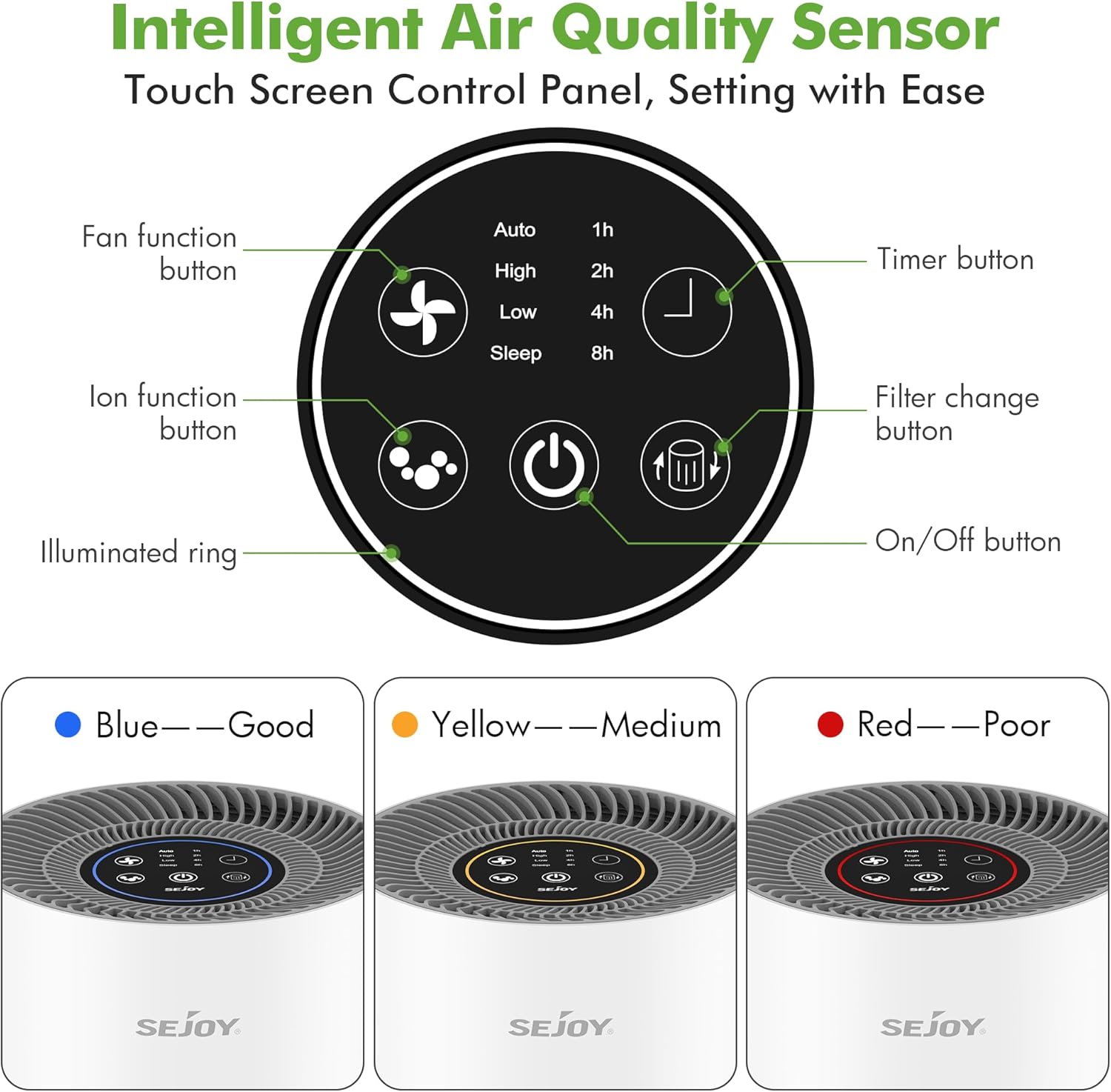
Image: Detailed view of the touch control panel and its various functions, including fan speed, ionizer, timer, and filter reset.
- On/Off Button: Press to turn the air purifier on or off.
- Fan Function Button: Cycles through fan speeds: Auto, High, Low, Sleep.
- Timer Button: Sets the operating time for 1, 2, 4, or 8 hours. The unit will automatically turn off after the selected time.
- Ion Function Button: Activates or deactivates the ionizer and cold plasma function.
- Filter Change Button: Illuminates when it's time to replace the filter. Press and hold for 3 seconds after replacing the filter to reset the indicator.
5.2 Air Quality Indicator
The illuminated ring on the control panel indicates the current air quality:
- Blue: Good air quality (PM2.5 ≤ 75)
- Yellow: Medium air quality (PM2.5: 78-150)
- Red: Poor air quality (PM2.5 > 150)
5.3 Sleep Mode
In Sleep Mode, the air purifier operates at its lowest fan speed and with reduced noise levels (25 dB) to ensure a quiet environment for rest. The display lights will dim.

Image: The air purifier in sleep mode, demonstrating its quiet operation at 25dB, suitable for bedrooms.
6. Maintenance and Care
6.1 Cleaning the Air Purifier
- Always unplug the air purifier before cleaning.
- Wipe the exterior surface with a soft, dry cloth. Do not use abrasive cleaners or solvents.
- Clean the air inlet and outlet vents with a soft brush or vacuum cleaner to remove dust.
6.2 Replacing the Filter
The filter change indicator light will illuminate when it's time to replace the 3-in-1 filter (approximately every 6-8 months, depending on usage and air quality).
- Unplug the air purifier.
- Turn the unit upside down and twist the base cover counter-clockwise to unlock it.
- Remove the old filter by pulling on the tabs.
- Insert a new Sejoy AP-1220-GS replacement filter (ensure plastic packaging is removed).
- Replace the base cover and twist clockwise to lock it.
- Plug in the air purifier. Press and hold the "Filter Change" button for 3 seconds to reset the filter indicator.
Note: The 3-in-1 filter is not washable and should be replaced entirely.
7. Troubleshooting
| Problem | Possible Cause | Solution |
|---|---|---|
| Air purifier does not turn on. | Not plugged in; power outlet malfunction; filter not installed correctly. | Ensure power cord is securely plugged in; try a different outlet; check if filter packaging is removed and filter is correctly seated. |
| Weak airflow. | Filter is dirty or clogged; air inlets/outlets are blocked. | Replace the filter; ensure no obstructions around the air purifier. |
| Unusual noise. | Filter not installed correctly; foreign object inside the unit. | Reinstall the filter; unplug and check for any foreign objects. |
| Odor persists. | Filter needs replacement; strong odor source. | Replace the activated carbon filter; ensure the room is adequately ventilated. |
| Filter change indicator remains on after replacement. | Indicator not reset. | Press and hold the "Filter Change" button for 3 seconds to reset. |
8. Specifications
| Feature | Detail |
|---|---|
| Model Number | AP-1220-GS |
| Brand | Sejoy |
| Dimensions (L x W x H) | 21 x 21 x 31.5 cm (8.2 x 8.2 x 12.4 inches) |
| Weight | 2.96 kg (6.5 lbs) |
| Noise Level | 25 dB (Sleep Mode) |
| CADR (Clean Air Delivery Rate) | 138 m³/h (80 CFM) |
| Coverage Area | Up to 16 m² (172 sq.ft) |
| Filtration Type | 3-in-1 True HEPA (Preliminary, H11 HEPA, Activated Carbon) |
| Fan Speeds | 4 (Auto, High, Low, Sleep) |
| Timer Settings | 1, 2, 4, 8 hours |
| Additional Functions | Ionizer, Cold Plasma, Air Quality Sensor |
| Control Method | Touch Screen |
9. Warranty and Support
Sejoy products are manufactured to high-quality standards. For warranty information, technical support, or customer service inquiries, please refer to the warranty card included with your purchase or visit the official Sejoy website.
Please retain your proof of purchase for warranty claims.
Ask a question about this manual
Ask about setup, troubleshooting, compatibility, parts, safety, or missing instructions. Manuals+ will review the question and use this page’s manual context to help answer it.