
Introduction
Thank you for choosing the ODK Reversible Gaming Desk. This manual provides detailed instructions for assembly, operation, maintenance, and troubleshooting to ensure you get the most out of your new desk. Designed for both gaming and home office environments, this desk combines functionality with modern aesthetics, featuring integrated LED lighting, power outlets, and versatile storage solutions.
Safety Information
- Read all instructions carefully before assembly and use.
- Keep all packaging materials away from children.
- Ensure all screws and fasteners are securely tightened before use. Periodically check and re-tighten as needed.
- Do not overload the desk or shelves beyond their stated weight capacity.
- Keep liquids away from electrical components (power outlets, LED lights).
- Use on a flat, stable surface to prevent tipping.
- Do not stand or sit on the desk.
Package Contents
Please verify that all components listed below are present before beginning assembly. If any parts are missing or damaged, please contact ODK customer support.
- Desk Main Board (1)
- Monitor Stand (1)
- Reversible Storage Shelf Unit (1)
- Metal Frame Components (Legs, Crossbars)
- LED Light Strip with Controller (1)
- Integrated Power Strip with 3 AC Outlets & 2 USB Ports (1)
- Headphone Hook (1)
- Adjustable Foot Pads (4)
- Assembly Hardware (Screws, Allen Wrench)
- Instruction Manual (1)
Assembly Instructions
Follow these steps carefully for proper assembly. It is recommended to have two people for certain steps, although one person can assemble it.
Step 1: Unpack and Identify Parts
Carefully unpack all components and lay them out on a clean, soft surface to prevent scratches. Identify each part using the provided parts list in the packaging.
Step 2: Assemble the Main Desk Frame
Attach the desk legs to the main desk board using the provided screws. Ensure all connections are firm but do not fully tighten screws until the entire frame is assembled.

Image: Fully assembled ODK Reversible Gaming Desk, showcasing its design and features.
Step 3: Install the Reversible Storage Shelf Unit
The storage shelf unit can be installed on either the left or right side of the desk. Decide your preferred orientation before attaching it to the main desk frame. Secure it using the designated screws.

Image: Illustration demonstrating the reversible design of the storage shelf unit, allowing left or right side installation.
Step 4: Attach the Monitor Stand
Position the monitor stand on the main desk board as desired and secure it. This stand helps promote a healthy sitting posture.
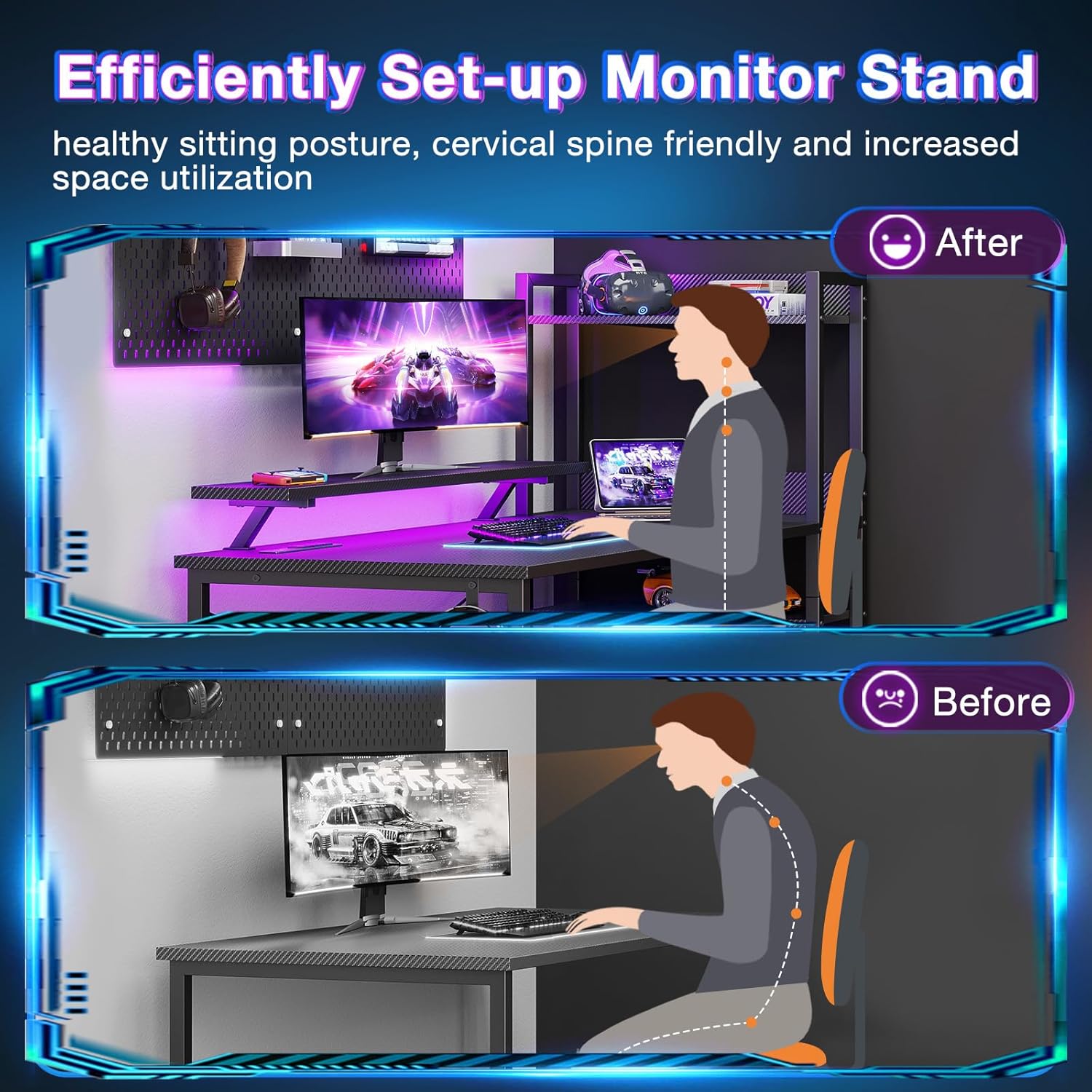
Image: Visual representation of improved posture with the monitor stand compared to without.
Step 5: Install the Integrated Power Strip and LED Lights
Mount the integrated power strip to the underside of the monitor stand or main desk board in the designated area. Connect the LED light strip to the power strip and adhere it to the desired location, typically under the monitor stand for ambient lighting.

Image: Detail of the integrated power strip, showing 3 AC outlets and 2 USB charging ports.

Image: The desk with its LED light strip active, displaying a purple hue.
Step 6: Final Adjustments
Once all components are in place, fully tighten all screws. Adjust the non-slip foot pads to ensure the desk is stable and level on uneven surfaces.

Image: Detail of the adjustable foot pads, designed for stability and floor protection.
Features Overview
A. Gaming Desk with Colorful LED Lights
The integrated LED strip offers 10 static colors, 6 brightness levels, and 10 dynamic modes. The lighting can be adjusted to reduce eye strain, improve focus, and enhance the ambiance of your workspace or gaming setup. It also features a memory function to recall your last setting.

Image: Display of the RGB LED strip highlighting its multiple color and mode options.
B. Computer Desk with Power Outlets
Equipped with 3 standard AC power outlets (120V/12A) and 2 USB charging ports (5V/2A), the desk allows convenient charging of electronic devices such as smartphones, gaming gear, and Bluetooth devices directly from your workspace. A versatile hook is also included for additional storage, ideal for headphones or bags.

Image: Close-up of the recessed power strip, detailing its power and USB charging capabilities.

Image: The desk's side hook in use, holding a pair of headphones.
C. Computer Desk with Reversible Shelf & Storage
The desk features a CPU stand and open shelves, providing ample storage space. The middle shelf is removable, allowing it to function as a 2-tier bookshelf or a dedicated CPU stand. The entire shelf unit can be fixed on either the left or right side of the desk to suit your preference and room layout.

Image: Visual guide on how to customize the storage space, including options for CPU placement.

Image: Illustration of the adjustable shelf feature, allowing for flexible storage configurations.
D. Spacious and Adjustable Design
The desk offers a generous tabletop (39.4”W x 19.7”D) and a monitor stand (35.4”W x 7.4”D), providing ample workspace. The open shelves (7.9"W x 18.1"D x 45.6"H) offer versatile storage for office supplies, computer cases, and other items.

Image: Comprehensive diagram displaying all key dimensions of the desk and its components.
Operating Instructions
A. LED Light Strip Control
The LED light strip is controlled via an inline remote. Ensure the power strip is plugged into a wall outlet.
- Static Color Button (C): Press once to switch to static color mode. Each subsequent press changes the color.
- Dynamic Mode Button (M): Press once to switch to dynamic mode effect. Each subsequent press changes the dynamic mode. Press and hold for 3 seconds to enter demo mode, where the strip cycles through various dynamic modes automatically.
- Speed & Brightness and Power Button (⑂/B):
- In static mode, press to adjust brightness levels.
- In dynamic mode, press to adjust dynamic mode speed.
- Press and hold to shut down when the strip is on. Press to turn on when the strip is off.
The LED strip has a power-off memory function, restoring the last color, brightness, and mode upon next power-on.

Image: Detailed guide on how to operate the LED light strip using its control buttons.
B. Power Outlets and USB Ports
Simply plug your devices into the AC outlets or USB ports located on the integrated power strip. Ensure the desk's main power cord is connected to a functioning wall outlet.
Maintenance
- Cleaning: Wipe the desk surfaces with a soft, damp cloth. Avoid abrasive cleaners or harsh chemicals that may damage the finish.
- Durability: The desk is constructed with a premium metal frame and high-quality MDF board, ensuring scratch and water resistance.
- Stability Check: Periodically check all screws and connections to ensure they remain tight. Re-tighten if necessary.
Troubleshooting
| Problem | Possible Cause | Solution |
|---|---|---|
| Desk is wobbly/unstable. | Loose screws; uneven floor. | Ensure all assembly screws are fully tightened. Adjust the non-slip foot pads to level the desk. |
| LED lights not working. | Power strip not plugged in; loose connection; faulty LED strip. | Check if the desk's main power cord is plugged into a wall outlet. Ensure the LED strip is securely connected to the power strip. If issues persist, contact customer support. |
| Power outlets/USB ports not working. | Desk's main power cord not plugged in; power surge; faulty power strip. | Verify the desk's main power cord is securely plugged into a live wall outlet. Test with another device. If still not working, contact customer support. |
| Difficulty with assembly. | Misinterpretation of instructions; incorrect part orientation. | Review the assembly instructions carefully, paying attention to diagrams. Ensure parts are oriented correctly (e.g., reversible shelf). Contact customer support for assistance. |
Specifications
| Feature | Detail |
|---|---|
| Brand | ODK |
| Model Name | Reversible Gaming Desk |
| Color | Carbon Fiber Black |
| Product Dimensions (D x W x H) | 19.7"D x 47.3"W x 45.6"H |
| Tabletop Dimensions (W x D) | 39.4"W x 19.7"D |
| Monitor Stand Dimensions (W x D) | 35.4"W x 7.4"D |
| Open Shelves Dimensions (W x D x H) | 7.9"W x 18.1"D x 45.6"H |
| Material | Premium Metal Frame, High-Quality MDF Board |
| Special Features | LED Lights (10 static colors, 6 brightness, 10 dynamic modes), Integrated Power Outlets (3 AC, 2 USB), Reversible Shelf, Monitor Stand, Headphone Hook, Adjustable Foot Pads |
| Assembly Required | Yes |
| Item Weight | 20 Kilograms |
Warranty and Support
ODK provides a comprehensive warranty for this product. For detailed warranty information, including coverage and duration, please refer to the warranty card included in your product packaging or visit the official ODK website. If you encounter any issues, require replacement parts, or have questions not covered in this manual, please contact our professional customer support team. We are committed to assisting you within 24 hours.
Contact Information: Please refer to your product packaging or the ODK official website for the most current contact details.


