
1. Introduction
The Elitech CLD-100 Refrigerant Leak Detector is an advanced tool designed for precise detection of halogenated refrigerants, including CFCs, HCFCs, and HFCs. This manual provides comprehensive instructions for the proper setup, operation, and maintenance of your CLD-100 detector to ensure optimal performance and longevity.
2. Key Features
- Upgraded Corona Sensor: Features a traditional corona sensor with an updated analog circuit for fast detection of R11, R22, R134A, R404a, R410A, and all halogenated refrigerants, including HFCs, CFCs, HCFCs, and blends.
- Rapid Response: Offers a quick 6-second preheating time and instantaneous response to refrigerant leaks.
- Adjustable Sensitivity: Provides 6 adjustable sensitivity levels, with a maximum sensitivity of 0.21 oz/yr, allowing for precise leak identification.
- Flexible Probe: Equipped with an 8.26-inch flexible probe for easy access to difficult and hard-to-reach areas.
- Audible & Visual Alarms: Direct status indication with clear audible and visual leakage alarms.
- Dual Color Battery Indicators: Provides clear indication of battery status.
- Integrated UV Light: Includes a UV light feature to assist in detecting refrigerant leaks that contain UV dye, often visible as oil spotting.

Figure 2.1: Elitech CLD-100 highlighting its main features.
3. Package Contents
Upon opening the package, please verify that all items listed below are present and in good condition:
- 1 x Elitech CLD-100 Refrigerant Leak Detector
- 1 x Carry Bag
- 1 x User Manual (this document)
- 1 x UV Light attachment

Figure 3.1: Contents included in the Elitech CLD-100 package.
4. Product Overview
Familiarize yourself with the main components of the Elitech CLD-100 detector:
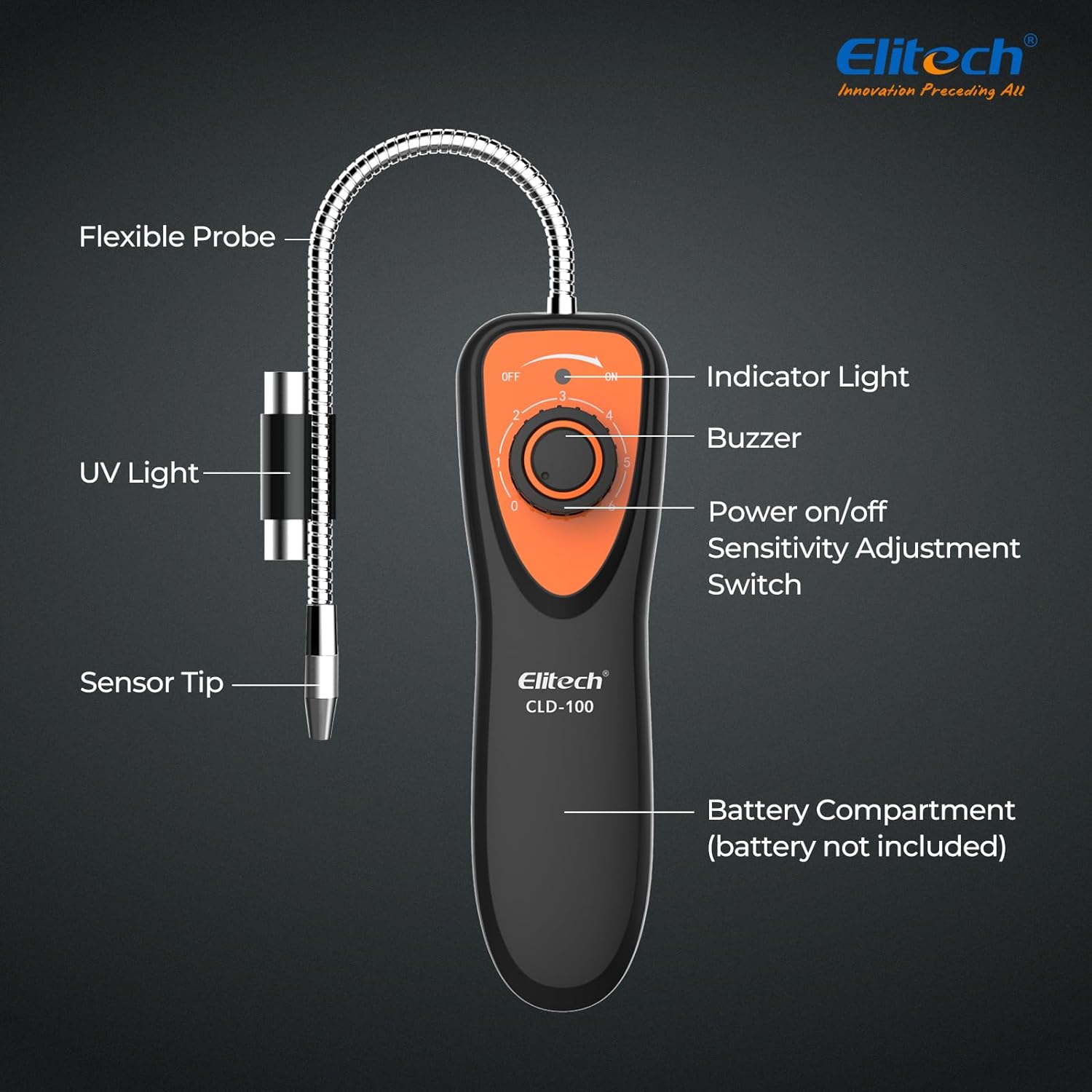
Figure 4.1: Main components of the CLD-100 detector.
- Flexible Probe: Allows for reaching confined spaces.
- UV Light: Aids in detecting leaks with fluorescent dye.
- Sensor Tip: The primary detection point for refrigerants.
- Indicator Light: Provides visual feedback on leak detection and battery status.
- Buzzer: Emits an audible alarm when a leak is detected.
- Power On/Off & Sensitivity Adjustment Switch: Rotary knob to power on/off and select sensitivity levels.
- Battery Compartment: Located at the bottom, holds 4 AAA batteries (not included).
5. Setup
Before first use, install the batteries:
- Locate the battery compartment cover at the bottom of the detector.
- Open the cover and insert 4 AAA batteries, ensuring correct polarity (+/-).
- Securely close the battery compartment cover.
Note: Batteries are not included in the package.

Figure 5.1: Elitech CLD-100 ready for use.
6. Operating Instructions
Follow these steps to operate your Elitech CLD-100 detector:
- Power On: Turn the Power On/Off & Sensitivity Adjustment Switch to the "ON" position. The detector will emit a continuous beeping sound, indicating it is preheating.
- Preheating: Allow approximately 6 seconds for the detector to preheat and stabilize. The beeping sound will become steady.
- Adjust Sensitivity: Rotate the switch to select the desired sensitivity level (1-6). For maximum sensitivity, it is recommended to turn the device on outdoors, away from any potential refrigerant sources, to allow it to calibrate to the ambient environment.
- Leak Detection:
- Point the flexible probe towards the area suspected of a leak.
- Move the probe slowly (approximately 1 inch per second) around the suspected leak points, such as AC system high-side and low-side lines, condenser coils, and compressor gaskets.
- If a refrigerant leak is detected, the beeping sound will increase in frequency, and the indicator light will change, signaling the presence of a leak. The closer the probe is to the leak, the faster the beeping will become.
- UV Light Function: The UV light feature can be activated by sliding the light switch on the probe.
- The light has two settings: a regular flashlight mode for illuminating dark work areas and a UV light mode.
- When a refrigerant leak occurs, it often involves oil mixed with the refrigerant. If a UV dye has been added to the system, the UV light will illuminate any oil spotting, helping to pinpoint the exact leak location.
- Power Off: When finished, turn the Power On/Off & Sensitivity Adjustment Switch to the "OFF" position.
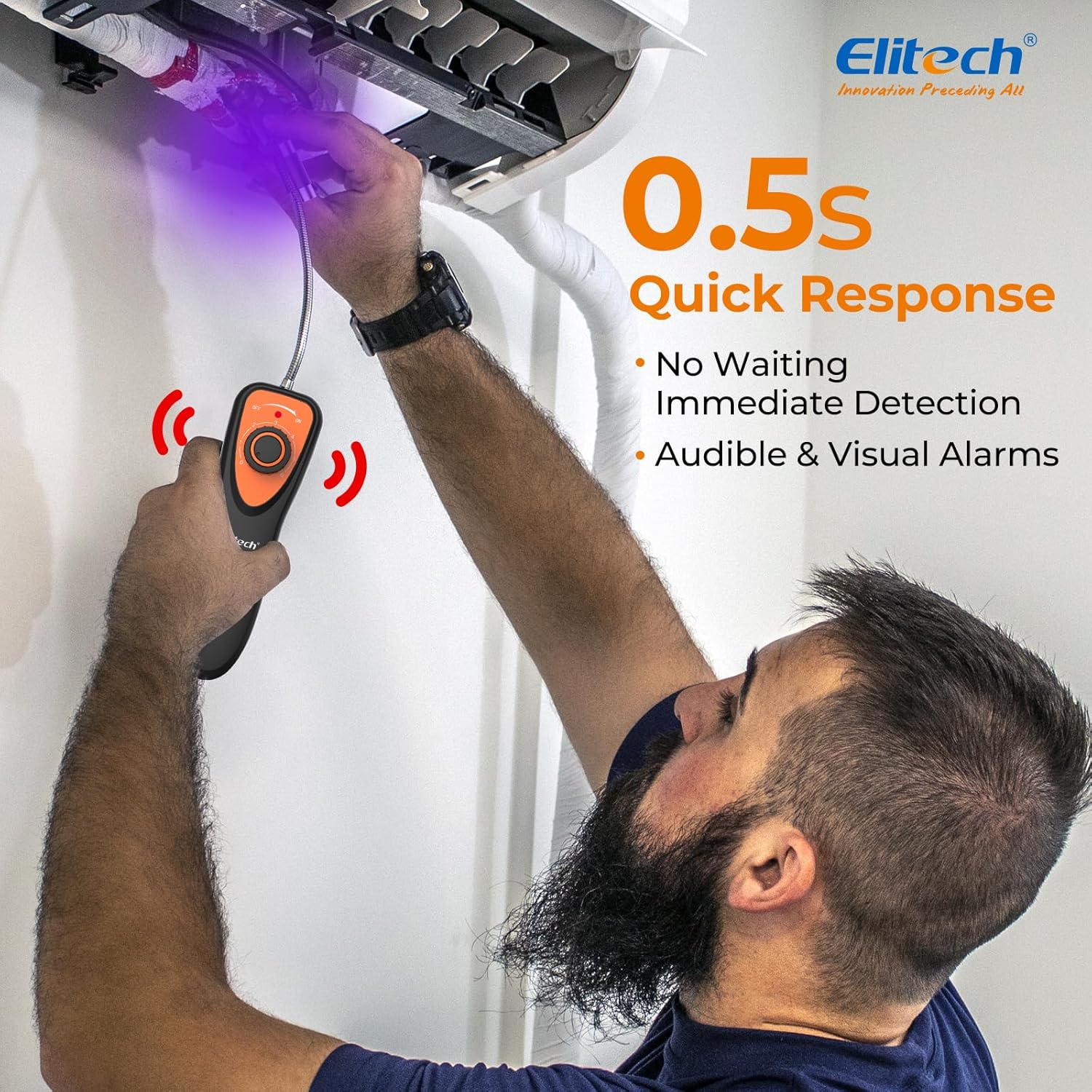
Figure 6.1: Using the CLD-100 for quick leak detection.

Figure 6.2: The CLD-100 is capable of detecting a wide range of halogenated refrigerants.
7. Specifications

Figure 7.1: Key specifications of the CLD-100 detector.
| Attribute | Value |
|---|---|
| Brand | Elitech |
| Model | CLD-100UV |
| Style | Industrial |
| Power Source | Battery Powered (4 AAA batteries required, not included) |
| Color | Orange |
| Product Dimensions (D x W x H) | 8.66" x 2.36" x 2.36" |
| Item Weight | 3.53 ounces (100 Grams) |
| Material | Plastic |
| Max Sensitivity | 0.21 oz/yr |
| Preheating Time | 6 seconds |
| Response Time | Instantaneous |
| Working Temperature | 0°C - 52°C |
| Battery Life | ~50 hours |
| Country of Origin | China |
8. Maintenance
To ensure the longevity and accuracy of your Elitech CLD-100, follow these maintenance guidelines:
- Cleaning: Wipe the detector with a soft, dry cloth. Do not use abrasive cleaners or solvents.
- Sensor Care: The sensor tip is a delicate component. Avoid physical damage and keep it clean. Over time, the sensor may wear out or become unstable, requiring replacement for optimal performance.
- Battery Replacement: Replace batteries when the dual color battery indicators show low power. Always use fresh AAA batteries.
- Storage: Store the detector in its provided carry bag in a cool, dry place when not in use.
9. Troubleshooting
If you encounter issues with your CLD-100, refer to the following common problems and solutions:
| Problem | Possible Cause | Solution |
|---|---|---|
| Detector not turning on. | Dead or incorrectly installed batteries. | Check battery polarity and replace with new AAA batteries. |
| Constant beeping or false positives. | High sensitivity setting in a contaminated environment; sensor needs calibration or replacement. | Turn on the device in a clean, outdoor environment for proper calibration. Reduce sensitivity if necessary. If problem persists, consider sensor replacement. |
| No detection or low sensitivity. | Low battery; sensor tip is dirty or worn out; sensitivity setting too low. | Replace batteries. Clean the sensor tip. Increase sensitivity. If still no detection, the sensor may need replacement. |
| UV light not working. | Light switch not activated; low battery. | Ensure the light switch is fully engaged. Check and replace batteries if needed. |
For further assistance, please contact Elitech customer support.
10. Warranty & Support
Elitech stands behind the quality of its products. For any technical assistance, warranty claims, or product inquiries, please utilize our dedicated support channels:
- US Technician Support: Available 24/7 via Email and Phone.
- Please refer to the product packaging or Elitech's official website for specific contact details.
For more information about Elitech and our range of products, visit the Elitech Store.
