1. Introduction
This manual provides detailed instructions for the setup, operation, and maintenance of your Victrola Montauk Vinyl Record Player, Model VM-135-FNT. This belt-driven turntable system offers three playback speeds, integrated Bluetooth connectivity, and includes matching stereo speakers for a complete audio experience. Please read this manual thoroughly before use to ensure proper functionality and longevity of your product.

Figure 1: Victrola Montauk Vinyl Record Player with included stereo speakers.
2. What's in the Box
- Victrola Montauk Turntable Unit
- Stereo Bluetooth Speakers (2 units)
- Removable Dust Cover
- Power Adapter
- RCA Output Cable
- 3.5mm Aux-in Cable
- Instruction Manual

Figure 2: All components included in the Victrola Montauk package.
3. Setup Instructions
- Unpack Components: Carefully remove all items from the packaging. Ensure all listed components are present.
- Place Turntable and Speakers: Position the turntable on a stable, level surface. Place the stereo speakers on either side of the turntable, ensuring they are within reach of the speaker cables.
- Install Drive Belt and Platter: Gently place the sub-platter onto the spindle. Carefully loop the drive belt around the motor pulley and the sub-platter. Then, place the main platter on top of the sub-platter.
- Balance Tone Arm: Install the counterweight onto the rear of the tone arm. Adjust the counterweight by rotating it until the tone arm is balanced and floats horizontally. Refer to the detailed instructions in the included manual for precise balancing.
- Install Dust Cover: Attach the removable dust cover to the hinges at the back of the turntable unit.
- Connect Speakers: Connect the included speaker cables from the turntable's speaker outputs to the input terminals on the back of each stereo speaker. Ensure correct polarity (red to red, black to black).
- Connect Power: Plug the power adapter into the DC IN port on the back of the turntable, then plug the adapter into a wall outlet.
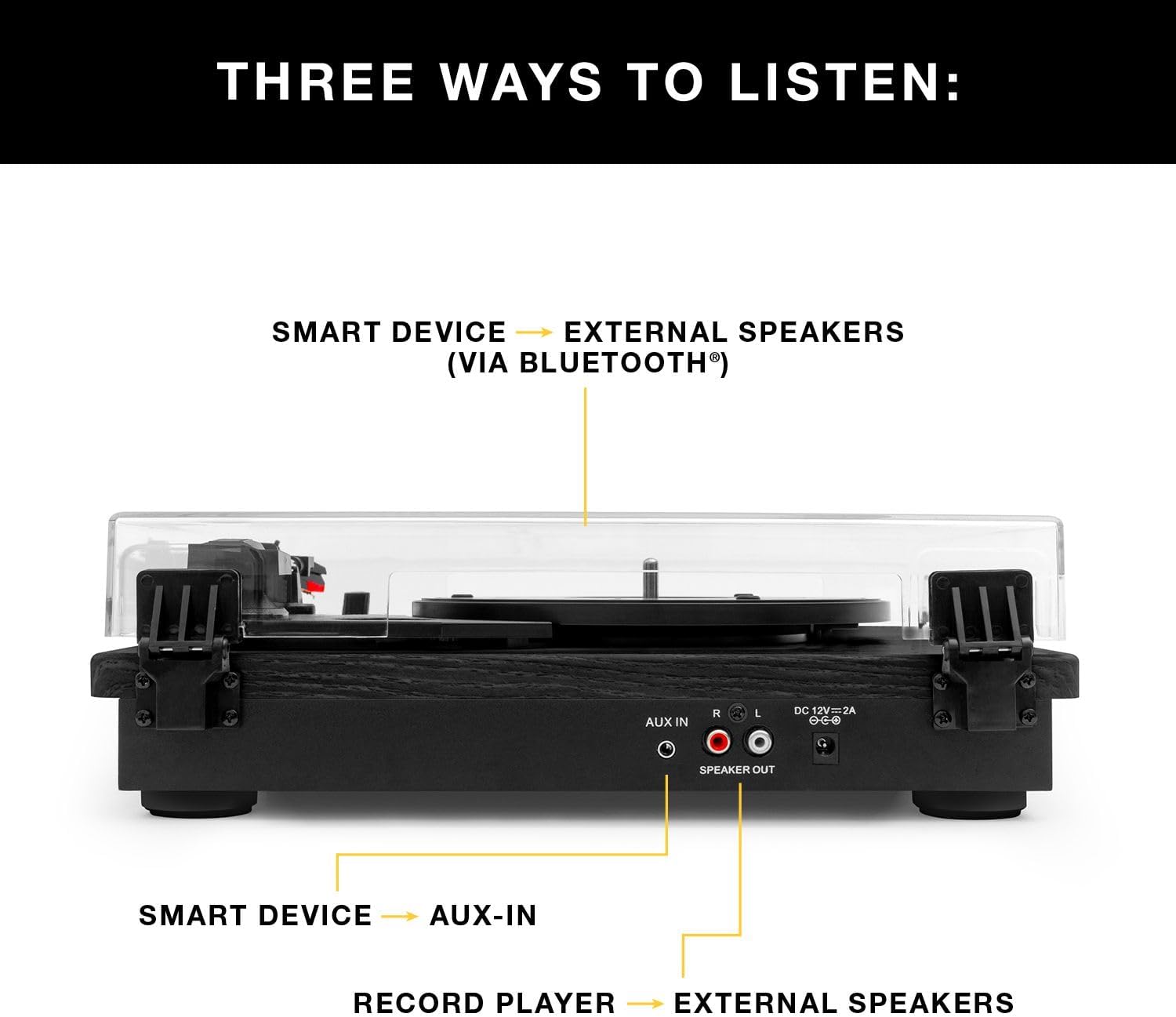
Figure 3: Rear view of the turntable showing audio output and power connections.
4. Operating Instructions
4.1 Playing Vinyl Records
- Power On: Turn on the turntable using the power switch.
- Select Speed: Choose the appropriate speed (33 1/3, 45, or 78 RPM) for your record using the speed selector switch.
- Place Record: Carefully place your vinyl record on the platter.
- Position Tone Arm: Release the tone arm lock. Gently lift the tone arm using the cueing lever and position the stylus over the desired track on the record.
- Lower Tone Arm: Slowly lower the cueing lever to gently place the stylus onto the record. Playback will begin automatically.
- Adjust Volume: Use the volume knob on the turntable to adjust the sound level.
- End Playback: At the end of the record, the tone arm will automatically return to its rest position (if auto-stop is enabled). Alternatively, manually lift the tone arm using the cueing lever and return it to its rest.

Figure 4: Detail of the stylus and record during playback.
4.2 Bluetooth Playback
- Activate Bluetooth: Switch the turntable to Bluetooth mode. The Bluetooth indicator will flash, indicating it's ready for pairing.
- Pair Device: On your smart device (phone, tablet, etc.), enable Bluetooth and select
Related Documents - VM-135-FNT

Victrola Montauk VM-135 Turntable: Instruction Manual & Operation Guide
Comprehensive guide to setting up, operating, and maintaining your Victrola Montauk VM-135 turntable. Learn about Bluetooth connectivity, stylus replacement, safety, and warranty.
Victrola VM-135 Montauk Turntable System: Instruction Manual
This instruction manual provides detailed information for the Victrola VM-135 Montauk Turntable System, covering safety guidelines, setup, operation for records, Bluetooth, and Aux-in, specifications, turntable layout, needle replacement, and warranty.
Victrola V50-200 50's Retro Bluetooth Record Player & Multimedia Center User Manual
Comprehensive user manual for the Victrola V50-200 50's Retro Bluetooth Record Player and Multimedia Center. Learn about its 3-speed turntable, CD player, AM/FM radio, Bluetooth streaming, and Vinyl to MP3 recording features, along with setup and safety instructions.
Victrola VM-137 Kingfield Turntable with Bluetooth Speakers - User Manual
Comprehensive user manual for the Victrola VM-137 Kingfield Turntable, detailing setup, operation, stylus replacement, Bluetooth and AUX-in connectivity, specifications, safety instructions, and warranty information.
Victrola Avery 3-in-1 Turntable (VTA-320B) User Manual
User manual for the Victrola Avery 3-in-1 Turntable (Model VTA-320B), detailing setup, operation, maintenance, troubleshooting, specifications, and warranty information for versatile audio playback.
Victrola VPT-800 Automatic Turntable Instruction Manual
This manual provides comprehensive instructions for setting up, operating, and maintaining the Victrola VPT-800 Automatic Turntable. Learn about unpacking, platter installation, connecting to speakers via Bluetooth or RCA, playing records, replacing the stylus, troubleshooting common issues, and product specifications.