
1. Product Overview
The Olafus 130W Motion Sensor Outdoor Light is designed to provide efficient and wide-ranging illumination for outdoor spaces. Featuring a five-headed adjustable design, it offers 360-degree coverage and can illuminate up to 1977 square feet. This light integrates motion sensing capabilities, a dusk-to-dawn mode, and a test mode for versatile operation. Its IP65 waterproof rating ensures reliable performance in various weather conditions.

Image 1.1: Front view of the Olafus 130W Motion Sensor Outdoor Light.
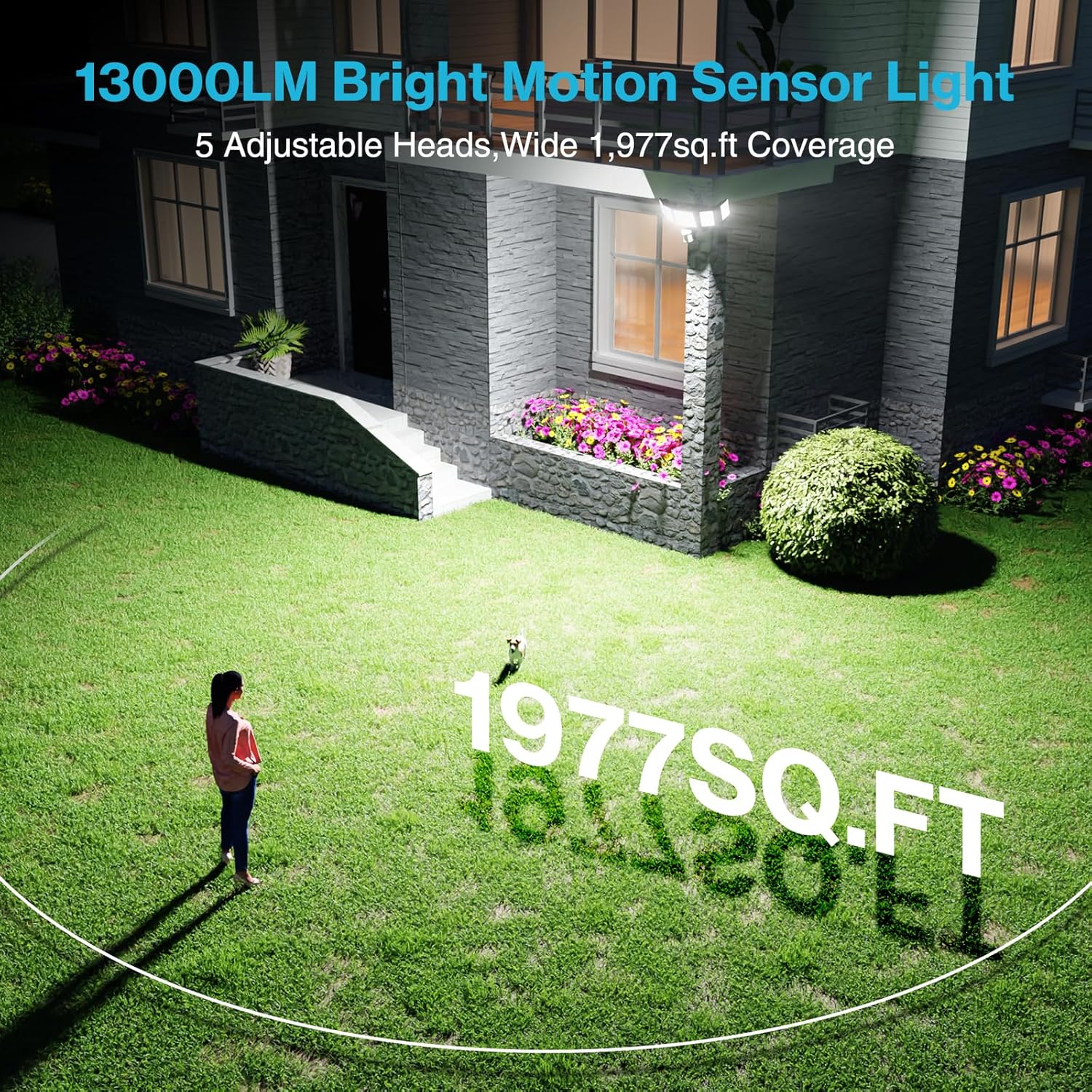
Image 1.2: The Olafus 130W Motion Sensor Outdoor Light providing 13000 lumens of bright light, covering up to 1977 square feet with its 5 adjustable heads.
2. Safety Information
Please read all instructions carefully before installation and use. Failure to follow these instructions may result in electric shock, fire, or other hazards.
- Electrical Safety: Ensure power is turned off at the circuit breaker before installation, wiring, or servicing. All wiring must be performed by a qualified electrician and conform to local electrical codes.
- Mounting: Mount the fixture securely to a sturdy surface. Do not install on unstable or vibrating surfaces.
- Heat: The light fixture may become hot during operation. Avoid touching the light heads directly.
- Eye Protection: Do not stare directly into the LED light source when illuminated, as this may cause eye damage.
- Environment: This product is designed for outdoor use and is IP65 waterproof. Do not submerge in water.
3. Package Contents
Verify that all components are present before beginning installation:
- Olafus 130W Motion Sensor Outdoor Light Fixture (1)
- Mounting Hardware (Screws, Wire Nuts, Silicone Gasket, EVA Gasket, Mounting Bracket)
- Instruction Manual (This document)

Image 3.1: Detailed view of the product dimensions and included mounting hardware.
4. Specifications
| Feature | Specification |
|---|---|
| Brand | Olafus |
| Model Number | 5-LBG130M |
| Wattage | 130 watts |
| Brightness | 13000 Lumens |
| Color Temperature | 6500 Kelvin (Daylight) |
| Material | Aluminum |
| Water Resistance Level | IP65 Waterproof |
| Motion Sensor Detection Range | Up to 72 ft |
| Motion Sensor Detection Angle | 180° |
| Adjustable Heads | 5 (360-degree coverage) |
| Installation Type | Flush Mount (Wall or Ceiling) |
| Product Dimensions | 16.4"L x 6.4"W x 5.6"H |
| Item Weight | 3.39 pounds |
5. Setup and Installation
Before installation, ensure the power supply is disconnected at the circuit breaker to prevent electric shock. This light is suitable for flush mounting on ceilings or walls.
5.1 Mounting Location
- Choose a location that provides the desired coverage area.
- Recommended installation height: 6.5-13.1 feet for optimal motion sensor performance.
- Ensure the mounting surface is sturdy and can support the weight of the fixture.
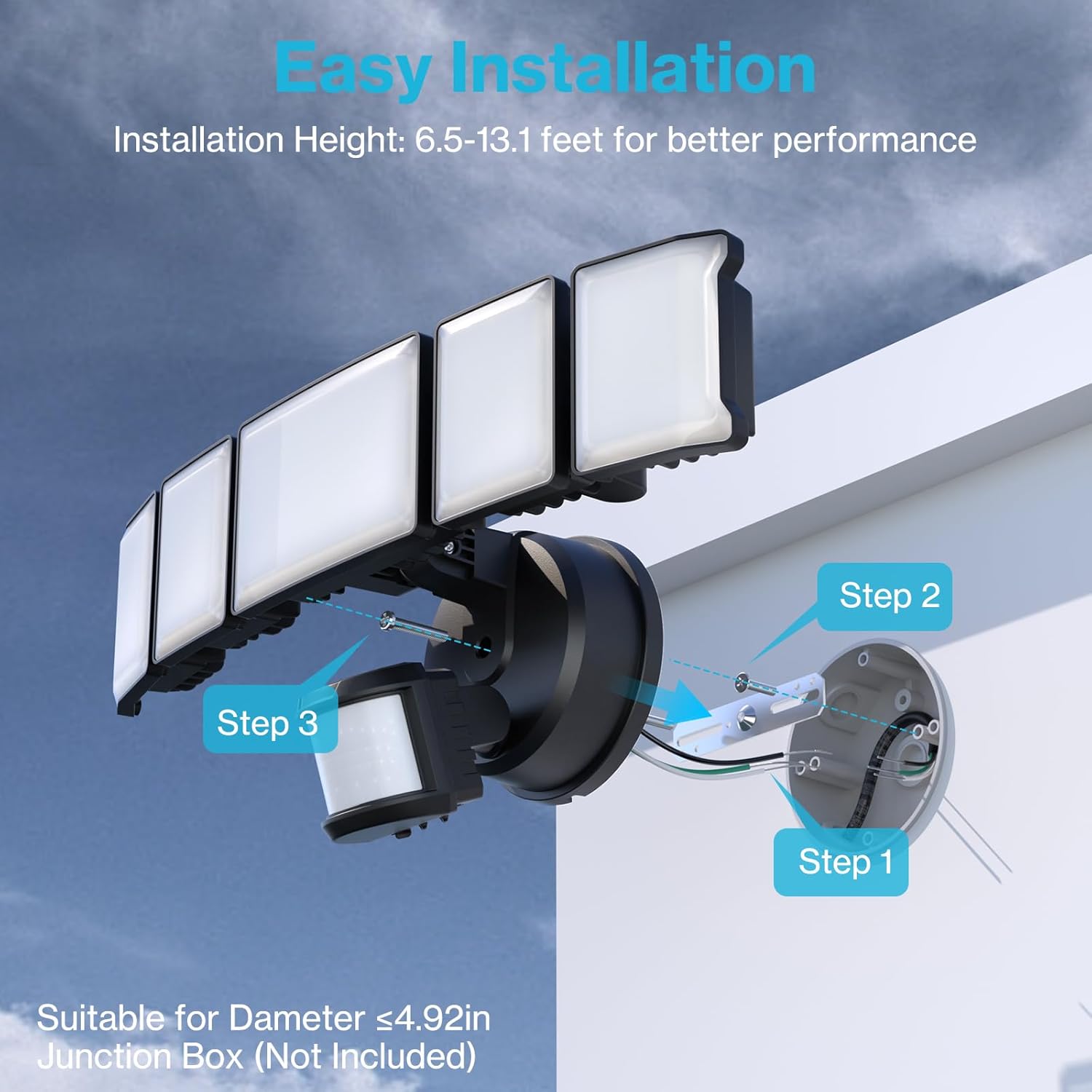
Image 5.1: Step-by-step guide for easy installation on a junction box (not included).
5.2 Wiring Steps
- Prepare Wiring: Turn off power at the circuit breaker. Remove the existing fixture if applicable.
- Attach Mounting Bracket: Secure the mounting bracket to the junction box using the provided screws.
- Connect Wires: Connect the household wires to the fixture wires using the provided wire nuts. Typically, black to black (live), white to white (neutral), and green/bare copper to green/bare copper (ground). Ensure connections are secure.
- Mount Fixture: Align the fixture with the mounting bracket and secure it with the remaining screws. Ensure the silicone and EVA gaskets are properly seated to maintain the IP65 rating.

Image 5.2: The 5-head adjustable design allows for multi-angle rotation, suitable for soffit or wall mounting.

Image 5.3: Example of wall-mounted installation.

Image 5.4: Example of soffit-mounted installation.
6. Operating Instructions
The Olafus 130W Motion Sensor Outdoor Light offers multiple operating modes and adjustable settings.
6.1 Adjusting Light Heads
The five light heads can be independently rotated to direct illumination precisely where needed, providing comprehensive coverage.
6.2 Sensor Settings
The motion sensor unit has three adjustable dials for customizing operation:

Image 6.1: The three adjustable dials on the motion sensor control mode, delay time, and light sensitivity.
- Mode Dial (Left): Selects the operating mode.
- D2D (Dusk to Dawn) Mode: The light automatically turns on at dusk and off at dawn.
- Motion Sensor Mode (L/M/H): The light activates when motion is detected. Sensitivity can be set to Low (L), Medium (M), or High (H).
- Setting Delay Time Dial (Middle): Adjusts how long the light stays on after motion is detected (in Motion Sensor Mode). Settings range from 10 seconds to 10 minutes (60-600 seconds).
- Light Sensitivity Dial (Right): Controls the ambient light level at which the sensor becomes active. Settings range from 80-2000 lux.
6.3 Operating Modes
- Motion Sensor Mode: When set to this mode, the light will automatically turn on for a set duration (10 seconds to 10 minutes) when motion is detected within its 180° detection angle and up to 72 ft range. The light will turn off after the set time if no further motion is detected.
- Dusk to Dawn Mode: In this mode, the light will automatically turn on when ambient light levels fall below the set sensitivity (dusk) and turn off when ambient light levels rise (dawn). Motion detection is not active in this mode.
- Test Mode: This mode activates the outdoor light for 5 seconds when motion is detected, both day and night. It is useful for verifying the sensor's functionality and coverage area after installation.
Video 6.1: An overview of the Olafus Motion Sensor Flood Light features, including motion sensor and dusk-to-dawn modes, and installation examples.
7. Maintenance
Regular maintenance helps ensure optimal performance and longevity of your Olafus outdoor light.
- Cleaning: Periodically clean the light heads and motion sensor lens with a soft, damp cloth. Do not use abrasive cleaners or solvents.
- Inspection: Annually inspect the wiring and mounting hardware for any signs of wear, damage, or loosening. Tighten screws as necessary.
- Obstructions: Ensure no new obstructions (e.g., growing foliage) are blocking the motion sensor's field of view.

Image 7.1: The IP65 waterproof design ensures reliability in all seasons, including rain, snow, and wind.

Image 7.2: The efficient heat dissipation design contributes to the light's 30,000-hour lifespan.
8. Troubleshooting
If you encounter issues with your Olafus outdoor light, refer to the following common problems and solutions:
| Problem | Possible Cause | Solution |
|---|---|---|
| Light does not turn on. | No power, incorrect wiring, sensor setting too high (for D2D), or faulty bulb. | Check circuit breaker. Verify wiring connections. Adjust light sensitivity dial. Contact support if issue persists. |
| Light stays on constantly. | Dusk to Dawn mode active, continuous motion detected, or sensor malfunction. | Ensure mode is set to Motion Sensor. Check for constant movement in sensor's range. Reduce delay time. |
| Light turns on too frequently or for no apparent reason. | Motion sensor sensitivity too high, environmental factors (wind, small animals), or sensor obstructed. | Reduce motion sensor sensitivity (L/M setting). Clear any obstructions from sensor's view. |
| Light does not detect motion. | Motion sensor sensitivity too low, sensor obstructed, or incorrect mounting height. | Increase motion sensor sensitivity (H setting). Clear obstructions. Verify installation height is within 6.5-13.1 feet. |
9. Warranty and Support
Olafus products are designed for durability and performance. For specific warranty details, please refer to the product packaging or contact Olafus customer support directly. If you require technical assistance or have questions regarding your product, please visit the official Olafus website or contact their customer service department.