
Strong POWERL1000TRIEUV2
POWERL1000TRIEUV2 Powerline 1000 Triple Pack User Manual
High-Speed Internet Anywhere From Any Power Outlet
1. Product Overview
The Strong POWERL1000TRIEUV2 Powerline 1000 Triple Pack provides a simple and effective solution for extending your home network using existing electrical wiring. This kit includes three Powerline 1000 adapters, enabling high-speed internet access in any room with a power outlet, eliminating the need for new network cables.
With speeds up to 1000 Mbit/s, it is ideal for demanding applications such as IPTV, UHD (4K) video streaming, HD video streaming, and online gaming. Each adapter features an integrated additional power outlet with a noise filter, ensuring no power outlet is wasted and maintaining signal quality.

Figure 1: Strong Powerline 1000 Triple Pack components.
2. Key Features
- High Performance: Standard HomePlug AV2/AV adapters with speeds up to 1000 Mbit/s, suitable for IPTV, UHD (4K), HD video streaming, and gaming.
- Wide Coverage: Operates effectively over a range of 300 meters on the electrical circuit.
- Energy Efficient: Automatic power saving mode reduces power consumption by up to 85%.
- Plug & Play: No complex setup required; installation takes approximately one minute.
- Enhanced Security: Features 128-bit AES Powerline encryption for network security and data protection, with a "Connect & Secure" button for optimal network security.
- Integrated Power Socket: Each adapter includes an additional power socket with a power output of up to 16A.
- Gigabit Ethernet Port: Equipped with one Gigabit Ethernet LAN port for connecting devices such as computers, set-top boxes, smart TVs, and game consoles.
3. Package Contents
Verify that all items are present in your package:
- 3 x Strong Powerline 1000 Adapters
- 3 x Ethernet Cables
- Quick Installation Guide (this manual)
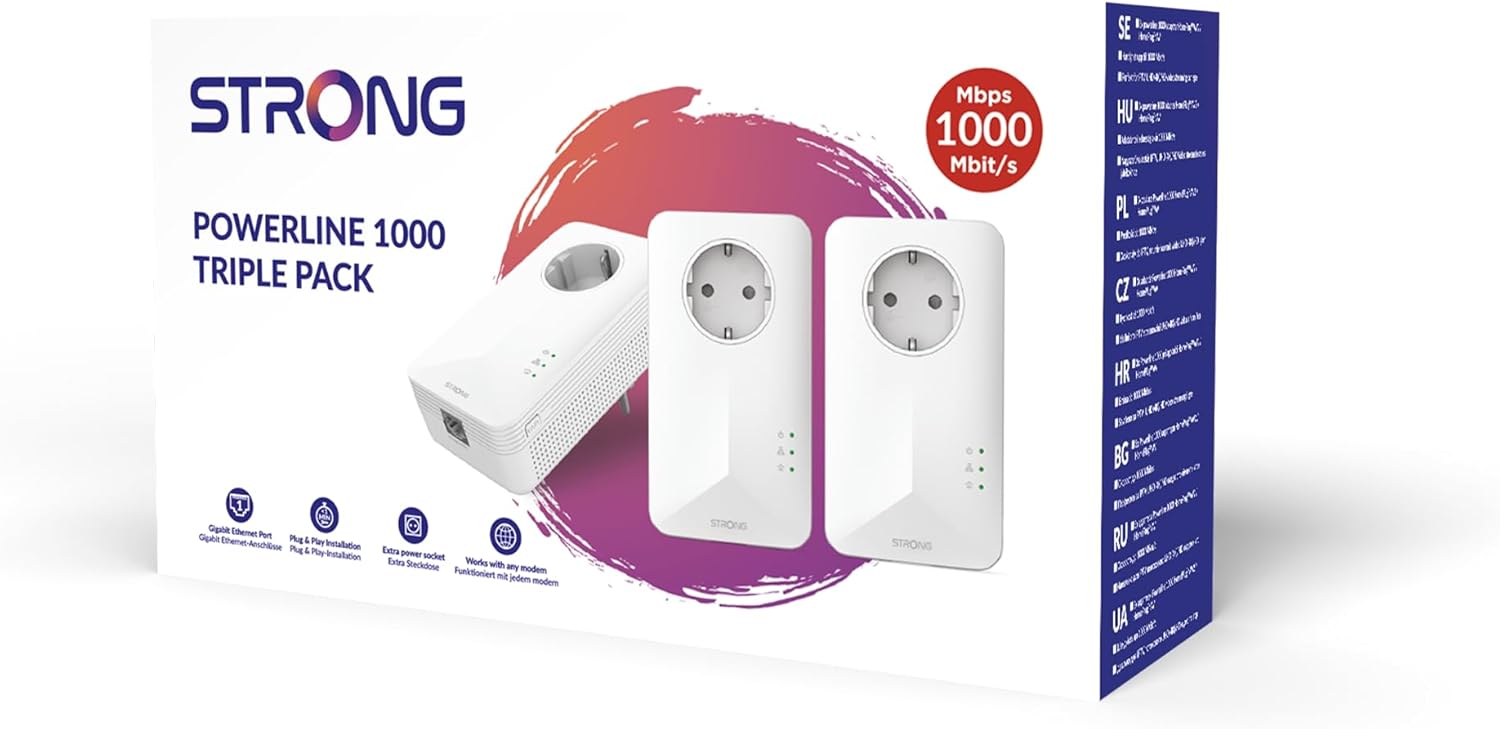
Figure 2: Product packaging indicating contents and features.
4. Setup Instructions
Follow these steps for a quick and easy setup:
- Connect the First Adapter: Plug one Powerline 1000 adapter into a power outlet near your internet modem or router. Connect an Ethernet cable from your modem/router to the Ethernet port on the Powerline adapter.

Figure 3: Ethernet port on the Powerline adapter.
- Connect the Second and Third Adapters: Plug the remaining two Powerline 1000 adapters into power outlets in the rooms where you need internet access. Ensure these outlets are on the same electrical circuit as the first adapter for optimal performance.

Figure 4: Powerline adapter with integrated power socket.
- Connect Devices: Use an Ethernet cable to connect your computer, smart TV, game console, or other network-compatible device to the Ethernet port on the second or third Powerline adapter.
- Verify Connection: The Powerline adapters should automatically establish a connection. Check the LED indicators on the adapters. A solid green Powerline LED indicates a successful connection.
Note: For best performance, plug Powerline adapters directly into a wall outlet. Avoid plugging them into power strips, surge protectors, or extension cords, as this can degrade performance.
5. Operating the Powerline Network
5.1. LED Indicators
Understand the status of your Powerline adapters through their LED indicators:
- Power LED (Lightbulb icon):
- Solid Green: Device is powered on.
- Off: Device is powered off.
- Powerline LED (House icon):
- Solid Green: Connected to a Powerline network with good signal quality.
- Flashing Green: Establishing a connection or in pairing mode.
- Off: Not connected to a Powerline network.
- Ethernet LED (Ethernet cable icon):
- Solid Green: Ethernet cable connected and active.
- Flashing Green: Data activity on the Ethernet port.
- Off: No Ethernet cable connected or no link.

Figure 5: LED indicators on the Powerline adapter.
5.2. Pairing for Security
While the adapters automatically connect, you can enhance security by pairing them. This creates a private encrypted network.
- Press the "Pair" button on one adapter for 1 second. The Powerline LED will start flashing.
- Within 2 minutes, press the "Pair" button on another adapter for 1 second. Its Powerline LED will also flash.
- Wait for the Powerline LEDs on both adapters to turn solid green, indicating successful pairing and a secure connection. Repeat for the third adapter.

Figure 6: Location of the 'PAIR' button.
6. Maintenance
To ensure the longevity and optimal performance of your Powerline adapters:
- Cleaning: Gently wipe the adapters with a soft, dry cloth. Do not use liquid cleaners or aerosols.
- Ventilation: Ensure the ventilation holes on the adapters are not blocked. Do not cover the devices.
- Environment: Keep the adapters away from direct sunlight, heat sources, and excessive moisture.
- Firmware Updates: Periodically check the Strong website for any available firmware updates for your model to ensure the best performance and security.
7. Troubleshooting
| Problem | Possible Cause | Solution |
|---|---|---|
| No Powerline connection (Powerline LED off) | Adapters are not on the same electrical circuit or are too far apart. Interference from other electrical devices. | Ensure all adapters are plugged directly into wall outlets. Try different outlets. Temporarily unplug other high-power appliances. Re-pair the adapters. |
| Slow connection speed | Electrical noise on the circuit. Adapters plugged into power strips. Distance between adapters. | Plug adapters directly into wall outlets. Avoid outlets near high-power appliances (e.g., washing machines, refrigerators). Try moving adapters closer. |
| Ethernet LED off | Ethernet cable not connected or faulty. Connected device is off or not functioning. | Check Ethernet cable connections. Try a different Ethernet cable. Ensure the connected device is powered on and working correctly. |
| Cannot pair adapters | Pairing button not pressed correctly or within the time limit. | Ensure you press the pairing button for exactly 1 second. Complete the pairing process for all adapters within 2 minutes. |
8. Specifications
| Feature | Detail |
|---|---|
| Model Number | POWERL1000TRIEUV2 |
| Standard | HomePlug AV2 / AV |
| Data Transfer Rate | Up to 1000 Mbit/s |
| Ethernet Ports | 1x Gigabit Ethernet LAN port |
| Security | 128-bit AES Encryption |
| Range | Up to 300 meters on electrical circuit |
| Power Consumption | Automatic power saving mode (up to 85% reduction) |
| Integrated Power Socket | Yes, up to 16A with noise filter |
| Color | White |
| Item Weight (each) | Approximately 0.7 Kilograms (1.54 pounds) |
| Manufacturer | Strong |
9. Warranty and Support
Strong products are designed for reliability and performance. For warranty information and technical support, please refer to the official Strong website or contact their customer service directly.
For the latest drivers, firmware, and support resources, visit: www.strong.tv/en/support
Please retain your proof of purchase for warranty claims.
Ask a question about this manual
Ask about setup, troubleshooting, compatibility, parts, safety, or missing instructions. Manuals+ will review the question and use this page’s manual context to help answer it.