
1. Introduction
Thank you for choosing the Moonshan 39-inch Desktop Belt Conveyor. This compact and versatile conveyor system is designed to enhance efficiency in various light-duty applications, including packaging, production lines, and home use. It features stepless speed adjustment and a durable PVC belt, making it a reliable addition to your workspace. Please read this manual thoroughly before operation to ensure safe and optimal performance.

Figure 1.1: Examples of Moonshan Desktop Belt Conveyor applications in various industries.
2. Safety Information
Always prioritize safety when operating any machinery. Failure to follow these safety guidelines may result in injury or damage to the equipment.
- Read the Manual: Familiarize yourself with all instructions and warnings before use.
- Power Source: Ensure the conveyor is connected to a compatible power source as specified.
- Stable Surface: Operate the conveyor on a stable, level surface to prevent tipping.
- Clear Area: Keep the area around the conveyor clear of obstructions and loose clothing.
- Load Capacity: Do not exceed the maximum load capacity of 11 pounds (5 kg). Overloading can damage the motor and belt.
- Emergency Stop: Know how to quickly disconnect power in an emergency.
- Children and Pets: Keep children and pets away from the operating conveyor.
3. Package Contents
Verify that all components are present in the package:
- Belt Conveyor Unit
- Mounting Brackets (pre-attached or separate)
- Speed Controller with Power Adapter
- Allen Wrenches (for assembly/adjustment)

Figure 3.1: Main components included with the Moonshan Desktop Belt Conveyor.
4. Setup Instructions
Follow these steps to set up your Moonshan Desktop Belt Conveyor:
4.1. Positioning the Conveyor
- Place the conveyor unit on a flat, stable desktop or workbench.
- Ensure the pre-attached brackets provide adequate stability. If not, adjust them using the provided Allen wrenches to secure the conveyor firmly.

Figure 4.1: The hidden motor design and solid roller ensure smooth and protected operation.
4.2. Connecting the Power and Speed Controller
- Locate the power input port on the conveyor unit.
- Connect the output cable from the speed controller to the conveyor's power input.
- Plug the power adapter into a standard electrical outlet.

Figure 4.2: The speed controller and power adapter connected to the conveyor motor.
5. Operating Instructions
The Moonshan Desktop Belt Conveyor is designed for straightforward operation.
5.1. Powering On and Off
- Once the power adapter is plugged in, the conveyor is ready for operation.
- To turn off, simply unplug the power adapter from the wall outlet.
5.2. Adjusting Belt Speed
- Use the rotary knob on the speed controller to adjust the belt speed.
- Turn the knob clockwise to increase speed and counter-clockwise to decrease speed. The speed adjustment is stepless, allowing for precise control.
- The maximum speed is approximately 4 inches per second.

Figure 5.1: Conveyor in operation, demonstrating its use for moving items.
5.3. Loading Items
- Place items gently onto the moving belt.
- Ensure items are within the conveyor's dimensions and do not exceed the 11-pound load capacity.

Figure 5.2: The conveyor can handle loads up to 11 pounds.
6. Maintenance
Regular maintenance ensures the longevity and optimal performance of your conveyor.
6.1. Cleaning the Belt
- Disconnect Power: Always unplug the conveyor before cleaning.
- Wipe Down: Use a damp cloth with mild soap to clean the PVC belt. The PVC material is waterproof and wear-resistant.
- Dry Thoroughly: Ensure the belt is completely dry before reconnecting power and operating.

Figure 6.1: The PVC belt is designed to be waterproof, flexible, and wear-resistant.
6.2. Belt Inspection
- Periodically inspect the belt for any signs of wear, tears, or damage.
- Check for proper belt tension. If the belt appears loose or too tight, consult the troubleshooting section or contact support.
7. Troubleshooting
If you encounter issues with your conveyor, refer to the following common problems and solutions:
| Problem | Possible Cause | Solution |
|---|---|---|
| Conveyor does not start | No power, loose connection, speed controller set to minimum. | Check power adapter connection, ensure outlet is functional, turn speed controller knob clockwise. |
| Belt moves unevenly or slips | Belt tension incorrect, foreign object, motor issue. | Inspect belt for obstructions, adjust belt tension if possible (refer to support if unsure), contact support if motor issue is suspected. |
| Unusual noise during operation | Foreign object, worn components, motor issue. | Disconnect power and inspect for foreign objects. If noise persists, contact support. |
| Speed adjustment not working | Faulty speed controller, motor issue. | Ensure connections are secure. If issue persists, contact support for replacement parts or assistance. |
8. Specifications
Detailed technical specifications for the Moonshan Desktop Belt Conveyor:
- Model: B0CCP8NSSJ
- Brand: Moonshan
- Product Dimensions: 39 inches (Length) x 6 inches (Width)
- Material: Polyvinyl Chloride (PVC) belt, Aluminum Alloy profiles
- Load Capacity: Up to 11 pounds (5 kg)
- Speed Adjustment: Stepless
- Motor: 320 RPM (for smooth, low-noise operation)
- Power: Compatible with standard electrical outlets (via included adapter)
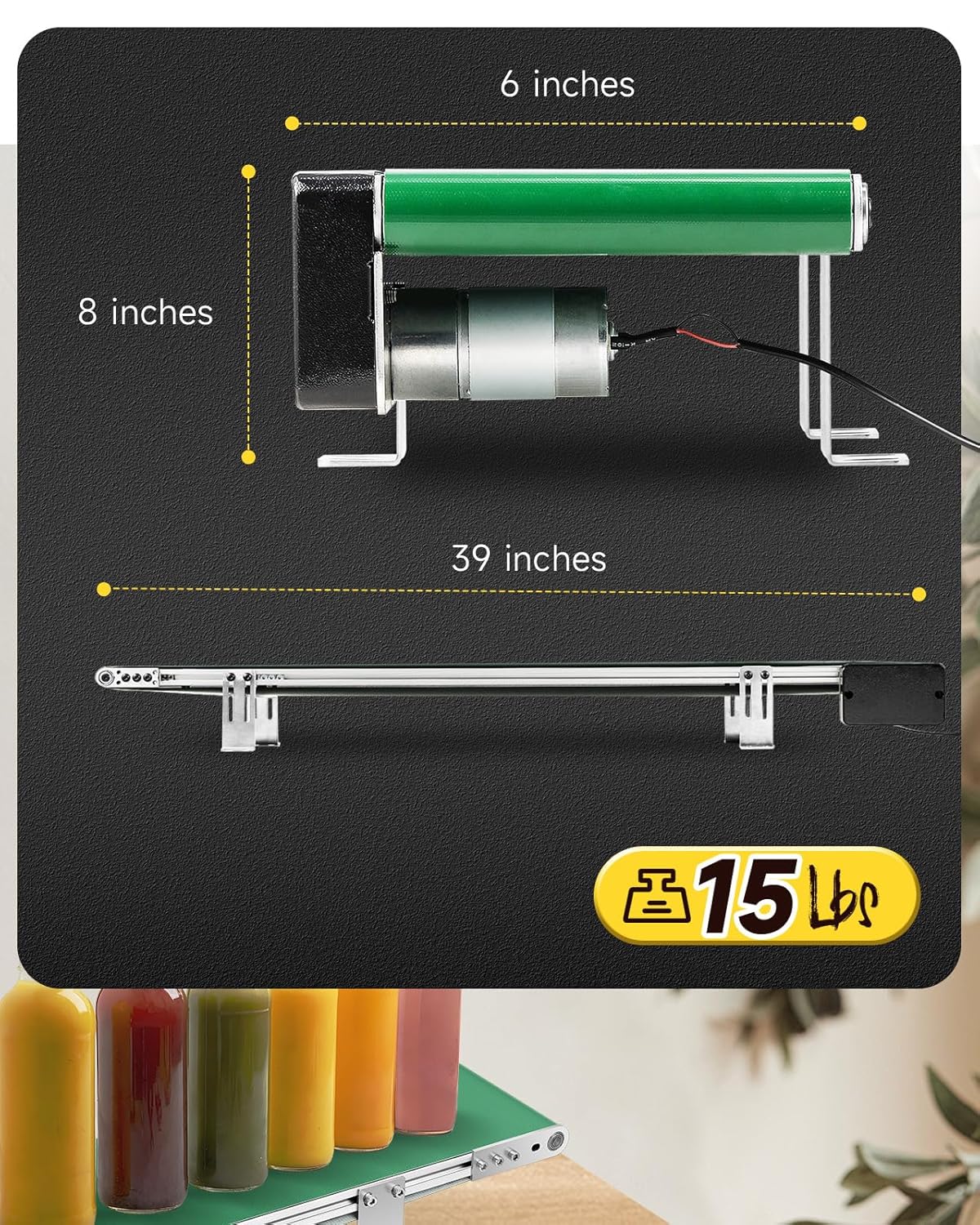
Figure 8.1: Key dimensions of the Moonshan Desktop Belt Conveyor.

Figure 8.2: Internal construction featuring all-metal gears and a pure copper coil for durability.

Figure 8.3: High-quality bearing brushes contribute to reliable performance.
9. Warranty and Support
Moonshan products are designed for quality and reliability. For warranty information, technical support, or to inquire about replacement parts, please contact Moonshan customer service through the retailer where the product was purchased or visit the official Moonshan store online.
Online Store: Moonshan Store on Amazon


