
1. Introduction
The CIRYCASE Laptop Stand B16 is designed to enhance your computing experience by providing an ergonomic and stable platform for your laptop. This adjustable aluminum stand promotes better posture, reduces physical strain, and facilitates efficient cooling for your device. Its foldable design ensures portability and convenient storage.
This manual provides essential information on setting up, operating, maintaining, and troubleshooting your CIRYCASE Laptop Stand B16.
2. Product Features
- Unique Single-Pole Design: Features an innovative single-pole structure for exceptional stability and a compact footprint on your desk. The high-quality pivot has undergone rigorous testing, enduring over 3,000 rotations to ensure reliable and smooth adjustments.
- Adjustable Height and Angle: Easily customize the stand's height (1.18 - 7.88 inches) and viewing angle to achieve an optimal ergonomic setup. This helps alleviate neck and back pain associated with poor posture. The stand allows for a 180-degree rotation and an adjustable angle up to 55 degrees.
- Robust Stability: Constructed from high-quality aluminum alloy with silicone pads on the platform, bumper, and base. This design ensures your laptop remains stable during use, preventing wobbling, slipping, or accidental falls.
- Efficient Cooling: The open panel design promotes natural airflow around your laptop, aiding in rapid heat dissipation and preventing overheating.
- Portable and Foldable: The stand's foldable design allows for easy transport and storage. It can be conveniently carried in a laptop bag, making it ideal for travel or commuting.
- Universal Compatibility: Compatible with a wide range of laptops and notebooks from 10 to 16 inches, including MacBook Pro, MacBook Air, DELL, Lenovo, and HP models.
3. Setup Instructions
- Prepare Your Workspace: Ensure your desk or surface is clean, flat, and stable before placing the stand.
- Unfold the Stand: Gently unfold the laptop stand from the middle. Avoid unfolding it from the sides to prevent undue stress on the pivot mechanism.
- Position the Stand: Place the unfolded stand on your prepared surface.
- Place Your Laptop: Carefully place your laptop onto the silicone-padded platform of the stand. Ensure it is centered and securely resting on the support.

Image 1: The CIRYCASE Laptop Stand B16 supporting a laptop, ready for use.
4. Operating Instructions
- Adjusting Height and Angle:
- Important: To ensure the safety of your device, always remove your laptop or tablet from the stand before adjusting its height or angle.
- Once the device is removed, gently hold the base and the platform, then adjust the stand to your desired height and tilt angle.
- After adjustment, carefully place your laptop back onto the stand.
- Ergonomic Positioning: Adjust the stand so that the top of your laptop screen is at or slightly below eye level. This helps maintain a neutral neck and spine position.

Image 2: Illustration of ergonomic posture achieved with the laptop stand, showing improved neck and back alignment.
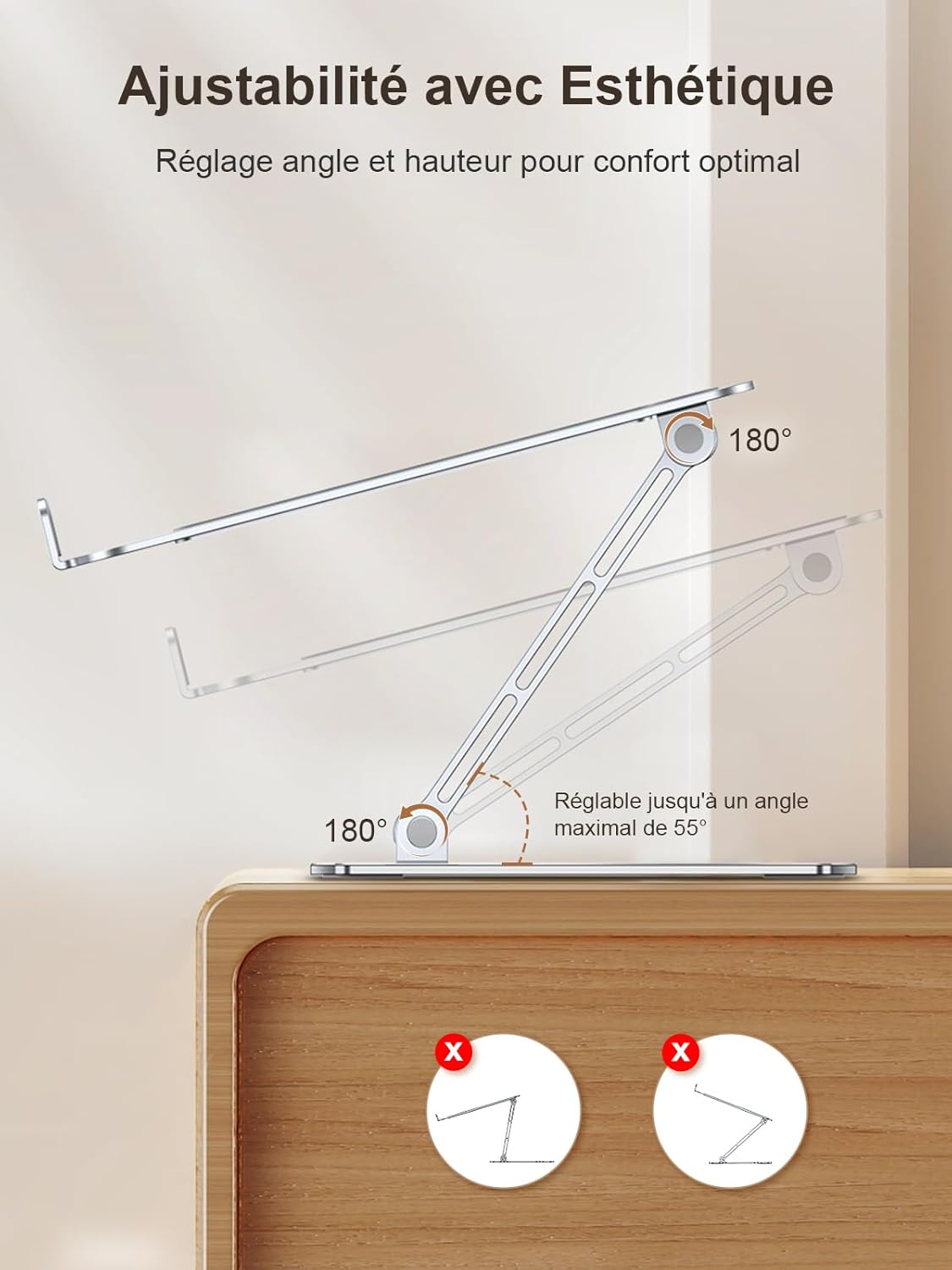
Image 3: Visual representation of the stand's adjustability, demonstrating its range of motion for height and angle.
5. Maintenance
- Cleaning: Wipe the stand with a soft, damp cloth to remove dust and smudges. Avoid using abrasive cleaners or solvents that could damage the finish.
- Storage: When not in use, fold the stand to its compact form and store it in a dry, clean place.
6. Troubleshooting
- Stand feels unstable:
- Ensure the stand is placed on a flat and stable surface.
- Verify that your laptop's weight does not exceed the maximum capacity of 8.8 pounds (4 kg).
- Check that the stand is fully unfolded and locked into position.
- Difficulty adjusting the stand:
- Ensure your laptop is removed from the stand before attempting to adjust its height or angle.
- Apply gentle, even pressure when adjusting the pivot points.
7. Important Precautions
- Always ensure your desk or surface is clean and flat before placing the stand.
- Unfold the laptop stand from the middle, not from the sides, to maintain structural integrity.
- Do not place items heavier than 8.8 pounds (4 kg) on the stand.
- For the safety of your device, remove your laptop or tablet from the stand before adjusting its height or angle.
8. Specifications
| Brand | CIRYCASE |
| Model Number | B16 |
| Material | Aluminum Alloy |
| Color | Silver |
| Weight Capacity | 8.8 lbs (4 kg) |
| Product Weight | 616g |
| Adjustable Height Range | 1.18 - 7.88 inches |
| Compatible Devices | MacBook Pro, MacBook Air, DELL, Lenovo, HP, Other laptops (10-16 inches) |

Image 4: The stand demonstrating universal compatibility with various laptop sizes and efficient use of desk space.
9. Warranty and Support
CIRYCASE is committed to providing innovative products and dedicated customer service. For any questions, concerns, or support needs regarding your Laptop Stand B16, please contact CIRYCASE customer support. Refer to your purchase documentation for specific warranty details.

Image 5: CIRYCASE Professional Support Team ready to assist customers.