
Brilvibera A19
Brilvibera A19 E26 Dimmable LED Light Bulb with Remote Control User Manual
Introduction
This manual provides detailed instructions for the installation, operation, and maintenance of your Brilvibera A19 E26 Dimmable LED Light Bulb with Remote Control. Please read this manual thoroughly before use to ensure proper function and safety.
Product Overview
The Brilvibera A19 E26 Dimmable LED Light Bulb offers versatile lighting solutions with adjustable brightness and color temperature. Designed for energy efficiency and a long lifespan, it provides convenient control via an included remote.

Image: The Brilvibera A19 E26 Dimmable LED Light Bulb shown alongside its dedicated remote control.
Key Features:
- Energy Efficiency: 9W LED bulb equivalent to a 60W incandescent bulb, designed for low power consumption and a long operational life.
- Adjustable Brightness: Smooth dimming from 1% to 100%.
- Adjustable Color Temperature: Selectable color temperatures from 2700K (warm white) to 6500K (cool white).
- High Color Rendering Index (CRI): CRI 85+ ensures vivid and natural color representation.
- Remote Control: Wireless control for brightness, color temperature, and preset modes.
- Long Lifespan: Rated for 25,000 to 35,000 hours of operation.

Image: Diagram illustrating key specifications of the Brilvibera A19 LED bulb, including E26 socket, 9W wattage, 805 lumens, 2700K-6500K color temperature, 25000-hour lifespan, and 0-100% brightness range.
Package Contents
Verify that all items are present in the package:
- Brilvibera A19 E26 Dimmable LED Light Bulb
- Remote Control (batteries not included)
Safety Information
- Always turn off the power supply before installing or removing the bulb.
- Do not use with standard dimmers; this bulb requires its dedicated remote control for dimming.
- Ensure the bulb is securely screwed into an E26 base fixture.
- This bulb is designed for indoor use only.
- Do not disassemble the bulb or remote control.
- Keep the remote control away from water and extreme temperatures.
Setup and Installation
- Power Off: Ensure the power to the light fixture is turned off at the switch before installation.
- Install Bulb: Carefully screw the Brilvibera A19 LED bulb into a standard E26 light socket until snug. Do not overtighten.
- Insert Remote Batteries: Open the battery compartment on the back of the remote control and insert two AAA batteries (not included), observing correct polarity.
- Power On: Turn on the power supply to the light fixture. The bulb should illuminate.
- Pairing (if necessary): The bulb and remote are typically pre-paired. If the remote does not control the bulb, turn the bulb off and on at the wall switch. Within 5 seconds of turning it on, press and hold the 'ON/OFF' button on the remote until the bulb flashes, indicating successful pairing.
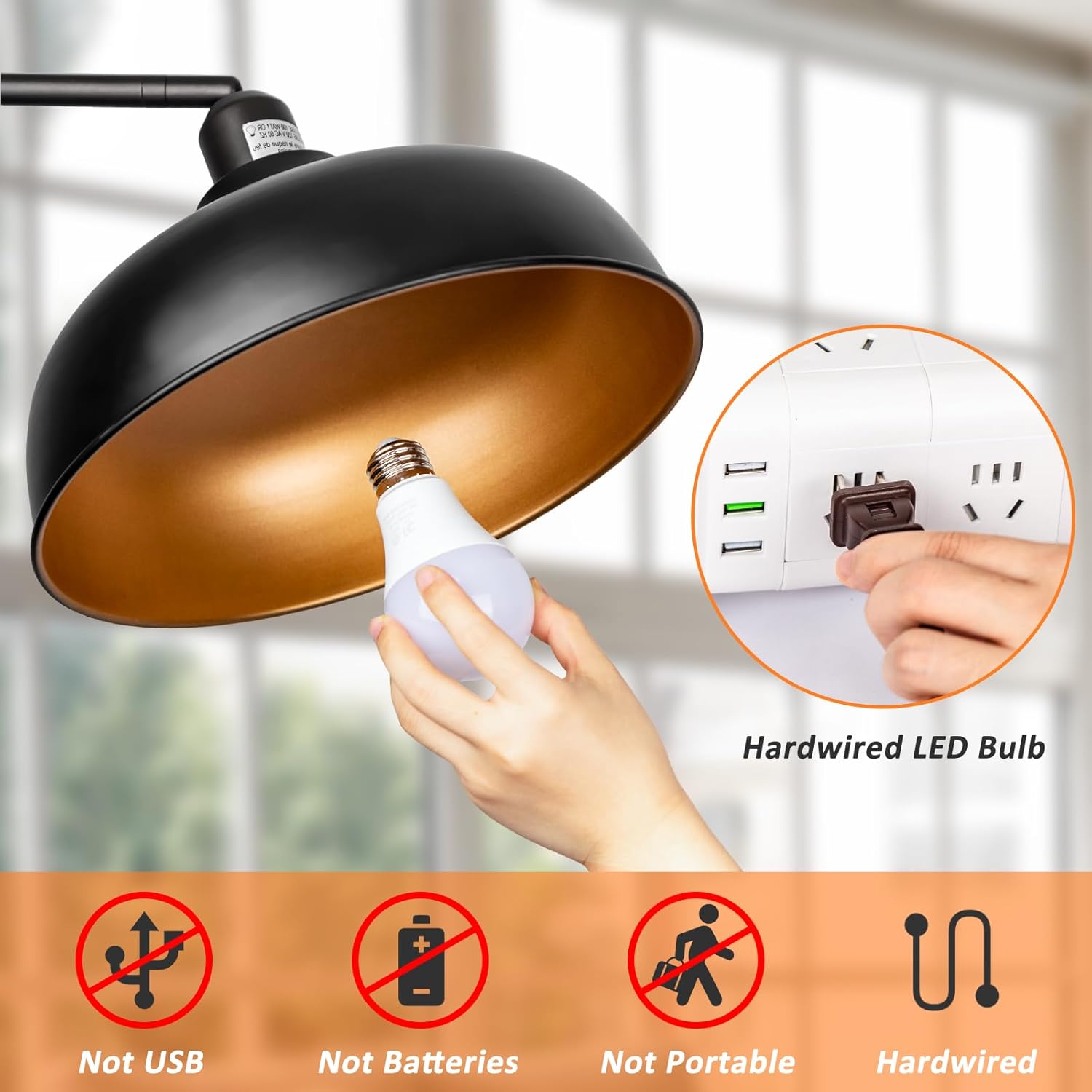
Image: A hand screwing the Brilvibera A19 LED bulb into a lamp fixture, demonstrating the installation process. Note that the bulb is hardwired and not portable.
Operating Instructions
The included remote control allows for full customization of your Brilvibera LED bulb. The remote has an effective range of up to 50 feet.
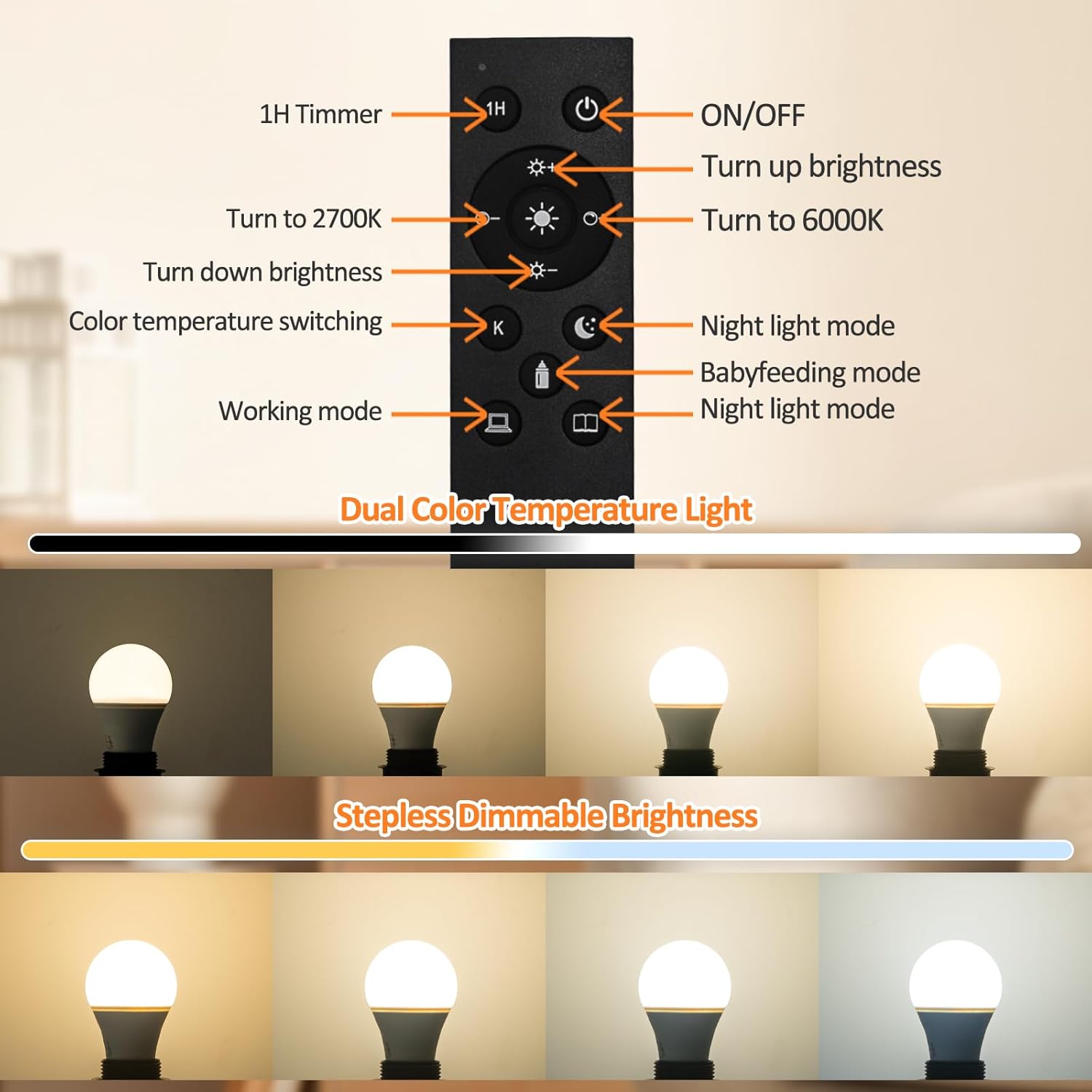
Image: Diagram of the remote control, labeling each button and its corresponding function for the Brilvibera A19 LED bulb.
Remote Control Functions:
- ON/OFF Button: Turns the light bulb on or off.
- Brightness Up (+): Increases the light brightness.
- Brightness Down (-): Decreases the light brightness.
- 2700K Button: Sets the color temperature to warm white (2700K).
- 6000K Button: Sets the color temperature to cool white (6000K).
- Color Temperature Switching (K): Cycles through preset color temperatures or allows fine-tuning.
- 1H Timer: Activates a 1-hour timer, after which the light will automatically turn off.
- Night Light Mode: Activates a low-brightness, warm light setting suitable for night use.
- Babyfeeding Mode: Provides a soft, gentle light setting.
- Working Mode: Sets the light to a bright, neutral white suitable for tasks.
- Reading Mode: Adjusts the light for optimal reading comfort.

Image: Visual representation of the 1-hour timer and various preset modes (Baby Feeding, Reading, Working, Night Light) available on the Brilvibera remote control.
Maintenance
- Cleaning: Ensure the bulb is off and cool before cleaning. Wipe with a soft, dry cloth. Do not use liquid cleaners.
- Battery Replacement: Replace remote control batteries when the remote's range decreases or it becomes unresponsive. Use two new AAA batteries.
- Storage: If storing the bulb for an extended period, remove the batteries from the remote control.
Troubleshooting
| Problem | Possible Cause | Solution |
|---|---|---|
| Bulb does not light up. | No power to the fixture, bulb not screwed in properly, bulb faulty. | Check power switch and circuit breaker. Ensure bulb is securely tightened. Test bulb in another working fixture. |
| Remote control is unresponsive. | Remote batteries are low or dead, remote is out of range, bulb and remote are not paired. | Replace remote batteries. Move closer to the bulb (within 50ft). Re-pair the remote with the bulb (see Setup and Installation). |
| Bulb flickers or dims unexpectedly. | Incompatible dimmer switch, unstable power supply. | Ensure no standard dimmer switches are used with this bulb. Check for stable power supply. |
| Cannot change color temperature or brightness. | Remote control issue, bulb not responding. | Check remote batteries and pairing. Power cycle the bulb (turn off and on at the wall switch) and try again. |
Specifications
| Feature | Detail |
|---|---|
| Brand | Brilvibera |
| Model Number | A19 |
| Light Type | LED |
| Bulb Shape Size | A19 |
| Bulb Base | E26 |
| Wattage | 9 Watts |
| Incandescent Equivalent | 60 Watts |
| Brightness | 805 Lumens |
| Color Temperature | 2700K - 6500K |
| Color Rendering Index (CRI) | 85+ |
| Voltage | 100-120 Volts AC, 60 Hz |
| Control Method | Remote Control |
| Average Lifespan | 25,000 - 35,000 Hours |
| Material | Acrylonitrile Butadiene Styrene (ABS) |
| Indoor/Outdoor Usage | Indoor |
| Product Dimensions | Standard A19 bulb size (approx. 4.4 inches height, 2.4 inches diameter) |
Warranty and Support
For warranty information or technical support, please refer to the product packaging or contact Brilvibera customer service through their official website or the retailer where the product was purchased. Keep your purchase receipt for warranty claims.
Ask a question about this manual
Ask about setup, troubleshooting, compatibility, parts, safety, or missing instructions. Manuals+ will review the question and use this page’s manual context to help answer it.