
Introduction
The KONGTEN NF-822 is a professional cable and network tester designed for locating and tracing various types of cables, including telephone cables, network cables, and power cables, in both visible and invisible environments. It features high voltage wire tracking, underground pipe detection, and advanced interference rejection for accurate results. This manual provides essential information for the safe and effective operation and maintenance of your NF-822 device.
Key Features
- Detects cable location in underground or invisible cables within a 0-0.5m range.
- Adjustable signal sensitivity for both transmitter and receiver.
- Adjustable probe length to suit various needs.
- Equipped with complete AC Interference Rejection for accurate tracking.
- Capable of tracing live cables (up to 220V) with socket protection to prevent burnout.
- Traces various cable types, including single conductors, 2-core, and multi-core cables.
- Includes an earphone for effective operation in noisy environments.
- Supports simultaneous use of cable lead and socket.
- Features a low battery indicator function.
- Powered by a rechargeable Lithium battery for extended use.
Product Components
Familiarize yourself with the main components of the NF-822 Cable and Network Tester:

Image: Labeled diagram of the NF-822 transmitter and receiver units, showing the probe, power indicator, earphone jack, status indicator, power button, sensitivity dial, charging ports, telephone cable adaptor, alligator clips, and speaker.
- Transmitter: The unit that sends the signal into the cable.
- Receiver: The handheld unit used to detect the signal from the transmitter.
- Probe: Flexible extension for precise signal detection.
- Sensitivity Dial: Adjusts the detection sensitivity on the receiver.
- Power Indicator: Lights to show the device is on.
- Charging Ports: For recharging the internal battery.
- Telephone Cable Adaptor: For connecting to telephone lines.
- Alligator Clips: For connecting to various cable types.
- Earphone Jack: For connecting an earphone for use in noisy environments.
Setup and Charging
Battery Charging
The NF-822 is equipped with a rechargeable Lithium battery. Ensure the battery is fully charged before first use to maximize performance and battery life.
- Connect the charging cable to the charging port on the transmitter unit.
- Plug the other end of the charging cable into a suitable power source.
- During charging, the "CHG" indicator light will turn red.
- Once fully charged, the "CHG" indicator will turn green.
- A full charge typically takes approximately 8 hours.
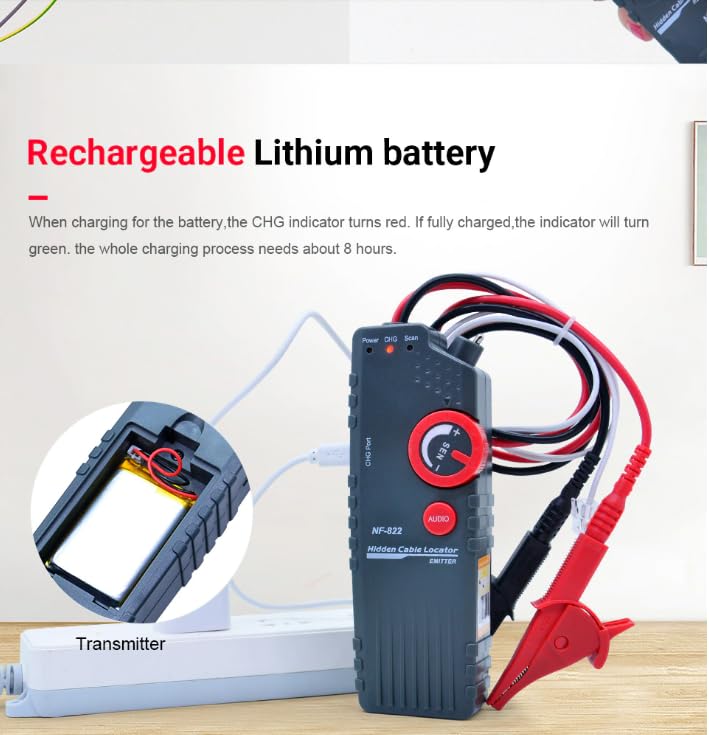
Image: The NF-822 transmitter connected to a power source for charging. The "CHG" indicator is visible, illustrating the charging process.
Initial Connection
Before operation, connect the transmitter to the cable you wish to trace using the appropriate connectors (alligator clips or telephone cable adaptor).
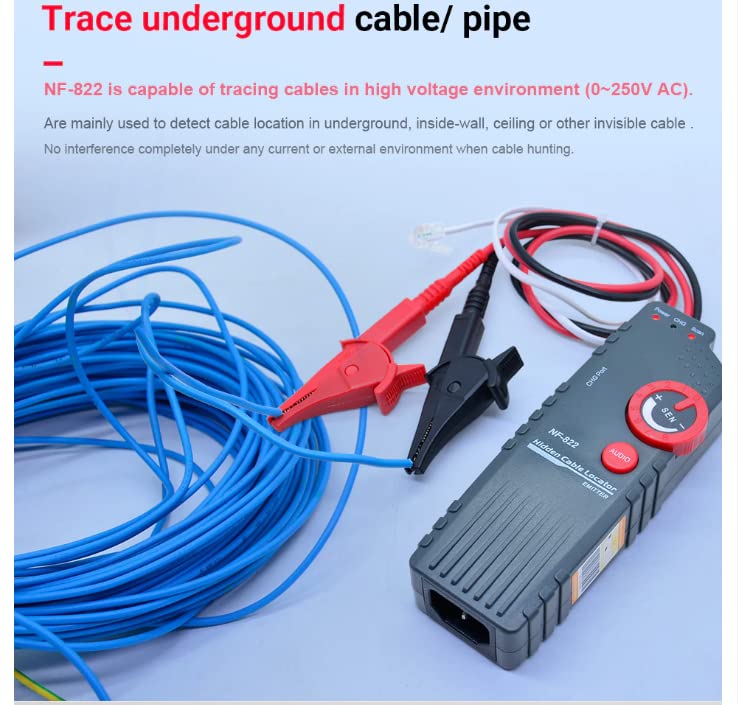
Image: The NF-822 transmitter connected to a bundle of blue cables, demonstrating a typical setup for tracing underground or hidden cables.
Operating Instructions
Cable Tracing and Location
- Connect Transmitter: Connect the transmitter to the cable to be traced. Ensure a secure connection using alligator clips or the telephone cable adaptor.
- Power On: Turn on both the transmitter and receiver units.
- Adjust Sensitivity: On the receiver, adjust the sensitivity dial (labeled "SEN") to an appropriate level. Start with a lower sensitivity and increase as needed.
- Scan for Cable: Use the receiver's probe to scan the area where the cable is suspected to be located. The receiver will emit an audible signal or visual indication when it detects the signal from the transmitter.
- Pinpoint Location: Move the probe slowly to pinpoint the exact location of the cable. The signal strength will be strongest directly over the cable.
- Adjust Probe Length: The probe length can be adjusted for optimal reach and precision in different environments.
- Use Earphone (Optional): In noisy environments, connect an earphone to the receiver for clearer signal detection.
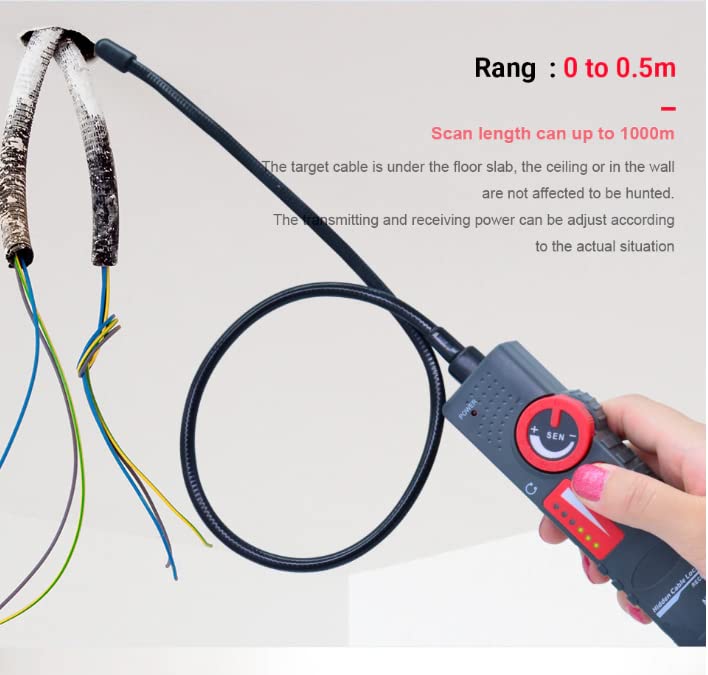
Image: The NF-822 receiver with its probe extended, being used to detect a cable hidden within a wall, illustrating its capability to locate cables up to 0.5m deep.
Tracing Live Cables (up to 220V)
The NF-822 can safely trace live cables up to 220V AC. Always exercise extreme caution when working with live circuits.
- Ensure the cable is within the specified voltage limit (<220V).
- Connect the transmitter to the live cable using the appropriate socket or clips, ensuring a secure and insulated connection.
- Proceed with tracing as described above, adjusting sensitivity as needed. The device is designed with protection to avoid burnout.
Maintenance
- Cleaning: Wipe the device with a soft, dry cloth. Do not use abrasive cleaners or solvents.
- Storage: Store the NF-822 in a cool, dry place away from direct sunlight and extreme temperatures.
- Battery Care: Recharge the battery regularly, even if the device is not in frequent use, to maintain battery health. Avoid fully discharging the battery for extended periods.
- Low Battery Indicator: When the low battery indicator activates (3.6V), recharge the unit promptly to ensure continued accurate operation.
Troubleshooting
| Problem | Possible Cause | Solution |
|---|---|---|
| No signal detected by receiver. | Transmitter not powered on, low battery, incorrect connection, receiver sensitivity too low, cable too deep. | Ensure transmitter is on and charged. Check cable connections. Increase receiver sensitivity. Verify cable depth is within detection range (0-0.5m). |
| Weak or intermittent signal. | Low battery, high interference, receiver sensitivity too low, loose connection. | Recharge batteries. Adjust receiver sensitivity. Ensure connections are secure. Move away from strong electromagnetic interference sources. |
| Transmitter not turning on. | Battery fully discharged or faulty. | Connect to charger and allow sufficient charging time (approx. 8 hours). If still not powering on, contact customer support. |
| Inaccurate cable location. | High interference, rapid movement of receiver, incorrect sensitivity setting. | Ensure AC Interference Rejection is active. Move the receiver slowly and steadily. Adjust sensitivity for optimal detection. |
Specifications

Image: A visual representation of the NF-822 units alongside a list of key technical specifications.
| Parameter | Value |
|---|---|
| Model Number | NF-822 |
| Signal Detect Depth | 0-0.5 meters (for underground/invisible cables) |
| Scan Length | Up to 1000 meters |
| Over Voltage Protection | 250V AC |
| Maximum Signal Voltage | 18V |
| Low Voltage Indication | 3.6V |
| Maximum Working Current | 130mA |
| Battery Type | 3.7V 1800mAh Lithium Polymer (rechargeable) |
| Charging Time | Approximately 8 hours |
| Product Dimensions | 29 x 11 x 10 cm |
| Item Weight | 0.6 Kilograms |
| Certifications | CE, EMC, ISO 9001, RoHS, UL |