
Introduction and Overview
This manual provides essential information for the safe and effective use of your eTORK 3/8” Drive Torque Wrench. Designed for precision and durability, this tool features a magnetic locking system and a dual scale for accurate measurements.
Key Features:
- Precision Measurement: Delivers ±4% accuracy across a 20-250 in.-lb. (3-28 N.m) range. Features an easy-to-read dual scale with high-contrast markings.
- Magnetic Locking System: An innovative design with a secure locking mechanism prevents settings from changing during use. The adjustment collar locks firmly in place with an audible click.
- Clear Notification Signal: Provides distinct tactile and audible feedback when the set torque value is reached.
- Versatile Applications: Ideal for moderate torque projects such as motorcycle maintenance, small machinery repair, and is compatible with standard socket wrench sets.
- Complete Toolkit Solution: Includes a certificate of calibration and a protective storage case.
Setup
Before first use, ensure the torque wrench is clean and free from any debris. Familiarize yourself with the components and adjustment mechanism.
- Unpacking: Carefully remove the torque wrench from its protective storage case. Inspect the tool for any signs of damage.
- Understanding the Scale: The wrench features a dual scale for inch-pounds (in.-lb.) and Newton-meters (N.m). Identify the desired measurement unit for your application. The high-contrast laser-etched scale ensures clear readability.
- Setting the Torque Value:
- Locate the adjustment collar near the handle.
- Pull the adjustment collar back to unlock it.
- Rotate the handle to align the desired torque value on the main scale with the zero mark on the micrometer scale. For intermediate values, rotate the micrometer scale until the desired value aligns with the main scale line.
- Once the desired torque is set, push the adjustment collar forward until it clicks into place, securing the setting. This magnetic locking system prevents accidental changes during use.
- Attaching a Socket: Press the push-button socket release on the ratchet head and firmly attach the appropriate 3/8-inch drive socket for your fastener.
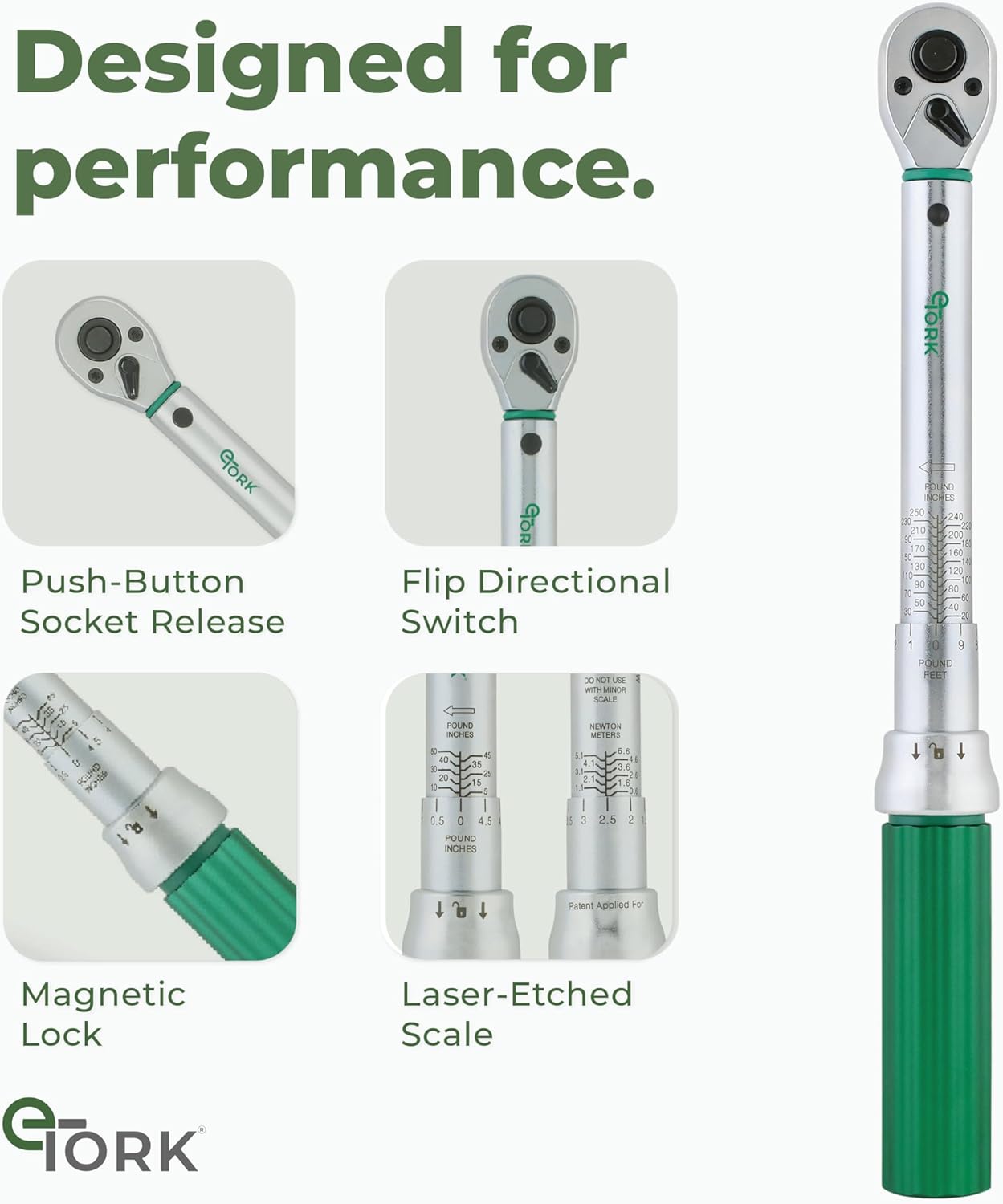
Image: Close-up of the torque wrench's adjustment collar and laser-etched scale, demonstrating how to set the torque.
Operating Instructions
Follow these steps to correctly apply torque using your eTORK wrench.
- Directional Switch: Use the flip directional switch on the ratchet head to select the tightening (clockwise) or loosening (counter-clockwise) direction. Ensure it is set for tightening when applying torque.
- Applying Torque: Place the socket onto the fastener. Apply steady, increasing pressure to the handle in the tightening direction. Do not use extension bars on the handle to increase leverage, as this can affect accuracy.
- Reaching Set Torque: Continue applying pressure until you feel and hear a distinct "click" from the wrench. This indicates that the preset torque value has been reached. Stop immediately after the click.
- Releasing the Fastener: To remove the socket, press the push-button socket release.

Image: Demonstrating the use of the torque wrench on a vehicle wheel.
Maintenance
Proper maintenance ensures the longevity and accuracy of your torque wrench.
- Storage: After each use, reset the torque wrench to its minimum setting (20 in.-lb. or 3 N.m) before storing it in its protective case. This relieves tension on the internal spring mechanism, preserving calibration.
- Cleaning: Wipe the wrench clean with a dry, soft cloth after each use. Do not use solvents or harsh chemicals, as these can damage the finish or internal components.
- Calibration: Torque wrenches are precision instruments and require periodic recalibration to maintain accuracy. Refer to the included certificate of calibration for recommended service intervals.
- Avoid Over-Torquing: Never use the torque wrench as a standard ratchet or for breaking loose fasteners. This can damage the internal mechanism and affect accuracy.

Image: Detail of the magnetic locking collar, which should be reset to the lowest setting for storage.
Troubleshooting
If you encounter issues with your torque wrench, consider the following:
- No Click Sound:
- Ensure the torque setting is not below the minimum range of the wrench.
- Verify the adjustment collar is fully locked in place after setting the torque.
- Apply steady, increasing pressure. A quick, jerky motion might prevent the click from being felt or heard.
- Inaccurate Readings:
- Check if the wrench has been dropped or subjected to impact. This can affect calibration.
- Ensure the wrench is reset to its minimum setting after each use and stored properly.
- Consider professional recalibration if accuracy issues persist.
- Stiff Adjustment:
- Ensure the adjustment collar is pulled back completely before attempting to rotate the handle.
- Clean any dirt or debris from the adjustment mechanism.
Specifications
| Feature | Detail |
|---|---|
| Brand | eTORK |
| Model Number | MC2250 |
| Drive Size | 3/8-Inch |
| Torque Range | 20-250 in.-lb. (3-28 N.m) |
| Accuracy | ±4% |
| Material | Alloy Steel |
| Item Length | 13 Inches |
| Item Weight | 2.01 pounds |
| Head Style | Fixed Square |
| Operation Mode | Manual |
| Ratcheting | Yes |
| Included Components | Protective Carrying Case, Certificate of Calibration |
Warranty and Support
eTORK is committed to providing high-quality tools. Your torque wrench includes a certificate of calibration to ensure its accuracy upon purchase.
- Calibration Services: The company offers recalibration services to maintain the accuracy of your tool over time.
- Protection Plans: Optional protection plans are available for extended coverage. Please refer to your purchase documentation for details on available plans and terms.