
Introduction
Thank you for choosing the Cozion Smart Bird Feeder Camera. This device allows you to observe and record wild bird activities with its 1080p HD camera, automatic video and photo capture, and night vision capabilities. This manual provides detailed instructions for setup, operation, and maintenance to ensure optimal performance and enjoyment.
Safety Information
- Use only appropriate bird food.
- Securely fix the bird feeder to prevent it from falling or being stolen.
- Avoid disturbing birds while they are feeding.
- Ensure the device is installed in a stable location to prevent injury or damage.
- Keep the device away from extreme temperatures and direct sunlight for prolonged periods.
Package Contents
Please check the package for the following items:
- Smart Bird Feeder Camera
- Camera Module
- 32GB Memory Card
- USB Cable
- Strap for mounting
- Handlebar Mount
- Handlebar Mount Adaptor
- Water Sink / Hummingbird Feeder attachment
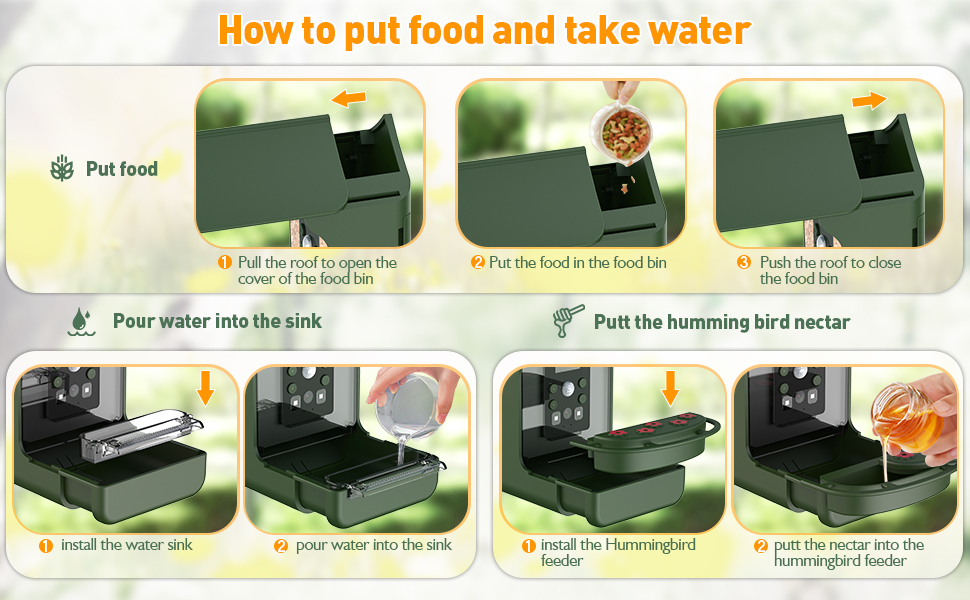
Figure 1: Included components of the Cozion Smart Bird Feeder Camera.
Setup
1. Charging the Battery
The bird feeder camera is equipped with a built-in 1000 mAh rechargeable lithium battery. Before first use, fully charge the device.
- Locate the charging port on the device, usually protected by a silicone cover.
- Uncover the silicone protective shell.
- Connect the provided USB cable to the charging port and to a 5V-1A/1.5A/2A USB power adapter (not included).
- Allow the device to charge until the charging indicator light (if present) indicates a full charge.

Figure 2: Charging the 1000 mAh rechargeable battery.
2. Inserting the Memory Card
The camera comes with a 32GB memory card for storing photos and videos.
- Locate the memory card slot on the side of the camera module.
- Gently insert the 32GB memory card into the slot until it clicks into place. Ensure correct orientation.
Installation
The Cozion Smart Bird Feeder Camera offers versatile installation options using either straps or brackets.
Using Straps
- Thread the provided strap through the designated slots on the back of the bird feeder.
- Wrap the strap around a tree trunk or pole.
- Securely fasten the strap to hold the feeder firmly in place.
Using Brackets
- Attach the handlebar mount adaptor to the threaded insert on the back of the bird feeder.
- Connect the handlebar mount to the adaptor.
- Secure the bracket to a suitable surface like a wall or a sturdy branch using appropriate screws (not always included, check package contents).
Video 1: Demonstrates two types of installation methods for the bird feeder camera: using straps to attach to a tree and using brackets for a more rigid mount.
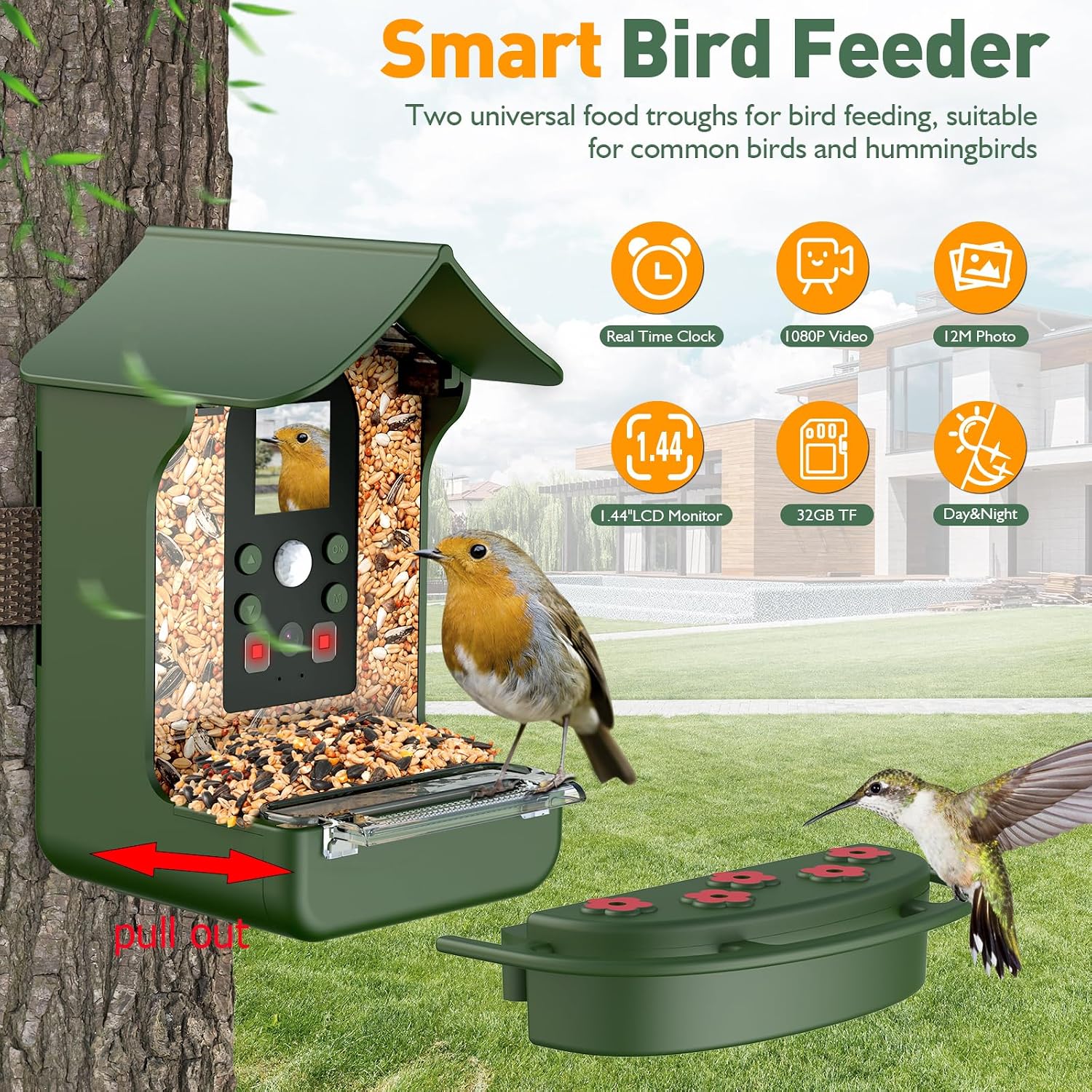
Figure 3: Bird feeder camera installed on a tree, showcasing its main features.
Operation
1. Filling the Feeder
The feeder is designed for easy refilling of bird seeds and water.
- For Bird Food: Pull the roof of the feeder to open the cover of the food bin. Pour bird food into the bin. Push the roof back to close.
- For Water: Install the water sink attachment. Pour water into the sink.
- For Hummingbird Nectar: Install the hummingbird feeder attachment. Pour nectar into the hummingbird feeder.
Figure 4: Instructions for filling the bird feeder with food, water, and hummingbird nectar.
2. Camera Modes and Features
The camera offers various modes to capture bird activities.
- 1080p HD Camera: Captures clear photos and videos of birds.
- PIR Motion Detection: Automatically senses birds and triggers photo/video recording within a 10m range.
- Day & Night Mode: Equipped with 940nm IR lights for clear observation even in dark environments.
- 1.44" LCD Monitor: Allows for real-time viewing and playback directly on the device.

Figure 5: PIR Motion Detection capabilities.

Figure 6: Day and Night vision capabilities.
3. Recording Modes
Choose from three distinct recording modes:
- Camera Mode: The PIR sensor detects an object, and the camera automatically takes 3/5/10 pictures.
- Video Mode: The PIR sensor detects an object, and the camera automatically records 10s/30s/1min/3min videos.
- Photo + Video Mode: The PIR sensor detects an object, and the camera automatically takes 3/5/10 photos followed by 10s/30s/1min/3min videos.

Figure 7: Available camera recording modes.
4. Playback and Data Transfer
You can view recorded files directly on the device or transfer them to a computer.
- On-Device Playback: Use the UP/DOWN buttons on the camera module to navigate through files. Press the OK button to start/stop playing videos. Press the Mode button to exit video viewing.
- Computer Transfer: Connect the bird feeder camera to your computer using the USB cable. The device will appear as a removable drive, allowing you to access and transfer recorded videos and photos.

Figure 8: Connecting the bird feeder camera to a computer for data transfer.
Maintenance
To ensure the longevity and optimal performance of your Cozion Smart Bird Feeder Camera, follow these maintenance guidelines:
- Cleaning: Regularly clean the feeder trays and camera lens to prevent residue buildup and ensure clear recordings. Use a soft, damp cloth for cleaning. Do not use harsh chemicals.
- Weather Protection: The feeder has an IP65 waterproof design, making it suitable for outdoor use in various weather conditions. However, for extreme weather, consider bringing the device indoors or providing additional shelter.
- Battery Care: Recharge the battery as needed. Avoid completely draining the battery frequently to prolong its lifespan.
- Memory Card: Periodically back up your recordings and format the memory card to maintain optimal performance.

Figure 9: IP65 Waterproof Design for outdoor use.
Troubleshooting
If you encounter issues with your Cozion Smart Bird Feeder Camera, please refer to the following common solutions:
- Device not turning on: Ensure the battery is fully charged. Check the power button.
- Poor image/video quality: Clean the camera lens. Ensure there is adequate lighting (or that night vision is active if it's dark).
- Motion detection not working: Check the PIR sensor settings. Ensure the detection range is appropriate for your setup.
- Cannot access files on computer: Ensure the USB cable is properly connected. Try a different USB port or cable.
- Short battery life: Ensure the battery is fully charged. Reduce recording frequency or video length if possible.
If the problem persists, please contact customer support for further assistance.
Specifications
| Brand | Cozion |
| Model Number | C93077 |
| Target Species | Birds |
| Recommended Uses | Seeds |
| Material | Acrylonitrile Butadiene Styrene (ABS) |
| Special Feature | Bird Feeder with Camera |
| Mounting Type | Wall Mount (also supports strap mounting) |
| Product Dimensions (L x W x H) | 13.5L x 12W x 17.8H centimeters |
| Power Source | Battery Powered (1000 mAh rechargeable) |
| Included Components | Bird Feeder, Camera, Memory Card |
| Color | Green |
| GTIN / UPC | 717021037808 |

Figure 10: Product dimensions.
Warranty and Support
The Cozion Smart Bird Feeder Camera comes with a warranty. If you encounter any questions or require assistance with the product, please contact our customer service. We are committed to resolving any issues you may have.
For support, please refer to the contact information provided with your purchase or visit the official Cozion website.