
1. Introduction
This manual provides essential information for the proper setup, operation, and maintenance of your LIKARVA 48-Key Electronic POS Cash Register System. Please read this manual thoroughly before using the product to ensure safe and efficient operation. Keep this manual for future reference.
2. Safety Information
- Power Supply: Use only the specified power supply (100V-240V, 50-60Hz). Ensure the power outlet is properly grounded.
- Environmental Conditions: Operate the cash register within an ambient temperature range of 0°C to +40°C (0°F to 100°F) and a relative humidity of less than 90%. Avoid extreme temperatures and high humidity.
- Placement: Place the unit on a stable, flat surface. Avoid placing it near water or in direct sunlight.
- Ventilation: Do not block ventilation openings.
- Cleaning: Disconnect power before cleaning. Use a soft, dry cloth. Do not use liquid cleaners or aerosols.
- Intended Use: This POS system is suitable for small businesses, restaurants, supermarkets, wholesale markets, convenience stores, bakeries, clothing stores, and milk tea stores. It is not suitable for pharmacies.
3. Package Contents
Verify that all items listed below are included in your package:
- Cash Register Unit x 1
- Data Cable (USB) x 1
- Shift Keys x 6
- Cash Box Keys x 2
- Register Paper Roll x 1
- Driver CD x 1
- English Manual x 1

Figure 3.1: Package Contents
4. Product Overview
The LIKARVA Electronic POS Cash Register is designed for efficient transaction processing and reporting. Familiarize yourself with its main components:

Figure 4.1: Cash Register Components
- Main Screen: Displays transaction details and operational information.
- Customer Display Screen: Shows transaction totals to the customer.
- Thermal Printing Paper Storage Area: Holds the paper roll for receipts.
- Sales File Keyboard: 48-key layout for inputting sales data, PLUs, and functions.
- Banknote Verification Function: Integrated feature for checking currency.
- Control Gear: Key-operated switch for different operational modes.
- Premium Cashbox: Secure drawer for cash and coins, with 4 bill and 4 coin compartments.

Figure 4.2: Cash Register with Open Drawer

Figure 4.3: Front View of the Cash Register
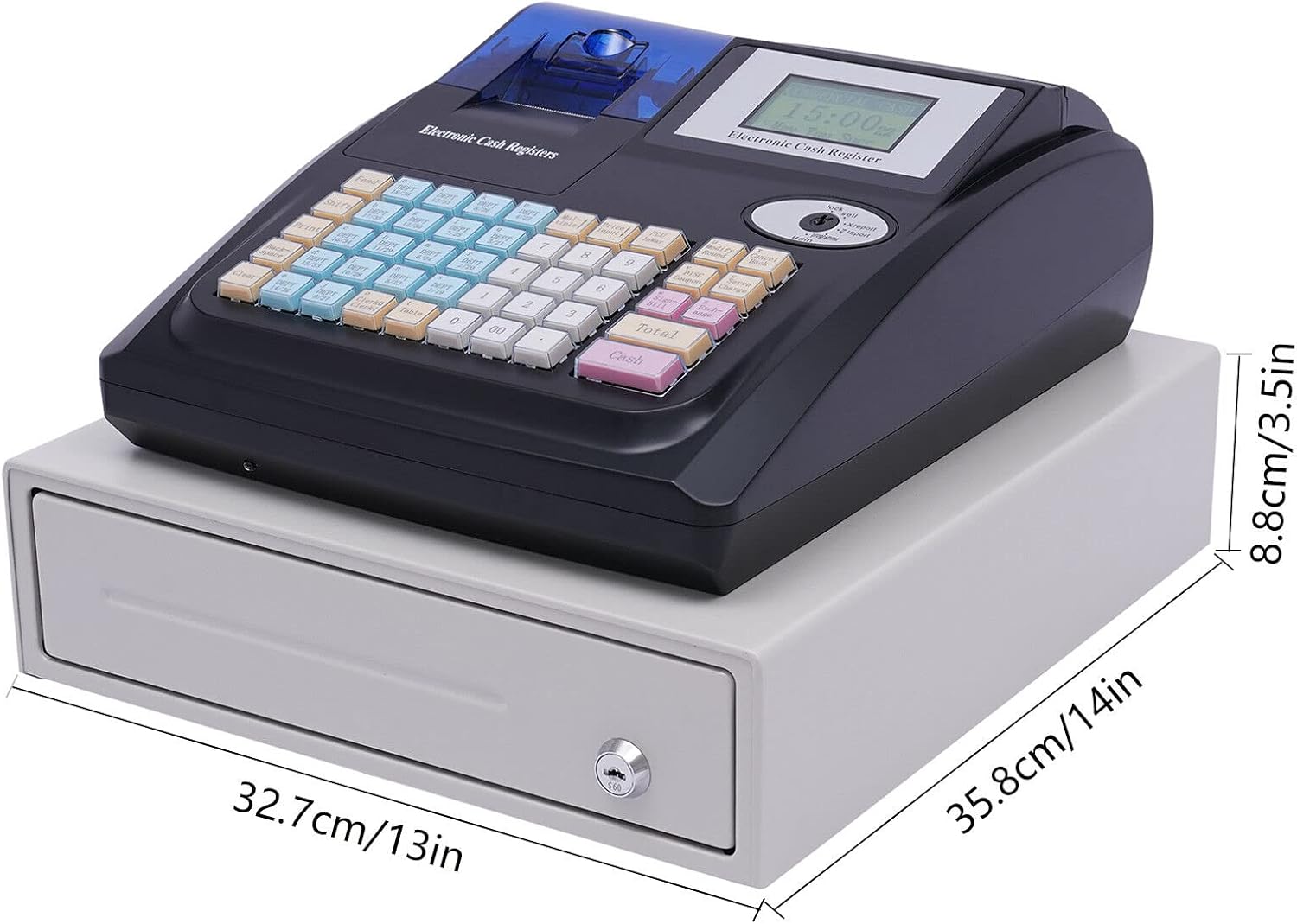
Figure 4.4: Cash Register Dimensions
5. Setup
5.1 Power Connection
- Ensure the cash register is placed on a stable surface.
- Connect the power cable to the power port at the rear of the unit.
- Plug the power cable into a compatible 100V-240V, 50-60Hz electrical outlet.
- Flip the power switch (located at the rear) to the 'ON' position.
5.2 Paper Roll Installation
- Open the thermal printing paper storage area cover.
- Insert the paper roll, ensuring the paper feeds correctly from the bottom and out through the top slot.
- Close the cover securely.

Figure 5.1: Paper Roll Installation
5.3 Connecting Peripherals
The cash register features various ports for connecting external devices:

Figure 5.2: Rear Ports
- USB Port: Connect the provided USB data cable to a computer for data import/export and programming.
- RS232 Ports (x2): Connect external devices such as barcode scanners or small ticket printers for enhanced functionality.
Use the provided Driver CD to install necessary drivers on your computer for proper communication.
6. Operating Instructions
6.1 Key Functions and Modes
The cash register features a 48-key keyboard and a control gear with 6 positions and 3 types of keys for different operational modes and access levels. This dual management system helps prevent unauthorized actions.
6.2 Programming PLUs and Departments
The system supports up to 10,000 Price Look-Up (PLU) codes and 36 departments. Refer to the detailed programming instructions in the included English manual for setting up product prices, names, and department assignments. The Driver CD may contain software for easier programming via computer.
6.3 Basic Sales Operations
The cash register supports various transaction modes, including:
- Standard Sales
- Wholesale Transactions
- Discount Sales
- Multiplication Sales
- Temporary Price Sales
Each transaction can handle up to 200 sales items. Detailed steps for each transaction type are provided in the comprehensive English manual.
6.4 Reporting Functions
The cash register records daily sales flow, returns, and discount logs. It can generate various reports to provide timely and clear account data:
- Register Reports
- Department Reports
- PLU Reports
- Time Reports
- Daily Reports
- Monthly Reports
Consult the English manual for instructions on how to access and print these reports.
7. Maintenance
7.1 Cleaning
- Always turn off and unplug the cash register before cleaning.
- Use a soft, dry, lint-free cloth to wipe the exterior surfaces.
- For stubborn dirt, slightly dampen the cloth with water or a mild, non-abrasive cleaner. Do not spray liquids directly onto the unit.
- Clean the display screen gently with a screen-safe cleaning solution and a microfiber cloth.
- Regularly clear any dust or debris from the printer area.
7.2 General Care
- Avoid dropping or subjecting the unit to strong impacts.
- Do not attempt to disassemble or repair the unit yourself. Refer to qualified service personnel.
- Ensure the cash drawer is not forced open or closed.
8. Troubleshooting
If you encounter issues with your cash register, try the following basic troubleshooting steps:
- No Power: Check if the power cable is securely connected and the power switch is 'ON'. Verify the power outlet is functional.
- Printer Not Printing: Ensure the paper roll is installed correctly and there is enough paper. Check for any paper jams.
- Keys Not Responding: Ensure the control gear is in the correct operational mode. If specific keys are unresponsive, gently clean around them.
- Connectivity Issues (USB/RS232): Ensure cables are securely connected. Reinstall drivers from the provided CD if necessary.
- Cash Drawer Not Opening: Check if the cash box keys are used correctly or if the electronic release mechanism is functioning. Do not force the drawer open.
For more complex issues or error codes, please refer to the detailed troubleshooting section in the included English manual or contact customer support.
9. Specifications
| Feature | Specification |
|---|---|
| Brand | LIKARVA |
| Model | POS Cash Register |
| Keyboard | 48 Keys |
| PLU Capacity | 10,000 |
| Clerk Capacity | 50 |
| Department Capacity | 36 |
| Voltage | 100V-240V, 50-60Hz |
| Power Consumption | 40W |
| Environmental Temperature | 0°C to +40°C (0°F to 100°F) |
| Relative Humidity | <90% |
| Gross Weight | 7.65 kg (16.87 lbs) |
| Net Weight | 7 kg (15.43 lbs) |
| Cash Box Size | 32.7 × 35.8 × 8.8 cm (13 × 14 × 3.5 inches) |
| Drawer Size (L×H) | 29 × 5.2 cm (11.4 × 2 inches) |
| Main Unit Size | 33.2 × 27.8 × 12 cm (13 × 11 × 4.7 inches) |
| Material | Hardware, Plastic |
| Footpad Material | Rubber |
| Color | Black + White |
| Shape | Rectangular |
| Control Type | Key Control |
| Lock Type | Cylinder, Electronic |
| Water Resistance | Waterproof |
| Connectivity | USB, 2x RS232 Ports |
10. Warranty and Support
For warranty information, please refer to the specific terms provided at the time of purchase or contact your retailer. If you require technical assistance or have questions not covered in this manual, please refer to the contact information provided with your product or consult the manufacturer's website.