
Introduction
This manual provides detailed instructions for the setup, operation, and maintenance of your bonkyo F999+BM800 Karaoke DJ Mixer Set. Please read this manual thoroughly before use to ensure proper functionality and to maximize your experience with the product.
Image: The bonkyo F999+BM800 Karaoke DJ Mixer Set in use for singing and recording.
Package Contents
Verify that all items listed below are included in your package:
- F999 Sound Card Unit ×1
- BM800 Microphone ×1
- XLR Cable ×1
- Audio Cable ×2
- Japanese Manual ×1 (Please refer to this English manual for detailed instructions)
- USB Charging Cable ×1

Image: All included components of the F999+BM800 set.
Setup Instructions
1. Charging the F999 Sound Card
Connect the F999 Sound Card to a power source using the provided USB charging cable. A full charge typically takes 1-2 hours and provides 8-10 hours of continuous use. Note: Avoid using mobile phone fast charging plugs, as this may damage the sound card's battery.
2. Connecting the BM800 Microphone
Connect the BM800 microphone to the F999 Sound Card using the XLR cable. Ensure a secure connection. The BM800 is a high-quality condenser microphone with a cardioid directional pattern, designed to accurately capture vocals.

Image: The BM800 condenser microphone, highlighting its cardioid pickup pattern.
3. Connecting to Devices
The F999 Sound Card is compatible with laptops, smartphones, and tablets running Android and iOS operating systems. Use the audio cables to connect your device to the sound card. If your smartphone has a round audio output jack, it is compatible. The sound card supports dual microphone input and simultaneous live streaming on multiple platforms.

Image: Connection diagram for dual microphones and dual smartphones to the F999 Sound Card.
4. Microphone Stand Assembly (if included)
Assemble the microphone stand and pop filter. The boom arm is adjustable up to 360 degrees. Secure the BM800 microphone to the stand. The stand typically includes adjustable springs, a table clamp, and a bearing bracket for stability.

Image: The BM800 microphone mounted on an adjustable boom arm with a pop filter.

Image: Details of the adjustable microphone boom arm.
Operating Instructions
1. Power On/Off
Press and hold the power button on the F999 Sound Card to turn the device on or off.
2. Adjusting Audio Levels
Use the dedicated knobs on the F999 Sound Card to adjust Treble, Mid, Bass, and Reverb levels for your microphone. There are also controls for overall volume and monitoring.
3. Voice Changer Functions
The F999 Sound Card features four voice effects: male voice, female voice, child voice, and monster voice. Select the desired voice effect using the dedicated buttons.

Image: The F999 Sound Card interface with voice changer and effect controls.
4. Sound Effects and Modes
The mixer offers 6 selectable modes, 12 electronic effects, 10 interesting sound effects, and 7 different game modes. Press the corresponding buttons to activate these effects. The device also features LED lights that respond to the effects.
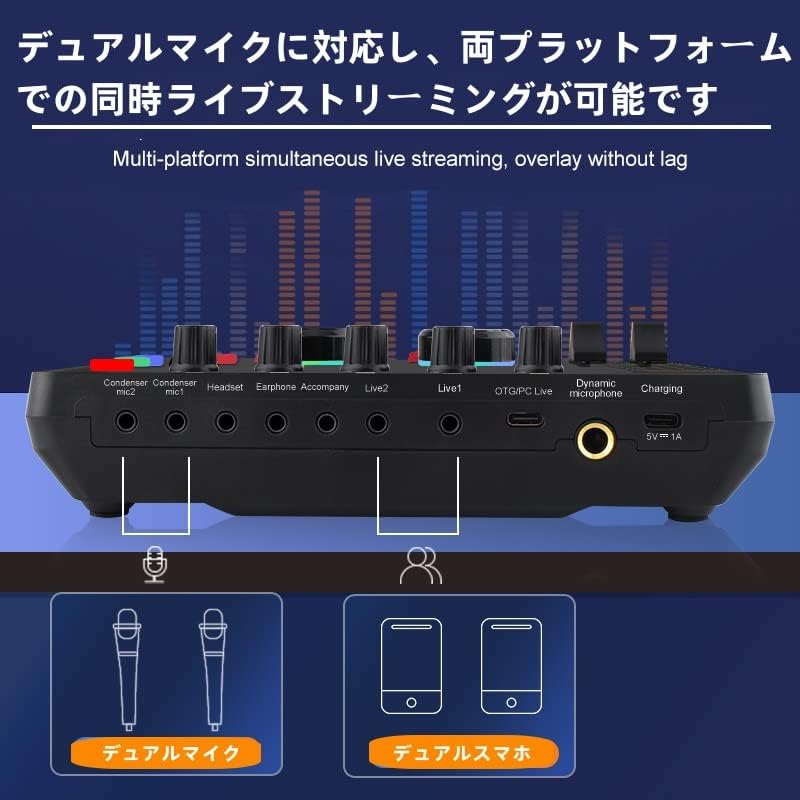
Image: Demonstrating the easy noise elimination feature on the F999 Sound Card.
5. Bluetooth Connectivity
To use Bluetooth accompaniment, activate Bluetooth on the F999 Sound Card and pair it with your smartphone or other Bluetooth-enabled device. This allows for wireless audio input for background music.

Image: Bluetooth pairing for wireless accompaniment with the F999 Sound Card.
6. Live Streaming and Recording
Connect the F999 Sound Card to your computer or mobile device. The device is compatible with platforms such as Stream, YouTube, Facebook, and TikTok, allowing you to focus on content creation and audience interaction.

Image: A typical setup for live streaming or karaoke using the bonkyo F999+BM800 set.
Maintenance
- Keep the device clean by wiping it with a soft, dry cloth.
- Avoid exposing the sound card and microphone to extreme temperatures, humidity, or direct sunlight.
- Do not use abrasive cleaners or solvents.
- Store the equipment in a dry, dust-free environment when not in use.
Troubleshooting
| Problem | Possible Cause | Solution |
|---|---|---|
| No sound output | Incorrect cable connection, low volume, device not powered on. | Check all cable connections. Ensure the F999 Sound Card is powered on and charged. Adjust volume knobs. |
| Microphone not working | Microphone cable loose, microphone muted, incorrect input selected. | Ensure the XLR cable is securely connected. Check if the microphone is muted on the sound card. Verify correct input selection. |
| Voice changer not active | Voice effect not selected. | Press the desired voice effect button on the F999 Sound Card. |
| Bluetooth pairing issues | Bluetooth not enabled, device too far, interference. | Ensure Bluetooth is enabled on both the sound card and your device. Keep devices within range. Restart both devices. |
| Battery drains quickly | Using fast charger, old battery. | Use the provided USB charging cable and a standard 5V charger. Avoid fast chargers. If the issue persists, contact support. |
Specifications
| Feature | Detail |
|---|---|
| Brand | bonkyo |
| Model Number | F999+BM800 |
| Channels | 2 |
| Item Weight | 452 grams |
| Connectivity Technology | USB |
| Power Source | Battery Powered |
| Frequency | 41.1 KHz |
| Output Connector Type | RCA, 3.5mm, XLR |
| Audio Input | Microphone input (XLR), Line input (3.5mm/RCA) |
| Voltage | 5 Volts |
| UPC | 749655386441 |
| Country of Origin | China |
| Included Components | Instruction Manual |
| Product Type | Voice Changer |
BM800 Microphone Parameters
| Parameter | Value |
|---|---|
| Type | Condenser Microphone |
| Polar Pattern | Cardioid |
| Frequency Response | 30Hz-20kHz |
| Sensitivity | -34dB±2dB (1KHz at 0dB-1V/Pa) |
| Output Impedance | 150Ω±30% (at 1KHz) |
| Load Impedance | ≥1000Ω |
| Equivalent Noise Level | 16dBA |
| Max SPL | 130dB (at 1KHz≤1% T.H.D) |
| Signal-to-Noise Ratio | 60dB |
| Current Consumption | 3mA |
| Monomer Weight | ~400g |
| Unit Size | 47x160mm |
| Audio Output Line | 5mm*3m, Line length 2.5m |
| Output Interface | 3.5mm XLR 3-pin XLR plug |
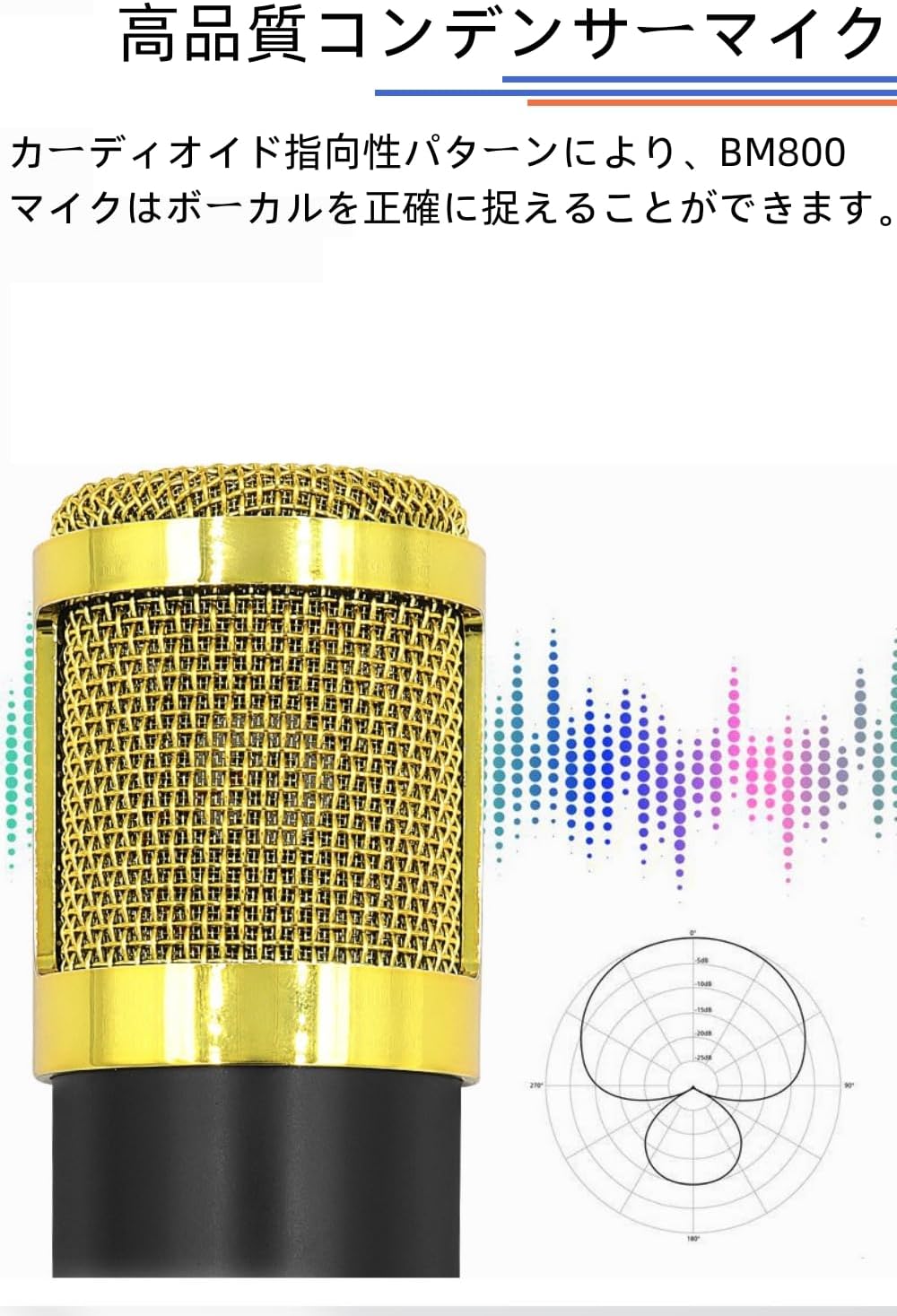
Image: BM800 Microphone specifications and dimensions.
Warranty and Support
This product comes with a 1-year warranty from the date of purchase. For any questions, technical support, or warranty claims, please contact bonkyo customer service via email. As the original manufacturer, we are committed to assisting you with any inquiries.
Please note that genuine bonkyo products are sold exclusively through the official bonkyo brand store. We do not provide official after-sales service for products purchased from other retailers. Always ensure your purchase is made from the official bonkyo brand store.

Image: Bonkyo official brand message.