
1. Introduction
Thank you for purchasing the Artis BT X5 60 Watts Wireless Bluetooth 5.0 Soundbar. This manual provides essential information for setting up, operating, and maintaining your soundbar to ensure optimal performance and longevity. Please read this manual thoroughly before use and retain it for future reference.
2. Safety Information
- Do not expose the soundbar to water, moisture, or extreme temperatures.
- Do not attempt to disassemble or repair the unit yourself. Refer all servicing to qualified personnel.
- Ensure proper ventilation around the soundbar to prevent overheating.
- Use only the power adapter supplied with the device.
- Keep the soundbar away from strong magnetic fields.
- Avoid placing heavy objects on top of the soundbar.
3. Package Contents
Verify that all items are present in the package:
- 1 x Artis BT X5 Bluetooth Soundbar
- 1 x All Function Remote Control
- 1 x Aux Cable
- 1 x User Manual (this document)
- 1 x Wall Mount Screws Set
4. Product Overview
The Artis BT X5 Soundbar features a sleek design with multiple connectivity options and powerful audio output. It includes four driver units and two passive radiators for a 2.0 channel 3D surround sound experience.
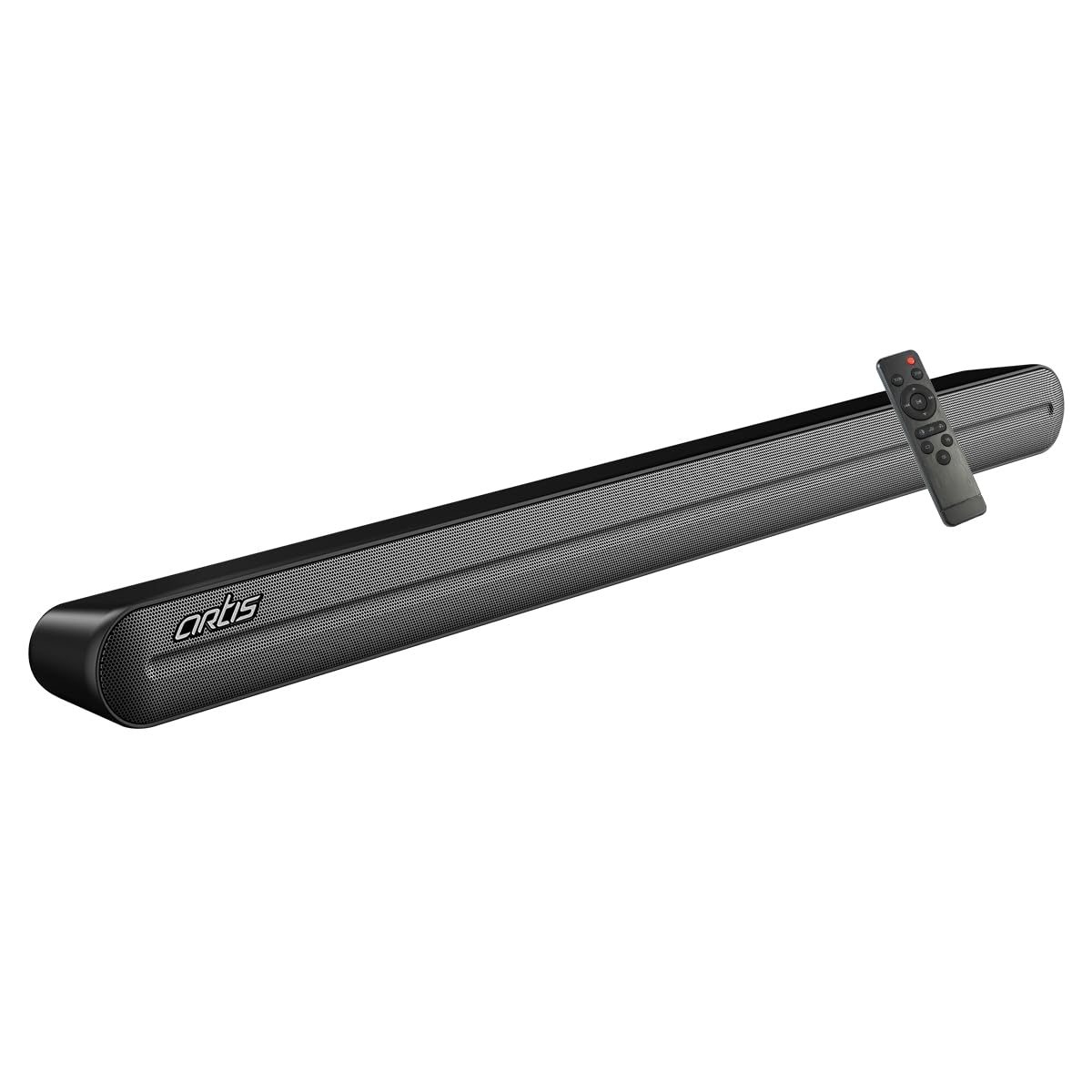
Figure 4.1: Artis BT X5 Soundbar and its remote control. The soundbar features a black finish with a metal mesh grille.
4.1. Front and Top Panel
- LED Display: Shows current input mode, volume level, and EQ settings.
- Integrated Controls: Power, Volume Up/Down, Mode selection buttons.
4.2. Rear Panel Connections
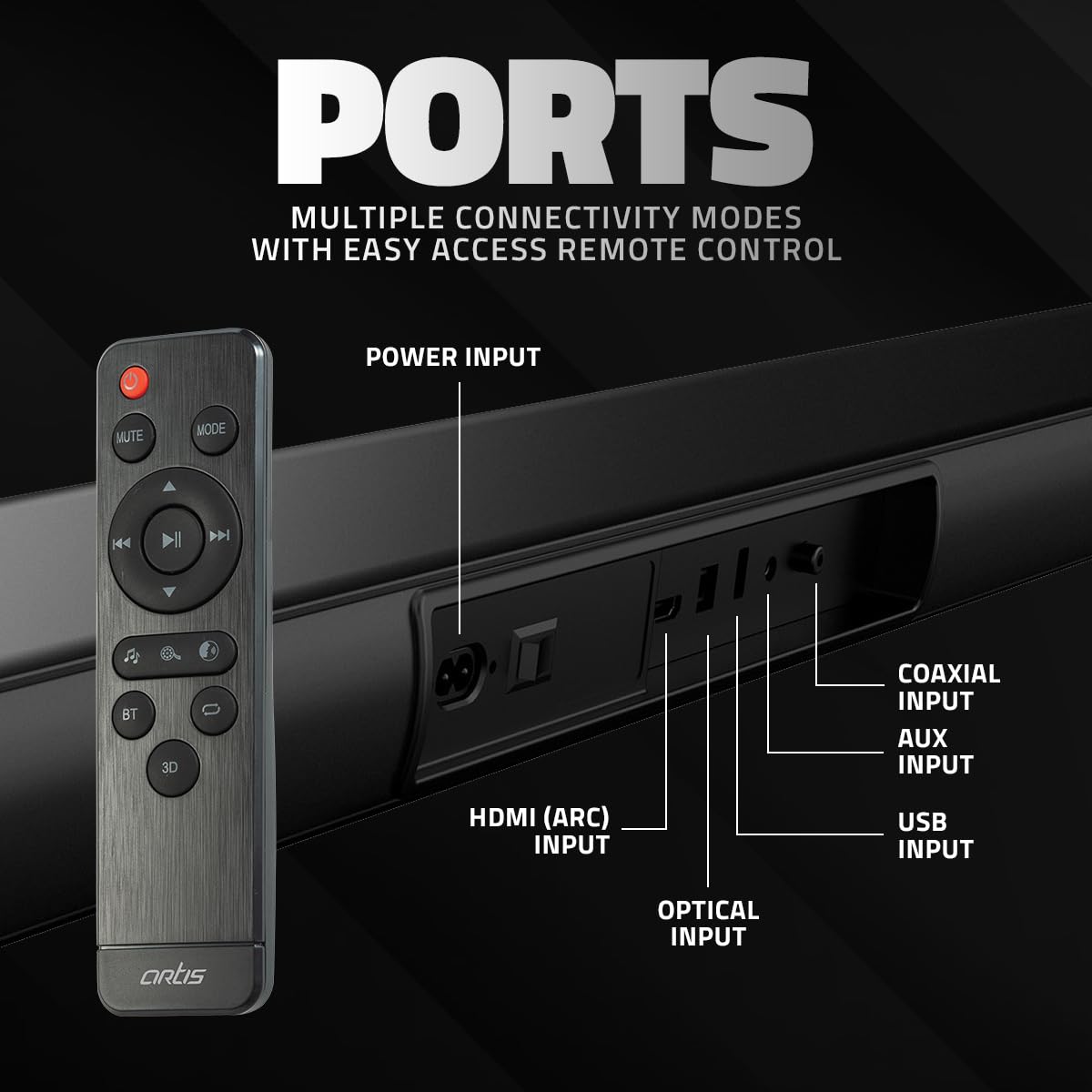
Figure 4.2: Rear view of the Artis BT X5 Soundbar showing the various input ports. From left to right: Power Input, HDMI (ARC) Input, Optical Input, Coaxial Input, AUX Input, and USB Input.
- Power Input: Connect the power adapter here.
- HDMI (ARC) Input: For connecting to a TV with HDMI ARC support.
- Optical Input: For digital audio connection from devices like TVs or game consoles.
- Coaxial Input: For digital audio connection from compatible devices.
- AUX Input: For analog audio connection using a 3.5mm cable.
- USB Input: For playing audio files from a USB pen drive.
4.3. Remote Control
The included remote control provides full functionality for operating the soundbar from a distance.
- Power Button: Turns the soundbar On/Off.
- Mute Button: Mutes or unmutes the audio.
- Mode Button: Cycles through input sources (Bluetooth, AUX, HDMI ARC, Optical, Coaxial, USB).
- Volume +/-: Adjusts the volume level.
- Playback Controls: Play/Pause, Previous/Next Track (for Bluetooth and USB modes).
- EQ Buttons: Selects sound equalization presets (Music, Movie, Speech).
- 3D Button: Activates or deactivates 3D surround sound mode.
- BT Button: Directly switches to Bluetooth mode.
5. Setup
5.1. Placement
Place the soundbar on a stable, flat surface in front of your television or mount it on the wall below your TV. Ensure there are no obstructions in front of the soundbar for optimal sound dispersion.

Figure 5.1: Illustration of the Artis BT X5 Soundbar mounted on a wall below a television, demonstrating its space-saving placement option.
5.2. Power Connection
- Connect the power adapter to the Power Input port on the rear of the soundbar.
- Plug the other end of the power adapter into a wall outlet.
5.3. Connecting to Audio Sources
Choose one of the following connection methods based on your device:
5.3.1. HDMI (ARC) Connection
For optimal digital audio quality and control, connect to a TV with HDMI ARC (Audio Return Channel) support.
- Connect an HDMI cable (not included) from the HDMI (ARC) port on the soundbar to the HDMI ARC port on your TV.
- Ensure HDMI ARC is enabled in your TV's audio settings.
5.3.2. Optical Connection
For high-quality digital audio from devices without HDMI ARC.
- Connect an optical cable (not included) from the Optical Input port on the soundbar to the Optical Output port on your TV or other audio device.
- Ensure your device's audio output is set to 'Optical' or 'PCM'.
5.3.3. Coaxial Connection
For digital audio connection from compatible devices.
- Connect a coaxial cable (not included) from the Coaxial Input port on the soundbar to the Coaxial Output port on your audio device.
5.3.4. AUX (3.5mm) Connection
For analog audio connection from devices with a 3.5mm audio output.
- Connect the supplied AUX cable from the AUX Input port on the soundbar to the 3.5mm audio output jack on your device.
5.3.5. USB Connection
For playing audio files directly from a USB pen drive.
- Insert a USB pen drive (FAT32 format, max 32GB) into the USB Input port on the soundbar.
6. Operating Instructions
6.1. Power On/Off
Press the Power button on the soundbar or the remote control to turn the unit on or off.
6.2. Selecting Input Source
Press the Mode button on the soundbar or the remote control repeatedly to cycle through the available input sources: Bluetooth, AUX, HDMI (ARC), Optical, Coaxial, USB. The selected mode will be indicated on the LED display.
6.3. Bluetooth Pairing

Figure 6.1: The Artis BT X5 Soundbar wirelessly connected via Bluetooth to a smartphone, illustrating easy music streaming.
- Turn on the soundbar.
- Press the Mode button or the BT button on the remote control to select Bluetooth mode. The LED display will show 'BT' and flash, indicating it is in pairing mode.
- On your Bluetooth-enabled device (e.g., smartphone, tablet), search for available Bluetooth devices.
- Select 'Artis BT X5' from the list.
- Once paired, the LED display will stop flashing and show 'BT' steadily. You can now play audio from your device through the soundbar.
6.4. USB Playback
When a USB pen drive is inserted and USB mode is selected, the soundbar will automatically begin playing compatible audio files.
- Use the Playback Controls (Play/Pause, Previous/Next) on the remote control to manage playback.
6.5. Adjusting Volume
Press the Volume + or Volume - buttons on the soundbar or remote control to adjust the audio level.
6.6. EQ Presets
The soundbar offers three equalization presets to optimize audio for different content types.

Figure 6.2: Visual representation of the three EQ presets: Movie, Music, and Speech, each designed to enhance specific audio experiences.
Press the corresponding EQ button on the remote control to select:
- Music: Optimized for musical playback.
- Movie: Enhanced for cinematic audio with deeper bass and clearer dialogue.
- Speech: Prioritizes vocal clarity, ideal for news or podcasts.
6.7. 3D Surround Mode
Activate the 3D Surround Mode for an immersive audio experience.

Figure 6.3: A hand holding the remote control, with a visual representation of sound waves emanating from the soundbar, indicating the activation of the 3D effect mode.
Press the 3D button on the remote control to toggle the 3D surround sound effect on or off.
7. Maintenance
7.1. Cleaning
- Before cleaning, ensure the soundbar is powered off and unplugged from the power outlet.
- Use a soft, dry cloth to wipe the exterior surfaces of the soundbar.
- Do not use liquid cleaners, aerosols, or abrasive materials, as they may damage the finish.
7.2. Storage
If storing the soundbar for an extended period, unplug it from the power source and store it in a cool, dry place, away from direct sunlight and extreme temperatures.
8. Troubleshooting
If you encounter issues with your Artis BT X5 Soundbar, refer to the following troubleshooting guide:
| Problem | Possible Cause | Solution |
|---|---|---|
| No power | Power cable not connected; Power outlet not active | Ensure power cable is securely connected. Check if the power outlet is working. |
| No sound | Incorrect input source; Volume too low; Mute activated; Cable connection issue | Select the correct input source. Increase volume. Deactivate mute. Check audio cable connections. |
| Bluetooth pairing fails | Soundbar not in pairing mode; Device too far; Interference | Ensure soundbar is in Bluetooth pairing mode. Move device closer. Avoid interference from other wireless devices. |
| Remote control not working | Batteries depleted; Obstruction; Remote not pointed at sensor | Replace remote control batteries. Remove any obstructions. Point remote directly at the soundbar's sensor. |
| Distorted sound | Volume too high; Poor audio source quality; Cable issue | Reduce volume. Try a different audio source. Check audio cables for damage. |
9. Specifications
Detailed technical specifications for the Artis BT X5 Soundbar:

Figure 9.1: Dimensions of the Artis BT X5 Soundbar: 93.5 cm (length), 9.95 cm (depth), and 7 cm (height).
| Feature | Specification |
|---|---|
| Model Name | BT X5 |
| Speaker Type | Soundbar |
| Total Output Power | 60 Watts RMS |
| Bluetooth Version | 5.0 |
| Bluetooth Range | Up to 10 meters (33 feet) |
| Driver Units | 4 x 2.25 inch drivers |
| Passive Radiators | 2 |
| Surround Sound Channel | 2.0 |
| Input Modes | Bluetooth, HDMI (ARC), Optical, Coaxial, AUX (3.5mm), USB |
| EQ Presets | Music, Movie, Speech |
| Special Features | 3D Surround Mode, Bass Boost, Display, USB Port |
| Signal-to-Noise Ratio | 75 dB |
| Product Dimensions (L x D x H) | 93.5 cm x 10 cm x 7 cm |
| Item Weight | 2.5 Kilograms |
| Material | Metal, Plastic |
| Power Source | Corded Electric |
| Control Method | Remote |
10. Warranty and Support
10.1. Warranty Information
The Artis BT X5 Soundbar comes with a 1 Year Carry-In Service Center Warranty from the date of purchase. This warranty covers manufacturing defects and workmanship under normal use. It does not cover damage caused by misuse, accidents, unauthorized modifications, or natural disasters.
10.2. Customer Support
For technical assistance, warranty claims, or any other inquiries, please contact Artis customer support:
- Toll-Free Number: 1800 123 8195 / 1800 120 8195
- Email: inquiry@artis.in