
UPBRIGHT Dreame R10 R10Pro Power Supply
UpBright 30V AC/DC Adapter Instruction Manual
Model: Dreame R10 R10Pro Power Supply
1. Product Overview
The UpBright 30V AC/DC Adapter is designed to provide reliable power to compatible Dreametech Dreame R10 and R10 Pro cordless vacuum cleaners. This power supply is engineered for efficiency and safety, ensuring proper charging and operation of your device's Li-ion battery pack.

Image 1: The UpBright 30V AC/DC Adapter, showing the main unit with the two-prong plug and the attached DC barrel connector cable.
2. Safety Information
Please read all safety instructions carefully before using this product to prevent injury or damage.
- Voltage Compatibility: Ensure the adapter's input voltage (100-240VAC) matches your local power supply.
- Indoor Use Only: This adapter is designed for indoor use in dry locations. Do not expose to water or high humidity.
- Proper Connection: Always connect the adapter to the device before plugging it into a wall outlet. Disconnect from the wall outlet first before unplugging from the device.
- Avoid Overloading: Do not overload the power outlet.
- Cable Care: Do not pull on the cord to disconnect. Grasp the plug firmly. Keep the cord away from heat, sharp edges, and moving parts.
- Damage Inspection: Do not use the adapter if the cord or plug is damaged. Contact support for replacement.
- Protection Features: This adapter includes Over Voltage Protection (OVP), Over Current Protection (OCP), and Short Circuit Protection (SCP) to ensure safe operation.
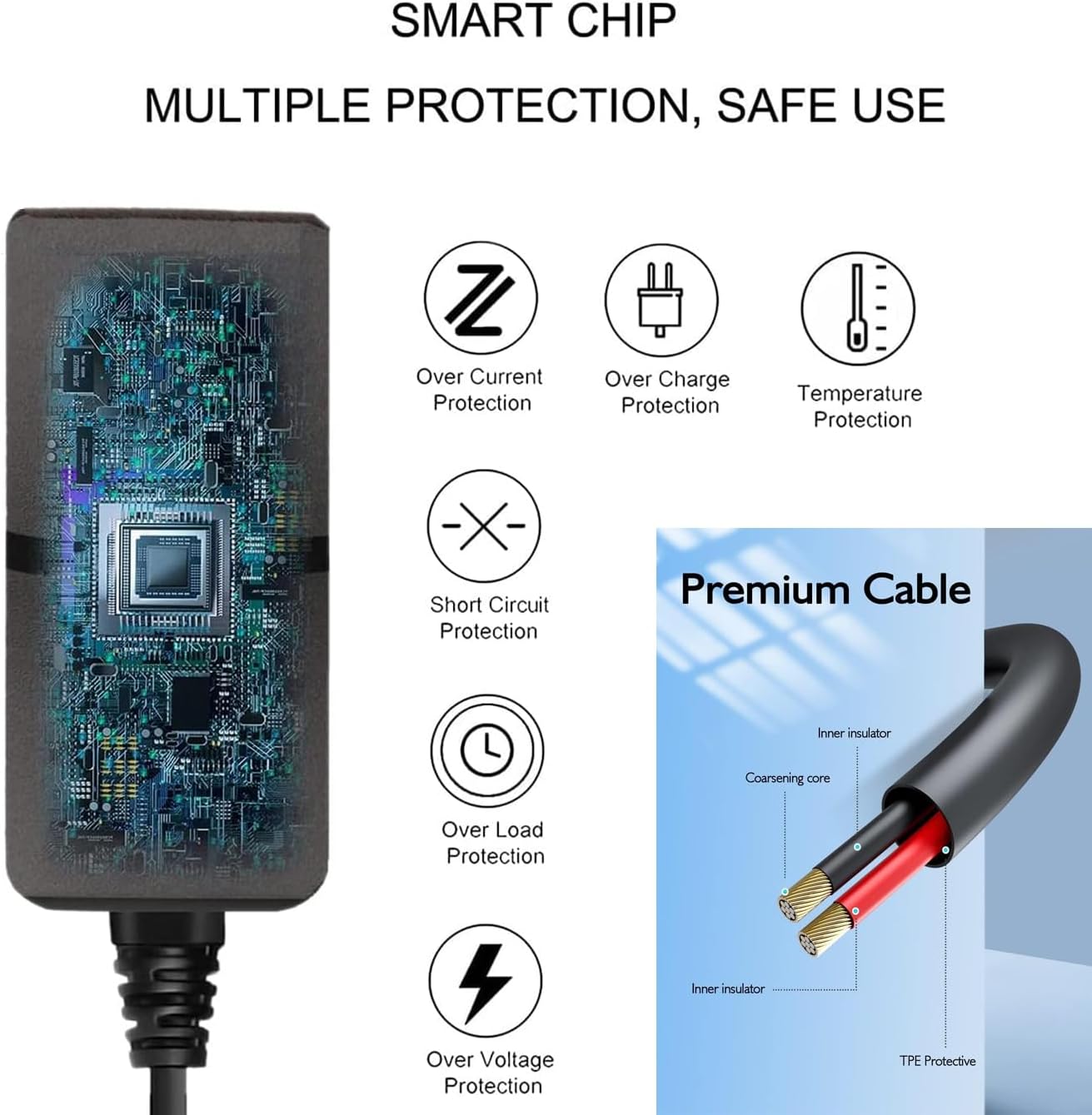
Image 2: Diagram illustrating the internal smart chip and multiple protection features of the adapter, including Over Current, Over Charge, Temperature, Short Circuit, Over Load, and Over Voltage Protection.
3. Setup
3.1 What's in the Box
- 1 x UpBright 30V AC/DC Adapter
3.2 Connecting the Adapter
This adapter is specifically designed for Dreametech Dreame R10 and R10 Pro cordless vacuum cleaners. Ensure your vacuum cleaner model is compatible before connecting.
- Locate the charging port on your Dreametech Dreame R10 or R10 Pro vacuum cleaner.
- Insert the barrel connector of the UpBright AC/DC adapter firmly into the charging port of the vacuum cleaner.
- Plug the two-prong end of the adapter into a standard wall power outlet (100-240VAC, 50/60Hz).
- The vacuum cleaner should indicate that it is charging (refer to your vacuum cleaner's manual for charging indicators).

Image 3: Visual representation of the UpBright AC Adapter Power Supply compatible with Dreametech Dreame R10 and R10 Pro cordless vacuum cleaners. (Vacuum machines are not included with the adapter).
4. Operating Instructions
The UpBright AC/DC Adapter functions as a power supply and charger for your compatible Dreametech Dreame vacuum cleaner. Its primary operation is automatic once connected.
- Charging: Once properly connected, the adapter will begin charging the vacuum cleaner's Li-ion battery. Charging times will vary depending on the battery's current charge level and capacity.
- Power Supply: In some cases, the adapter may also provide direct power for operation while plugged in, depending on the vacuum cleaner's design. Refer to your vacuum cleaner's manual for details on this functionality.
- Disconnection: To disconnect, first unplug the adapter from the wall outlet, then remove the barrel connector from the vacuum cleaner.
5. Maintenance
Proper maintenance ensures the longevity and safe operation of your UpBright AC/DC Adapter.
- Cleaning: Wipe the adapter with a dry, soft cloth. Do not use liquid cleaners or sprays. Ensure the adapter is unplugged from all power sources before cleaning.
- Storage: Store the adapter in a cool, dry place when not in use. Avoid extreme temperatures.
- Cable Inspection: Periodically inspect the power cord and connector for any signs of damage, fraying, or bending. If damage is observed, discontinue use immediately.
6. Troubleshooting
If you encounter issues with your UpBright AC/DC Adapter, refer to the following common problems and solutions:
| Problem | Possible Cause / Solution |
|---|---|
| Adapter not charging the vacuum cleaner. |
|
| Adapter feels warm during use. |
|
| Visible damage to the adapter or cable. |
|
7. Specifications
| Feature | Detail |
|---|---|
| Brand | UPBRIGHT |
| Model Number | Dreame R10 R10Pro Power Supply |
| Input Voltage | 100-240VAC, 50/60Hz |
| Output Voltage | 30V DC |
| Output Current | 0.8A (800mA) |
| Power Output | 24W |
| Connector Type | Barrel Connector |
| Compatible Devices | Dreametech Dreame R10, R10 Pro, VTV22B, VTV41B Cordless Vacuum Cleaners (with 25.2V Li-ion Battery Packs) |
| Protection Features | OVP (Over Voltage Protection), OCP (Over Current Protection), SCP (Short Circuit Protection) |
| Product Dimensions | Approximately 4 x 3 x 2 inches |
| Item Weight | Approximately 4 ounces |
8. Warranty and Support
UpBright products are designed for reliability and performance. For warranty information and customer support, please refer to the details below:
- Refund Policy: UpBright offers a 30-day refund policy from the date of purchase.
- Exchange Policy: UpBright provides a 24-month exchange policy for defective units.
- Contact Support: For any questions, troubleshooting assistance, or warranty claims, please visit the UPBRIGHT Store on Amazon or contact their customer service directly through your purchase platform.
Related documentsDreame R10 R10Pro Power Supply

Ask a question about this manual
Ask about setup, troubleshooting, compatibility, parts, safety, or missing instructions. Manuals+ will review the question and use this page’s manual context to help answer it.