
1. Introduction
Thank you for choosing the CUIUIC 18.5 Inch Portable Monitor. This manual provides essential information for setting up, operating, and maintaining your new portable display. Please read it thoroughly to ensure optimal performance and longevity of your device.
2. What's in the Box
- 1 x 18.5'' Large Portable Monitor
- 2 x USB-C to USB-C Cable
- 1 x mini HDMI to Standard HDMI Cable
- 1 x USB-C Charger
- 1 x Magnetic Smart Cover

Image: The CUIUIC 18.5 Inch Portable Monitor and its complete set of accessories as packaged.
3. Product Features
- 1080P FHD IPS Screen: Experience vivid colors and crisp images with a 1920x1080 resolution, 2000:1 contrast ratio, 100% sRGB color gamut, and 178° viewing angle. Eye-care technology (Blue Light Reduction) minimizes eye strain during extended use.
- Portable Design: Lightweight and thin, designed for easy transport and plug-and-play functionality without additional driver installation. The 18.5-inch screen size offers a significant advantage for productivity tasks compared to smaller portable monitors.
- Multiple Display Modes: Supports Duplicate mode, Extend mode, and Second Screen Only mode for versatile use. A 3.5mm audio output allows connection to external speakers for enhanced audio.
- Smart Case & VESA Mountable: The magnetic smart case protects the screen from scratches and functions as a stand. Standard 75x75 VESA holes enable mounting to wall or arm brackets for flexible placement.
- Wide Compatibility: Equipped with two USB-C ports and one mini HDMI port, compatible with PCs, laptops, smartphones, and gaming devices (Switch, Xbox, PS3/4/5). Note: For USB-C, the device's port must support USB 3.1 or Thunderbolt 3 for signal transmission; otherwise, it will only provide power.
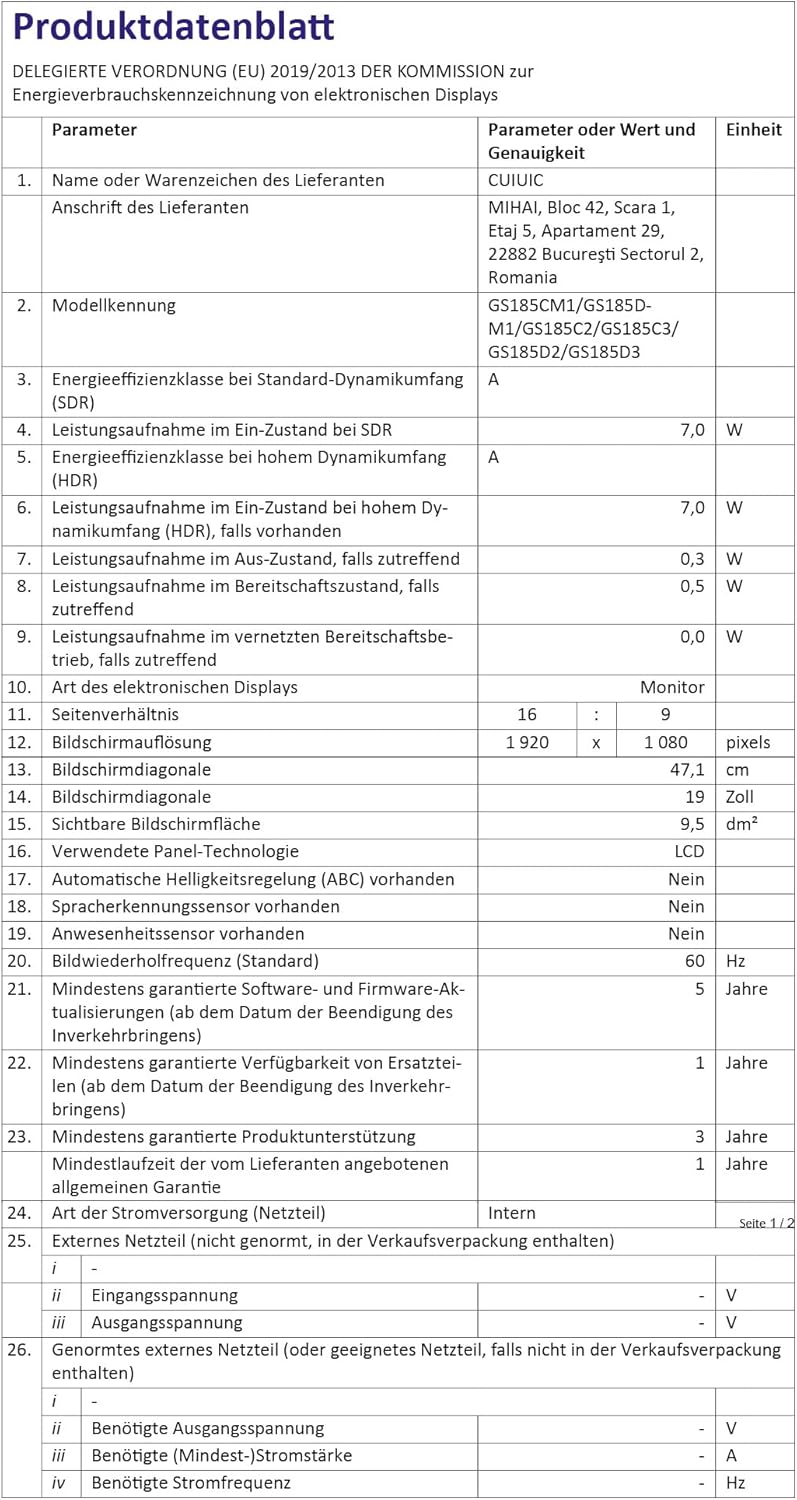
Image: Key features of the CUIUIC 18.5 Inch Portable Monitor, including resolution, connectivity, and mounting options.
4. Setup Instructions
4.1 Using the Smart Cover as a Stand
The included magnetic smart cover can be folded to create a stable stand for your monitor. This allows for adjustable viewing angles.
Video: Demonstrates how to correctly fold and use the smart case as a stand for the portable monitor.
4.2 Connecting to Your Device
The monitor supports both single-cable USB-C connections (for compatible devices) and dual-cable HDMI + USB-C power connections.
4.2.1 One Cable Connection (USB-C)
For devices with a full-featured USB-C port (supporting USB 3.1 or Thunderbolt 3), a single USB-C to USB-C cable can transmit both video signal and power.

Image: Illustration of a laptop connected to the portable monitor using a single USB-C cable for both power and display.
4.2.2 Two Cables Connection (HDMI + USB-C Power)
If your device does not have a full-featured USB-C port, or for devices like gaming consoles, use the mini HDMI to Standard HDMI cable for video signal and a USB-A to USB-C cable connected to the USB-C charger for power.

Image: Diagram showing a laptop connected to the portable monitor using an HDMI cable for video and a USB-C cable for power.
Video: Overview of the CUIUIC 18.5 Inch Portable Monitor, demonstrating its connectivity options and ease of use with various devices.
5. Operating Instructions
5.1 Display Modes
The monitor supports three primary display modes when connected to a compatible device:
- Duplicate Mode: Mirrors your primary screen's content onto the portable monitor.
- Extend Mode: Extends your desktop workspace, allowing you to drag windows between your primary screen and the portable monitor.
- Second Screen Only Mode: Displays content only on the portable monitor, turning off your primary screen.

Image: Visual representation of the three display modes available: Extend Mode, Duplicate Mode, and Second Screen Only Mode.
5.2 On-Screen Display (OSD) Menu
The OSD menu allows you to adjust various settings such as brightness, contrast, color temperature, input source, and more. Navigate the menu using the buttons located on the side of the monitor.
5.3 VESA Mounting
The monitor features standard 75x75mm VESA mounting holes on the back. This allows you to attach the monitor to a compatible wall mount or desk arm for ergonomic positioning and space-saving.

Image: The portable monitor shown mounted on a VESA arm, illustrating its flexibility for both landscape and portrait orientations.
6. Connectivity
The CUIUIC 18.5 Inch Portable Monitor offers versatile connectivity options to suit various devices:
- Two USB-C Ports: These ports support power delivery and video signal transmission. Ensure your device's USB-C port is full-featured (USB 3.1 or Thunderbolt 3) for single-cable operation.
- One Mini HDMI Port: Use this port for video input from devices like laptops, PCs, and gaming consoles. An HDMI to mini HDMI cable is included.
- 3.5mm Audio Output: Connect headphones or external speakers for audio output.

Image: The portable monitor demonstrating compatibility with multiple devices, including gaming consoles, laptops, and smartphones.
7. Maintenance
- Cleaning the Screen: Use a soft, lint-free cloth slightly dampened with water or a screen cleaner. Avoid harsh chemicals or abrasive materials.
- General Care: Keep the monitor away from extreme temperatures, direct sunlight, and high humidity. Use the smart cover to protect the screen during transport.
- Storage: When not in use, store the monitor in a dry, cool place, preferably in its original packaging or protective case.
8. Troubleshooting
- No Signal: Ensure all cables are securely connected. Verify that your device's USB-C port supports video output if using a single USB-C cable. Try a different input source or cable.
- No Power: Check if the USB-C power adapter is correctly plugged into a working outlet and the monitor. If using a single USB-C cable for power and video, ensure your device can supply sufficient power.
- Flickering or Unstable Display: Try adjusting the refresh rate or resolution on your connected device. Ensure cables are not damaged.
- Audio Issues: Check the volume settings on both the monitor and your connected device. Ensure external speakers or headphones are properly connected to the 3.5mm audio output.
- Image Quality: Adjust brightness, contrast, and color settings via the OSD menu to suit your preference.
9. Specifications
| Feature | Specification |
|---|---|
| Screen Size | 18.5 Inches |
| Resolution | 1920 x 1080 Pixels (FHD 1080p) |
| Aspect Ratio | 16:9 |
| Image Brightness | 400 Candela |
| Screen Surface Description | Glossy |
| Total USB Ports | 2 (USB-C) |
| Video Input | USB-C, Mini HDMI |
| Audio Output | 3.5mm Jack |
| Item Weight | 5.44 pounds |
| Product Dimensions | 0.2 x 9.84 x 13.78 inches |
| VESA Mount | 75x75mm |
For detailed energy efficiency information, please refer to the official EU EPREL database: https://eprel.ec.europa.eu/qr/1641470
10. Warranty and Support
For warranty information and customer support, please refer to the documentation included with your purchase or visit the official CUIUIC website. Keep your proof of purchase for any warranty claims.
