
COWSAR CH-WQP4-6201
COWSAR Portable Countertop Dishwasher Instruction Manual
Model: CH-WQP4-6201
Introduction
This manual provides essential information for the safe and efficient operation of your COWSAR Portable Countertop Dishwasher. Designed for compact living spaces such as apartments, RVs, dorms, and for camping, this dishwasher offers convenient dishwashing solutions with multiple cleaning modes and high-temperature sanitization.
Please read this manual thoroughly before first use and retain it for future reference.
Safety Information
General Safety Precautions
- Ensure the dishwasher is placed on a stable, level surface.
- Do not operate the dishwasher if the power cord or plug is damaged.
- Keep children and pets away from the dishwasher during operation.
- Use only dishwasher-safe detergents and rinse aids.
- Do not immerse the appliance, cord, or plug in water or other liquids.
- Unplug the dishwasher before cleaning or performing any maintenance.
- Avoid touching the heating element during or immediately after operation.
Electrical Safety
- Connect the dishwasher to a properly grounded electrical outlet.
- Do not use extension cords or adapters with this appliance.
- Ensure the voltage and frequency of your power supply match the specifications on the appliance rating label.
Product Overview
The COWSAR Portable Countertop Dishwasher is designed for efficiency and convenience in small spaces.

Figure 1: Front view of the COWSAR Portable Countertop Dishwasher, showing the control panel and transparent door.
Key Components
- Control Panel: Features an LED display and touch controls for program selection, delay start, and child lock.
- Dish Rack: Removable rack for holding dishes, cups, and cutlery.
- Spray Arms: Dual 360° spray arms ensure thorough cleaning.
- Water Inlet/Outlet: Connections for water supply and drainage.
- Water Tank (Optional): For models with manual water fill capability.

Figure 2: Interior view of the dishwasher demonstrating the 360° rinsing action from the dual spray arms.

Figure 3: Diagram illustrating the compact size and typical dish capacity suitable for 2-3 people.
Setup
Unpacking
- Carefully remove the dishwasher from its packaging.
- Inspect the appliance for any shipping damage. Report any damage to the retailer immediately.
- Remove all packing materials, including internal protective foam and tape.
Placement
- Place the dishwasher on a flat, stable, and heat-resistant countertop or surface.
- Ensure there is adequate space around the unit for ventilation and hose connections.
- Avoid placing the dishwasher near heat sources or in direct sunlight.
Water Connection
The dishwasher can be connected to a faucet for water supply or manually filled via its internal tank (if applicable to your model).
Faucet Connection (Recommended)
- Connect the water inlet hose to a standard kitchen faucet using the provided adapter. Ensure a secure, leak-free connection.
- Place the drain hose into a sink or a designated drain area. The suction cup on the drain hose helps fix it in place.
- Ensure the drain hose is not kinked or blocked.

Figure 4: Illustration of connecting the water pipe for automatic draining and supply.
Manual Water Fill (Tank Model Only)
- Open the water inlet cap located on the top of the dishwasher.
- Carefully pour water into the tank until the water level indicator shows full. The tank capacity is approximately 1.9 gallons.
- Close the water inlet cap securely.
Power Connection
- Plug the power cord into a grounded 120V AC, 60Hz electrical outlet.
Operating Instructions
Loading Dishes
- Scrape off large food particles from dishes before loading.
- Place dishes securely in the dish rack, ensuring they do not block the spray arms.
- Load cups and bowls upside down.
- Place cutlery in the designated cutlery tray.
- The dishwasher can accommodate various items, including tableware, fruits, and baby bottles.
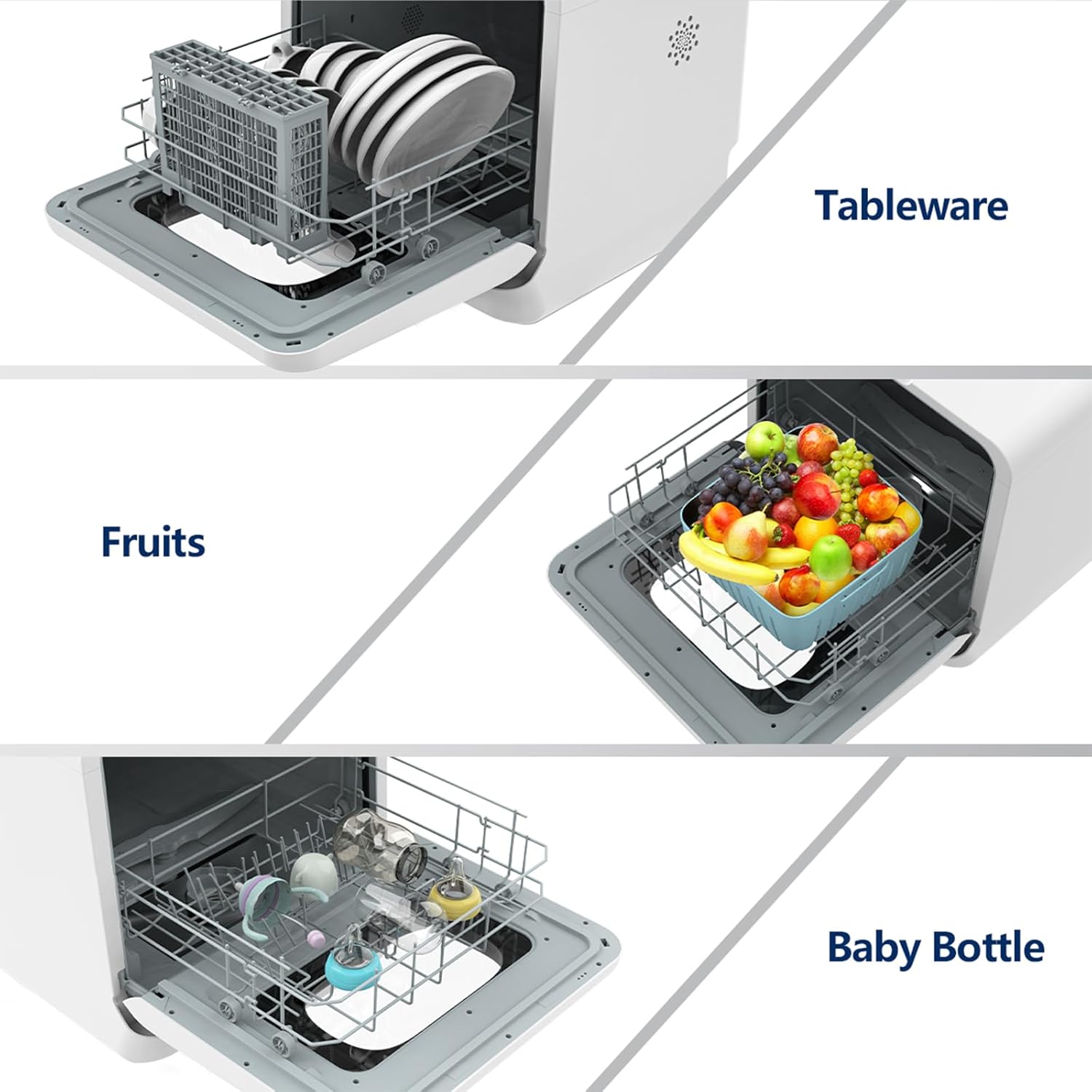
Figure 5: Examples of items that can be washed, including standard tableware, fruits in a basket, and baby bottles.
Adding Detergent
- Add a small amount of dishwasher detergent to the dispenser. Liquid or powder detergent is recommended.
- Note: Detergent pods may not dissolve completely in shorter cycles or with insufficient water.
Selecting a Wash Mode
The COWSAR Portable Dishwasher features 6 washing modes to suit different needs:

Figure 6: Control panel displaying the six available wash programs and their approximate durations.
- ECO Washing (145 Minutes): Energy-efficient cycle for normally soiled dishes.
- Standard Washing (60 Minutes): Regular cycle for daily dishwashing.
- Strong Washing (120 Minutes): For heavily soiled dishes and pots.
- Rapid Washing (35 Minutes): Quick wash for lightly soiled items.
- Glass Washing (90 Minutes): Gentle cycle for delicate glassware.
- Fruit and Vegetable Washing (18 Minutes): Dedicated cycle for cleaning produce.
To select a mode, press the "Mode" button on the control panel until the desired program is highlighted on the LED display.
Starting a Wash Cycle
- Load dishes and add detergent.
- Select the desired wash mode.
- Press the "Start/Pause" button to begin the cycle.
- The LED display will show the remaining time.
Air-Dry Function
After the wash cycle, the dishwasher automatically activates an air-dry function with a temperature reaching 167°F (75°C) to ensure dishes are dry and odor-free. This also includes a 72-hour ventilation storage feature to keep tableware dry and clean.

Figure 7: Visual representation of the hot air convection drying process within the dishwasher.
Child Lock Function
To activate the child lock, press and hold the "Child Lock" button for a few seconds until the lock indicator appears on the display. This prevents accidental operation by children. Repeat the process to deactivate.
Official Product Video
Video 1: A demonstration of the COWSAR Countertop Dishwasher's features, including loading, cycle selection, and the cleaning process. This video highlights the compact design and ease of use.
Maintenance
Cleaning the Filter
- Regularly clean the filter to ensure optimal washing performance.
- Twist and remove the filter assembly from the bottom of the dishwasher.
- Rinse the filter under running water to remove any food debris.
- Reinstall the filter securely.
Cleaning the Interior
- Wipe the interior surfaces with a damp cloth after each use.
- For stubborn stains or odors, run an empty cycle with a dishwasher cleaner or a cup of white vinegar.
Exterior Care
- Wipe the exterior with a soft, damp cloth. Do not use abrasive cleaners or solvents.
Troubleshooting
| Problem | Possible Cause | Solution |
|---|---|---|
| Dishwasher does not start | Power cord not plugged in; Door not closed properly; Child lock activated. | Check power connection; Ensure door is latched; Deactivate child lock. |
| Dishes are not clean | Improper loading; Clogged spray arms; Insufficient detergent; Clogged filter. | Reload dishes correctly; Clean spray arm nozzles; Add more detergent; Clean filter. |
| Water leaks | Loose hose connections; Damaged door seal; Overfilling (manual tank). | Tighten hose connections; Inspect and clean door seal; Do not overfill tank. |
| Dishwasher is noisy | Dishes rattling; Foreign object in pump; Unit not level. | Rearrange dishes; Check for obstructions; Adjust leveling feet. |
| Error Code "FA" on display | Water supply issue (Faucet connection). | Check water supply, ensure faucet is open and hose is not kinked. |
Specifications
- Model Name: COWSAR Portable Dishwasher
- Model Number: CH-WQP4-6201
- Form Factor: Countertop
- Product Dimensions: 20.45"D x 21"W x 20.45"H (51.94 x 53.34 x 51.94 cm)
- Item Weight: 29.9 pounds (13.56 kg)
- Capacity: 1.9 Gallons (water consumption per flush)
- Number of Wash Modes: 6
- High-Temp Wash/Dry: Up to 167°F (75°C)
- Voltage: 120 Volts (AC)
- Operating Frequency: 60 Hz
- Wattage: 785 watts
- Noise Level: 49 dB
- Material: Stainless Steel (Dishwasher Rack), Stainless Steel (General Material Type)
- Display Type: LED
- Special Features: Portable, 2 Spray Arms, 72H Ventilation Storage, 24H Dishwashing Reservation, Child Lock
- Certification: ETL
Warranty and Support
For warranty information, technical support, or service inquiries, please refer to the warranty card included with your product or contact COWSAR customer service directly. Contact details can typically be found on the manufacturer's official website or on the product packaging.
For additional resources, you may also refer to the official Installation Manual (PDF).
Related documentsCH-WQP4-6201

Ask a question about this manual
Ask about setup, troubleshooting, compatibility, parts, safety, or missing instructions. Manuals+ will review the question and use this page’s manual context to help answer it.