
Dell Precision 7780
Dell Precision 7780 Mobile Workstation User Manual
Model: Precision 7780
1. Introduction
This manual provides essential information for setting up, operating, maintaining, and troubleshooting your Dell Precision 7780 Mobile Workstation. Please read this guide thoroughly to ensure optimal performance and longevity of your device.

2. Setup
Follow these steps to set up your new mobile workstation.
2.1 Unboxing and Initial Inspection
- Carefully remove the workstation and its accessories from the packaging.
- Verify that all components are present, including the Dell Precision 7780 Mobile Workstation and the charger.
- Inspect the workstation for any physical damage. If damage is found, contact Dell support immediately.
2.2 Connecting Power
- Connect the power adapter to the power connector on the workstation.
- Plug the power cable into a grounded electrical outlet.
- The battery will begin charging automatically. It is recommended to fully charge the battery before first use.
2.3 Initial Boot and Operating System Setup
- Open the display and press the power button.
- Follow the on-screen instructions to complete the Windows 11 Pro operating system setup. This includes selecting language, region, and creating a user account.
- Connect to a Wi-Fi network when prompted to ensure the system can download necessary updates.
3. Operating Your Workstation
This section covers the basic operation of your Dell Precision 7780.
3.1 Keyboard and Touchpad
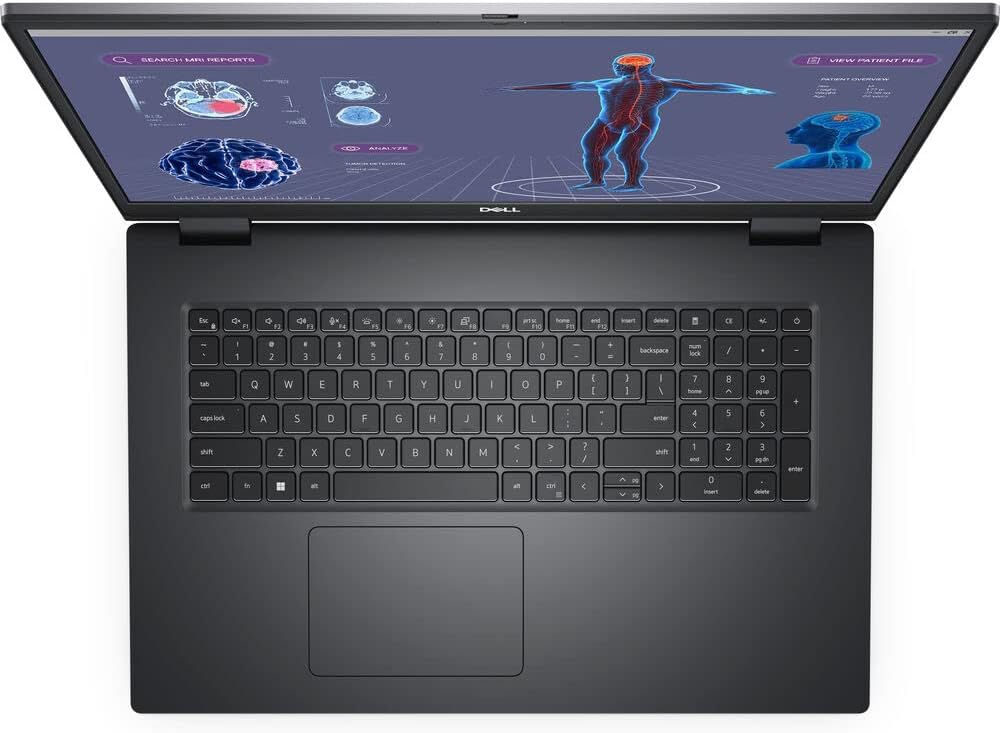
- The workstation features a US English Backlit Keyboard for comfortable typing in various lighting conditions.
- The integrated touchpad serves as your pointing device. Adjust sensitivity and gestures in Windows settings.
- A Single Pointing Palmrest with Full Scan FIPS Fingerprint Reader and Contacted SmartCard Reader (if configured) is included for enhanced security and convenience.
3.2 Display
Your workstation is equipped with a 17.3-inch FHD (1920 x 1080) Wide View Angle Anti-Glare 60Hz 500-nits 99% DCI-P3 ComfortView Plus Low Blue Light Non-Touch Display. Adjust brightness and display settings through Windows display options.
3.3 Ports and Connectivity
The Dell Precision 7780 offers a variety of ports for connecting peripherals and external devices:
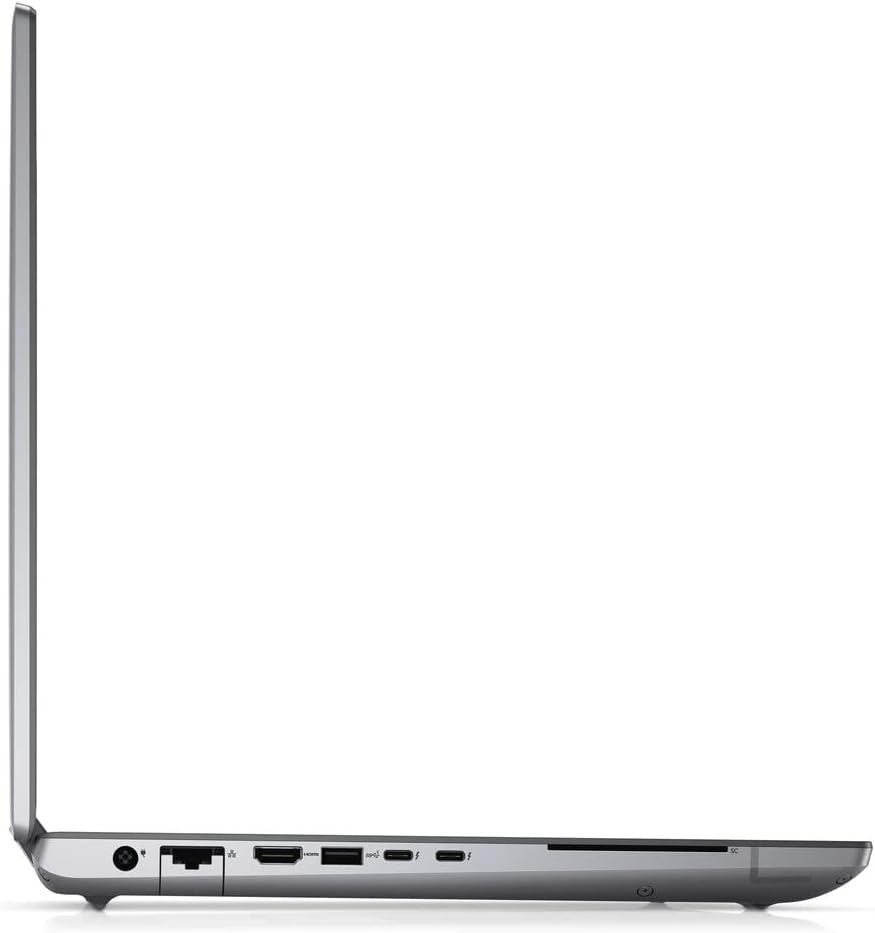
- Left Side: Power connector, Ethernet port, HDMI port, USB 3.2 Gen 1 Type-A port, two Thunderbolt 4 (USB-C) ports.
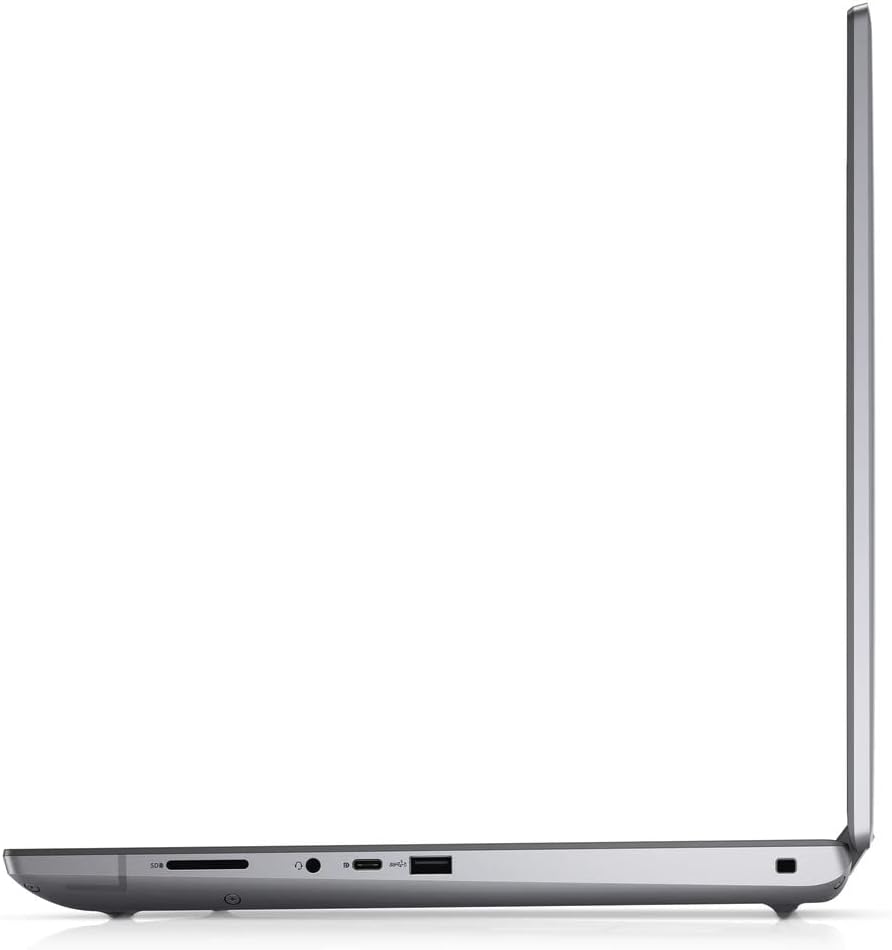
- Right Side: SD Card Reader, Headphone/Microphone combo jack, USB 3.2 Gen 1 Type-A port.
For wireless connectivity, the workstation includes Intel Wi-Fi 6E AX211 and Bluetooth.
3.4 Camera
The integrated FHD IR Camera with Shutter supports ExpressSign-In and Intelligent Privacy features, along with a microphone for video conferencing and secure login.
4. Maintenance
Proper maintenance ensures the longevity and optimal performance of your workstation.
4.1 Cleaning Your Workstation
- Use a soft, lint-free cloth to clean the display. For stubborn smudges, use a screen cleaner specifically designed for electronics.
- Wipe the keyboard and chassis with a slightly damp cloth. Avoid excessive moisture.
- Use compressed air to clear dust from vents and ports. Ensure the workstation is powered off before cleaning.
4.2 Battery Care
The workstation is powered by a 6-Cell, 93 WHr Lithium Ion Battery. To maximize battery life:
- Avoid extreme temperatures.
- Do not fully discharge the battery frequently.
- Calibrate the battery periodically (refer to Dell's official support for instructions).
4.3 Software Updates
Regularly update your Windows 11 Pro operating system and Dell drivers to ensure security, stability, and performance. Use Windows Update and Dell SupportAssist for this purpose.

5. Troubleshooting
This section provides solutions to common issues you might encounter.
5.1 Power Issues
- Workstation does not turn on: Ensure the power adapter is securely connected and the outlet is functional. Try a different outlet. If using battery, ensure it is charged.
- Battery not charging: Verify the power adapter is correctly connected. Check for any damage to the adapter or cable.
5.2 Display Issues
- No display or blank screen: Connect an external monitor to check if the issue is with the internal display. Restart the workstation.
- Flickering or distorted display: Update graphics drivers. Adjust display resolution and refresh rate in Windows settings.
5.3 Connectivity Issues
- Wi-Fi not connecting: Ensure Wi-Fi is enabled. Restart your router and the workstation. Update wireless drivers.
- Bluetooth device not pairing: Ensure Bluetooth is enabled on both devices. Check device compatibility and drivers.
For more complex issues, refer to the Dell support website or contact technical support.
6. Specifications
Detailed technical specifications for the Dell Precision 7780 Mobile Workstation:
| Feature | Specification |
|---|---|
| Model Name | Precision 7780 |
| Processor | Intel Core i7-13850HX (13th Gen, 20 Core, Up to 5.30GHz) |
| Operating System | Windows 11 Pro |
| Display | 17.3-inch FHD (1920 x 1080) Anti-Glare, 60Hz, 500-nits, 99% DCI-P3 |
| RAM | 64GB DDR5 (5600MHz) |
| Storage | 1TB PCIe M.2 NVMe Gen 4 Class 40 SSD |
| Graphics | NVIDIA RTX 4000 Ada Generation (12GB GDDR6) |
| Wireless Connectivity | Intel Wi-Fi 6E AX211 + Bluetooth |
| Battery | 6-Cell, 93 WHr Lithium Ion |
| Dimensions (LxWxH) | 15.67 x 10.44 x 1.06 inches |
| Weight | 10.56 pounds |
| Keyboard | US English Backlit Keyboard |
| Camera | FHD IR Camera with Shutter, ExpressSign-In |
7. Warranty Information
Your Dell Precision 7780 Mobile Workstation includes:
- Dell 3 Years ONSITE Warranty
- ProSupport: Next Business Day Onsite, 3 Years
- ProSupport: 7x24 Technical Support, 3 Years
For detailed terms and conditions of your warranty, please refer to the documentation provided with your purchase or visit the official Dell support website.
8. Customer Support
For technical assistance, warranty claims, or additional information, please contact Dell customer support:
- Dell Support Website: Visit www.dell.com/support
- Phone Support: Refer to the Dell support website for regional contact numbers.
When contacting support, please have your service tag or express service code ready. This information is typically located on a label on the bottom of your workstation.
Related documentsPrecision 7780


Ask a question about this manual
Ask about setup, troubleshooting, compatibility, parts, safety, or missing instructions. Manuals+ will review the question and use this page’s manual context to help answer it.