
Introduction
Thank you for choosing the SONICAKE QDT Drum Throne. This manual provides essential information for the safe assembly, operation, and maintenance of your new drum throne. Please read these instructions carefully before use and retain them for future reference.

Image: The SONICAKE QDT Drum Throne, featuring a black padded seat, chrome-plated double-braced legs, and a height adjustment mechanism.
Safety Information
- Ensure the drum throne is assembled correctly and all components are securely fastened before use.
- Place the throne on a stable, level, and non-slip surface to prevent tipping.
- Do not exceed the maximum weight capacity of 200 kg (440 lbs).
- Keep hands and fingers clear of moving parts during height adjustment.
- Regularly inspect the throne for any signs of wear or damage. Discontinue use if damage is found.
Package Contents
Verify that all components are present before beginning assembly:
- 1x Padded Seat
- 1x Threaded Swivel Rod
- 1x Height Adjustment Collar with Wing Bolt
- 1x Double-Braced Leg Base

Image: Exploded view of the SONICAKE QDT Drum Throne components, showing the seat, threaded rod, adjustment collar, and leg base.
Assembly Instructions
Assembly of the SONICAKE QDT Drum Throne is straightforward and requires no additional tools.
- Attach the Threaded Swivel Rod to the Leg Base: Insert the smooth end of the threaded swivel rod into the top opening of the double-braced leg base. Ensure it is fully seated.
- Install the Height Adjustment Collar: Slide the height adjustment collar (the metal ring with the wing bolt) over the threaded swivel rod, positioning it above the plastic bushing on the leg base.
- Secure the Seat: Place the padded seat onto the top of the threaded swivel rod. The seat has a receptacle designed to fit securely over the rod.
- Lock the Height (Initial Setup): Rotate the threaded swivel rod to achieve your desired initial height. Once the height is set, tighten the wing bolt on the adjustment collar firmly. Ensure the metal ring of the adjustment collar is positioned correctly over the plastic part of the leg base before tightening the wing bolt to ensure maximum stability and prevent rocking.
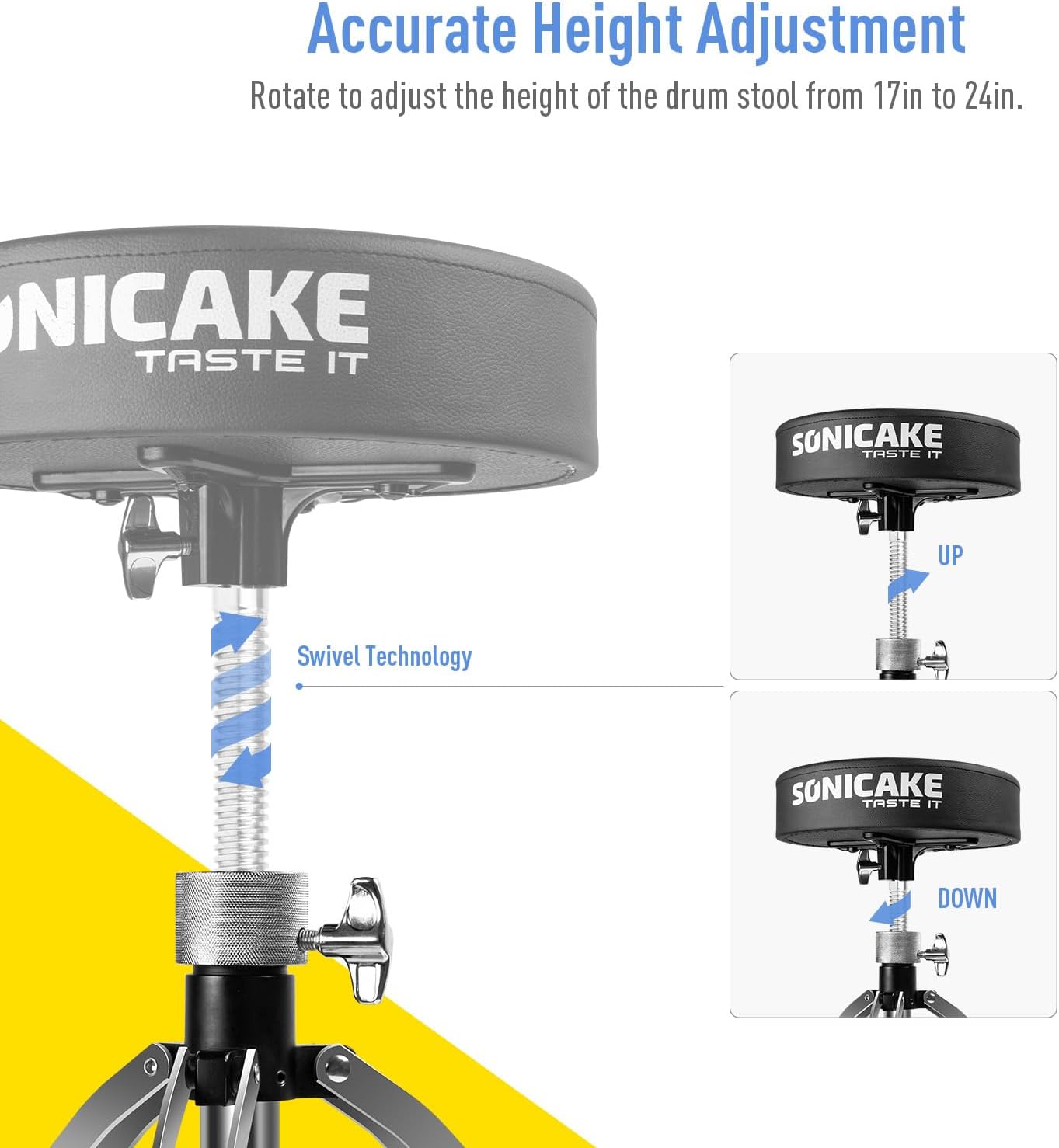
Image: Diagram illustrating the assembly process, showing the threaded rod inserting into the leg base and the seat attaching to the rod, with an emphasis on the locking mechanism.
Operating Instructions
Height Adjustment
The SONICAKE QDT Drum Throne features a swivel height adjustment mechanism, allowing for precise height settings between 16.93 inches (43 cm) and 23.62 inches (60 cm).
- Unlock: Loosen the wing bolt on the height adjustment collar.
- Adjust Height: Rotate the padded seat clockwise to lower the throne or counter-clockwise to raise it. The threaded rod allows for continuous adjustment.
- Lock: Once the desired height is achieved, firmly tighten the wing bolt on the adjustment collar to secure the throne in place. This prevents unwanted movement during use.

Image: Visual guide demonstrating the swivel technology for accurate height adjustment, showing arrows for 'UP' and 'DOWN' rotation.

Image: Diagram illustrating the adjustable height range of the drum throne, from 17 inches (43cm) to 24 inches (60cm).
Stability Features
The drum throne is designed with a double-braced leg base and anti-slip rubber feet to ensure maximum stability during use. These features prevent shifting and provide a secure foundation for the user.

Image: Close-up view of the double-braced feet and anti-slip rubber ends, highlighting the stable structure of the drum throne.
Maintenance
To ensure the longevity and proper function of your SONICAKE QDT Drum Throne, follow these simple maintenance guidelines:
- Cleaning: Wipe the padded seat and metal components with a dry, soft cloth. Avoid using abrasive cleaners or solvents, which may damage the finish.
- Inspection: Periodically check all bolts and connections to ensure they are tight. Re-tighten if necessary.
- Storage: Store the drum throne in a dry environment away from extreme temperatures.
Troubleshooting
- Throne feels unstable: Ensure all leg braces are fully extended and the height adjustment wing bolt is securely tightened. Verify the throne is on a flat, stable surface.
- Difficulty adjusting height: Loosen the wing bolt completely before attempting to rotate the seat. Ensure the threaded rod is clean and free of debris.
- Squeaking noises: Check all connections for tightness. A small amount of lubricant on the threaded rod may resolve minor squeaks.
Specifications
| Feature | Detail |
|---|---|
| Product Dimensions | 17"D x 12"W x 17"H (43cm D x 30cm W x 43cm H) |
| Adjustable Height Range | 16.93 in to 23.62 in (43 cm to 60 cm) |
| Seat Thickness | 3.15 inches (8 cm) |
| Maximum Weight Recommendation | 200 Kilograms (440 lbs) |
| Leg Style | Double-Braced, Straight |
| Furniture Finish | Stainless Steel (frame), Faux Leather (seat) |
| Color | Black |
| Item Weight | 9.46 pounds |
| Model Number | QDT |
| UPC | 843037102299 |
Warranty and Support
SONICAKE products are designed for durability and performance. For any questions, technical support, or warranty inquiries, please contact SONICAKE customer service through their official website or the retailer where the product was purchased. Please have your model number (QDT) and proof of purchase available when contacting support.