
Introduction
This manual provides detailed instructions for the ALLIMITY RG57A16/BGEF Replacement Remote Control. This remote is designed to function as a direct replacement for your original Midea AC Air Conditioner remote, offering seamless control without complex setup.
Compatible Models:
- RG57A16/BGEF
- RG57H3 (B) BGCEF-M
- RG57A2/BGEF
- RG57A3/BGEF
- RG57B/BGE
- RG57D/BGE
Setup
The ALLIMITY RG57A16/BGEF remote control requires no programming. Simply install batteries to begin operation.
Battery Installation
- Locate the battery compartment on the back of the remote control.
- Slide the battery compartment cover downwards to open it.
- Insert two (2) 1.5V AAA alkaline batteries, ensuring the correct polarity (+ and -) as indicated inside the compartment.
- Slide the battery compartment cover back into place until it clicks securely.
Note: Always replace both batteries at the same time with new ones. Do not mix old and new batteries or different types of batteries.

Image: Back of the remote control with the battery compartment open, illustrating where to insert AAA batteries.
Operating Instructions
Familiarize yourself with the buttons on your ALLIMITY RG57A16/BGEF remote control to effectively operate your Midea AC unit.
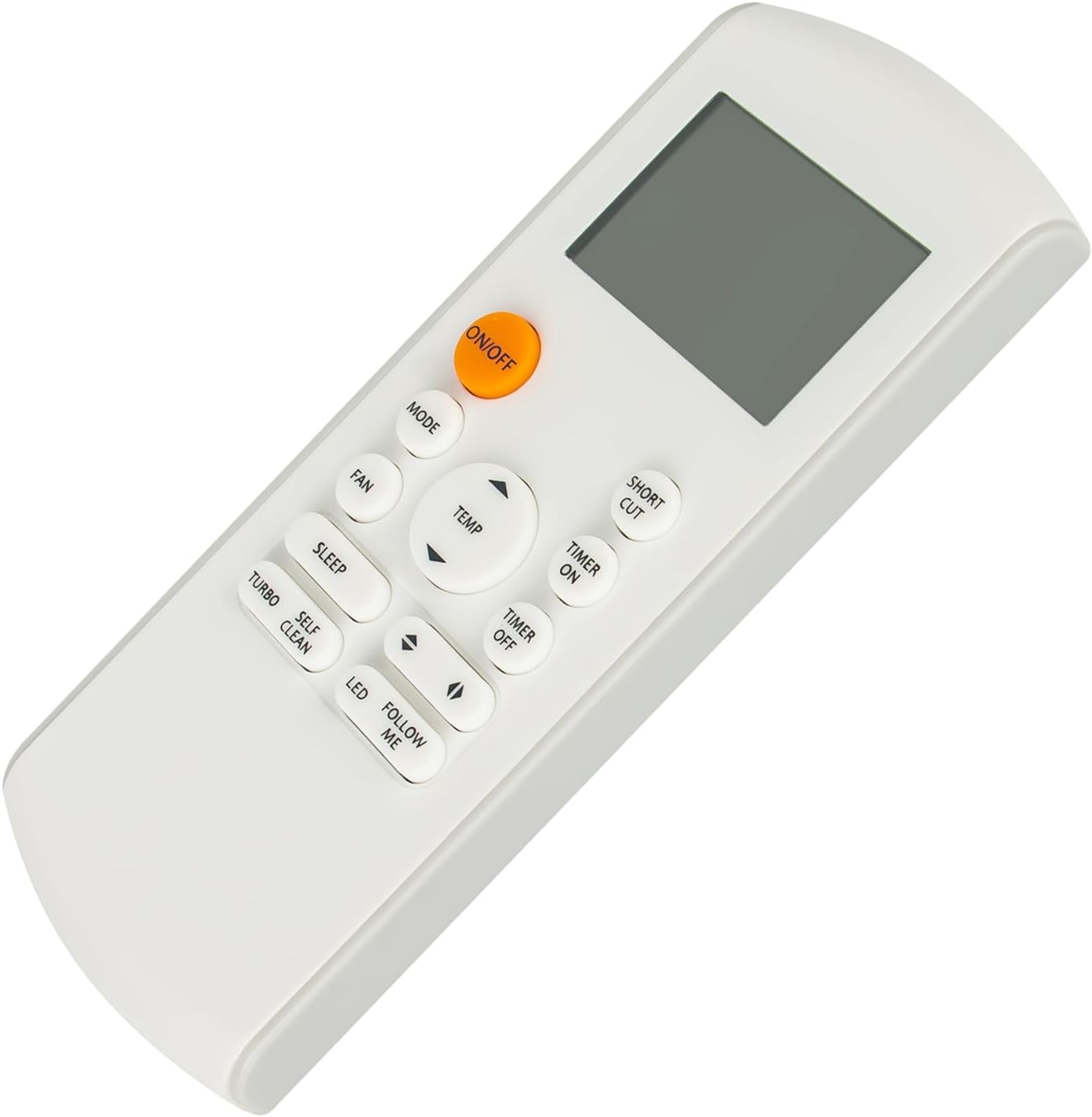
Image: Front view of the remote control, displaying the LCD screen and all function buttons.
Button Functions:
- ON/OFF: Press to turn the air conditioner unit on or off.
- MODE: Cycles through operating modes: Auto, Cool, Dry, Fan, Heat (if supported by AC unit).
- FAN: Adjusts the fan speed (Auto, Low, Med, High).
- TEMP ▲ / ▼: Increases or decreases the set temperature.
- SHORT CUT: Activates a pre-set favorite setting for quick operation.
- TIMER ON: Sets a timer for the unit to turn on automatically.
- TIMER OFF: Sets a timer for the unit to turn off automatically.
- SLEEP: Activates sleep mode, which adjusts temperature for comfortable sleep and saves energy.
- TURBO: Engages maximum fan speed and cooling/heating capacity for rapid temperature change.
- SELF CLEAN: Initiates the self-cleaning function of the indoor unit (if available).
- LED: Turns the display light on the indoor unit on or off.
- FOLLOW ME: Activates the 'Follow Me' function, where the remote's sensor measures the temperature and adjusts the AC accordingly.
- ◀ / ▶ (Swing/Airflow): Adjusts the horizontal or vertical airflow direction (functionality may vary by AC model).
Maintenance
Proper maintenance ensures the longevity and optimal performance of your remote control.
Cleaning:
- Wipe the remote control with a soft, dry cloth.
- Do not use liquid cleaners, sprays, or abrasive materials, as these can damage the remote's surface or internal components.
Battery Care:
- Replace batteries when the remote's response becomes sluggish or the display dims.
- If the remote will not be used for an extended period (e.g., one month or more), remove the batteries to prevent leakage and potential damage.
- Dispose of used batteries according to local regulations.
Troubleshooting
If you encounter issues with your remote control, refer to the following common problems and solutions:
- Remote not responding:
- Check if the batteries are inserted correctly with the proper polarity.
- Replace old batteries with new 1.5V AAA alkaline batteries.
- Ensure there is a clear line of sight between the remote control and the air conditioner's receiver. Obstructions can block the infrared signal.
- Confirm that the remote is pointed directly at the AC unit.
- Limited range:
- Ensure batteries are fresh. Weak batteries can reduce signal strength.
- Remove any obstacles between the remote and the AC unit.
- AC unit not responding to specific functions:
- Some advanced functions (e.g., Self Clean, Follow Me) may only be available on specific Midea AC models. Refer to your air conditioner's original manual to confirm feature availability.
Specifications
| Model Number | RG57A16/BGEF (Internal SKU: CV-RG57A16-BGEF-SH) |
| Product Dimensions | 6.5 x 1.38 x 0.72 inches |
| Item Weight | 1.59 ounces |
| Power Supply | 2 x 1.5V AAA Batteries (not included) |
| Compatible Devices | Midea AC Air Conditioners |
| Connectivity Technology | Infrared |
| Special Feature | Ergonomic design |
Warranty and Support
For warranty information, technical assistance, or customer support regarding your ALLIMITY RG57A16/BGEF Replacement Remote Control, please refer to your purchase documentation or contact the seller directly. Specific warranty terms may vary based on the retailer and region of purchase.