
1. Introduction
The AOPUTTRIVER AP-189A is a high-precision digital manometer designed for measuring differential, positive, and negative pressure. It is widely used in various applications including flow measurement, air quality monitoring, level measurement, gas temperature measurement, and HVAC system control. This manual provides detailed instructions for the safe and effective use of your device.
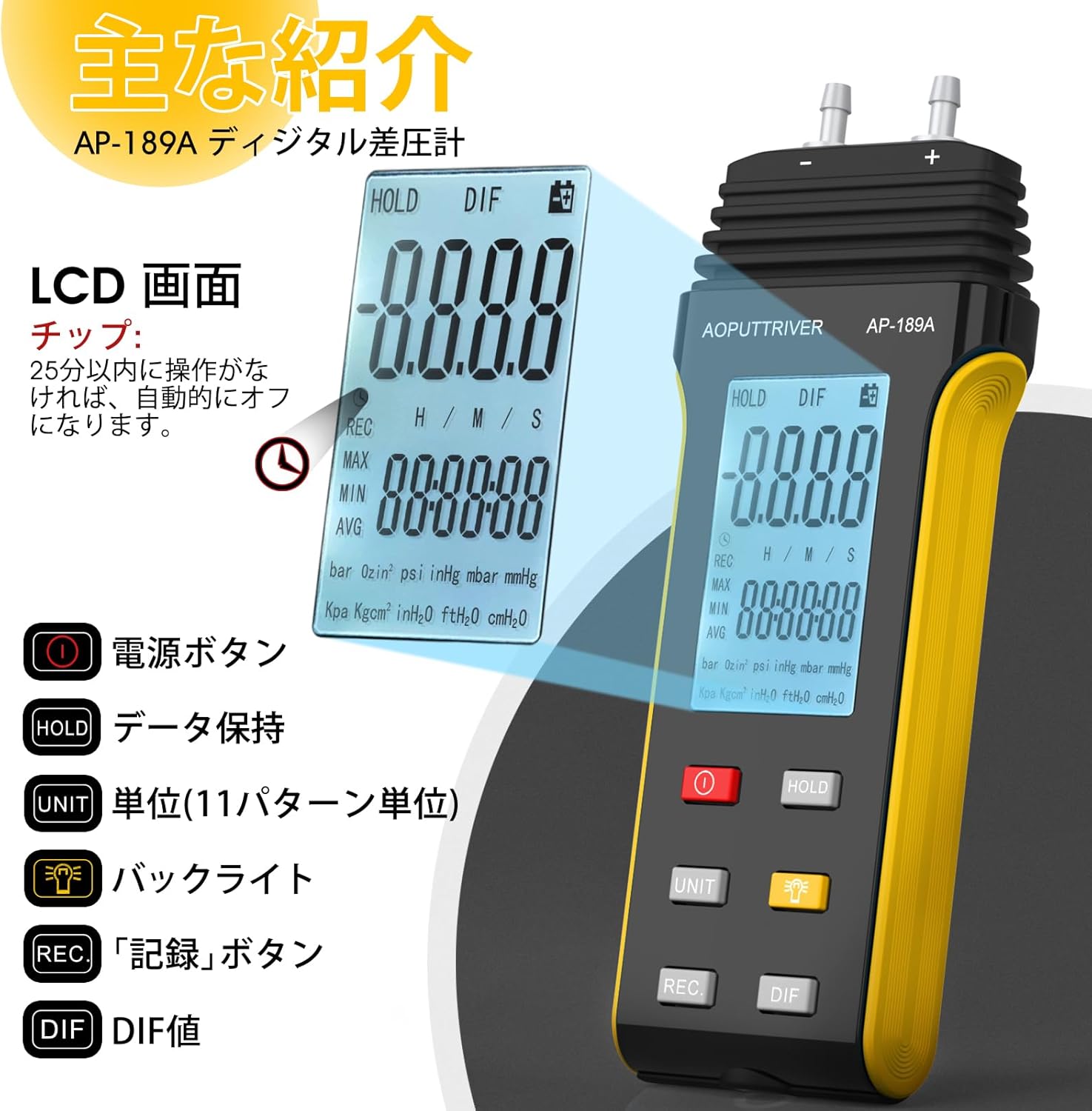
The device features a large LCD with backlight, data hold function, automatic power-off, and the ability to record maximum, minimum, and average values, as well as differential pressure (DIF). It supports 11 selectable pressure units for versatility in professional applications.
2. Product Features
- High Precision: Measurement range of ±2.000psi with an accuracy of ±0.3%FSO (at 25°C).
- Multiple Units: Easily switch between 11 pressure units: Psi, kPa, Kgfcm2, ozin2, Bar, mbar, inHg, mmHg, inH2O, ftH2O, cmH2O.
- Data Recording: Records MAX/MIN/AVG values for easy data analysis.
- Zero Setting: Allows for precise zero calibration before measurements.
- Multifunction Display: Large LCD with backlight for clear readings.
- Power Management: Low battery indicator and automatic power-off after 25 minutes of inactivity to conserve battery life.
- DIF Function: Measures differential pressure.

Image: Overview of the AP-189A Digital Manometer's key features and specifications, including accuracy, repeatability, maximum pressure, and various functions like data hold, auto-off, and unit selection.
3. Package Contents
Verify that all items are present and in good condition upon opening the package:
- 1 x AP-189A Digital Manometer
- 1 x Protective Bag
- 1 x Small Screwdriver
- 2 x 1.5V AAA Batteries
- 1 x User Manual (Japanese)

Image: The complete package contents of the AP-189A Digital Manometer, showing the device, a protective carrying bag, a small screwdriver, two AAA batteries, and the user manual.
4. Setup
4.1 Battery Installation
- Locate the battery compartment cover on the back of the device.
- Use the provided small screwdriver to open the battery compartment.
- Insert two 1.5V AAA batteries, ensuring correct polarity (+/-).
- Replace the battery compartment cover and secure it with the screw.
4.2 Connecting Hoses
The AP-189A features dual ports for differential pressure measurement. Connect the hoses to the appropriate ports (+ and -) based on your measurement requirements. Ensure a secure connection to prevent leaks.

Image: A detailed view of the AP-189A Digital Manometer, highlighting its dimensions and the dual port connections at the top for pressure hoses.
5. Operating Instructions
5.1 Power On/Off
- Press the Power Button (
 ) to turn the device ON.
 - Press and hold the Power Button for a few seconds to turn the device OFF.
5.2 Zero Setting
Before taking any measurements, it is crucial to perform a zero setting to ensure accuracy. Disconnect all pressure hoses from the device before performing this step.
- Ensure the device is powered on and no pressure is applied to the ports.
- Press and hold the HOLD button for approximately 5 seconds.
- The display will show "----" indicating that the zero setting is complete.

Image: Visual guide demonstrating how to perform a zero setting on the manometer by long-pressing the HOLD button until the display shows dashes.
5.3 Unit Selection
Press the UNIT button to cycle through the 11 available pressure units (Psi, kPa, Kgfcm2, ozin2, Bar, mbar, inHg, mmHg, inH2O, ftH2O, cmH2O) until your desired unit is displayed.
5.4 Backlight Function
Press the Backlight Button () to turn the LCD backlight ON or OFF for improved visibility in low-light conditions.
5.5 Data Hold
Press the HOLD button briefly to freeze the current reading on the display. Press it again to release the hold function and resume live readings.
5.6 MAX/MIN/AVG/DIF Recording
Press the REC button to enter recording mode. In this mode, the device will track the maximum, minimum, and average pressure values. Press REC repeatedly to cycle through MAX, MIN, AVG, and DIF displays. To exit recording mode, press and hold the REC button.
5.7 Automatic Power Off
The device will automatically power off after 25 minutes of inactivity to save battery life. This feature can typically be disabled or adjusted by pressing and holding specific buttons during power-on, as detailed in the full manual.
Image: A close-up of the AP-189A's LCD screen and control buttons, illustrating the functions of the Power, Hold, Unit, Backlight, Record, and DIF buttons.
6. Maintenance
- Cleaning: Wipe the device with a soft, dry cloth. Do not use abrasive cleaners or solvents.
- Storage: Store the manometer in its protective bag in a cool, dry place when not in use. Remove batteries if storing for extended periods to prevent leakage.
- Calibration: Regular calibration by a qualified technician is recommended to maintain measurement accuracy, especially for critical applications.
- Battery Replacement: Replace batteries promptly when the low battery indicator appears to ensure continuous operation and prevent data loss.
7. Troubleshooting
| Problem | Possible Cause | Solution |
|---|---|---|
| Device does not power on | Dead or incorrectly installed batteries | Check battery polarity; replace batteries. |
| Inaccurate readings | No zero setting performed; sensor obstruction; device not calibrated | Perform zero setting; ensure ports are clear; consider professional calibration. |
| Display shows "OL" or "Err" | Overload (pressure exceeds maximum limit) | Remove pressure immediately. Ensure pressure does not exceed 6 Psi. |
| Backlight not working | Backlight function off; low battery | Press the backlight button; replace batteries. |
8. Specifications
- Measurement Range: ±2.000psi
- Accuracy: ±0.3%FSO (at 25°C)
- Repeatability: ±0.25%FSO
- Linearity/Hysteresis: ±0.1%FSO
- Limited Maximum Pressure: 6 Psi
- Units: Psi, kPa, Kgfcm2, ozin2, Bar, mbar, inHg, mmHg, inH2O, ftH2O, cmH2O
- Functions: Backlight, Data Hold, Auto Power Off (25 min), MAX/MIN/AVG/DIF, Zero Setting
- Power Supply: 2 x 1.5V AAA Batteries
- Dimensions: Approximately 166mm x 62mm x 31mm (6.29in x 2.44in x 1.22in)
- Weight: Approximately 250g
Image: A diagram illustrating the physical dimensions of the AP-189A Digital Manometer, including length, width, and thickness.
9. Warranty and Support
The AOPUTTRIVER AP-189A Digital Manometer comes with a 365-day warranty and lifetime technical support. If you encounter any quality issues with the product, please contact our customer support team. We are committed to resolving any problems as quickly as possible.
For support, please refer to the contact information provided in your product packaging or visit the official AOPUTTRIVER website.