
1. Introduction
Thank you for choosing the Moondrop Starfield 2 In-Ear Headphones. These earphones are engineered to deliver high-fidelity audio reproduction through advanced acoustic technology and premium materials. This manual provides essential information for proper setup, operation, and maintenance to ensure optimal performance and longevity of your device.
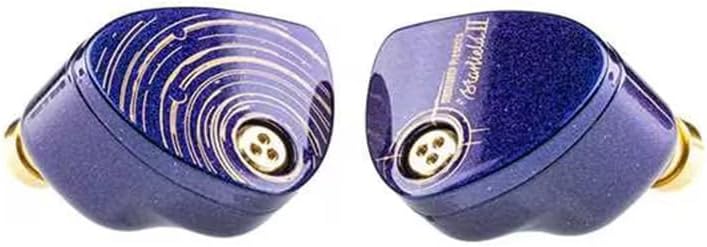
Figure 1: Moondrop Starfield 2 In-Ear Headphones.
2. What's in the Box
Verify that all items are present in the packaging:
- Moondrop Starfield 2 In-Ear Headphones (Left and Right units)
- Detachable 0.78 2-Pin Cable
- Carrying Case
- Replacement Acoustic Filters
- Silicone Ear Tips (various sizes)
- User Manual (this document)
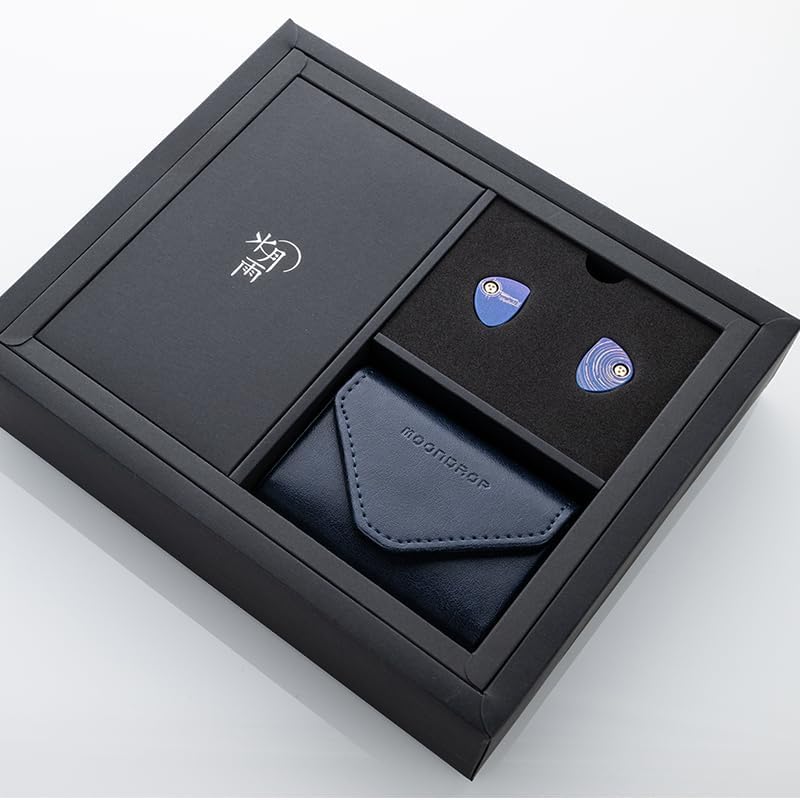
Figure 2: Contents of the Moondrop Starfield 2 packaging.
3. Product Overview
The Moondrop Starfield 2 features a sophisticated design and advanced components for superior audio performance.
3.1. Design and Construction
- Cast Alloy CNC-milled Shell: The earphone shells are crafted using alloy casting and CNC milling, providing intricate details and a durable structure. The iridescent paint finish reflects varying colors under different light conditions, creating a unique aesthetic.
- Brass CNC-Milled Acoustic Nozzle: The nozzle is a separate brass CNC-milled component with a gold-plated surface, ensuring high precision, density, and contributing to a refined sound timbre.
- Lithium-Magnesium Alloy Dome Composite Diaphragm: The 10mm dynamic driver utilizes a lithium-magnesium alloy dome composite diaphragm. This material offers optimal rigidity and a lighter weight compared to pure beryllium, enhancing bandwidth and playback details while suppressing unnecessary resonance.
- High-Quality Single-Ended Cable: The included silver-plated cable features a star-twisted structure to reduce signal interference. Its color matches the earphone shells, emphasizing the starry theme.

Figure 3: Lithium-Magnesium Alloy Dome Composite Diaphragm.

Figure 4: Advanced Electroacoustic Technology and Scientific Acoustic Architecture.
4. Setup
4.1. Attaching the Cable
- Identify the left (L) and right (R) earphone units and the corresponding connectors on the cable. The cable connectors are typically marked.
- Align the 0.78 2-pin connector on the cable with the receptacle on the earphone unit. Ensure the pins are correctly oriented.
- Gently but firmly push the cable connector into the earphone receptacle until it is securely seated. Avoid excessive force to prevent damage to the pins.
- Repeat for the other earphone unit.

Figure 5: Detachable 0.78 2-Pin Cable.
4.2. Selecting Ear Tips
Choose the ear tips that provide the best seal and comfort for your ears. A proper seal is crucial for optimal sound quality and bass response. Experiment with different sizes to find the best fit.
4.3. Connecting to an Audio Source
Plug the 3.5mm single-ended plug of the cable into your audio device (e.g., smartphone, digital audio player, computer). Ensure the connection is secure.

Figure 6: Earphones connected to an audio source.
5. Operating Instructions
5.1. Wearing the Earphones
- Insert the earphone units into your ear canals, ensuring a snug and comfortable fit. The cable is designed to be worn over the ear for better stability and reduced microphonics.
- Adjust the cable behind your ears for comfort.
5.2. Audio Playback
Once connected to your audio source, begin audio playback. Adjust the volume on your device to a comfortable listening level. Avoid excessively high volumes to protect your hearing.
6. Maintenance
6.1. Cleaning
- Regularly clean the ear tips with a soft, damp cloth to remove earwax and debris.
- Wipe the earphone shells and cable with a dry, soft cloth. Avoid using harsh chemicals or abrasive materials.
6.2. Replacing Acoustic Filters
The Starfield 2 incorporates replaceable acoustic filters located at the tip of the brass nozzle. If you notice a decrease in sound quality or blockage, the filters may need replacement.
- Gently unscrew the removable nozzle tip from the earphone unit.
- Carefully remove the old acoustic filter.
- Insert a new acoustic filter into the nozzle tip.
- Screw the nozzle tip back onto the earphone unit, ensuring it is secure.

Figure 7: Replaceable Acoustic Nozzle.
Replacement filters are available from authorized Moondrop retailers. This design improves reliability and reduces replacement costs compared to multi-layer filters.
7. Troubleshooting
| Problem | Possible Cause | Solution |
|---|---|---|
| No sound or intermittent sound from one or both earphones. | Loose cable connection, blocked acoustic filter, faulty audio source. | Ensure cable is securely connected to both earphones and audio source. Check and replace acoustic filters if necessary. Test with a different audio source. |
| Poor sound quality (e.g., lack of bass, muffled sound). | Improper ear tip seal, blocked acoustic filter. | Try different sized ear tips to achieve a better seal. Clean or replace acoustic filters. |
| Earphones falling out easily. | Incorrect ear tip size, improper wearing method. | Experiment with different ear tip sizes. Ensure the cable is worn over the ear for added stability. |
8. Specifications
| Feature | Detail |
|---|---|
| Brand | Moondrop |
| Model Number | Starfield 2 |
| Ear Placement | In Ear |
| Impedance | 15 Ohms |
| Frequency Response Range | 12Hz-24KHz |
| Audio Driver Type | Dynamic Driver |
| Audio Driver Size | 10 Millimeters |
| Connectivity Technology | Wired |
| Headphone Jack | 0.78 2-pin connector (detachable cable) |
| Cable Features | Silver-plated, Star-twisted, Retractable |
| Enclosure Material | Cast Alloy (shell), Brass (nozzle) |
| Nonlinear Distortion | Below 0.05% |
| Water Resistance Level | Not Water Resistant |
9. Warranty & Support
9.1. Warranty Information
The Moondrop Starfield 2 In-Ear Headphones come with a 1-year manufacturer's warranty from the date of purchase. This warranty covers defects in materials and workmanship under normal use. It does not cover damage caused by misuse, accidents, unauthorized modifications, or normal wear and tear. Please retain your proof of purchase for warranty claims.
9.2. Customer Support
For technical assistance, warranty claims, or further inquiries, please contact Moondrop customer support through their official website or the retailer from whom you purchased the product. Refer to the packaging or official Moondrop resources for specific contact details.
10. Product Video
Video: Moondrop Starfield 2 In-Ear Headphones overview. This video provides a visual demonstration of the product's features and design.
