
Introduction
This manual provides essential information for the safe and efficient operation of your Magic Chef MC99MW 0.9 cu. ft. 900 Watt Countertop Microwave. Please read all instructions carefully before use and retain this manual for future reference.
Important Safety Instructions
When using electrical appliances, basic safety precautions should be followed, including the following:
- Read all instructions before using the appliance.
- Do not operate the oven if the cord or plug is damaged, if it is not working properly, or if it has been damaged or dropped.
- Do not heat liquids or other foods in sealed containers as they are liable to explode.
- Do not use corrosive chemicals or vapors in this appliance.
- Close supervision is necessary when the appliance is used by or near children.
- Always ensure the turntable and roller ring are correctly positioned before operation.
- Do not attempt to operate this oven with the door open as this can result in harmful exposure to microwave energy.
Setup and Installation
Unpacking
Carefully remove the microwave oven and all packaging materials. Check the oven for any damage, such as dents or a misaligned door. Do not operate the oven if it is damaged. Contact customer service for assistance.
Placement
Place the microwave oven on a flat, stable surface that can support its weight (approximately 19.1 pounds). Ensure adequate ventilation around the unit. The dimensions of the microwave are 19.1"W x 11.4"H x 14.7"D. Allow at least 4 inches of space on the top, back, and sides for proper airflow.

Image: Front view of the Magic Chef MC99MW microwave with dimensions labeled: 19.1" W, 11.4" H, 14.7" D. This illustrates the compact size suitable for countertops.
Electrical Requirements
The microwave operates on 120 Volts and consumes 900 Watts of power. Ensure the electrical outlet is properly grounded and can support the appliance's power requirements.
Turntable Installation
Place the roller ring in the center of the oven cavity. Position the glass turntable securely on top of the roller ring. Ensure it rotates freely.
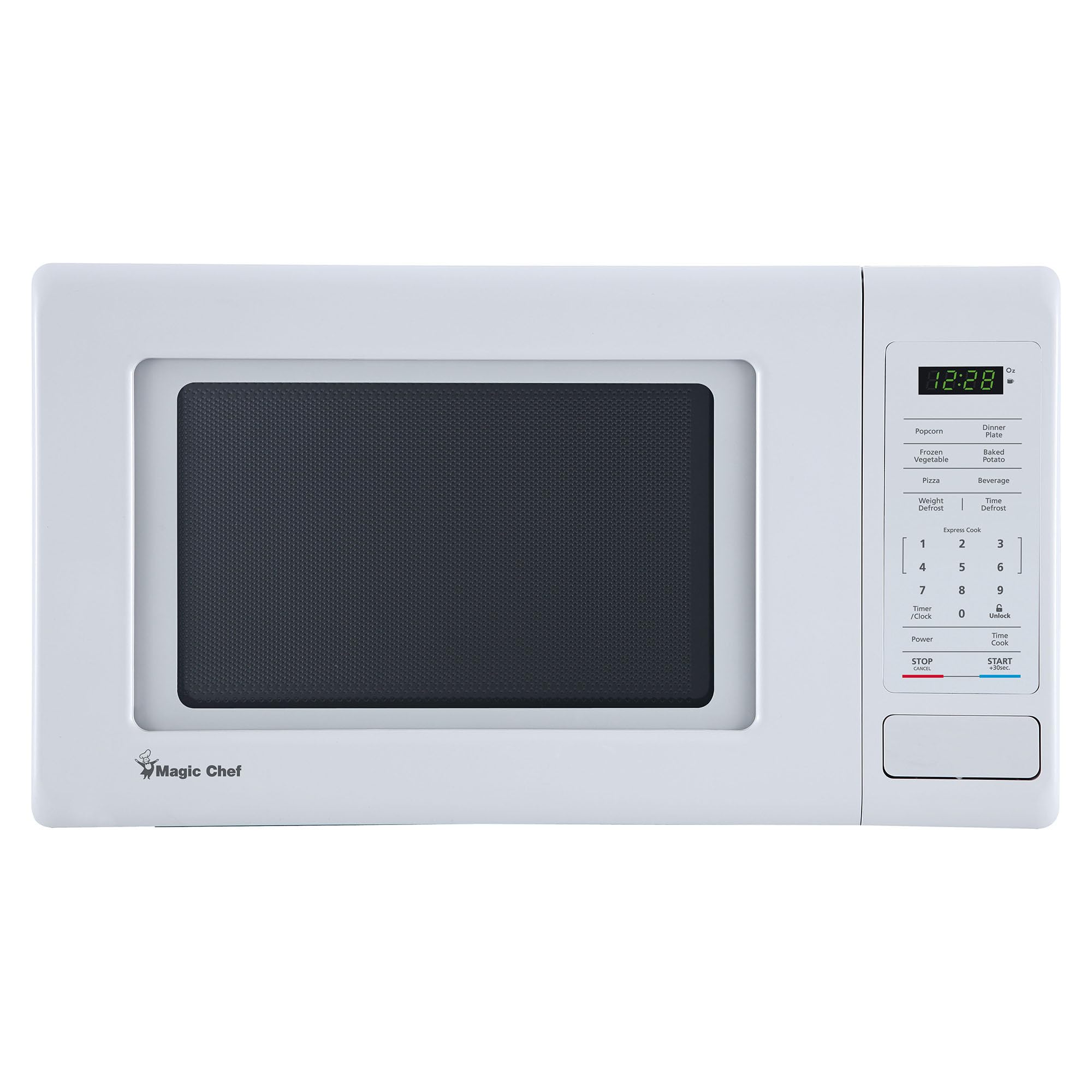
Image: The interior of the Magic Chef MC99MW microwave with the door open, showing the glass turntable and roller ring in place. The control panel is visible on the right.
Operating Instructions
Control Panel Overview
The microwave features an easy-to-use electronic control panel with a digital display and push-button interface.
Basic Cooking (Time Cook)
- Place food in the microwave.
- Enter the desired cooking time using the number pad.
- Press the 'START/+30SEC' button to begin cooking.
Express Cooking
For quick heating, press the 'START/+30SEC' button repeatedly to add 30 seconds of cooking time per press, up to a maximum of 6 minutes.
Preprogrammed Cooking Modes
The microwave includes 6 preprogrammed cooking modes for common foods:
- Popcorn: For popping popcorn.
- Dinner Plate: For reheating a dinner plate.
- Frozen Vegetable: For cooking frozen vegetables.
- Baked Potato: For baking potatoes.
- Pizza: For reheating pizza.
- Beverage: For heating beverages.
To use, press the corresponding button for the desired food item. The oven will automatically set the appropriate cooking time and power level.
Defrost Modes
The microwave offers two defrost options:
- Weight Defrost: Defrosts food based on its weight.
- Time Defrost: Defrosts food for a specified duration.
Refer to the control panel for specific instructions on selecting and adjusting these modes.
Power Levels
Customize cooking to perfection with the choice of 10 power levels. Press the 'POWER' button and then select a number from 1 to 10 to set the desired power level.
Child Safety Lock
The child safety lock feature prevents unintended use of the microwave. Consult the full manual for activation and deactivation procedures.
Video: A demonstration of the Magic Chef 0.9 Cu. Ft. 900W Countertop Microwave Oven, highlighting its compact size and features.
Maintenance and Cleaning
Cleaning the Interior
The ceramic interior is designed for easy cleaning. Wipe the interior cavity, door, and door seals regularly with a soft, damp cloth and mild detergent. Avoid abrasive cleaners or scouring pads.
Cleaning the Exterior
Clean the exterior surface with a soft, damp cloth. Do not allow water to enter the ventilation openings.
Turntable Care
The glass turntable and roller ring can be removed for cleaning. Wash them in warm, soapy water or in the dishwasher. Ensure they are completely dry before placing them back in the oven.
Troubleshooting
If your microwave oven is not operating correctly, please refer to the following common issues before contacting customer service:
- Oven not starting: Check if the power cord is securely plugged in and if the door is fully closed. Ensure no circuit breaker has tripped.
- Food not heating: Verify that the cooking time and power level are set correctly. Ensure the door is properly latched.
- Unusual noise during operation: Check if the turntable and roller ring are correctly positioned and free from obstructions.
For more detailed troubleshooting, consult the comprehensive guide in the full product manual or contact Magic Chef customer support.
Specifications
| Feature | Specification |
|---|---|
| Brand | Magic Chef |
| Model Number | MC99MW |
| Capacity | 0.9 Cubic Feet |
| Wattage | 900 Watts |
| Voltage | 120 Volts |
| Product Dimensions (D x W x H) | 14.7"D x 19.1"W x 11.4"H |
| Item Weight | 19.1 Pounds |
| Material (Interior) | Ceramic |
| Number of Power Levels | 10 |
| Cooking Programs | 6 (Popcorn, Dinner Plate, Frozen Vegetable, Baked Potato, Pizza, Beverage) |
| Defrost System Type | Auto Defrost (Weight/Time) |
| Special Feature | One Touch Cooking, Child Safety Lock |
| UPC | 665679008056 |
Warranty Information
This Magic Chef microwave oven comes with a 1-year limited warranty. For detailed terms and conditions, please refer to the warranty card included with your product or visit the official Magic Chef website.
Customer Support
For technical assistance, replacement parts, or any questions regarding your Magic Chef MC99MW microwave, please contact Magic Chef customer service. Contact information can typically be found on the manufacturer's website or in the product packaging.
Online Support: Visit the official Magic Chef website for FAQs and support resources.
Phone Support: Refer to your product documentation for the customer service phone number.


