Introduction
This manual provides detailed instructions for the proper use, setup, and maintenance of your Kapbom KA-999 Bluetooth 5.0 Wireless Stereo Earphones. Please read this manual thoroughly before using the product to ensure optimal performance and longevity.
Product Overview
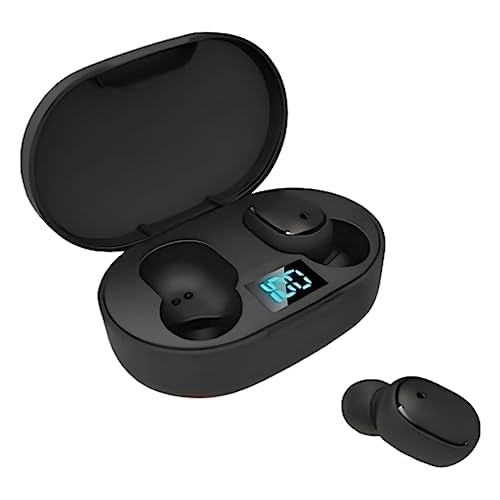
Image: The Kapbom KA-999 wireless earphones are shown in their black charging case, which has an open lid. A digital display on the case shows '100', indicating full charge. One earbud is placed outside the case, next to it.
Components Included:
- Kapbom KA-999 Wireless Earphones (Left and Right)
- Wireless Charging Case
- USB Charging Cable (Type-C, not explicitly mentioned but standard for such devices)
- User Manual (this document)
Setup
1. Initial Charging
Before first use, fully charge the earphones and the charging case. Place both earphones into the charging case. Connect the charging case to a USB power source using the provided USB cable. The digital display on the case will indicate the charging status. A full charge is indicated by '100' on the display.
2. Pairing with a Device
- Ensure the earphones are charged.
- Open the charging case. The earphones will automatically enter pairing mode, indicated by a flashing LED light on the earbuds (specific light pattern may vary).
- On your device (smartphone, tablet, laptop), go to the Bluetooth settings.
- Search for available Bluetooth devices.
- Select "KA-999" from the list of devices.
- Once connected, the LED indicator on the earphones will stop flashing or change to a solid light, and your device will confirm the connection.
Note: The earphones will automatically reconnect to the last paired device when taken out of the case, if Bluetooth is enabled on the device.
Operating Instructions
1. Power On/Off
- Power On: Open the charging case, and the earphones will power on automatically. Alternatively, press and hold the touch control area on both earbuds for approximately 3 seconds.
- Power Off: Place the earphones back into the charging case and close the lid. They will power off automatically. Alternatively, press and hold the touch control area on both earbuds for approximately 5 seconds.
2. Music Playback Control
- Play/Pause: Single tap the touch control area on either earbud.
- Next Track: Double tap the touch control area on the right earbud.
- Previous Track: Double tap the touch control area on the left earbud.
- Volume Up: Triple tap the touch control area on the right earbud.
- Volume Down: Triple tap the touch control area on the left earbud.
3. Call Management
- Answer/End Call: Single tap the touch control area on either earbud.
- Reject Call: Press and hold the touch control area on either earbud for 2 seconds.
4. Voice Assistant
- Activate Voice Assistant: Press and hold the touch control area on either earbud for 2 seconds (when not on a call).
Care and Maintenance
- Cleaning: Use a soft, dry, lint-free cloth to clean the earphones and charging case. Do not use harsh chemicals or abrasive materials.
- Storage: When not in use, store the earphones in their charging case to protect them from dust and damage.
- Battery Care: To preserve battery life, avoid fully discharging the earphones and charging case frequently. Charge them regularly, even if not in constant use.
- Water Resistance: These earphones are not waterproof. Avoid exposure to water, moisture, or extreme temperatures.
Troubleshooting Guide
| Issue | Possible Solution |
|---|---|
| Earphones do not power on. | Ensure the earphones and charging case are fully charged. |
| Cannot pair with device. | Make sure Bluetooth is enabled on your device. Place earphones back in case, close, then reopen to re-enter pairing mode. Forget "KA-999" from your device's Bluetooth list and try pairing again. |
| Only one earbud is working. | Place both earbuds back into the charging case, close the lid, wait a few seconds, then take them out again. This should reset their connection. |
| Low volume or poor sound quality. | Adjust the volume on both your device and the earphones. Ensure the earbuds are properly seated in your ears. Clean any debris from the earbud mesh. |
| Charging case not charging. | Check the USB cable and power adapter. Ensure connections are secure. Try a different cable or power source. |
Technical Specifications
| Feature | Detail |
|---|---|
| Brand | Kapbom |
| Model | KA-999 |
| Connectivity Technology | Bluetooth 5.0 |
| Earphone Form Factor | In-ear (Earbud) |
| Color | Black |
| Control Method | Touch Control |
| Compatible Devices | Cell phones, Notebooks, Tablets, Televisions |
| Wireless Feature | Cable-free design |
| Specific Uses | Travel, Daily Use |
Warranty Information
Kapbom products are designed for reliability and performance. For specific warranty terms and conditions, please refer to the warranty card included with your purchase or contact Kapbom customer support. Keep your proof of purchase for warranty claims.
Customer Support
If you encounter any issues not covered in this manual or require further assistance, please contact Kapbom customer support through the retailer where you purchased the product or visit the official Kapbom website for support options.


