
1. Introduction
Thank you for choosing the CristalRecord Smart Mei 3D 135W 3CCT Adjustable LED Ceiling Light. This manual provides essential information for the safe installation, operation, and maintenance of your new lighting fixture. Please read these instructions carefully before installation and retain them for future reference.

Figure 1: The CristalRecord Smart Mei 3D 135W 3CCT Adjustable LED Ceiling Light, showcasing its unique layered square design and illuminated state.
2. Safety Instructions
To ensure safe installation and operation, please observe the following precautions:
- Always disconnect power at the main circuit breaker before installation, maintenance, or cleaning.
- Installation must be performed by a qualified electrician in accordance with all local and national electrical codes.
- Do not install the fixture on a surface that is not structurally sound.
- Ensure all electrical connections are secure and properly insulated.
- Do not attempt to modify the fixture in any way.
- Keep packaging materials out of reach of children.
- This fixture is designed for indoor use only.
- Do not look directly into the LED light source when illuminated.
3. Package Contents
Please check that all components are present and undamaged before proceeding with installation.
- LED Ceiling Light Fixture (1 unit)
- Mounting Bracket (1 unit)
- Mounting Screws and Wall Anchors (set)
- Wire Connectors (set)
- User Manual (this document)
- Remote Control (if included, check packaging)

Figure 2: Underside view of the ceiling light, illustrating the central mounting area and the layered design.
4. Setup and Installation
Follow these steps for proper installation of your ceiling light. If you are unsure about any step, consult a qualified electrician.
- Prepare for Installation:
- Turn off power at the circuit breaker for the area where the light will be installed.
- Ensure the power is off by testing the existing light switch.
- Gather necessary tools: screwdriver, wire strippers, drill (if needed), ladder.
- Remove Existing Fixture (if applicable):
- Carefully disconnect and remove the old light fixture.
- Ensure the junction box is clean and accessible.
- Install Mounting Bracket:
- Attach the mounting bracket to the ceiling junction box using the provided screws. Ensure it is securely fastened.
- Make Electrical Connections:
- Connect the live (black or brown) wire from the ceiling to the live wire of the fixture.
- Connect the neutral (white or blue) wire from the ceiling to the neutral wire of the fixture.
- Connect the ground (green/yellow or bare copper) wire from the ceiling to the ground wire of the fixture.
- Use wire connectors to secure all connections. Ensure no bare wire is exposed.
- Mount the Fixture:
- Carefully align the fixture with the mounting bracket.
- Secure the fixture to the mounting bracket using the provided screws. Do not overtighten.
- Restore Power:
- Turn the power back on at the circuit breaker.
- Test the light fixture.

Figure 3: Top-down view of the ceiling light, highlighting the central area where the mounting bracket connects.
5. Operating Instructions
Your CristalRecord Smart Mei 3D ceiling light offers adjustable brightness and color temperature (3CCT).
5.1 Power On/Off
Use your standard wall switch to turn the light fixture on or off.
5.2 Adjusting Color Temperature (3CCT)
The 3CCT feature allows you to switch between three color temperatures: Warm White, Neutral White, and Cool White. This is typically controlled via a remote control (if supplied) or by cycling the wall switch.
- Using Remote Control: Refer to the remote control's specific instructions for buttons related to CCT adjustment.
- Using Wall Switch: Rapidly toggle the wall switch OFF and ON to cycle through the available color temperatures. The light will remember the last setting if left off for a few seconds.

Figure 4: The ceiling light illuminating a living room with a warm white glow, suitable for relaxing environments.
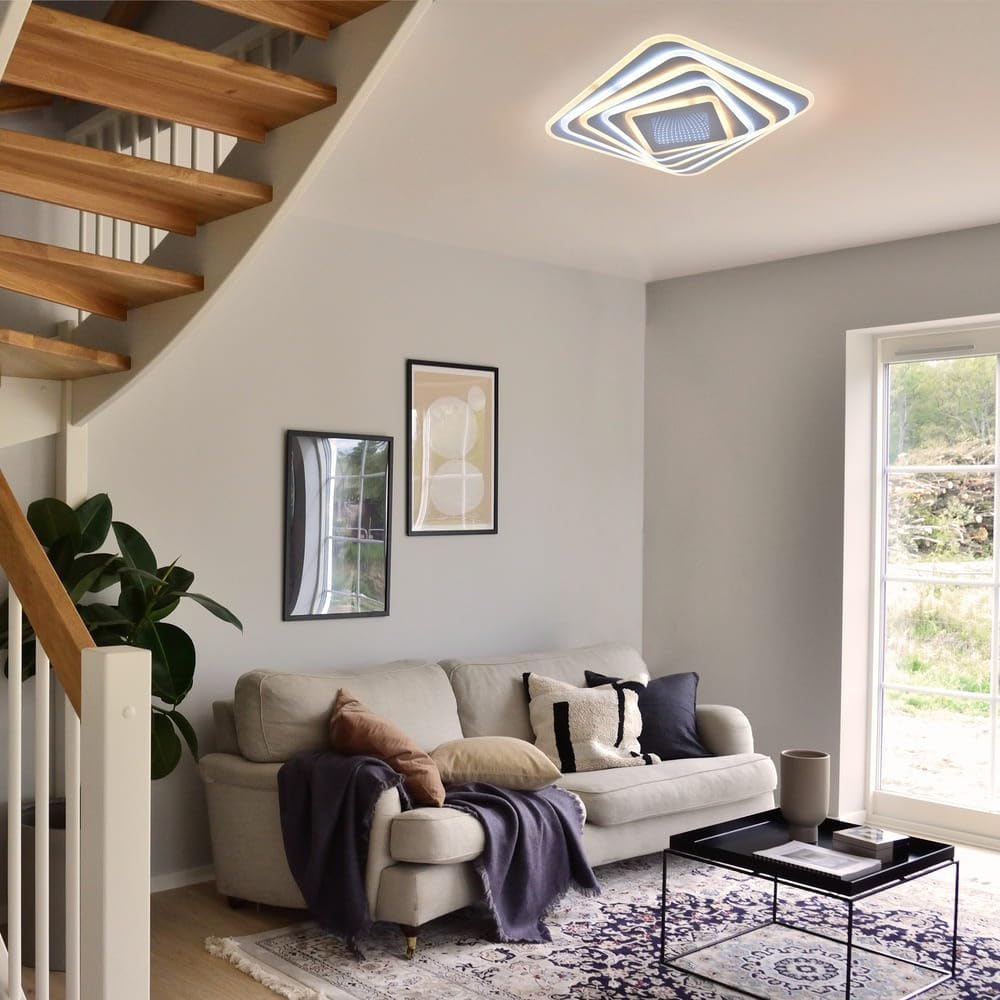
Figure 5: The ceiling light providing neutral white illumination in a living room, ideal for general tasks and everyday use.

Figure 6: The ceiling light emitting cool white light in a living room, enhancing focus and providing bright, crisp illumination.
5.3 Dimming Function
The fixture is dimmable. If a remote control is provided, use the designated dimming buttons to adjust brightness. If no remote is present, the dimming function may be integrated with the wall switch (e.g., holding the switch) or require a compatible dimmer switch (not included). Consult the product packaging or retailer for specific dimming compatibility.
5.4 Smart Features (if applicable)
If your model includes "Smart" features beyond remote control, such as app control or voice assistant integration, please refer to the separate smart device pairing instructions provided with the product or available on the manufacturer's website.
6. Maintenance
The CristalRecord Smart Mei 3D LED Ceiling Light requires minimal maintenance.
- Cleaning: Ensure the power is off before cleaning. Wipe the fixture with a soft, dry, or slightly damp cloth. Do not use abrasive cleaners, solvents, or polishes as they may damage the finish or electrical components.
- LEDs: The integrated LED light source is designed for long-term use and is not user-replaceable. Do not attempt to open or replace the LED components.
7. Troubleshooting
If you encounter issues with your ceiling light, refer to the following common problems and solutions:
| Problem | Possible Cause | Solution |
|---|---|---|
| Light does not turn on. |
|
|
| Light flickers or dims unexpectedly. |
|
|
| Cannot change color temperature or dim. |
|
|
If the problem persists after attempting these solutions, please contact customer support or a qualified electrician.
8. Specifications
| Brand | CristalRecord |
| Model Number | 27-242-15-100 |
| Type | Adjustable LED Ceiling Light |
| Power | 135W |
| Color Temperature | 3CCT (Warm White, Neutral White, Cool White) |
| Dimmable | Yes |
| ASIN | B0CC5X7QJV |
| First Available on Amazon.fr | 19 February 2024 |
9. Warranty and Support
For warranty information, please refer to the documentation provided with your purchase or contact the retailer where the product was acquired. CristalRecord products typically come with a manufacturer's warranty covering defects in materials and workmanship.
For technical support or inquiries, please contact CristalRecord customer service through their official website or the contact information provided in your purchase documentation.
Note: Information regarding spare parts availability and software updates is not available at this time.