
FREDI HD PLUS FH-33
FREDI HD PLUS WiFi T189 Mini Pen Cam User Manual
Model: FH-33
Product Overview
The FREDI HD PLUS WiFi T189 Mini Pen Cam is a compact and portable surveillance camera designed for discreet recording. It features 1080P Full HD video recording, a 120-degree wide-angle lens, and supports up to 32GB Micro SD cards. Its small size and wearable design make it suitable for various indoor and outdoor security applications, as well as for recording meetings, lectures, or interviews.

Image: The FREDI HD PLUS T189 Mini Pen Cam, showcasing its compact design and integrated camera lens.
Product Features and Components
Familiarize yourself with the key features and components of your T189 Mini Pen Cam:
- 1080P Full HD Recording: Captures clear video at 1920x1080 resolution.
- 120-Degree Wide Angle Lens: Provides a broad field of view.
- Motion Detection: Automatically records when motion is detected.
- Loop Recording: Overwrites oldest files when storage is full.
- Long Battery Life: Up to 3-4 hours of recording on a single charge.
- Micro SD Card Support: Supports up to 32GB (card not included).
- USB Interface: For charging and data transfer.
- Compact and Portable: Designed for easy concealment and portability.
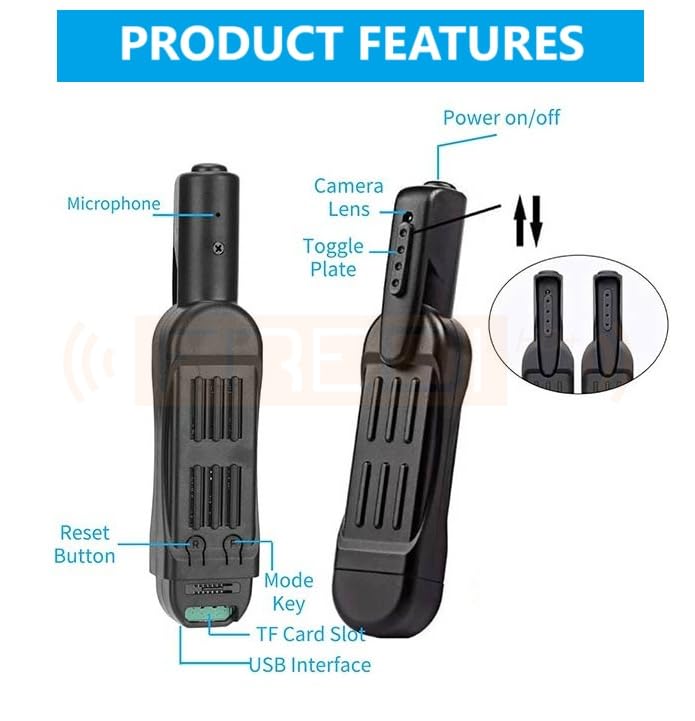
Image: Diagram illustrating the components of the T189 Mini Pen Cam, including the microphone, camera lens, power on/off button, toggle plate, reset button, mode key, TF card slot, and USB interface.
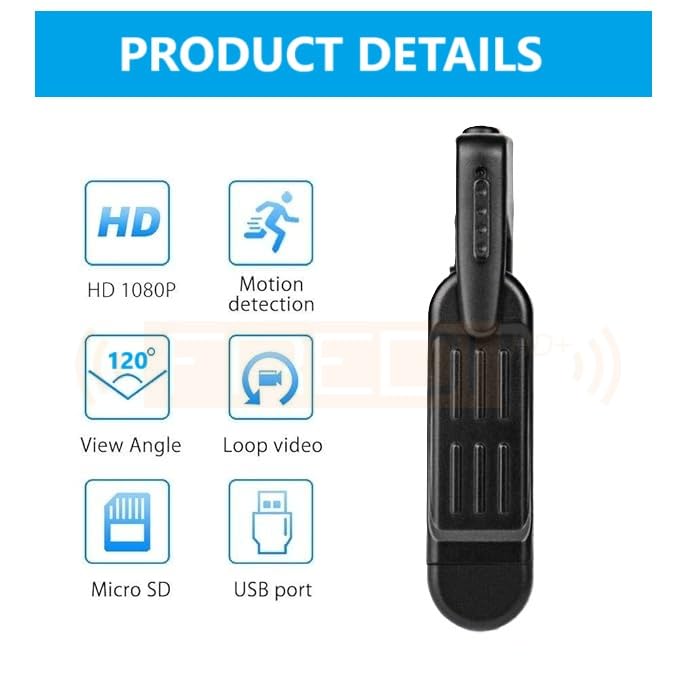
Image: Icons representing key product details: HD 1080P, motion detection, 120-degree view angle, loop video, Micro SD card support, and USB port.
Setup Guide
- Charge the Device: Before first use, fully charge the camera. Connect the camera to a USB power source (e.g., computer USB port or USB wall adapter) using the provided USB cable. The charging indicator light will typically show charging status and turn off or change color when fully charged. A full charge takes approximately 1.5 hours.
- Insert Micro SD Card: Open the rear cover or locate the TF card slot. Carefully insert a Micro SD card (up to 32GB, not included) into the slot until it clicks into place. Ensure the card is inserted correctly to avoid damage.
- Power On: Press and hold the Power On/Off button for a few seconds until the indicator light illuminates, indicating the device is powered on.

Image: Detailed diagram showing the location of the TF Card Slot and USB Interface, essential for setup.
Operating Instructions
Recording Video
- Standard Video Recording: With the device powered on, press the Mode Key once to switch to video recording mode. The indicator light will typically blink to indicate recording is in progress. Press the Mode Key again to stop recording.
- Motion Detection Recording: Refer to the specific instructions in your included manual for activating motion detection mode, as this may vary. Generally, it involves a specific sequence of button presses or a dedicated switch. When activated, the camera will automatically begin recording when motion is detected and stop when motion ceases.
Taking Photos
- Photo Mode: With the device powered on, press the Mode Key until the indicator light signifies photo mode (e.g., a solid blue light). Press the Power On/Off button briefly to take a photo.
Connecting to Computer
To access recorded files or charge the device:
- Ensure the camera is powered off.
- Connect the camera to your computer using the provided USB cable.
- The camera will be recognized as a removable disk. You can then browse, copy, or delete files from the Micro SD card.

Image: Visual representation of the 1080P HD video resolution capability of the camera, showing clear picture quality.
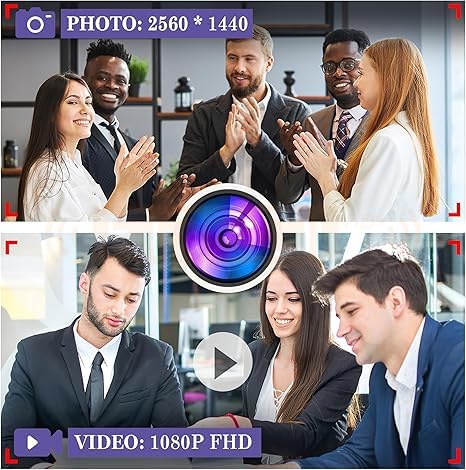
Image: Comparison showing photo resolution at 2560*1440 and video resolution at 1080P FHD.
Maintenance
- Cleaning: Use a soft, dry cloth to clean the camera body. For the lens, use a specialized lens cleaning cloth and solution if necessary. Avoid abrasive materials or harsh chemicals.
- Storage: Store the camera in a cool, dry place away from direct sunlight, extreme temperatures, and high humidity.
- Battery Care: To prolong battery life, avoid fully discharging the battery frequently. If storing for extended periods, charge the battery to about 50% every few months.
- Firmware Updates: Check the manufacturer's website periodically for any available firmware updates that may improve performance or add features.
Troubleshooting
| Problem | Possible Cause | Solution |
|---|---|---|
| Device does not power on. | Low battery; device malfunction. | Charge the device for at least 1.5 hours. If problem persists, contact support. |
| Cannot record video. | No Micro SD card; card full; card error; incorrect mode. | Insert a Micro SD card. Delete old files or use a new card. Format the card. Ensure device is in video recording mode. |
| Poor video quality. | Insufficient lighting; dirty lens. | Ensure adequate lighting. Clean the camera lens carefully. |
| Computer does not recognize device. | Loose USB connection; driver issue; device not powered off. | Reconnect USB cable. Try a different USB port or computer. Ensure device is powered off before connecting. |
Specifications
- Model: FH-33
- Video Resolution: 1080P Full HD (1920x1080)
- Photo Resolution: 2560x1440
- View Angle: 120 degrees
- Storage: Supports Micro SD card up to 32GB (not included)
- Battery Type: Lithium Polymer (included)
- Recording Time: Approximately 3-4 hours
- Charging Time: Approximately 1.5 hours
- Connectivity: Wi-Fi (for certain models/features, though primary function is local recording), USB
- Dimensions: 10 x 2 x 1 cm
- Weight: 30 g
- Included Components: 1*T189 Pen Camera, 1*Cable, 1*Manual
- Country of Origin: Hong Kong
Support and Contact Information
For technical assistance, inquiries, or support regarding your FREDI HD PLUS product, please contact the manufacturer directly:
- Manufacturer: FREDI HD PLUS
- Contact Numbers: 9810589579, 9773661598 (WhatsApp available)
- Operating Hours: Monday to Saturday - 10:00 AM to 6:30 PM (Sunday - Closed)
Please note: Hidden Camera Products are strictly prohibited for use for any kind of illegal activity. The manufacturer shall not be held responsible for any crimes committed by using the products. Users are requested to respect the country's laws and regulations. Some countries may ban the use of hidden cameras unless consent is taken from law makers. The company reserves the right for no refund policy. For any discrepancies, customers can move legal jurisdiction in Ghaziabad jurisdiction only.
Ask a question about this manual
Ask about setup, troubleshooting, compatibility, parts, safety, or missing instructions. Manuals+ will review the question and use this page’s manual context to help answer it.