
Khptop X7
Motorcycle Helmet Bluetooth Headset X7 User Manual
Model: X7 | Brand: Khptop
1. Product Overview
The Khptop X7 Motorcycle Helmet Bluetooth Headset is designed to provide clear audio communication and entertainment while riding. Featuring CVC noise cancellation, stereo music, and automatic call answering, this ultra-thin headset ensures a comfortable and connected experience. It is waterproof and compatible with various helmet types.

Image: The main unit of the Khptop X7 Motorcycle Helmet Bluetooth Headset, showcasing its compact design and control button.
2. What's in the Box
Please check the package contents upon unboxing to ensure all components are present:
- User Manual
- Charging Cable (Type-C)
- Protective Case
- Headband
- Speak Adhesive (Single/Double Sided)
- Speaker Adhesive
- Circular Velcro (4 pieces)
- Square Velcro (2 pieces)
- Adhesive Base
- Clip-on Base
- Headset & Microphone (Soft and Hard microphone options)

Image: A visual representation of all items included in the Khptop X7 product package, including the main unit, various adhesives, bases, cables, and microphones.
3. Setup and Installation
3.1 Charging the Device
Before first use, fully charge the headset. The device features an 800mAh battery and can be fully charged in approximately 2 hours using the provided Type-C charging cable. A full charge provides up to 90 hours of continuous play time.
- Connect the Type-C charging cable to the charging port on the headset.
- Connect the other end of the cable to a USB power source (e.g., computer, wall adapter).
- The indicator light will show charging status (refer to the device's specific light indicators for details).

Image: The Khptop X7 headset connected to a USB-C charging cable, illustrating its fast charging capability and long battery life.
3.2 Helmet Installation
The headset is designed for easy installation within various helmet types using either an adhesive base or a clip-on base. It includes both soft and hard microphones to suit different helmet interiors.
- Choose Installation Method:
- For helmets with a thick brim, use the adhesive base.
- For helmets with a thin brim, use the clip-on base for a more secure fit.
- Position the Main Unit: Attach the main Bluetooth unit to the side of your helmet, ensuring it does not obstruct your vision or helmet functionality.
- Install Speakers: Place the ultra-thin speakers inside the helmet's ear pockets using the provided Velcro. Ensure they are positioned comfortably over your ears.
- Install Microphone: Select either the soft or hard microphone based on your helmet type and preference. Route the microphone cable discreetly and position the microphone near your mouth for optimal voice pickup.

Image: Illustrations demonstrating the adhesive base installation for helmets with thick brims and clip-on base installation for helmets with thin brims, along with soft and hard microphone options.
3.3 Bluetooth Pairing
To connect your headset to a mobile phone or other Bluetooth-enabled device:
- Ensure the headset is powered off.
- Press and hold the power button (or designated pairing button) until the indicator light flashes rapidly, indicating pairing mode.
- On your mobile device, go to Bluetooth settings and search for available devices.
- Select "X7" from the list of devices.
- Once connected, the indicator light will change (e.g., slow flash or solid blue).
4. Operation
4.1 Basic Controls
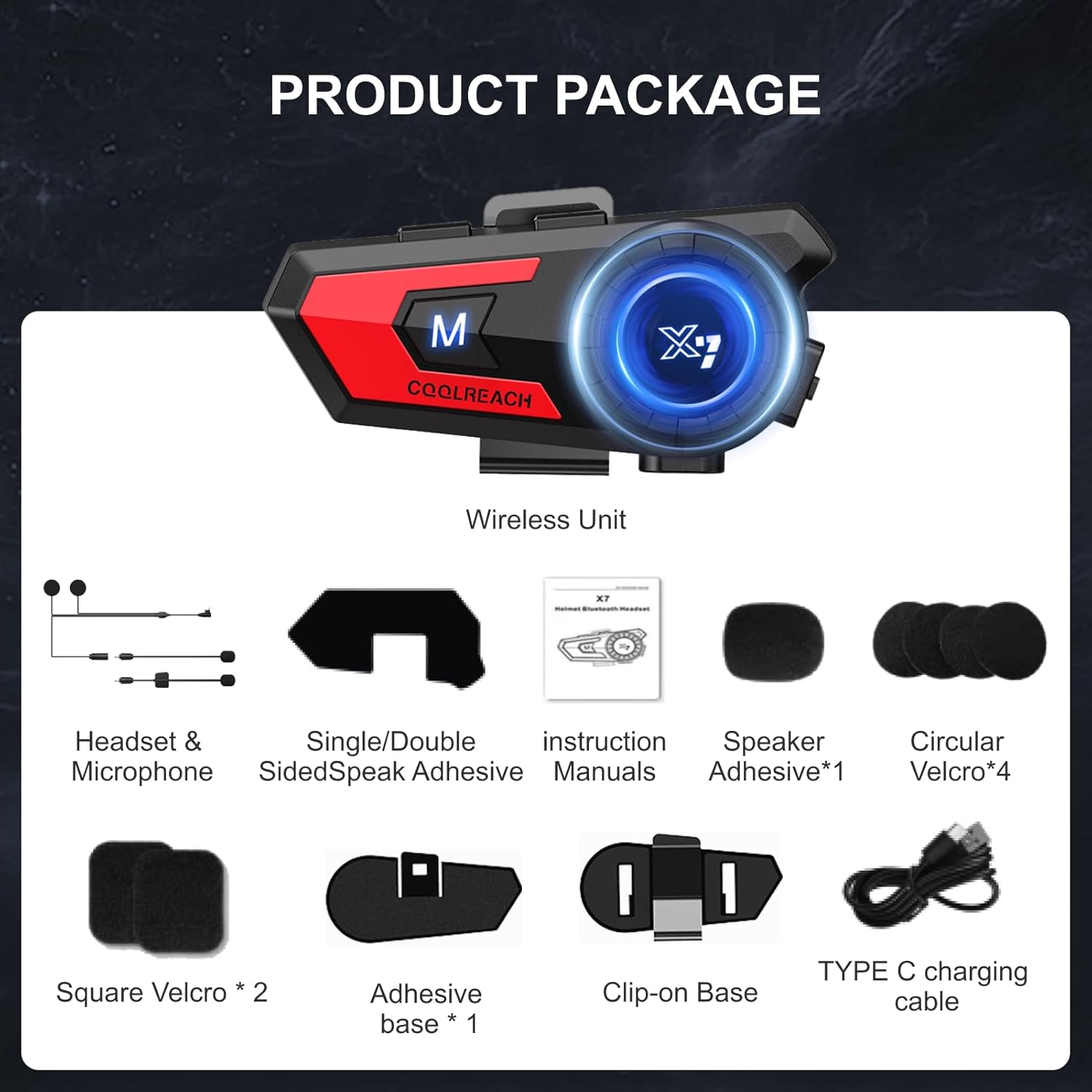
Image: A detailed diagram labeling the various buttons and ports on the Khptop X7 headset, including volume controls, mode key, multiple use key, charging port, work indicator light, earphone jack, and clamp type base.
- Power On/Off: Press and hold the 'M' key for approximately 3 seconds.
- Volume Control: Use the '+' and '-' buttons to adjust the volume.
- Play/Pause Music: Short press the 'M' key.
- Next/Previous Track: Long press the '+' or '-' button (specific functionality may vary, refer to included manual).
4.2 Call Management
- Automatic Answering: The headset is set to automatically answer incoming calls after 10 seconds by default.
- Manual Answering: To switch to manual answering, double-click the '+' button after connecting.
- End Call: Short press the 'M' key.
- Reject Call: Long press the 'M' key.

Image: A motorcyclist wearing a helmet with the Khptop X7 headset, illustrating the automatic answering feature for safe riding.
4.3 Voice Assistant
The headset supports voice assistant activation for hands-free control.
- Activate Voice Assistant: Double-click the 'M' key to wake up your phone's voice assistant (e.g., Siri, Google Assistant).
- Once activated, you can issue commands for playing music, navigation, making calls, and checking weather.

Image: A motorcyclist interacting with the Khptop X7 headset to activate a voice assistant, demonstrating hands-free control for music, navigation, and calls.
4.4 Connecting Multiple Devices
The Khptop X7 headset supports simultaneous connection to two mobile phones.
- Pair the first phone as described in Section 3.3.
- Put the headset into pairing mode again and pair the second phone.
- The headset will manage audio from both devices, allowing you to switch between calls, music, and navigation without delay.

Image: The Khptop X7 headset shown connected to two separate mobile phones, illustrating its capability to manage audio and calls from multiple devices simultaneously.
4.5 Breathing Light
The headset features a 'breathing light' with three modes: breathing, slow flashing, and flash flashing. Short press the 'M' key to cycle through and select the desired mode.

Image: The Khptop X7 headset displaying its 'cool breathing light' feature, which can be set to breathing, slow flashing, or flash flashing modes.
4.6 Battery Level Display
The headset supports battery level display functions on most Apple and Android phones, allowing you to monitor the remaining battery level directly on your phone screen.

Image: A smartphone screen showing the intelligent battery level display for the Khptop X7 headset, indicating a full charge.
5. Maintenance
5.1 Cleaning
To maintain the headset's performance and appearance:
- Wipe the main unit and speakers with a soft, dry cloth.
- Avoid using harsh chemicals or abrasive cleaners.
- Ensure no moisture enters the charging port or earphone jack.
5.2 Water Resistance
The Khptop X7 headset features an IP67 waterproof rating, providing deep protection against dust and water. This design allows for fearless riding in various weather conditions.

Image: The Khptop X7 headset shown in scenarios with rain and dust, highlighting its IP67 waterproof and dustproof design for reliable performance in harsh environments.
6. Troubleshooting
If you encounter issues with your Khptop X7 headset, refer to the following common problems and solutions:
- No Power:
- Ensure the headset is fully charged.
- Press and hold the power button for a few seconds to turn it on.
- Cannot Pair with Device:
- Ensure the headset is in pairing mode (rapidly flashing indicator light).
- Turn off and on your phone's Bluetooth.
- Clear previous Bluetooth connections on both devices and try pairing again.
- Ensure the headset is within the Bluetooth range (approximately 20 meters).
- No Sound or Low Volume:
- Check the volume levels on both the headset and your connected device.
- Ensure the speakers are correctly positioned over your ears.
- Reconnect the Bluetooth connection.
- Poor Call Quality/Noise:
- Ensure the microphone is positioned correctly near your mouth.
- Check for strong wind noise; the CVC noise cancellation works best within its operational limits.
- Move away from sources of strong electromagnetic interference.
- Short Battery Life:
- Ensure the headset is fully charged each time.
- Battery life can be affected by extreme temperatures or continuous high-volume usage.
7. Specifications
| Feature | Specification |
|---|---|
| Model Name | X7 |
| Brand | Khptop |
| Connectivity Technology | Wireless (Bluetooth) |
| Wireless Communication Technology | Bluetooth 5.0 |
| Bluetooth Range | Up to 20 meters |
| Battery Capacity | 800mAh |
| Battery Life | Up to 90 Hours |
| Charging Time | Approximately 2 Hours |
| Standby Time | 400 Hours |
| Water Resistance Level | IP67 Waterproof |
| Noise Control | Active Noise Cancellation (CVC) |
| Speaker Thickness | 0.3 inches (Ultra-thin) |
| Control Method | Touch, Voice |
| Item Weight | 7 ounces (0.2 Kilograms) |
| Material | ABS + Silicone |
8. Safety Information
Please read and follow these safety guidelines to ensure safe operation and prolong the life of your headset:
- Do not attempt to disassemble or modify the headset. This may void the warranty and cause damage.
- Keep the device away from extreme temperatures, direct sunlight, and open flames.
- Avoid exposing the charging port to moisture. Ensure it is dry before charging.
- Do not use the headset at excessively high volumes for prolonged periods, as this may cause hearing damage.
- Always prioritize road safety. Do not allow the headset to distract you while riding.
- Dispose of the battery and device according to local regulations. Do not dispose of in household waste.
9. Warranty and Support
For warranty information and customer support, please refer to the documentation included with your purchase or visit the official Khptop website. Keep your proof of purchase for warranty claims.
Ask a question about this manual
Ask about setup, troubleshooting, compatibility, parts, safety, or missing instructions. Manuals+ will review the question and use this page’s manual context to help answer it.