
ATOMSTACK MAKER A5 V2
ATOMSTACK MAKER A5 V2 Laser Engraver User Manual
Model: A5 V2 | Brand: ATOMSTACK MAKER
1. Introduction
This user manual provides comprehensive instructions for the ATOMSTACK MAKER A5 V2 Laser Engraver. This versatile 5W laser engraving and cutting machine features a 400x400 mm engraving area and supports APP control, making it suitable for various materials including wood, leather, and 304 stainless steel. Please read this manual thoroughly before operation to ensure safe and efficient use of the device.
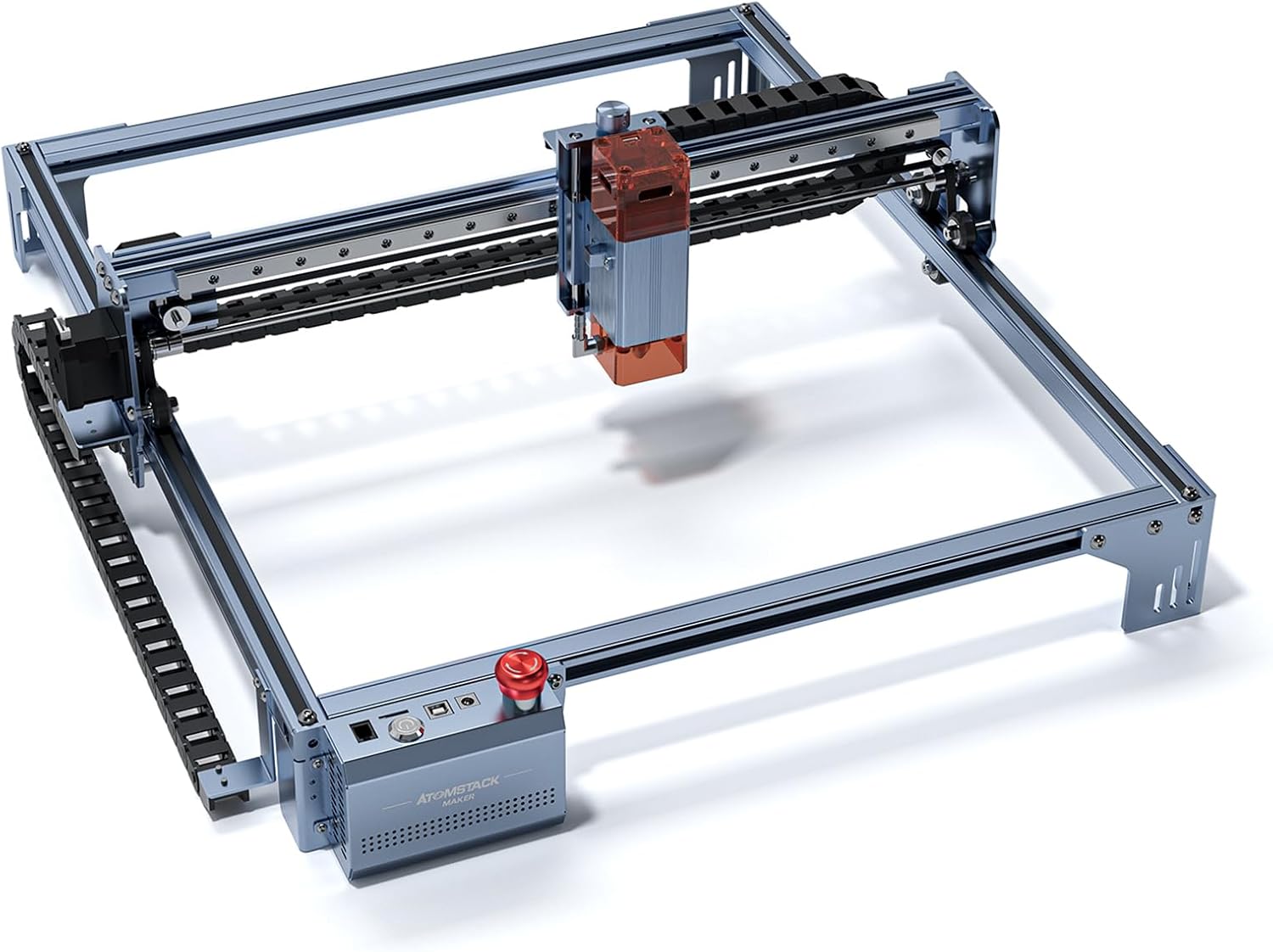
Figure 1.1: ATOMSTACK MAKER A5 V2 Laser Engraver overview.

Figure 1.2: Key features of the ATOMSTACK MAKER A5 V2.
2. Safety Instructions
Operating a laser engraving machine requires strict adherence to safety guidelines to prevent injury and damage. Always wear appropriate eye protection (laser safety goggles) when the machine is in operation. Ensure proper ventilation to dissipate fumes and smoke generated during engraving and cutting. Keep the work area clear of flammable materials.
Figure 2.1: Important warning regarding plastic bag safety. To avoid suffocation hazard, keep this plastic bag away from babies and children.
- Always wear laser safety goggles during operation.
- Ensure adequate ventilation in the work area.
- Do not leave the machine unattended during operation.
- Keep children and pets away from the machine.
- Avoid direct exposure to the laser beam.
- Do not engrave or cut unknown materials that may produce toxic fumes.
3. Packing List
Verify that all components listed below are included in your package before beginning assembly.

Figure 3.1: Exploded view of the ATOMSTACK MAKER A5 V2 components.
| Component | Quantity |
|---|---|
| X axis assembly | 1 |
| Y axis left support beam | 1 |
| Y axis right support beam | 1 |
| Rear support beam | 1 |
| Front support beam | 1 |
| Laser Head | 1 |
| Support Feet | 3 |
| Belts | 2 |
| Y axis tank chain | 1 |
| Control Box | 1 |
| Power Adapter & Cable | 1 set |
| USB Cable | 1 |
| Safety Goggles | 1 |
| Tools & Screws | 1 set |
4. Setup
4.1 Assembly
Follow the detailed assembly instructions provided in the included PDF manual. Ensure all connections are secure and belts are properly tensioned. The machine features a new custom 32-bit motherboard for enhanced data processing power.

Figure 4.1: The new custom 32-bit motherboard for improved performance.
4.2 Initial Power-On and Focus Adjustment
After assembly, connect the power adapter and USB cable. The laser engraver features an ultra-long 50mm focal length laser, which is optimized for cutting. Proper focus is crucial for optimal engraving and cutting results. Use the integrated focus adjustment mechanism on the laser head to set the correct distance from the material.

Figure 4.2: The 50mm focal length laser enhances cutting capabilities.
Watch the official product video for a visual guide on setup and initial operation:
Video 4.1: ATOMSTACK MAKER A5 V2 5W Laser Engraver in operation, demonstrating setup and engraving on various materials. (Duration: 1 minute 6 seconds)
Download English Closed Captions5. Operating the Laser Engraver
5.1 Software and Connectivity
The ATOMSTACK MAKER A5 V2 supports popular operating software such as LaserGRBL and LightBurn, compatible with Windows XP/Win 7/Win 8/Win 10 systems. Connectivity options include USB connection and APP control, offering flexibility in managing your engraving projects.

Figure 5.1: The A5 V2 offers wide compatibility with software and connection types.
5.2 Engraving and Cutting Process
Prepare your material and place it within the 400x400 mm engraving area. The machine features a fixed focus laser, simplifying the setup process. The smaller 0.05mm x 0.05mm ultra-fine compressed spot ensures high precision and strong cutting ability.

Figure 5.2: The precise 0.05mm x 0.05mm laser spot for detailed work.

Figure 5.3: The dual compression spot coupling technology provides fine details.
The 5W optical power provides powerful cutting capabilities. The machine can achieve a maximum working speed of 24000mm/min, significantly faster than many comparable models, due to its upgraded optical shaft to optical shaft and linear bearing system.

Figure 5.4: Demonstrating the 6W optical power and its cutting performance.

Figure 5.5: One-pass cutting depths for various materials with 5W output.
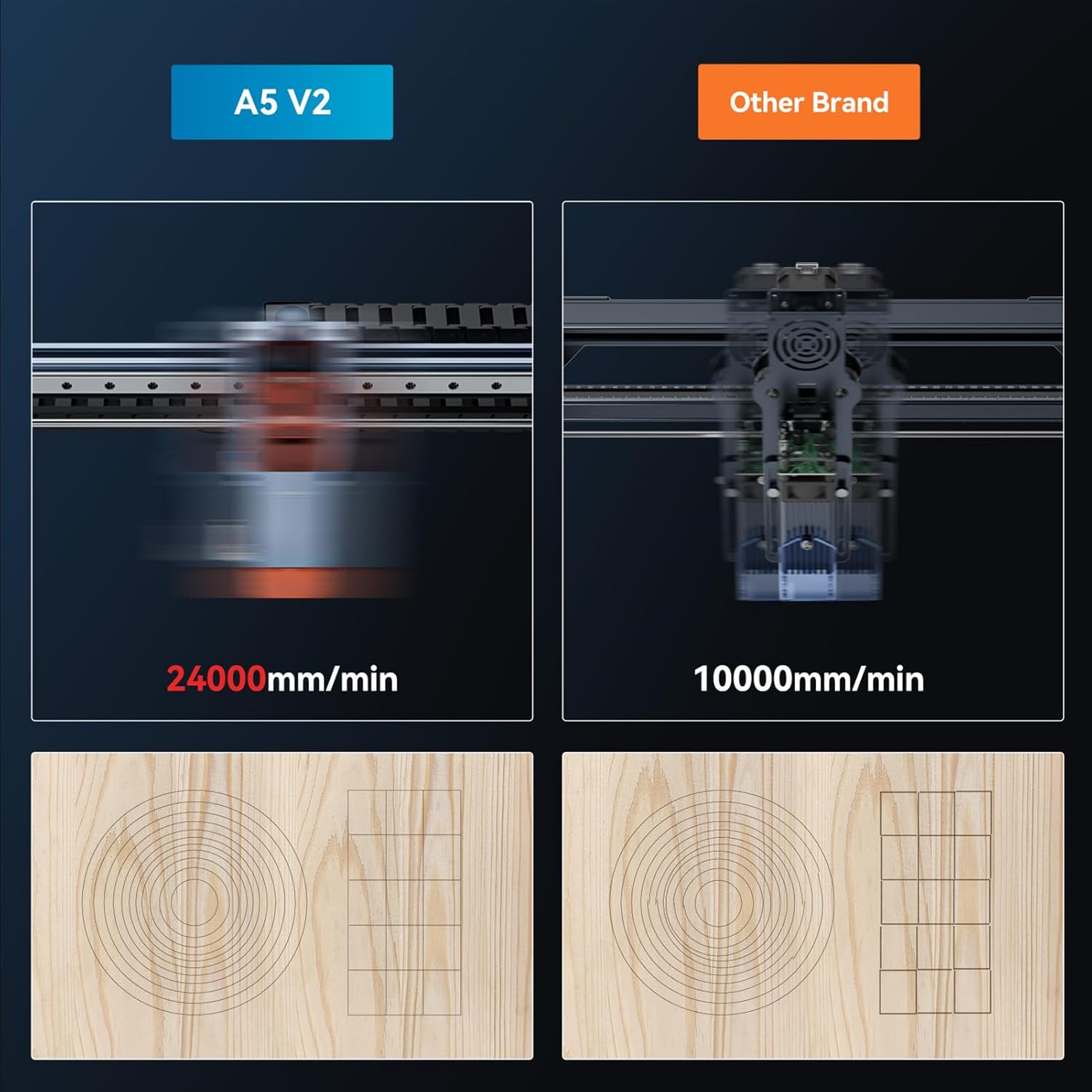
Figure 5.6: Speed comparison highlighting the A5 V2's 24000mm/min working speed.

Figure 5.7: The A5 V2 offers a large engraving area and high working speed.

Figure 5.8: The upgraded motion system contributes to increased speed and stability.
6. Maintenance
Regular maintenance ensures the longevity and optimal performance of your ATOMSTACK MAKER A5 V2. Keep the laser lens clean using a soft, lint-free cloth and appropriate lens cleaning solution. Periodically check and clean the guide rails and belts to ensure smooth movement of the laser head. Ensure all screws and connections remain tight.
- Clean the laser lens regularly.
- Inspect and clean guide rails and belts.
- Ensure proper tension of the belts.
- Keep the machine free from dust and debris.
7. Troubleshooting
This section addresses common issues you might encounter. For more detailed troubleshooting, refer to the full user manual (PDF) or contact customer support.
7.1 Common Issues and Solutions
- Machine not powering on: Check power cable connection and power outlet. Ensure the emergency stop button is not pressed.
- Laser not firing: Verify software settings, ensure the laser head is properly connected, and check focus.
- Engraving/Cutting quality is poor: Adjust focus, check laser power and speed settings in software, ensure material is flat and clean.
- Machine not connecting to computer/APP: Reinstall drivers, check USB cable, ensure Bluetooth/Wi-Fi is enabled for APP control.
- Skipping steps/Inaccurate engraving: Check belt tension, ensure guide rails are clean and lubricated, verify motor connections.
8. Specifications
Detailed technical specifications for the ATOMSTACK MAKER A5 V2 Laser Engraver.

Figure 8.1: Technical specifications of the A5 V2.
| Parameter | Value |
|---|---|
| Product Dimensions | 25.5 x 22.2 x 8.5 inches |
| Item Model Number | A5 V2 |
| Item Weight | 13.75 pounds |
| Engraving Ruler | 400*400 mm |
| Laser Output Optical Power | 5-6W |
| Engraving Accuracy | 0.01mm |
| Data Transmission Type | USB connection |
| Focusing Type | Fixed focus laser, no focusing |
| Operating Software | LaserGRBL, LightBurn |
| System Compatibility | Win XP/Win 7/Win 8/Win 10 system |
| Electric Power | 40W |
| Laser Wave | 455 +5 nm |
| Net Weight of Equipment | 4.0kg |
9. Warranty and Support
For warranty information and technical support, please refer to the official ATOMSTACK MAKER website or contact your retailer. Keep your purchase receipt as proof of purchase for warranty claims.
10. Further Resources
For a more detailed guide and additional information, please download the official User Manual in PDF format:
Related documentsA5 V2

Ask a question about this manual
Ask about setup, troubleshooting, compatibility, parts, safety, or missing instructions. Manuals+ will review the question and use this page’s manual context to help answer it.