
1. Introduction
This instruction manual provides essential information for the safe and efficient installation, operation, and maintenance of your Steinel L 40 SC Outdoor LED Wall Light. Please read this manual thoroughly before beginning installation or use, and retain it for future reference.
The Steinel L 40 SC is an intelligent outdoor LED wall light featuring a 180° passive infrared motion sensor and Bluetooth Mesh connectivity. It allows for convenient control and customization via the Steinel Connect App on your smartphone or tablet.
2. Safety Information
- Electrical Installation: Installation must be performed by a qualified electrician in accordance with national wiring regulations and local electrical codes.
- Power Disconnection: Always disconnect power at the main circuit breaker before performing any installation, maintenance, or repair work.
- Product Integrity: Do not modify or alter the product. Use only genuine Steinel replacement parts if necessary.
- Operating Environment: This product is designed for outdoor use and is waterproof. Ensure proper sealing during installation to maintain its IP rating.
- LED Light Source: The LED light source is not user-replaceable. Do not attempt to open the light housing.
3. Package Contents
Verify that all components are present before beginning installation:
- Steinel L 40 SC Outdoor LED Wall Light
- Mounting material (3x wall plugs, 3x screws, 3x spacers)
- Instruction Manual
4. Product Overview
The Steinel L 40 SC is an advanced outdoor lighting solution designed for efficiency and convenience.

Figure 4.1: Front view of the Steinel L 40 SC outdoor LED wall light.
Key Features:
- Precise Motion Detection: Passive infrared sensor with a 180° detection angle and a maximum range of 10 meters. Includes a colored sensor lens matching the housing and masking covers to define the detection zone.
- Steinel Connect App Control: Adjust settings such as range, duration (10 seconds to 60 minutes), twilight sensor (2-2000 lux), and create lighting groups via Bluetooth Mesh using a smartphone or tablet.
- Optimal Illumination: 12.9 W LED wall light providing 930 lumens of pleasant warm white light (3000K). Features a soft light start for gentle illumination.
- Advanced Functions: Includes a timer, learning twilight setting (lux and time learning), switchable permanent light, dimmable main and night light, and creep guard protection.
- Durable Design: Constructed from aluminum and plastic, designed for outdoor use with a waterproof rating.
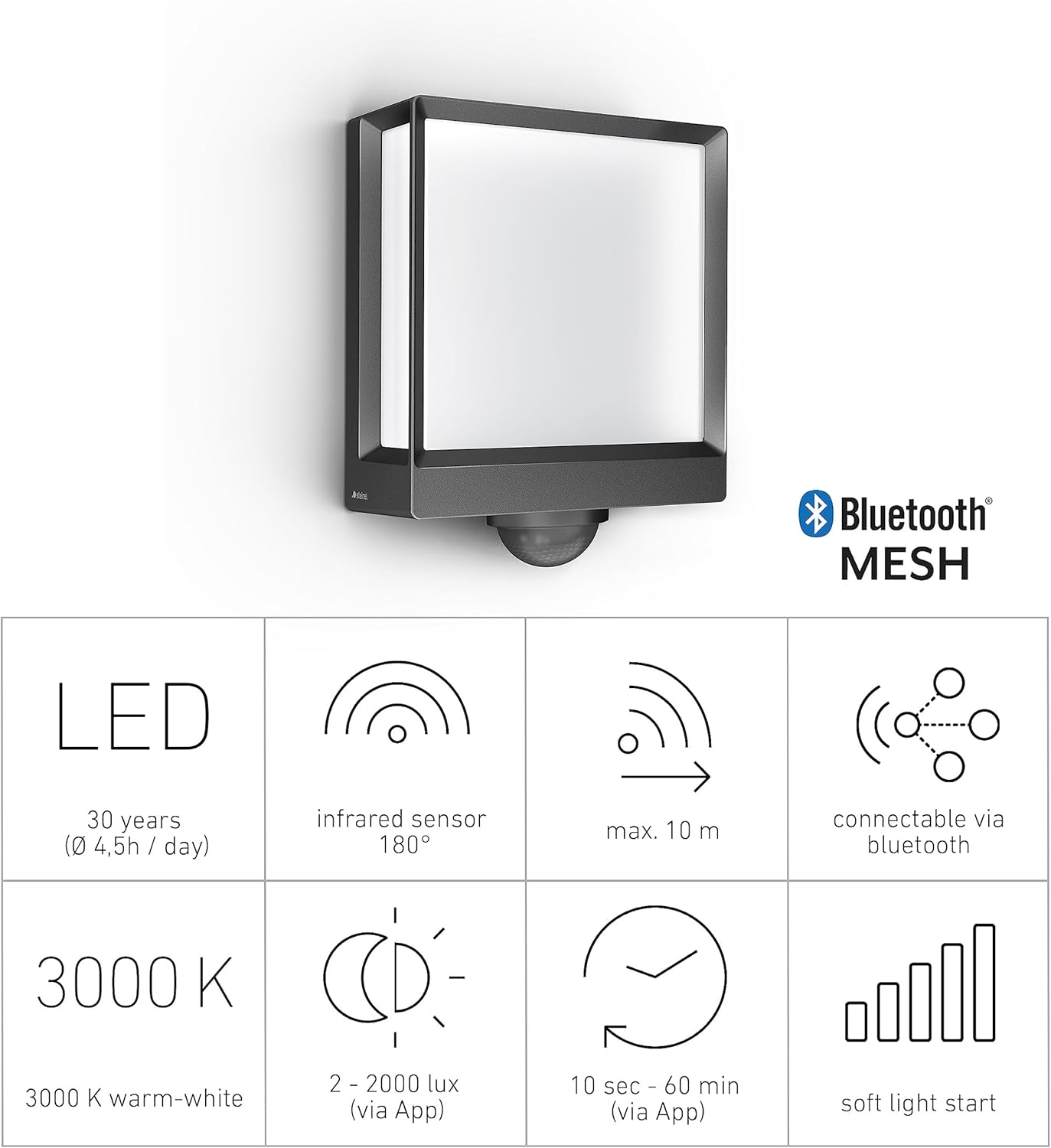
Figure 4.2: Key features and specifications at a glance.
5. Setup and Installation
Follow these steps for proper installation of your L 40 SC wall light.
5.1 Mounting Location
Choose a suitable wall-mounting location for optimal motion detection and light distribution. Consider areas such as building facades, house entrances, garden paths, or patios.

Figure 5.1: Example installation on a house exterior.
5.2 Electrical Connection
- Disconnect Power: Ensure the main power supply to the installation area is switched off at the circuit breaker.
- Prepare Wiring: Route the electrical cable (240 Volts) to the mounting point.
- Connect Wires: Connect the live, neutral, and earth wires to the corresponding terminals inside the light fixture. Ensure all connections are secure.
- Secure Fixture: Mount the light fixture securely to the wall using the provided mounting material (plugs, screws, spacers). Ensure a flush installation and proper sealing to maintain the waterproof rating.
5.3 Initial Configuration (via Steinel Connect App)
The L 40 SC is configured using the Steinel Connect App. Download the app from your device's app store (available for Android).
- Restore Power: Once installation is complete and secure, restore power at the circuit breaker. The light will enter pairing mode.
- Open App: Launch the Steinel Connect App on your smartphone or tablet.
- Pair Device: Follow the in-app instructions to discover and pair your L 40 SC light via Bluetooth Mesh.
- Adjust Settings: Use the app to customize the following:
- Detection Range: Adjust the sensor's sensitivity and range (up to 10m). Use the included masking covers to precisely define the detection area.
- Duration: Set how long the light stays on after motion detection (10 seconds to 60 minutes).
- Twilight Sensor: Configure the ambient light level (2-2000 lux) at which the motion sensor becomes active.
- Light Groups: If you have multiple Steinel Connect devices, group them for synchronized control.

Figure 5.2: Steinel Connect App interface for light configuration.

Figure 5.3: Controlling the L 40 SC via the Steinel Connect App.
6. Operating Instructions
The L 40 SC operates automatically based on its sensor settings and app configurations.
6.1 Motion Sensor Operation
The integrated passive infrared sensor detects heat emitted by moving objects (e.g., people, animals) within its detection zone. When motion is detected and the ambient light level is below the set twilight threshold, the light will activate.

Figure 6.1: Motion sensor detection range.

Figure 6.2: Infrared sensor detection principle.
6.2 App-Controlled Functions
Through the Steinel Connect App, you can access and modify various lighting behaviors:
- Dimmable Main Light: Adjust the brightness of the main light output.
- Dimmable Night Light: Set a low-level continuous light for orientation during darkness.
- Permanent Light: Activate continuous illumination for a set period, overriding sensor control.
- Timer Function: Schedule specific on/off times or lighting scenarios.
- Learning Twilight: The sensor can learn the natural twilight levels of its environment for more accurate activation.
- Creep Guard: Provides additional detection directly below the sensor to prevent undetected approach.
7. Maintenance
The Steinel L 40 SC requires minimal maintenance.
- Cleaning: Clean the light fixture regularly with a soft, damp cloth. Do not use abrasive cleaners or solvents, as these can damage the surface.
- LED Lifespan: The integrated LED light source has a long operational life, estimated at 30 years based on an average usage of 4.5 hours per day. It is not designed to be replaced by the user.
- Software Updates: Periodically check the Steinel Connect App for available firmware updates for your device to ensure optimal performance and access to new features.
8. Troubleshooting
If you encounter issues with your L 40 SC, refer to the following common problems and solutions:
| Problem | Possible Cause | Solution |
|---|---|---|
| Light does not turn on with motion. |
|
|
| Light stays on continuously. |
|
|
| Cannot connect to the light via app. |
|
|
| Light flashes or flickers. |
|
|
9. Specifications
Detailed technical specifications for the Steinel L 40 SC:
| Feature | Specification |
|---|---|
| Model Number | 085247 |
| Dimensions (L x W x H) | 20.1 x 10.5 x 26.1 cm |
| Weight | 1.22 Kilograms |
| Material | Aluminium, Plastic |
| Color | Anthracite |
| Power Source | Corded Electric |
| Voltage | 240 Volts |
| Wattage | 12.9 Watts |
| Luminous Flux | 930 Lumens |
| Light Color | Warm White (3000 Kelvin) |
| Bulb Type | LED |
| Motion Sensor Angle | 180° |
| Motion Sensor Range | Max. 10 meters |
| Twilight Setting | 2-2000 lux (adjustable via app) |
| Time Setting | 10 seconds - 60 minutes (adjustable via app) |
| Connectivity | Bluetooth Mesh |
| Control Method | Steinel Connect App (Android compatible) |
| Waterproof Level | Waterproof |
| Certifications | CE, RoHS, UKCA |
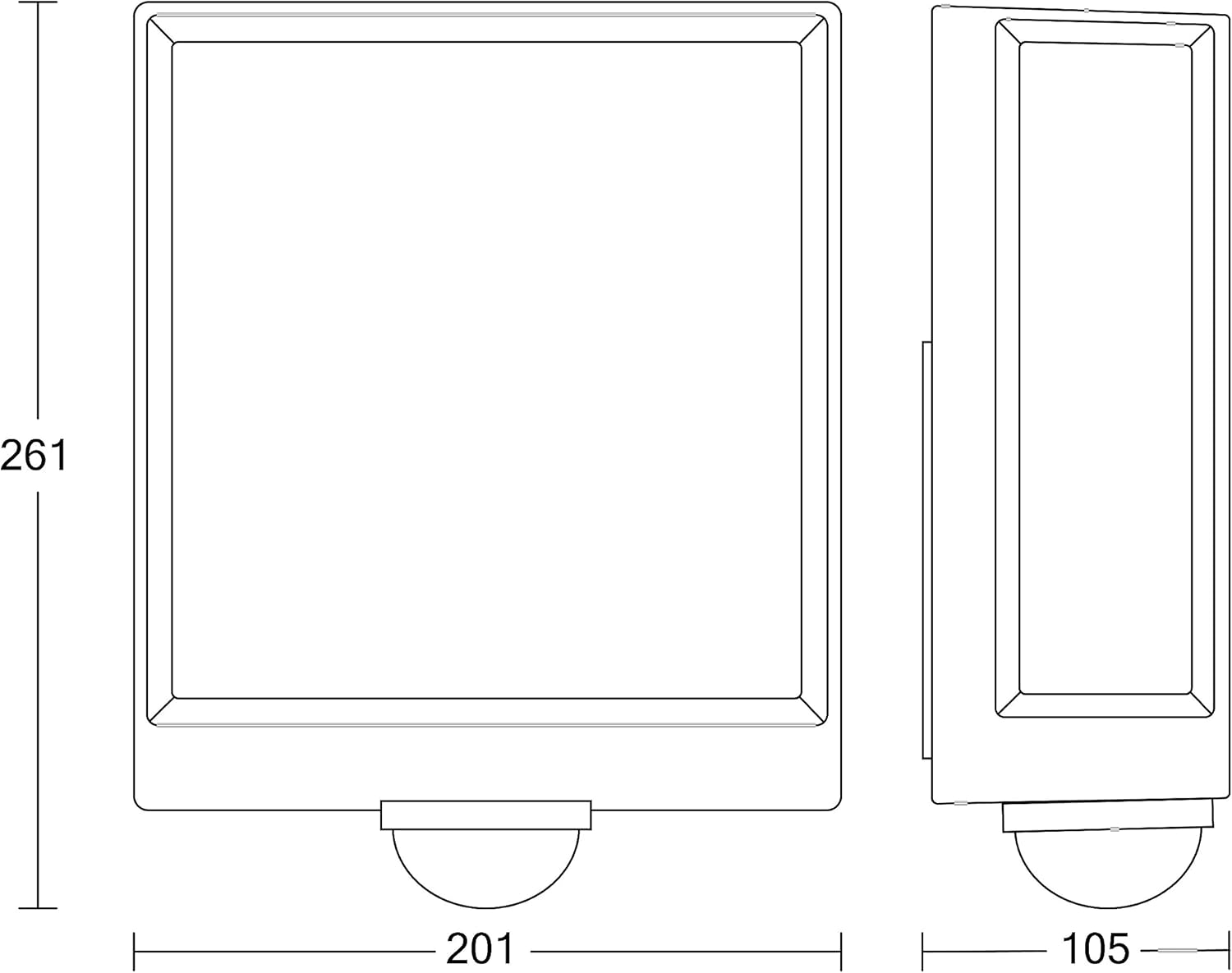
Figure 9.1: Dimensions of the Steinel L 40 SC.
10. Warranty and Support
For warranty information, please refer to the documentation provided with your purchase or visit the official Steinel website. In case of technical issues or questions not covered in this manual, please contact Steinel customer support or your authorized dealer.
Manufacturer: Steinel
Country of Origin: China


