
Steinel 087562
Steinel L 810 SC Outdoor LED Wall Light User Manual
Model: 087562 | Brand: Steinel
1. Introduction
This manual provides detailed instructions for the installation, operation, and maintenance of your Steinel L 810 SC Outdoor LED Wall Light. Please read this manual carefully before installation and use to ensure proper function and safety.
The Steinel L 810 SC is an intelligent up- and downlight designed for outdoor use, featuring an invisible 160° iHF motion detector and app control via Bluetooth Mesh technology. It offers energy-efficient lighting with customizable settings for various outdoor areas.
2. Safety Instructions
- Installation must be carried out by a qualified electrician in accordance with national wiring regulations and local building codes.
- Ensure the power supply is disconnected before installation, maintenance, or repair.
- Do not modify the product in any way. Unauthorized modifications may void the warranty and pose safety risks.
- This product is designed for outdoor use. Ensure it is installed in a location protected from direct water jets if not rated for such exposure (check IP rating in specifications).
- Do not look directly into the LED light source when illuminated.
- Keep packaging materials away from children.
3. Package Contents
Verify that all components are present before beginning installation:
- Steinel L 810 SC Outdoor LED Wall Light
- Mounting material (screws, wall plugs)
- Instruction Manual
 Figure 3.1: The Steinel L 810 SC Outdoor LED Wall Light.
4. Installation
Follow these steps for safe and correct installation:
- Preparation: Turn off the main power supply at the circuit breaker before starting any electrical work.
- Mounting Location: Choose a suitable outdoor location for the wall light. Consider the desired light coverage and motion detection area.
- Marking and Drilling: Use the mounting plate as a template to mark the drilling points on the wall. Drill holes and insert the provided wall plugs.
- Wiring: Connect the electrical wires (Live, Neutral, Earth) from your mains supply to the corresponding terminals on the light fixture. Ensure secure connections.
- Mounting the Fixture: Secure the light fixture to the wall using the provided screws.
- Power On: Restore power at the circuit breaker. The light should briefly illuminate to indicate successful installation.
 Figure 4.1: Example of the L 810 SC installed on an exterior wall, providing up and down lighting.
 Figure 4.2: The L 810 SC illuminating a house facade at night.
 Figure 4.3: The L 810 SC highlighting its Bluetooth Mesh capability and an optional remote switch.
5. Operating Instructions
5.1 Initial Setup and App Connection
The Steinel L 810 SC is controlled via the free STEINEL Connect app. Download the app from your device's app store (Google Play or Apple App Store).
- Open the STEINEL Connect app.
- Follow the on-screen instructions to add your L 810 SC light. The light connects wirelessly via Bluetooth.
- Once connected, you can access all functions and settings through the app.
 Figure 5.1: The STEINEL Connect app interface for controlling light settings.
5.2 Key Features and App Functions
- Main and Night Light Dimmable: Adjust the brightness of both the main light and the night light (0-100%) via the app.
- Timer Function: Set daily and weekly schedules for lighting operation.
- Permanent Light: Option to switch on permanent lighting.
- Lighting Duration: Configure the duration the light stays on after detection.
- Twilight Setting: Adjust the ambient light level at which the sensor activates.
- Precise Detector: The invisible 160° high-frequency sensor is flexibly adjustable on two axes via the app and detects movements up to 5 meters.
- Wireless Networking: Create groups of lights and network them wirelessly via Bluetooth Mesh without an additional bridge.
- Soft Light Start: The light gradually increases to full brightness for a more pleasant experience.
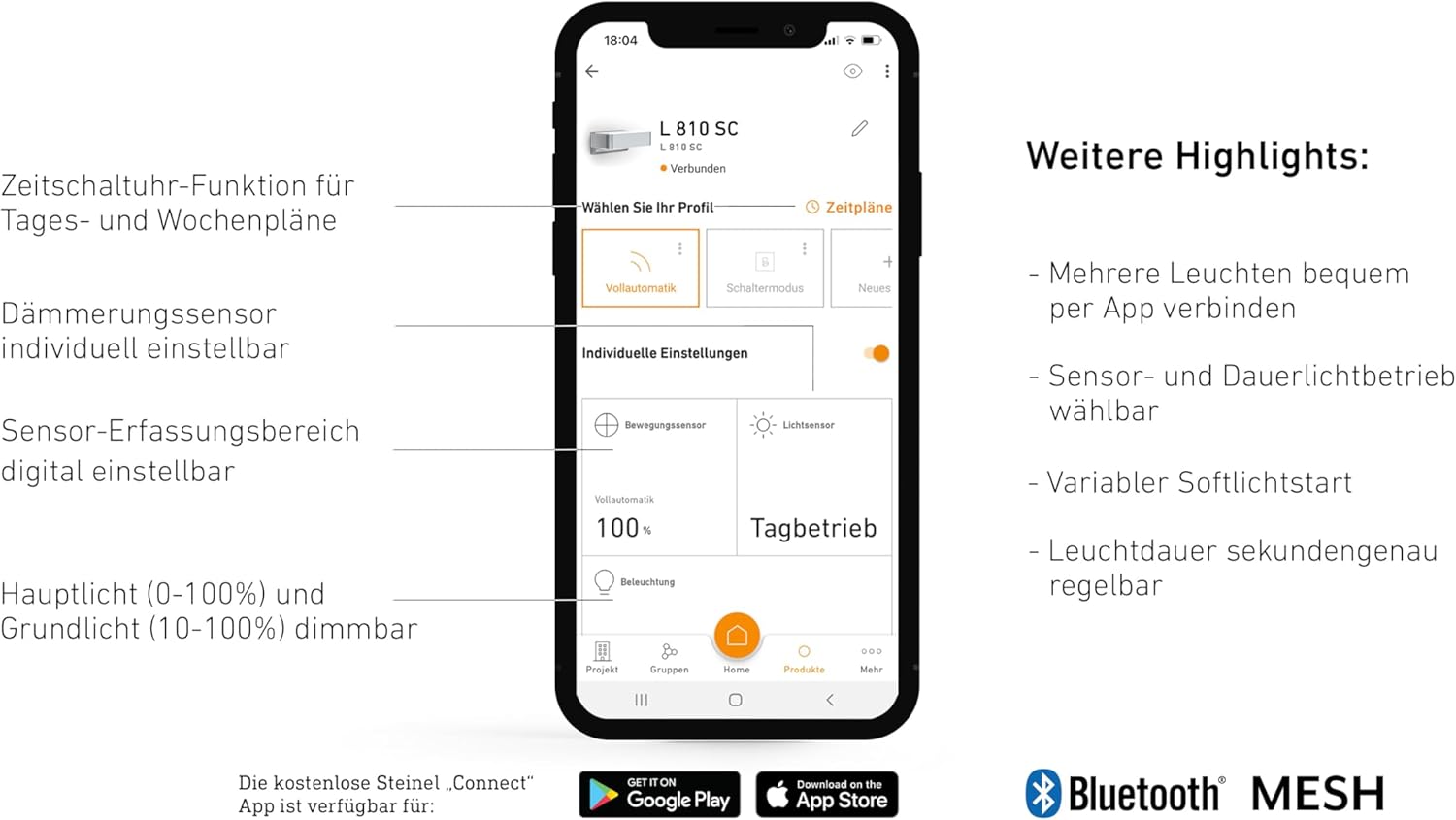 Figure 5.2: Overview of the light's intelligent features.
 Figure 5.3: Illustration of the 160° iHF motion detection area.
 Figure 5.4: The iHF sensor's ability to detect motion through certain materials.
 Figure 5.5: Example of the motion detection coverage around a building.
6. Maintenance
- Clean the light fixture regularly with a soft, damp cloth. Do not use abrasive cleaners or solvents.
- Ensure the sensor lens is kept clean for optimal performance.
- The LED light source is integrated and not user-replaceable. Do not attempt to open the light housing beyond what is necessary for installation.
7. Troubleshooting
| Problem | Possible Cause | Solution |
|---|---|---|
| Light does not turn on. | No power supply; incorrect wiring; sensor settings too high (twilight). | Check circuit breaker and wiring connections. Adjust twilight setting in the app. |
| Light stays on continuously. | Permanent light function activated; continuous motion in detection area; faulty sensor. | Deactivate permanent light in the app. Check for obstructions or constant movement. Contact support if sensor is faulty. |
| Light turns on without apparent motion. | Sensor sensitivity too high; environmental factors (e.g., strong wind, small animals). | Reduce sensor sensitivity or detection range in the app. Adjust sensor angle if possible. |
| Cannot connect to the app. | Bluetooth off; light not in pairing mode; app issue. | Ensure Bluetooth is enabled on your device. Restart the light (power cycle). Reinstall the app if necessary. |
8. Specifications
| Feature | Detail |
|---|---|
| Model Number | 087562 |
| Dimensions (L x W x H) | 23 x 14.6 x 9.1 cm (9.06 x 5.75 x 3.58 inches) |
| Weight | 1.04 kg (2.29 lbs) |
| Power Supply | 220-240 V / 50-60 Hz |
| Power Consumption | 9.8 Watts |
| Luminous Flux | 679 lm |
| Color Temperature | 3000 Kelvin (Warm White) |
| Motion Detector | 160° iHF (High-Frequency) |
| Detection Range | Up to 5 meters |
| Material | Aluminum, Plastic |
| Color | Silver |
| Special Features | Dimmable, Motion Sensor, Energy Efficient, App Control, Bluetooth Mesh |
| Certifications | CE, RoHS, UKCA |
| Light Source Energy Efficiency Class | D |
 Figure 8.1: Technical dimensions of the L 810 SC.
9. Warranty and Support
Steinel products are manufactured to the highest quality standards. For warranty information and customer support, please refer to the official Steinel website or contact your local distributor.
Regular software updates for the STEINEL Connect app ensure continuous improvement and new features for your lighting system.
Related documents087562


Ask a question about this manual
Ask about setup, troubleshooting, compatibility, parts, safety, or missing instructions. Manuals+ will review the question and use this page’s manual context to help answer it.