
WAYXIN M910
WAYXIN M910 Motorcycle Headset User Manual
Model: M910
Introduction
The WAYXIN M910 Motorcycle Headset is an advanced intercom system designed for motorcycle riders, enabling real-time, full-duplex communication for up to 6 riders simultaneously. Featuring a Qualcomm chip and Bluetooth 5.0, it offers stable connections, high-definition audio, and intelligent noise reduction for an enhanced riding experience.

Image: The main unit of the WAYXIN M910 Motorcycle Headset, showcasing its sleek black design with blue accents and control buttons.
Package Contents
Please verify that all items listed below are included in your package:
- 1 x Bluetooth Intercom Unit
- 1 x 35 mm Port Headset
- 1 set of 40 mm HiFi Speakers
- 2 x Microphones (one for full-face, one for open-face helmets)
- 1 x Mounting Bracket
- 1 x Type-C Charging Cable
- 1 x Velcro Fastener Set
- 1 x User Manual

Image: Front view of the WAYXIN M910 product packaging, showing the headset unit and model number.
Setup
1. Charging the Device
Before first use, fully charge the M910 unit. Connect the provided Type-C charging cable to the charging port on the intercom unit and a USB power source. The LED indicator will show charging status and turn off when fully charged.
- Charging Time: Approximately 1.5 hours
- Battery Life: Up to 15 hours music playback, 20 hours talk time, 360 hours standby.

Image: Visual representation of the M910's charging process and extended battery life, including icons for charge time, music time, intercom time, and standby time.
2. Installation on Helmet
The M910 can be installed using the provided mounting bracket. Choose a suitable location on the side of your helmet. Ensure the speakers are positioned correctly inside the helmet, aligning with your ears for optimal audio quality. Attach the microphone to a position where it is close to your mouth but does not obstruct your vision or comfort.
- Speaker Placement: Ensure 40mm HiFi speakers are centered over ears.
- Microphone Choice: Use the appropriate microphone for your helmet type (boom mic for open-face, soft wire mic for full-face).
3. Pairing with Mobile Device
- Ensure the M910 is powered off.
- Press and hold the power button until the LED indicator flashes red and blue, indicating pairing mode.
- On your mobile device, go to Bluetooth settings and search for "WAYXIN M910".
- Select the device to connect. Once paired, the LED will flash blue slowly.
Operating Instructions
Power On/Off
- Power On: Press and hold the power button for 3 seconds.
- Power Off: Press and hold the power button for 5 seconds.
Volume Control
- Increase Volume: Press the Volume Up button.
- Decrease Volume: Press the Volume Down button.
Music Playback
- Play/Pause: Press the Multi-function button once.
- Next Track: Press and hold the Volume Up button.
- Previous Track: Press and hold the Volume Down button.
Call Management
- Answer Call: Press the Multi-function button once.
- End Call: Press the Multi-function button once during a call.
- Reject Call: Press and hold the Multi-function button for 2 seconds.
- Redial Last Number: Double-press the Multi-function button.
Voice Assistant
Activate your smartphone's voice assistant (Siri, Google Assistant, Bixby) directly from the M910.
- Activate: Double-press the Voice Assistant button (if available, or specific button combination).

Image: Illustration of the M910's compatibility with mobile phone voice assistants like Siri and Google Assistant for hands-free control.
Intercom Communication (Group Pairing)
The M910 supports group communication for up to 6 riders. For optimal performance, ensure all units are M910 models for one-button pairing.
- One-Button Pairing (M910 to M910): With all M910 units powered on, press the intercom button on any one unit. All identical M910 units within range will automatically pair.
- Universal Pairing: The M910 can connect with other brands like Sena, Cardo, Midland. Refer to the specific pairing instructions for the third-party device and the M910's universal pairing mode (usually involves holding the intercom button until a specific LED pattern appears).

Image: Diagram illustrating the M910's capability for group intercom communication among up to 6 riders over a distance of up to 1500 meters.
Music Sharing
Share your music with another M910 user for a synchronized listening experience.
- Initiate Music Sharing: While playing music, press and hold the Music Sharing button (or specific button combination) to share with a paired M910 unit.

Image: Visual depiction of the M910's music sharing feature, allowing two riders to listen to the same audio simultaneously.
Audio Multitasking
The M910's dual-chip architecture allows for seamless audio multitasking, blending intercom communication, music, and GPS navigation without interruption.
- Functionality: Voice communication, music streaming, and GPS navigation audio are processed in parallel.
- No Manual Switching: Audio sources are automatically mixed, eliminating the need to manually switch modes.
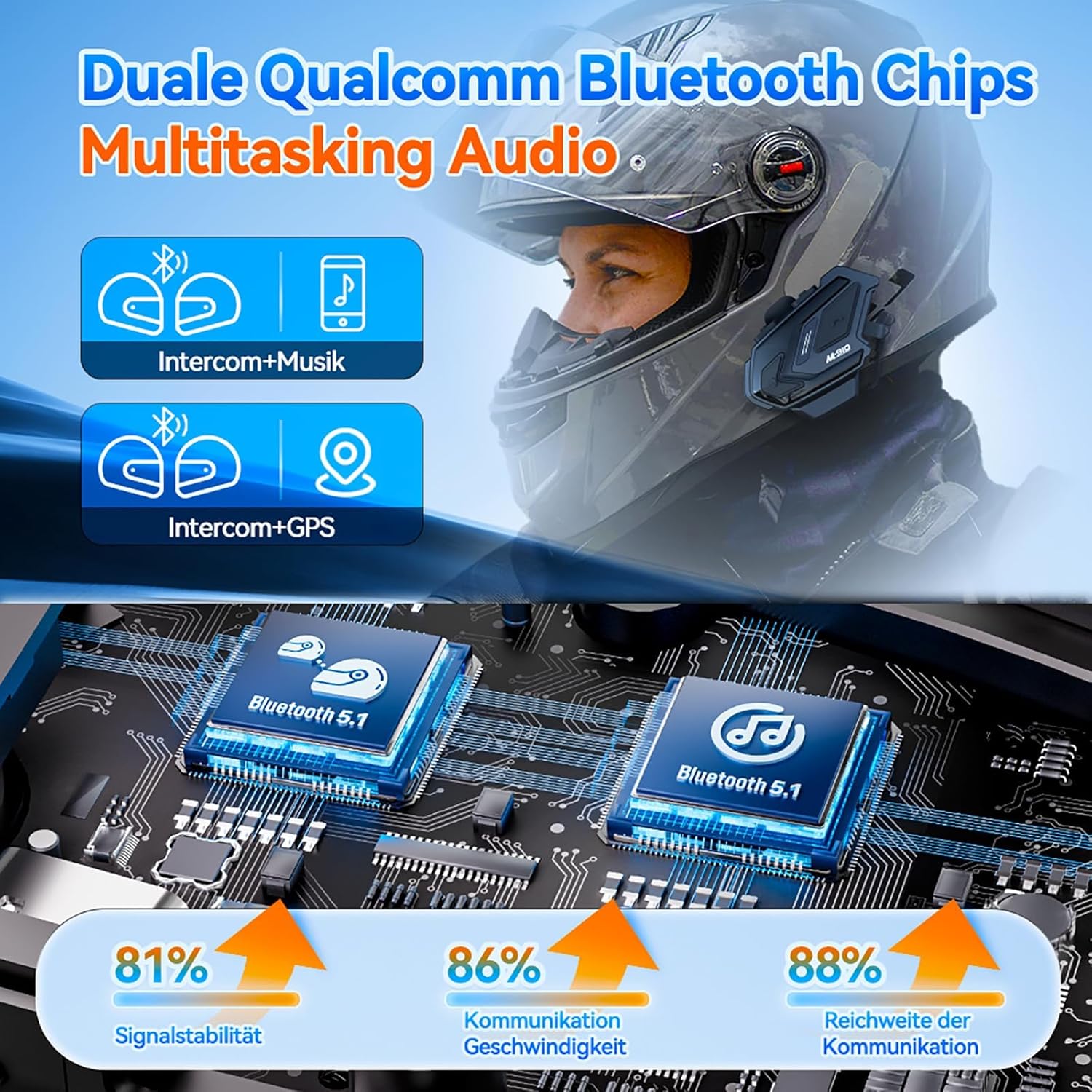
Image: An infographic highlighting the M910's dual Qualcomm Bluetooth chips and their role in enabling seamless audio multitasking for intercom, music, and GPS.

Image: A rider using the M910, demonstrating how audio multitasking allows for simultaneous intercom conversation and GPS navigation prompts.
Maintenance
Cleaning
Wipe the unit with a soft, damp cloth. Do not use harsh chemicals or abrasive cleaners. Ensure the charging port cover is securely closed to maintain IP67 water resistance.
Storage
Store the device in a cool, dry place away from direct sunlight and extreme temperatures. For long-term storage, charge the battery to about 50% every few months to preserve battery health.
Battery Care
To maximize battery lifespan, avoid fully discharging the battery frequently. Charge the device regularly, even if not in constant use.
Troubleshooting
| Problem | Possible Solution |
|---|---|
| Device does not power on. | Ensure the battery is charged. Connect to a power source and try again. |
| Cannot pair with mobile device. | Ensure the M910 is in pairing mode (flashing red/blue). Turn off and on Bluetooth on your phone. Forget previous pairings and try again. |
| Intercom connection issues. | Ensure all units are within range (up to 1500m). Re-initiate group pairing. Check for obstacles. |
| Poor audio quality / Noise. | Check speaker and microphone placement. Ensure microphone is not blocked. The M910 features ENC2.0, DSP, and CVC8.0 noise reduction for clear audio. |

Image: An illustration detailing the M910's triple noise reduction technologies (ENC2.0, DSP, CVC8.0) and wind protection microphone for superior audio clarity.

Image: A cutaway view of the M910's 40mm Hi-Fi speaker with a Graphene Diaphragm, emphasizing its high sound quality and support for AAC and SBC codecs.
Specifications
| Feature | Detail |
|---|---|
| Model Number | M910 |
| Bluetooth Version | 5.0 (Qualcomm Chip) |
| Intercom Range | Up to 1500 meters (group communication) |
| Group Communication | Up to 6 riders |
| Noise Reduction | ENC2.0, DSP, CVC8.0 |
| Speaker Size | 40mm HiFi speakers with titanium diaphragm |
| Battery Capacity | 800 mAh |
| Charging Port | Type-C |
| Waterproof Rating | IP67 |
| Compatibility | Universal pairing with Sena, Cardo, Midland; Siri/Google Assistant/Bixby |
| Dimensions | 18.3 x 15 x 4.8 cm (Package) |
| Weight | 10 g (Product) |
Warranty and Support
The WAYXIN M910 comes with a manufacturer's warranty of up to 2 years from the date of purchase. For any product issues or support inquiries, please contact the seller directly through your purchase platform.
To contact support:
- Go to your account service on the platform where you purchased the product.
- Navigate to your "Order History".
- Locate your order for the WAYXIN M910 and select "Contact Seller".
This method ensures direct assistance for your specific product and order.
Related Documents - M910
 |
WAYXIN-R9 User Manual: Motorcycle Bluetooth Intercom System Comprehensive user manual for the WAYXIN-R9 motorcycle Bluetooth intercom system, detailing features, operation, pairing, installation, and maintenance. |
 |
WAYXIN WX-R5 Motorcycle Helmet Headset: User Manual & Features Comprehensive guide to the WAYXIN WX-R5 Motorcycle Helmet Headset, covering power, button functions, pairing, phone calls, GPS navigation, FM radio, installation, and maintenance. |
 |
Fodsports FX7 Bluetooth Motorcycle Headset: Start Guide & Installation Get started with your Fodsports FX7 Bluetooth motorcycle headset. This comprehensive guide covers installation, pairing, intercom modes, music sharing, FM radio, call handling, charging, and troubleshooting for riders. |
 |
WAYXIN WX-R5 Motorcycle Helmet Headset User Manual and Guide Comprehensive guide for the WAYXIN WX-R5 Motorcycle Helmet Headset, covering power functions, button operations, Bluetooth pairing for phones and GPS, FM radio usage, phone call handling, installation, and maintenance. Learn how to connect and use your headset for a safer and more connected ride. |
 |
WAYXIN T2 Motorcycle Helmet Headset User Manual User manual for the WAYXIN T2 Motorcycle Helmet Headset, detailing button functions, phone connection, intercom pairing, music control, and installation methods. |
 |
LEXIN GTX Motorcycle Bluetooth Intercom User Manual Comprehensive user manual for the LEXIN GTX Motorcycle Bluetooth Intercom, covering installation, operation, features, group intercom, and maintenance. |
Ask a question about this manual
Ask about setup, troubleshooting, compatibility, parts, safety, or missing instructions. Manuals+ will review the question and use this page’s manual context to help answer it.